


How to Download Audible Books to MP3 (2026 Guide)
If you’re trying to download Audible books to MP3, you’ve probably noticed something frustrating, Audible doesn’t let you do it directly. That’s because all Audible audiobooks are protected by DRM (Digital Rights Management), which prevents you from freely downloading or converting them into standard formats like MP3. In this guide, you’ll learn the easiest way to download Audible audiobooks to MP3, why it’s not possible natively, and how to permanently unlock your audiobooks.
Contents Guide Part 1. Can You Download Audible Books as MP3 Files Directly?Part 2. Best Way to Download Audible Books as MP3 FilesPart 3. Other Methods to Download Audible Books as MP3 FilesPart 4. FAQsPart 5. Final Verdict
Part 1. Can You Download Audible Books as MP3 Files Directly?
Can you download Audible books to MP3 directly from Audible? No. Audible files are saved in AA or AAX format and protected by DRM. This means that you cannot export them as MP3s and cannot freely transfer them to all devices. You are limited to the Audible app or authorized players. So while you can download audiobooks inside the app, you cannot truly download Audible audiobooks to MP3 without using additional tools.
Part 2. Best Way to Download Audible Books as MP3 Files
The most effective solution is to use a professional Audible converter. DumpMedia Audible Converter is the easiest and most reliable way to download Audible books to MP3 without restrictions.
Why It’s the Best Solution
- ✅ Remove DRM Protection* : This tool removes DRM, allowing you to fully control your files.
- ✅ Convert Audible to MP3 Easily: You can quickly download Audible books to MP3 and other formats like M4A or FLAC.
- ✅ High-Speed Conversion: Convert entire audiobooks in minutes.
- ✅ Lossless Quality: No quality loss during conversion.
- ✅ Works on Multiple Devices: Play your audiobooks anywhere after conversion.
How to Download Audible Books to MP3 (Step-by-Step)
Step 1: Download and install the software on your computer. It works with both Windows and Mac. The interface is user-friendly, making it easy for beginners.
Step 2: Open the built‑in Audible web player inside DumpMedia and log in with your Audible account. Browse Audible and drag the audiobook you want to download into the converter.
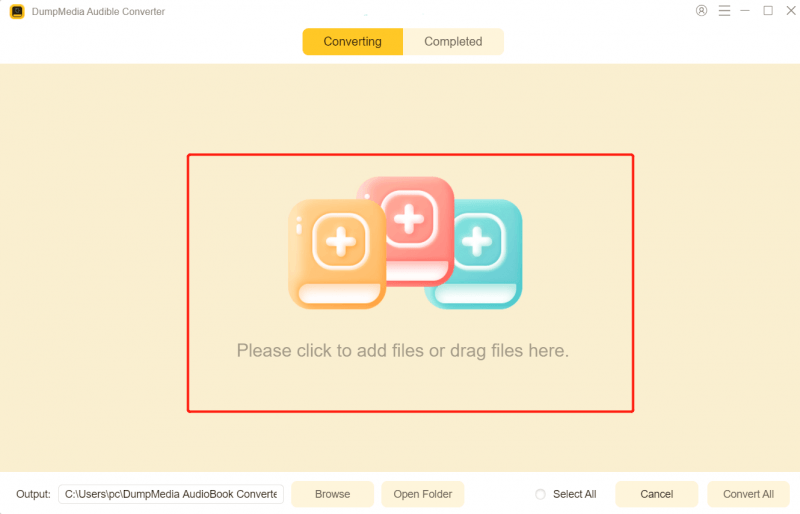
Step 3: In the settings panel, select MP3 as the output format to enable the MP3 download of your selected audiobooks.

Step 4: Click Convert and download Audible books to MP3.

Part 3. Other Methods to Download Audible Books as MP3 Files
There are alternative methods, but they are far less efficient.
1. Recording with Audio Software (e.g., Audacity)
Recording your Audible books using audio software like Audacity is often referred to as the "Analog Hole" method. Audacity is open-source and free forever. You don't need to buy a license for a converter. Since you are recording what you hear, there is no "encryption" that can stop you. It works even if dedicated converters fail. During the recording process, please try to keep notification sounds turned off. If your computer plays a notification sound (like a New Email ping) while you are recording, that "ping" will be permanently recorded into your audiobook.
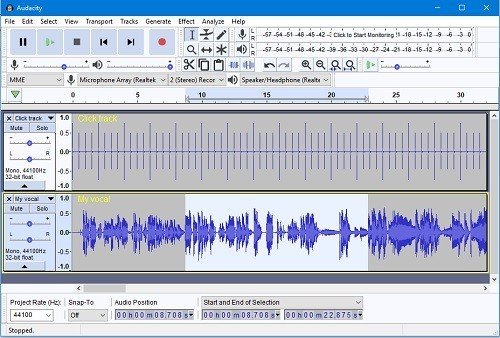
Since you are capturing the sound as it plays through your computer's sound card, you are effectively bypassing DRM without technically "cracking" it. Also, this method is considered the most time-consuming and least efficient way to back up your library. If your audiobook is 10 hours long, your computer must stay on and play that book for 10 hours to finish the recording. Professional tools like DumpMedia Audible Converter can do this in minutes.
2. Online Conversion Tools
audible-tools (kamsker.at) is currently the most highly-regarded web-based Audible converter available. It leverages your browser's local processing power to download Audible books to MP3; simply drag your .aax file into the browser window, and it will complete the conversion locally, allowing you to download the resulting MP3 file. Its key advantages are that it is free, requires no installation, and does not upload any private data to a server.
However, using the online version often presents the following issues:
- Error Messages: You may encounter prompts such as "Encrypted file" or "File format not supported."
- Large File Sizes: Audiobooks typically run into the hundreds of megabytes; uploading and downloading them is extremely time-consuming and prone to connection interruptions.
- Security Risks: Certain malicious websites may attempt to trick you into downloading "plugins" or "accelerators", which are, in reality, Trojan horse programs.
Nevertheless, if you only have one or two books to process and prefer not to install any software, giving audible-tools.kamsker.at a try remains a viable option.
Part 4. FAQs
Can I download Audible books as MP3 legally?
Yes, for personal use. Many users convert their audiobooks for backup and device compatibility.
Will I lose audio quality?
No. A good converter allows you to download Audible audiobooks to MP3 without quality loss.
Can I play converted files on any device?
Yes. Once you download Audible books to MP3, they can be played on phones, MP3 players, and computers.
Do I still need Audible after conversion?
No. After conversion, your files are independent of Audible.
Part 5. Final Verdict
If you’re trying to download Audible books to MP3, the biggest obstacle is DRM protection. While Audible doesn’t allow direct MP3 downloads, using a reliable tool like DumpMedia Audible Converter solves the problem completely. It’s the fastest, safest, and most effective way to download Audible AAX books to MP3, giving you full control over your audiobooks.
*DumpMedia works by decrypting and downloading your audiobooks into DRM-free files, allowing you to obtain a clean, unrestricted copy of your library for any device.