


Pros and Cons of Apple Music (2026 Comprehensive Review)
If you are researching the pros and cons of Apple Music, you’ve come to the right place. Apple Music is one of the most popular streaming platforms, offering millions of songs, curated playlists, and integration with the Apple ecosystem. However, like any service, it has its advantages and disadvantages. In this guide, we will explore the pros and cons of Apple Music, highlight user experiences, and show how can help overcome some of its key limitations.
Contents Guide Part 1. Apple Music Pros and Cons Part 2. Apple Music vs CompetitorsPart 3. How DumpMedia Helps Apple Music Users? Part 4. Frequently Asked Questions (FAQ)Part 5. Conclusion
Part 1. Apple Music Pros and Cons
Pros of Apple Music
Apple Music offers several notable advantages for users:
- Extensive Music Library: Access over 100 million songs across all genres.
- Seamless Apple Ecosystem Integration: Works smoothly with iPhone, iPad, Mac, Apple Watch, and HomePod.
- Curated Playlists and Personalized Recommendations: Apple Music provides tailored playlists and daily suggestions based on your listening habits.
- Offline Listening: Download tracks for offline playback within the Apple Music app.
- High Audio Quality: Supports Lossless and Spatial Audio for premium listening experiences.
These benefits make Apple Music a strong choice for Apple device users looking for convenience and high-quality music streaming.
Cons of Apple Music
While Apple Music has many advantages, there are some drawbacks to consider:
- DRM Protection: Songs are protected by digital rights management, preventing them from being freely transferred or played on non-Apple devices.
- Limited Cross-Platform Compatibility: While apps exist for Windows and Android, Apple Music works best within Apple devices.
- Subscription Cost: Monthly fees may add up, especially for families or students.
- No Permanent Ownership: Even downloaded songs remain tied to the subscription, meaning they can become inaccessible if you cancel.
The DRM restriction is often cited as the biggest limitation for users wanting full control over their purchased or downloaded music.
Part 2. Apple Music vs Competitors
When evaluating the pros and cons of Apple Music, it helps to compare it with other platforms:
| Feature | Apple Music | Spotify | Amazon Music |
| Library Size | 100M+ | 100M+ | 100M+ |
| DRM | Yes | Yes | Yes |
| Offline Playback | Yes | Yes | Yes |
| Cross-Platform | Apple ecosystem best | Wide | Wide |
| High-Quality Audio | Lossless/Spatial | Up to 320 kbps | Lossless |
This comparison highlights Apple Music’s strengths in audio quality and ecosystem integration, but also its key limitation in DRM-protected music.
Part 3. How DumpMedia Helps Apple Music Users?
One of the biggest cons of Apple Music is DRM protection, which limits how users can access their purchased or downloaded songs. DumpMedia Apple Music Converter is a reliable solution that allows you to:
- Remove DRM from Apple Music tracks safely
- Convert Apple Music to MP3, M4A, AAC, FLAC, and other formats
- Batch download playlists, albums, or your entire library
- Preserve high audio quality and ID3 tags
- Enjoy your music on any device without subscription restrictions
By addressing the DRM issue, DumpMedia helps Apple Music users maximize the value of their library and overcome one of the platform’s main cons.
Good News: Apple Music Converter has now been integrated into our new software, Any Music Converter. The new software integrates all the previous Apple Music conversion features while expanding support to multiple streaming platforms, offering more output formats, and improved performance.
Use Cases and Benefits of Converting Apple Music
- Listen offline on non-Apple devices
- Backup your entire Apple Music library
- Free your music from subscription restrictions
- Maintain high-quality audio and metadata
- Enjoy cross-platform playback without limitations
Guide of DumpMedia Apple Music Converter
These are the steps to use DumpMedia Apple Music Converter:
Step 1. Download and install DumpMedia Apple Music Converter. PC and Mac versions are available.
Step 2. Open DumpMedia, then go to the Library tab. Choose the songs you want converted from your Apple Music Library through the checkbox on each song.
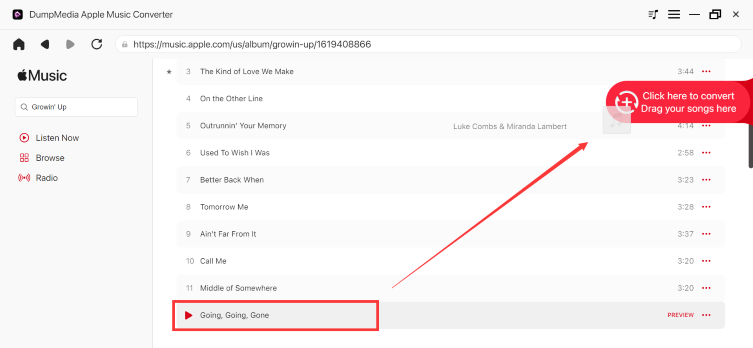
Step 3. Choose MP3 as the output format.

Step 4. Click Convert to process the files. Your music files will be exported as MP3.

Part 4. Frequently Asked Questions (FAQ)
What are the pros and cons of Apple Music?
- Pros include an extensive music library, seamless integration with Apple devices, personalized playlists, offline listening, and high-quality audio.
- Cons include DRM protection, limited cross-platform support, subscription costs, and lack of permanent ownership.
Can I remove DRM from Apple Music?
Yes. Using DumpMedia Apple Music Converter, you can safely remove DRM from Apple Music tracks and convert them into MP3, M4A, AAC, FLAC, or other formats for offline use.
Does DumpMedia Apple Music Converter preserve audio quality and metadata?
Yes. DumpMedia preserves the original audio quality and all ID3 tags, including song title, artist, album, and album artwork.
Can I convert multiple playlists or albums at once?
Yes. DumpMedia supports batch conversion, allowing you to convert entire playlists, albums, or even your full Apple Music library in one process.
Part 5. Conclusion
After evaluating the pros and cons of Apple Music, it is clear that the platform excels in library size, high-quality audio, and integration within the Apple ecosystem. However, DRM restrictions and subscription dependency can limit flexibility. DumpMedia Apple Music Converter provides an effective solution to overcome these limitations, enabling users to convert Apple Music tracks to MP3 or other formats, retain audio quality, and enjoy their music freely.
By using this tool, you can take full advantage of Apple Music while mitigating its main drawbacks. Don’t let DRM stop you, download and convert your Apple Music library today.