DumpMedia DeezPlus Best Deezer Music Converter
Download and convert any Deezer song, album, playlist or audiobook to MP3 in 100% original quality.


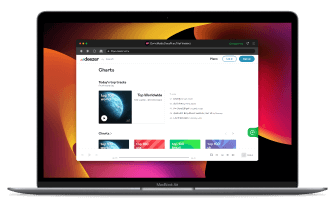
Download and convert any Deezer song, album, playlist or audiobook to MP3 in 100% original quality.
DumpMedia strictly follows United States Copyright regulations. We adopt leading technology to record unencrypted audio data while maintaining lossless sound quality.
More details here
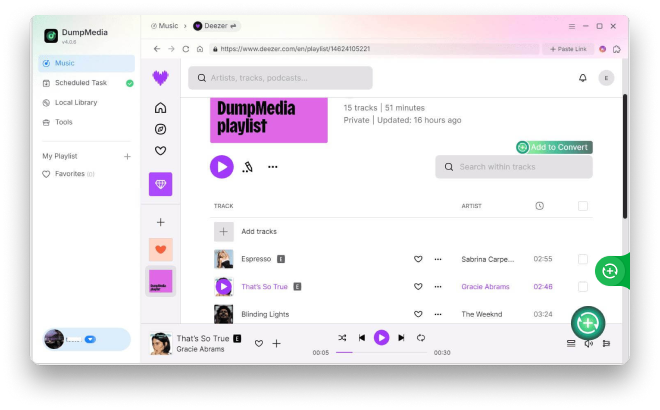
Download Deezer Music for Flexible Offline Listening Looking to keep your favorite songs and playlists from Deezer? DumpMedia DeezPlus provides a simple and efficient way to save your Deezer music for offline listening. Converted tracks retain excellent audio quality and can be played on various portable devices. With an intuitive interface and advanced processing technology, the software ensures a smooth and reliable conversion experience.
High-Quality Output with Original Details The software is designed to preserve the original sound quality of Deezer music during conversion. Track details such as title, artist, and album information are retained, ensuring your music library remains accurate and well organized.


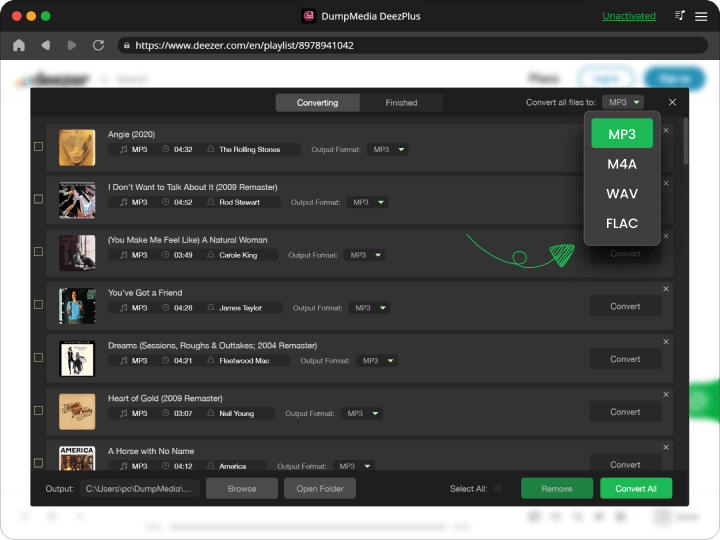
Multiple Output Formats Supported DumpMedia DeezPlus supports multiple common audio formats like MP3, WAV, FLAC, AIFF, M4A, AAC, and ALAC, giving you the flexibility to choose the format that best suits your devices and playback preferences. This ensures broad compatibility across different players and systems.
Fast and Stable Batch Conversion The software supports batch processing, allowing you to convert multiple Deezer tracks or playlists at once. Even when handling large music libraries, DumpMedia DeezPlus delivers stable performance and reliable output, helping you manage your downloads efficiently.


Smart Music Organization Made Easy DumpMedia DeezPlus offers flexible file naming rules and automatic folder organization based on metadata such as artist and album. This helps keep your music library clean, structured, and easy to navigate, especially as your collection grows.
Advanced Features

Multi-language
The interface is currently available in 3 languages and more will be added.

Customizable settings
Customized output audio quality according to your needs.

Preserve 100% original
Keep ID tags and metadata information.

Drag-and-drop support
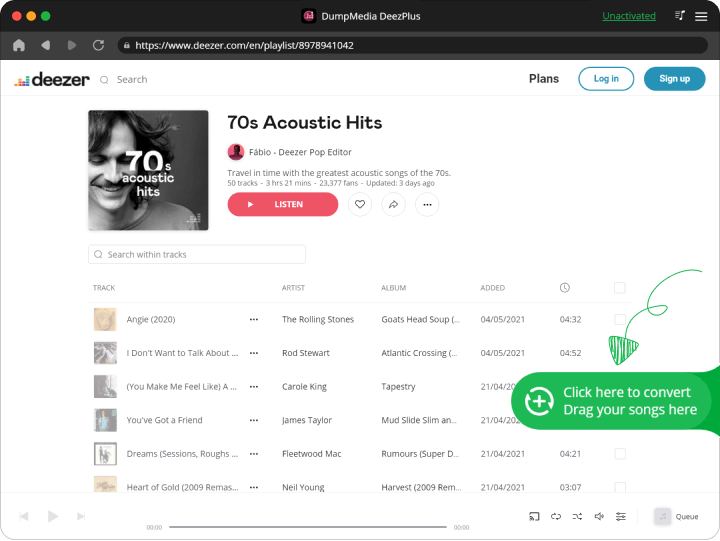
Quick to add Deezer playlists/songs into the converter with the drag-and-drop method.
3 Steps
Convert Deezer Music to MP3
Step 1. Launch DumpMedia DeezPlus Launch DumpMedia DeezPlus, then drag and add Deezer songs/playlists/albums into the program.
Step 2. Select Output Format Choose the output format and output folder for the converted Deezer music, such as MP3.
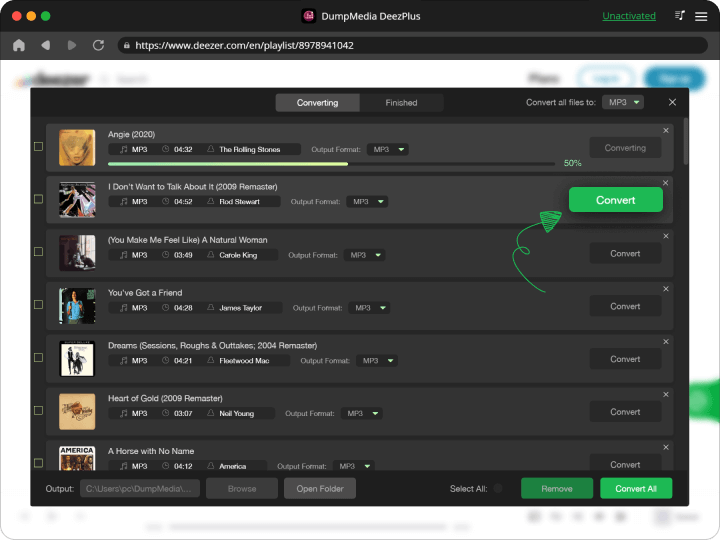
Step 3. Convert Deezer Music to MP3 Click on the "Convert" button to convert Deezer songs to MP3 with 4x faster speed and original quality.
Step 1
Step 2
Step 3
Tech Specs
System Requirements
Windows OS: Windows 7 or later (64-bit required)
Mac OS: macOS X 10.15 or higher
Resolution: 1024×768 display or above
Processor: 1G Hz processor or above
RAM: 512 MB or more (1GB Recommended)
Supported Input Content
Songs, Albums, Playlists, and Podcasts from Deezer Music.
Supported Output Formats
Windows/Mac: MP3, WAV, FLAC, AIFF, M4A (AAC and ALAC codecs)
Tell us what you think
Please Rate Our Products, Thank You.

FAQs
1. What's the limitation of the free trial version?
With the free trial version, you can only convert 3 full songs from Deezer Music. To convert more tracks without any limitations, you will need to register and activate the full version of the software.
2. What kinds of audio formats could be converted?
Songs, albums, playlists, podcasts and audiobooks from Deezer Music.
3. How to activate the software?
See our User Guide for more detailed instructions.
4. What's the DumpMedia refund policy?
Go to the refund policy page: https://www.dumpmedia.com/refund-policy/
5. How to get back your activation code?
Go to the license retrieval page: https://www.dumpmedia.com/support/license-retrieval/
Free Try
DumpMedia DeezPlus
Download and Convert Deezer Music to Formats You Want.

I've been using this app for three months. It supports all the formats that I frequently use, and the conversion process is faster than previous converters. I don't enjoy listening to music on streaming platforms most of the time. Because you must be concerned about the possibility that some songs will vanish without a hint one day. It's a great relief to make sure that I can keep them in my local Disc drive.
Timothy Marcell
I tried the free trial and it works perfectly. Then I go with a lifetime license, which is a bargain. And the customer service team has never let me down. I was able to feel as though my purchase was worthwhile.
Steve Jennings
This software is excellent, helped me convert all the songs I love. And it's very easy to use!
Lyle Charpie
Write A Review
More Review