


Spotify DJ Mode: How to Use It (2026 Complete Guide)
If you've recently heard about Spotify DJ mode, you might be wondering what it actually does and how to use it. Spotify AI DJ Mode is one of Spotify’s most exciting features, offering a personalized music experience powered by artificial intelligence. But while it’s powerful, it also comes with limitations that many users don’t realize. In this guide, you’ll learn what Spotify AI DJ is and how to enable AI DJ on Spotify.
Contents Guide Part 1. What Is Spotify AI DJ?Part 2. How to Enable Spotify AI DJ?Part 3. Limitations of Spotify AI DJPart 4. How to Save Spotify DJ Music for Offline Use?Part 5. FAQsPart 6. Conclusion
Part 1. What Is Spotify AI DJ?
Spotify DJ mode is a personalized music guide that functions like a virtual radio host, blending advanced machine learning with a remarkably realistic AI voice. Available to Premium subscribers, it doesn't just shuffle songs; it curates a continuous stream of music based on your specific listening history, current trends, and even nostalgic hits you haven't played in years.
Key Features of Spotify AI DJ
- Personalized song recommendations
- Continuous playback without manual input
- AI-generated voice commentary
- Smart mood and genre transitions
This is why Spotify DJ mode is becoming increasingly popular among users who prefer effortless listening.
Part 2. How to Enable Spotify AI DJ?
How to access Spotify DJ mode? If you have subscribed to Spotify Premium, follow these steps:
Step 1. Make sure your app is updated to the latest version. Navigate to the Home section.
Step 2. Look for the DJ feature in your feed. Start listening instantly.
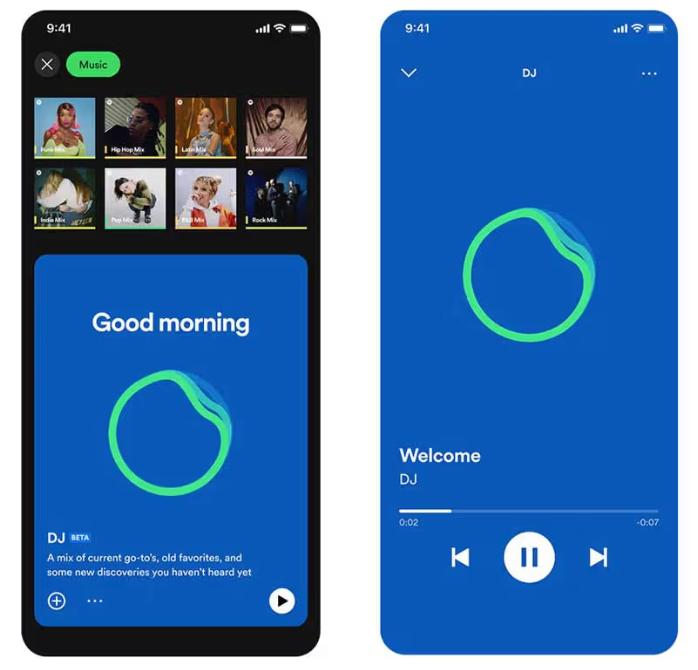
Spotify's AI DJ now supports a "Requests" feature. Just as you would speak to a human DJ, you can use voice commands or text messages, saying things like, "Switch to a softer genre" or "Play more songs by Jay Justin Bieber," and the AI will instantly adjust the playlist.
Part 3. Limitations of Spotify AI DJ
Spotify DJ mode stands out because it removes the need to manually search for music. It is ideal for background listening, discovering new songs, and creating a radio-like experience. While Spotify’s AI DJ is impressive, it comes with several important limitations.
1. No Permanent Downloads
Even with Premium, songs are not truly downloadable. Files are locked in the app, and they cannot be transferred.
2. No Offline Freedom
You can download for offline listening, but access depends on a subscription. Music disappears if you cancel it.
3. No Export or Sharing
You cannot export DJ playlists and save mixes externally.
4. Limited Control
Spotify AI controls song selection and order. You don't have full customization.
These limitations become important if you want more control over your music.
Part 4. How to Save Spotify DJ Music for Offline Use?
If you enjoy Spotify DJ mode but want more flexibility, you need a way to save songs permanently. Instead of relying on Spotify’s built-in limitations, you select songs from DJ recommendations and convert them into local files. This gives you full control over your music. The most reliable way to do this is by using a professional tool like DumpMedia Spotify Music Converter.
🏅Why Choose DumpMedia Spotify Music Converter:
- ⭐Integration with Spotify web player
- ⭐Work for both Spotify Premium and Spotify Free users
- ⭐Provide batch conversion at up to 35x speed
- ⭐Convert Spotify songs to MP3, WAV, or FLAC
- ⭐Retain ID3 tags like artist, cover, art, etc.
- ⭐Preserve the original audio quality
- ⭐100% clean. No risk in using
Step-by-Step: Convert Spotify DJ Music
Step 1. Download and install the software on your computer. It works with both Windows and Mac. The interface is user-friendly, making it easy for beginners.
Step 2. Open the built‑in Spotify web player inside DumpMedia and log in with your Spotify account. Browse Spotify and drag the songs, albums, or playlists you want to download into the converter.

Step 3. In the settings panel, select MP3 as the output format to enable a MP3 download of your selected tracks.

Step 4. Press the "Convert All" button and start the conversion. DumpMedia Spotify Music Converter supports 35x faster speed download, so you can just wait for the conversion process to finish.

Part 5. FAQs
1. What is Spotify DJ mode?
It is an AI-powered feature that plays personalized music based on your taste.
2. Is Spotify’s AI DJ free?
No, it typically requires a Premium subscription.
3. Can I download Spotify DJ songs?
Only within the app, not as local files.
4. Can I create my own DJ playlist?
Yes, especially if you have local copies of your music.
Part 6. Conclusion
Spotify DJ mode is a powerful feature that makes music discovery easier and more enjoyable. However, it comes with limitations such as a lack of permanent downloads and restricted offline access. If you want to fully enjoy the benefits of Spotify’s AI DJ without these restrictions, using a reliable tool to save your music is the best solution. This allows you to keep your favorite tracks, build your own playlists, and enjoy complete freedom over your listening experience.
*DumpMedia works by decrypting and downloading Spotify songs into DRM-free files, allowing you to obtain a clean, unrestricted copy of your library for any device. Its functionality does not include the conversion of local audio files.