


How to Get Spotify Crack PC/ Mac Version for Premium 2026
In an era dominated by digital streaming platforms, Spotify has emerged as a titan in the world of music. With its vast library and user-friendly interface, it has revolutionized the way we listen to music.
However, for some users, the premium features offered by Spotify come at a cost that they may not be willing or able to afford. This has led to the rise of Spotify's cracked PC, a modified version of the app that grants access to the full suite of premium features without requiring a paid subscription.
In this article, we delve into the world of Spotify Cracked PC and examine its impact on both users and the music industry as a whole. We will explore the reasons behind its popularity, the risks associated with its usage, and the ethical considerations it raises. Join us as we uncover the phenomenon of Spotify-cracked PC and the implications it brings to the table.
Contents Guide Part 1: Best Way to Download Spotify Cracked PC/ Mac VersionPart 2: How to Crack Spotify Ad-Free Feature on PCPart 3: How to Crack Spotify Offline Feature on PCPart 4: How to Crack Spotify Unlimited Skip Feature on PCPart 5: Cracked Spotify or Spotify Premium? Part 6: Summary
Part 1: Best Way to Download Spotify Cracked PC/ Mac Version
With the immense popularity of Spotify as a leading music streaming platform, many users find themselves wanting more flexibility with their music. While Spotify offers a vast library of songs, it still comes with limitations such as online streaming, restricted access for non-premium users, and DRM protection preventing users from truly owning the music they love.
However, a powerful tool has emerged to break these barriers and provide users with the ultimate Spotify music freedom - DumpMedia Spotify Music Converter. DumpMedia Spotify Music Converter is a versatile software designed to convert and download Spotify music to various formats, including MP3, FLAC, WAV, and more.
This innovative tool enables users to enjoy their favorite Spotify tracks offline on any device without the need for a premium subscription or an internet connection. Let's delve deeper into the features and benefits that make DumpMedia Spotify Music Converter a game-changer for music enthusiasts.
One of the standout features of DumpMedia Spotify Music Converter is its ability to download Spotify songs, playlists, albums, and podcasts for offline listening. Users can now take their music on the go and enjoy it anytime, anywhere, without relying on a stable internet connection. Whether you're on a road trip, on a plane, or simply in an area with poor network coverage, DumpMedia empowers you to access your favorite tunes effortlessly.
DumpMedia Spotify Music Converter ensures that the converted files retain the original audio quality of the Spotify tracks. By utilizing advanced technology, the software maintains the integrity of each song, delivering a listening experience that is indistinguishable from the original. This means you can enjoy your favorite music in high fidelity, exactly as the artists intended.
Here’s how to use the tool:
- Download and install DumpMedia from their official website. Once the download finishes, run the installer and follow the on-screen instructions to install the Spotify Music Converter onto your computer.
- After installing, launch DumpMedia and add your Spotify music. To convert your desired Spotify songs, playlists, or albums, click on the “Add Files” button in the DumpMedia program to open a window where you can browse your computer and select the files you want to convert. After choosing your files, click "Open" to add them to DumpMedia.
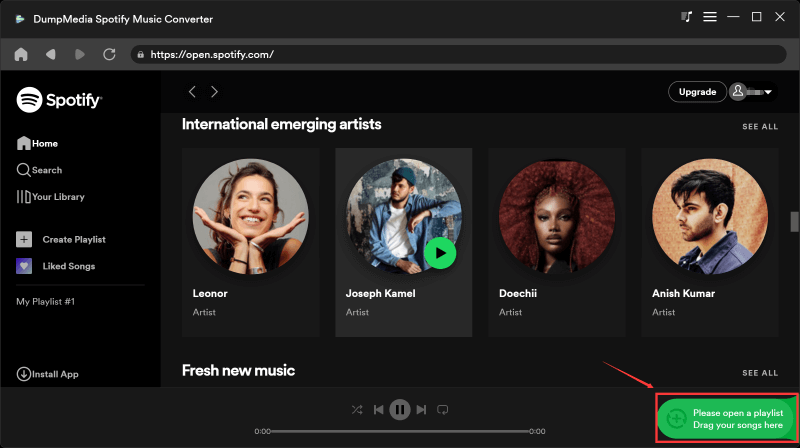
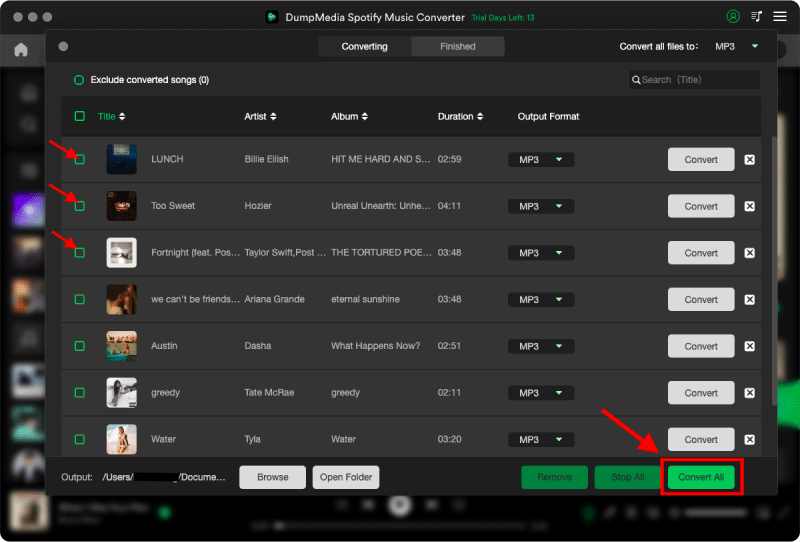
- Next, select the output format you want and adjust the settings as desired. From the "Output Format" menu, select your preferred option. You can also personalize additional settings, such as the bitrate, sample rate, and output folder location, to fit your needs.
- Finally, start the conversion process. After selecting the output format and adjusting the settings, click the "Convert" button to begin the conversion process. DumpMedia will convert your chosen Spotify tracks to the specified output format and save them to your designated location on your computer.
- Get ready to enjoy your new Spotify music on your PC! Once the conversion is finished, you can easily find your tracks in the output folder you previously selected. These songs are now prepared for transfer and playback on any media player or device that suits you, without requiring an active Spotify subscription.
DumpMedia Spotify Music Converter offers a comprehensive solution for Spotify users seeking enhanced control and freedom over their music. By allowing offline listening, preserving audio quality, providing batch conversion, and removing DRM protection, DumpMedia empowers users to enjoy their favorite Spotify tracks without limitations.
With DumpMedia Spotify Music Converter, you can truly unlock the full potential of Spotify and elevate your music experience to new heights.
Part 2: How to Crack Spotify Ad-Free Feature on PC
To enjoy uninterrupted playback on Spotify, consider using cracked versions of the software that allow you to enjoy the platform's ad-free feature. In this section, we'll take a look at two examples: BlockTheSpot and the Spotify Crack Chrome app.
1. BlockTheSpot
SpotX is a functional Spotify modification that blocks all banner, video, and audio ads within the Spotify application. It provides additional features such as friend-keeping, vertical video/radio, automatic Spotify update blocking, and track skipping. Before installation, ensure that your device meets the following system requirements.
OS: This software supports Windows 7 or higher on desktops.
Spotify: Get the latest official version.
PowerShell: You need version 3 or higher.
To crack Spotify's ad-free feature using BlockTheSpot on a PC, you'll need to follow these steps:
- Install BlockTheSpot on your PC.
- Open Spotify and go to Settings.
- Click on the "Spotify Premium" tab.
- Click the "Get premium" button.
- Select "Spotify Premium" and click "Choose Premium".
- Choose "Pay monthly" or "Pay yearly" as your payment option.
- In the "Add code" box, enter the code provided by BlockTheSpot.
- Click "My security information" and enter your email
2. Spotify Crack Chrome
The Spotify Crack Chrome App is a Windows, macOS, and Linux-compatible Chrome extension. It is not an official Chrome product and the download source is available on GitHub. This cracked Spotify allows you to listen to Spotify without any ads, even without a premium account. The installation process is straightforward and can be completed by following the steps below.
- Download or copy this repository into a folder. Then, turn on Developer mode by visiting chrome://extensions in the upper-right corner.
- Drag and drop the folder containing the repository to this location. Afterward, navigate the Spotify Web player to Chrome's "Options > More Tools > Create Shortcut."
- Check "open as window & hit Create" and open Spotify as an app to listen to music ad-free. Remember not to delete the folder containing the repository; otherwise, it will no longer function.
Part 3: How to Crack Spotify Offline Feature on PC
To crack the Spotify offline feature on PC, follow these steps:
1. Download and install Spotify Download Manager on your PC.
2. Connect your PC to your Spotify account.
3. Go to settings on your Spotify account and click on "Download."
4. Select "Offline playlist updates."
5. Click on "Download" again and choose the playlist you want to download.
6. Start the download process.
7. Once the download is complete, disconnect your PC from your Spotify account.
Part 4: How to Crack Spotify Unlimited Skip Feature on PC
Spotify's unlimited skip feature allows you to skip an unlimited number of songs in a row without taking a break. Here's how to crack it on a PC:
1. Firstly, make sure you have the latest version of Spotify installed on your PC.
2. Open the Spotify desktop or laptop application.
3. Spotify track you want to skip on.
4. Right-click anywhere on the track and select "Copy Addressed".
5. Open a text editor (such as NotePad or Notepad++) and paste the address into it, including the leading "." and the rest of the song's track number (e.g. "
Part 5: Cracked Spotify or Spotify Premium?
Please note that using a Spotify Premium Crack is against Spotify's terms of service. If you are caught using a Spotify Premium Crack, your account may be banned. Here are some of the risks associated with using a Spotify Premium Crack:
- Your account may be banned.
- Your computer may be infected with malware.
- You may not be able to get the latest updates for Spotify.
- You may not be able to use all of the features of Spotify.
If you are not comfortable using Spotify Premium Crack, you can subscribe to Spotify Premium for a monthly fee. With Spotify Premium, you will get ad-free listening, unlimited skips, and the ability to download songs for offline listening.
Here are the benefits of subscribing to Spotify Premium:
- You can listen to music without ads.
- You can skip songs as many times as you want.
- You can download songs for offline listening.
- You can listen to music on any device.
- You can get access to exclusive content, such as podcasts and playlists.
- If you are a music lover, Spotify Premium is a great way to enjoy your favorite songs.
Part 6: Summary
The use of Spotify Cracked PC, a modified version of the Spotify app that grants access to premium features without a paid subscription, comes with several inherent risks and potential consequences. It is important to consider these risks before engaging with such unauthorized methods. That’s why we’ve talked about DumpMedia Spotify Music Converter.
Overall, DumpMedia Spotify Music Converter is a game-changer for Spotify users, offering enhanced control, portability, and ownership of their music. It provides the ultimate solution for unlocking Spotify music freedom, allowing users to elevate their music experience and enjoy their favorite tracks without limitations.