


How to Put Music on MP3 Player from Spotify in 2026
How to put music on MP3 player from Spotify remains one of the most common questions among Spotify users, mainly because Spotify does not allow direct downloads to any MP3 device because of DRM. If you try to transfer downloaded Spotify tracks, most MP3 players will fail to recognize them.
To work around this limitation, you need a tool that can convert Spotify music into a standard audio format such as MP3. DumpMedia Spotify Music Converter is one of the most reliable solutions for this task. If your goal is to move your Spotify library to a portable device for offline listening, this converter provides the fastest and most straightforward method.
Contents Guide Part 1. Why You Can't Put Spotify Songs on MP3 Player?Part 2. How to Put Spotify Music on MP3 Player?Part 3. FAQPart 4. To Sum It All
Part 1. Why You Can't Put Spotify Songs on MP3 Player?
Spotify does not allow users to transfer songs directly to an MP3 player because all Spotify tracks are protected by Digital Rights Management (DRM). This DRM encryption prevents users from copying, exporting, or converting Spotify’s audio files into standard formats like MP3. Even if you download songs using a Spotify Premium account, those files remain in a locked OGG format that only the Spotify app can read. As a result, traditional MP3 players, especially non-smart devices, cannot recognize or play these encrypted files.
In short, the DRM system ensures that Spotify music can only be played within Spotify’s authorized ecosystem. That is why simply dragging Spotify songs to an MP3 player will never work.
How to put music on MP3 player from Spotify? To bypass this limitation, you need a tool capable of removing Spotify’s DRM protection and converting tracks into universal formats. DumpMedia Spotify Music Converter fulfills this exact purpose. It converts Spotify songs, albums, and playlists into DRM-free MP3, M4A, WAV, or FLAC files, making them compatible with any MP3 player and allowing true offline ownership of your music.
Part 2. How to Put Spotify Music on MP3 Player?
How to put music on MP3 player from Spotify? Before putting Spotify music on your MP3 player, make sure you have DumpMedia Spotify Music Converter installed.
DumpMedia Spotify Music Converter is gaining popularity among Spotify listeners for its wonderful music download service. No matter if you’re a user of Spotify Free or Spotify Premium, you can download and convert Spotify songs, playlists, and albums to MP3, AAC, ALAC, FLAC, or other formats using DumpMedia. Better yet, the downloads will always be available even if your subscription expires.
Step-by-Step Guide: How to Put Spotify Music on MP3 Player
Step 1. Open the software on your computer. It works with both Windows and Mac. The interface is user-friendly, making it easy for beginners.
Step 2. Go to Spotify and choose the song, album, or playlist you want to convert. The software will automatically detect the tracks.

Step 3. Select a format compatible with your MP3 player. Common choices are MP3, M4A, WAV, or FLAC. You can also set output quality and conversion speed.

Step 4. Click the "Convert" button to begin the conversion process. DumpMedia Spotify Music Converter will remove DRM and convert all selected tracks into your chosen format. The conversion preserves high audio quality.

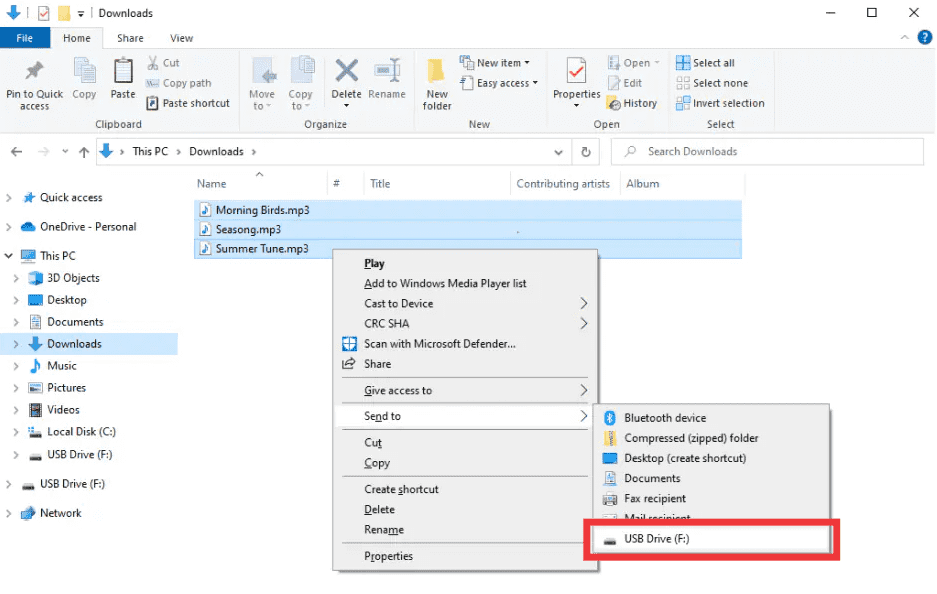
Step 5. How to put music on MP3 player from Spotify? After conversion, locate the output folder. Connect your MP3 player to your computer via USB and copy the converted files. Your Spotify music is now ready to play offline on any MP3 device.
Part 3. FAQ
1. Can I put Spotify songs directly on MP3 players?
No. Spotify’s tracks are DRM-protected and cannot be exported directly. You need a converter like DumpMedia Spotify Music Converter to make them compatible.
2. How do I convert Spotify playlists to MP3?
Use DumpMedia Spotify Music Converter: copy playlist links, select MP3 as output, and convert. Then transfer files to your MP3 player.
3. Is it legal to convert Spotify music?
Converting Spotify music for personal offline use is generally allowed. Avoid distributing converted files to others, which may violate copyright laws.
4. Which formats can I use for MP3 players?
MP3 is the most common. DumpMedia Spotify Music Converter also supports M4A, WAV, and FLAC, all compatible with most devices.
5. Can I transfer Spotify music to multiple devices?
Yes. Once converted with DumpMedia, your Spotify songs are DRM-free and can be played on any MP3 player, phone, or tablet.
Part 4. To Sum It All
If you’ve ever wondered how to put music on an MP3 player from Spotify, the solution is clear: Spotify’s DRM prevents direct transfers, but DumpMedia Spotify Music Converter removes these restrictions. It converts your favorite songs, albums, or playlists into MP3 or other universal formats, preserving high quality and allowing offline playback on any device.
Try DumpMedia Spotify Music Converter today and enjoy Spotify music anywhere, anytime, no more limits, no more DRM issues.