


What Are Apple Music Devices? (2025 Update)
If you love listening to music then you must have heard of the term Apple Music devices once or twice in your life. But what are these devices? In this article, you will learn a lot about these Apple music devices everyone is talking about. In short, Apple Music devices are Apple-supported devices where you can listen to and enjoy your favorite tracks from Apple Music without any hassles. But if you want to learn more, all you need to do is follow this post and read the rest of the things we are going to list for you. Sit back, relax, and learn!
Contents Guide Part 1. Does Your Device Support Apple Music?Part 2. What Is The Best Device to Play Apple Music?Part 3. How to Convert Apple Music to MP3 for Listening on Any DevicesPart 4. Summary
Part 1. Does Your Device Support Apple Music?
Before we proceed to let you learn about the different Apple Music devices, let us ask you a question first, is your device supported by Apple Music? You will know that your device is supported by Apple Music if it can download and use the Apple Music app.
But to make it easier for you, you can check out this list we made so you can see if your device is among the devices supported by Apple Music:
- iPhone – as one of Apple’s leading units, all types of iPhones are supported by the Apple Music app. But if your Apple Music isn’t playing on your iPhone, make sure to update either your iPhone or your Apple Music app to its latest version
- iPod Touch – iPod Touch is mostly used for listening to music, and yes, it is supported by the Apple Music app
- iPad – iPads are also supported by Apple Music, considering that it is also a tablet made by Apple – which is the very same company that developed Apple Music
- Apple TV – only Apple TV 4th generation and Apple TV 4K can support Apple Music. If you have Apple TV 2nd and 3rd generation, unfortunately, you cannot use Apple Music on these devices
- Apple Watch – all types of Apple Watch can support Apple Music but you can only add p to 2GB of music
- iPod Nano, iPod Shuffle, iPod Classic – even though these devices are made by Apple, they are not supported by an iOS system which makes it not possible to use Apple Music on these devices
- Windows – you can use Apple Music or iTunes on your Windows computer as long as you use iTunes version 12.2
- Mac OS – since it is a desktop developed by Apple, Apple Music, and iTunes are supported on these units
- Android phones – there are Android phones that can support Apple Music and there are those that can’t. You can try downloading the Apple Music app on your device and see if they are a match
- Game Consoles – any game consoles like PSP, PS4, or Xbox are not supported by Apple Music
- MP3 Players – MP3 Players who can connect to a WiFi can support Apple Music
Part 2. What Is The Best Device to Play Apple Music?
Now, after learning what are Apple Music devices and which device is supported by Apple Music, we know that you are now wondering which among these devices is the best one to use and listen to Apple Music?
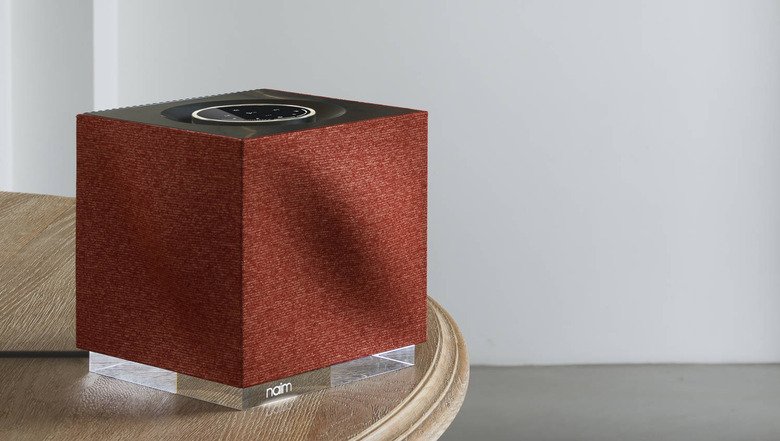
If you’re looking for the best device to play music, we have a lot to recommend and most of these are AirPlay speakers that can support both Bluetooth and WiFi connections. Using these speakers, you can have so much fun listening to your favorite Apple Music songs in the best quality possible. Here is a list of the best AirPlay speakers of today:
- Naim Mu-so Qb 2nd Generation – this speaker can both use Bluetooth and WiFi, and you can have to choose between different streaming options when using this speaker
- Audio Pro Addon C10 Mkll – it also supports both Wifi and Bluetooth and has a very clean and airtight base
- Audio Pro Addon C10 – it has a multi-room functionality, has an expert sense of timing, and can be used for both WiFi and Bluetooth connections
Part 3. How to Convert Apple Music to MP3 for Listening on Any Devices
Even though Apple Music is such a great streaming platform, you will not be able to listen to your favorite Apple Music tracks if your device is not one of the Apple Music devices that are supported by Apple. So to make it easier for you, we have found a great tool that can help you listen to Apple Music and convert it to MP3 so you can listen to it on any device you want, even if it’s not one of the Apple Music devices. This tool is no other than the DumpMedia Apple Music Converter.
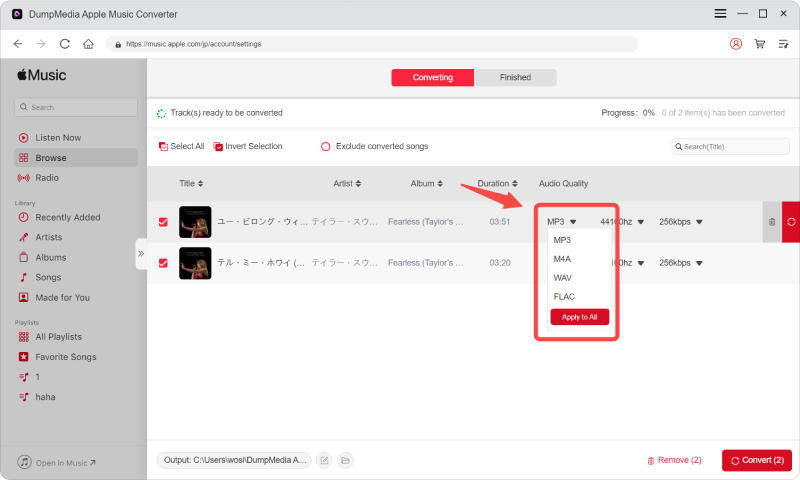
The DumpMedia Apple Music Converter is now considered the best converting tool as it can help you remove the DRM from any Apple Music tracks that prevent you from downloading and listening to them outside the Apple Music app. It can also help you convert your Apple Music songs to the MP3 format or any format of your choice so you can save and transfer them to a device or an MP3 player even though it is not supported by Apple Music. To use the DumpMedia Apple Music Converter, follow these steps:
- Download and install the software to your Mac or Windows PCs
- Run the app and log in to your Apple Music account
- Select all the Apple Music songs you want to download
- Or you can just Copy and Paste their links to the system
- Choose an Output Format and the folder where you want to save it
- Now, click Convert and wait for it to finish
Part 4. Summary
There are lots of Apple Music devices that you can use so you can listen to your favorite tracks from Apple Music. However, not all of these devices are great or can easily be obtained. So if you have a device that is not supported by Apple Music, now is your chance to download and install DumpMedia Apple Music Converter.