


Apple Music Album Covers Not Showing? 10 Fixes That Actually Work
Album artwork is an important part of the music listening experience. Seeing a blank music icon instead of your favorite album cover can be frustrating, especially when you're browsing large playlists or music libraries. If you're dealing with Apple Music album covers not showing, don't worry. This guide explains the most common causes, provides proven solutions, and shows how to prevent album artwork issues from happening again.
Contents Guide Part 1. Why Are Apple Music Album Artworks Not Showing?Part 2. How to Fix Apple Music Album Artwork Not Showing?Part 3. How to Keep Apple Music Album Artwork Permanently?Part 4. FAQsPart 5. Conclusion
Part 1. Why Are Apple Music Album Artworks Not Showing?
There are several reasons why Apple Music album covers not showing may occur.
Internet Connection Problems: Apple Music often loads album artwork from Apple's servers. If your internet connection is unstable, artwork may fail to appear correctly.
iCloud Music Library Sync Errors: If your library recently updated, syncing issues may be responsible for Apple Music album covers not showing.
Corrupted Metadata: Album artwork is linked to song metadata. Missing or damaged metadata can prevent covers from displaying properly.
Outdated Apple Music App: Older versions of Apple Music may contain bugs affecting artwork display.
Apple Music Server Issues: Sometimes the issue is not on your device at all. Temporary Apple server outages may affect artwork loading and synchronization.
Part 2. How to Fix Apple Music Album Artwork Not Showing?
Apple Music album covers not showing? Try the following solutions one by one.
Fix 1: Restart Apple Music
A simple restart can refresh artwork data and solve temporary display glitches.
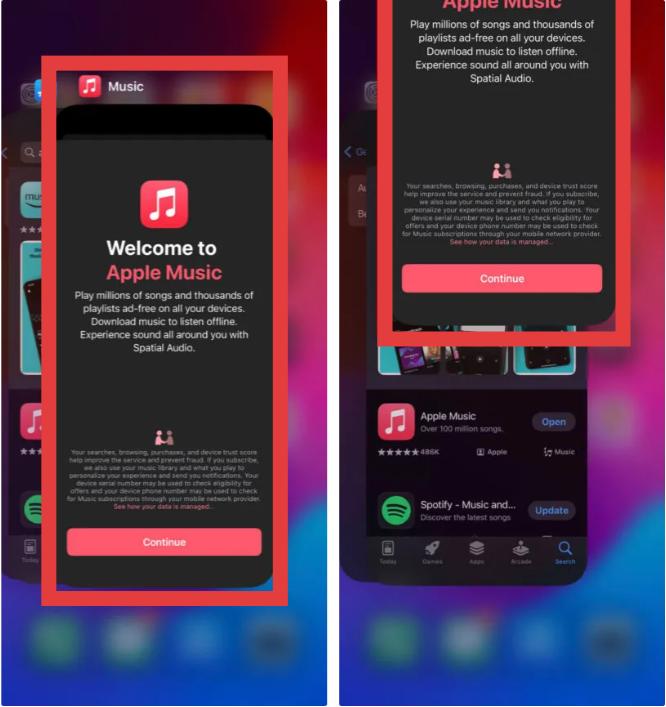
On iPhone: Swipe up from the bottom of your screen and pause in the middle (or double-click the Home button). Swipe up on the Music app card to close it. Tap the Music icon to relaunch.
On Mac: Press Command + Option + Esc, select Music, and click Force Quit.
On Windows: Click the Start menu, right-click the Apple Music icon, and select App settings > Terminate (or Repair).
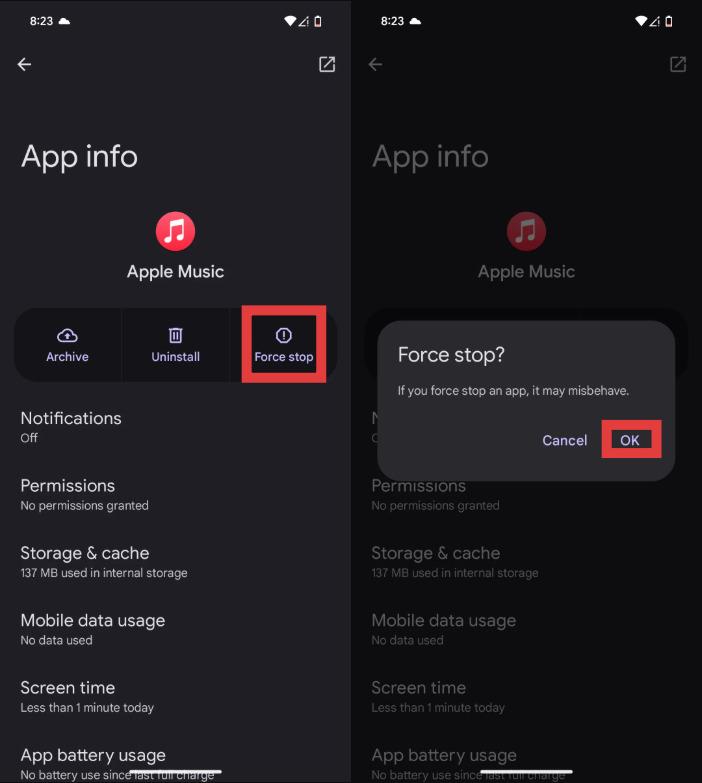
On Android: Open your phone's Settings. Go to Apps (or Apps & notifications). Find Apple Music in the list and tap it. Tap Force stop. Relaunch the Apple Music app from your home screen.
Fix 2: Check Your Internet Connection
Since artwork often loads from Apple's servers, ensure you have a stable internet connection. Switching between Wi-Fi and cellular data may help.
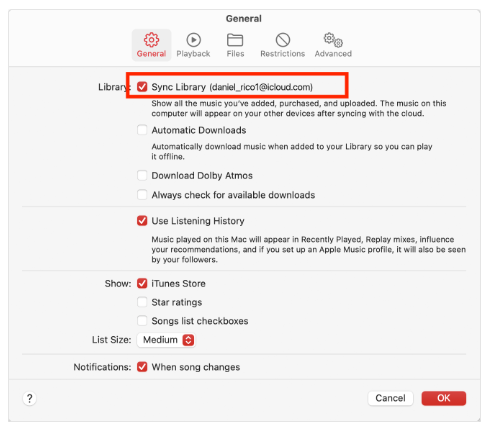
Fix 3: Sync Your Library Again
Please refresh your music library. This often fixes Apple Music album covers not showing after library updates.
Related Article: Why Is Apple Music Not Syncing?
Fix 4: Update iOS or Apple Music
Software updates frequently contain bug fixes related to media libraries and artwork synchronization. Installing the latest version may resolve recurring issues if Apple Music album covers are not showing on your iPhone.
Fix 5: Sign Out and Sign Back In
Signing out of your Apple ID and logging back in forces Apple Music to reload account information and library data.
Fix 6: Re-download the Affected Songs
If only certain albums are missing artwork, delete the downloads and download them again. Many users find this method effective when Apple Music album covers not showing affects only specific albums.
Fix 7: Refresh Album Information
Sometimes Apple Music needs to rebuild artwork associations. Removing and re-adding the affected album can trigger a metadata refresh.
Fix 8: Rebuild Your Music Library
Large libraries occasionally develop indexing issues. Rebuilding the library may restore missing artwork across multiple albums.
Fix 9: Disable and Re-enable Sync Library
This creates a fresh synchronization process and can fix persistent artwork problems.
Fix 10: Contact Apple Support
If none of the above methods work, the issue may involve account-specific syncing problems that require Apple Support assistance.
Part 3. How to Keep Apple Music Album Artwork Permanently?
Many users successfully fix Apple Music album artworks not showing, only to experience the issue again later. Because Apple Music relies heavily on cloud-based synchronization, artwork may occasionally disappear even after it has been restored. One way to reduce dependence on cloud-based artwork loading is by maintaining local music files with embedded metadata.
Tools like DumpMedia Apple Music Converter allow users to convert Apple Music tracks into common audio formats while preserving important music information. For users repeatedly experiencing Apple Music album covers not showing, preserving music metadata locally can provide a more stable listening experience.
More Features of DumpMedia Apple Music Converter
- 🎵Convert Apple Music to MP3, WAV, AAC, and more
- 🎵Integration with Apple Music web player
- 🎵Provide batch conversion at up to 35x speed
- 🎵Retain ID3 tags like artist, cover, art, etc.
- 🎵Preserve the original audio quality
- 🎵100% clean. No risk in using
These benefits help reduce the chances of encountering Apple Music album covers not showing in the future.
How to Convert Apple Music to MP3
Step 1. Download and install the software on your computer. It works with both Windows and Mac. The interface is user-friendly, making it easy for beginners.
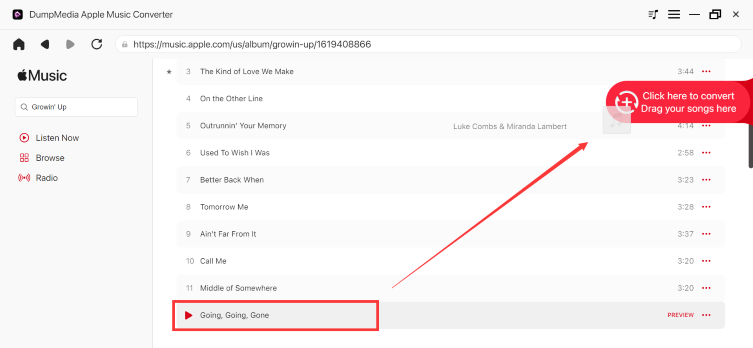
Step 2. Open the built‑in Apple Music web player inside DumpMedia and log in with your Apple Music account. Browse Apple Music and drag the songs, albums, or playlists you want to download into the converter.
Step 3. In the settings panel, select MP3 as the output format to enable a MP3 download of your selected tracks.

Step 4. Click Convert and download songs directly as MP3 files.

Part 4. FAQs
Why are Apple Music album covers not showing on my iPhone?
The most common causes include internet issues, iCloud sync problems, outdated software, and corrupted metadata.
Why did my Apple Music artwork disappear?
Artwork may disappear due to synchronization errors, server issues, or library corruption.
How do I refresh album artwork in Apple Music?
Try re-downloading the album, refreshing your library, or disabling and re-enabling Sync Library.
Does Apple Music store album artwork locally?
Some artwork information may be cached locally, but much of the artwork experience depends on Apple's cloud services.
Part 5. Conclusion
Experiencing Apple Music album covers not showing can be frustrating, but in most cases, the problem can be fixed through synchronization, network, or software troubleshooting. If Apple Music album covers not showing continues to occur, maintaining music files with preserved metadata and artwork can help provide a more reliable listening experience. Solutions such as DumpMedia Apple Music Converter allow users to keep album information, artwork, and music details intact while enjoying greater control over their music libraries.