


How to Download YouTube Music to USB Drive (Works for Offline Playback)
Many people want to download YouTube Music to a USB drive so they can play their favorite songs in the car, on a smart TV, or on other USB-supported devices without relying on an internet connection. However, if you have tried to download music directly from YouTube Music and copy it to a USB stick, you may have found that it does not work as expected because of DRM (Digital Rights Management) protection.
With DRM protection, the downloaded files from YouTube Music are not standard audio formats that USB devices can recognize. To successfully put YouTube Music on a USB drive, you need to convert it into a USB-compatible format such as MP3. In this guide, you will learn how to download music from YouTube to USB with a reliable solution for offline playback.
Contents Guide Part 1. Why You Can't Download YouTube Music Directly to a USB?Part 2. How to Download YouTube Music to USB with DumpMedia?Part 3. How to Play YouTube Music from USB in Your Car or Other Devices?Part 4. FAQs About Downloading YouTube Music to USBPart 5. Summary
Part 1. Why You Can't Download YouTube Music Directly to a USB?
How to download music from YouTube to USB? Although YouTube Music Premium allows offline downloads within its app, those downloads come with strict limitations:
- YouTube Music downloads are DRM-protected and encrypted.
- Downloaded songs can only be played inside the YouTube Music app.
- You cannot locate or copy the actual audio files to external storage.
- Most USB devices, including car stereos, only support formats like MP3, AAC, or WAV.
Because of these restrictions, simply copying YouTube Music downloads to a USB drive will not work. Your car or audio system will not recognize the files at all.
What You Need to Put YouTube Music on a USB Drive
How to download music from YouTube to USB? To successfully play YouTube Music from a USB drive, you need three essential things:
- USB-compatible audio formats: MP3 is the most widely supported format for car stereos and other devices.
- DRM-free music files: The files must be playable outside the YouTube Music app.
- A professional YouTube Music converter: This tool converts YouTube Music into standard audio formats.
This is exactly where DumpMedia YouTube Music Converter becomes essential.
Part 2. How to Download YouTube Music to USB with DumpMedia?
DumpMedia YouTube Music Converter is designed to help users remove DRM from YouTube Music and convert songs, albums, and playlists into USB-compatible formats. Once converted, the files can be freely copied to any USB drive and played on different devices.
Why Choose DumpMedia YouTube Music Converter?
DumpMedia YouTube Music Converter is not just a basic downloader. It is built specifically for YouTube Music users who want flexibility and offline access:
- Convert YouTube Music to MP3 for USB playback
- Remove DRM restrictions for offline use
- Play YouTube Music in your car without internet access
- Preserve original audio quality
- Download entire playlists and albums in batch
With DumpMedia, your YouTube Music library becomes truly portable.
How to download music from YouTube to USB? Follow these simple steps to download YouTube Music to MP3 first:
Step 1. Download and install DumpMedia YouTube Music Converter on your computer.
Good News: YouTube Music Converter has now been integrated into our new software, Any Music Converter. The new software integrates all the previous YouTube Music conversion features while expanding support to multiple streaming platforms, offering more output formats, and improved performance.
Step 2. Launch the program and sign in to your YouTube Music account. Browse and select the songs, albums, or playlists you want to download.
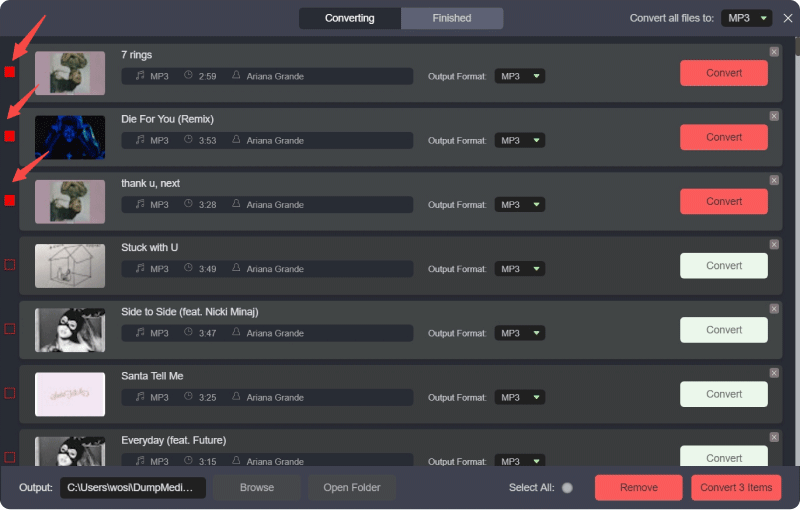
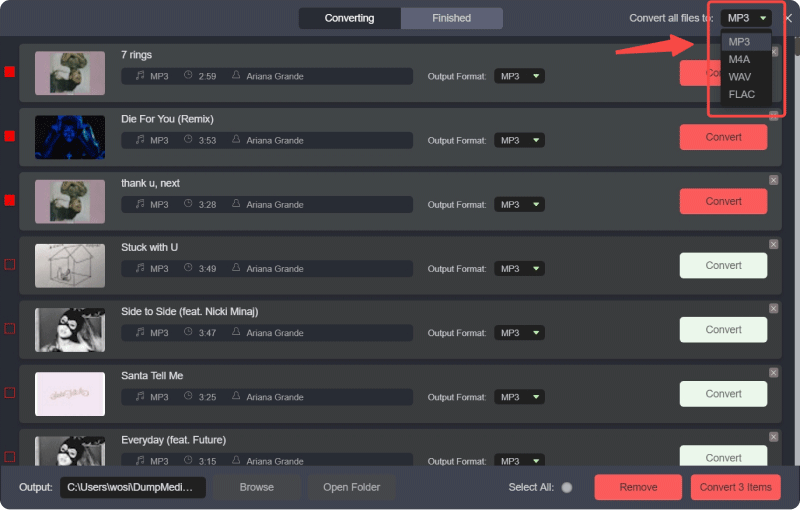
Step 3. How to download music from YouTube to USB? Choose MP3 as the output format for maximum USB compatibility.
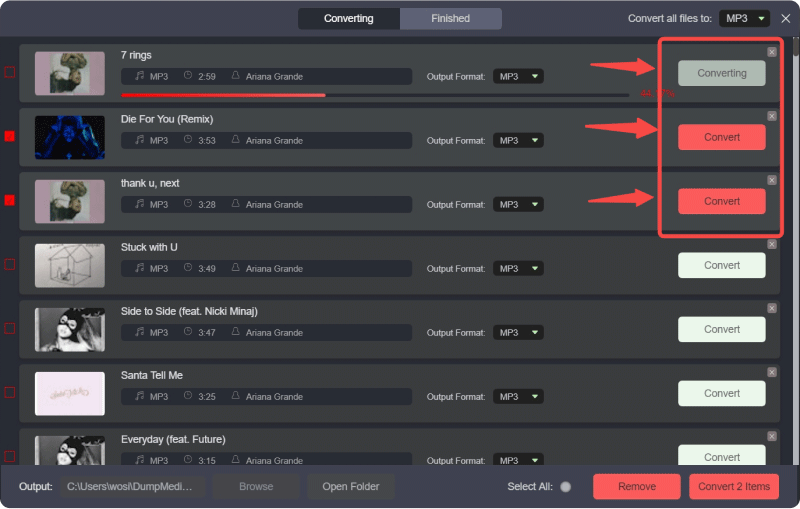
Step 4. Start converting YouTube Music to local audio files.
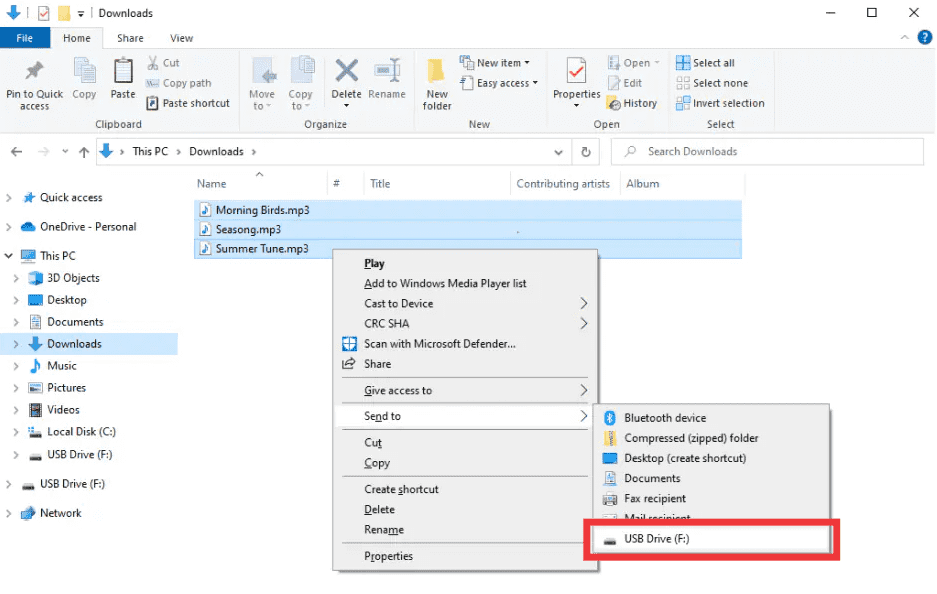
Step 5. Insert your USB drive into the computer and copy the converted MP3 files to it. After the conversion, you can safely eject the USB drive and use it on any supported device.
Part 3. How to Play YouTube Music from USB in Your Car or Other Devices?
Once your YouTube Music files are stored on a USB drive, you can enjoy them in many scenarios:
- Car stereo: Plug the USB drive into your car and play music without using mobile data.
- Smart TV: Enjoy YouTube Music tracks through your TV’s USB port.
- Home audio systems: Play music on speakers that support USB input.
- Offline travel: Take your music anywhere without worrying about connectivity.
Related Topics: How to Play YouTube Music on Google Home?
Because the files are in MP3 format, they are widely compatible with most devices.
Part 4. FAQs About Downloading YouTube Music to USB
Can I put YouTube Music directly on a USB drive?
No. YouTube Music files are DRM-protected and cannot be copied directly to USB without conversion.
Why won’t my car recognize YouTube Music files?
Car stereos only support standard audio formats like MP3. YouTube Music downloads are encrypted and unsupported.
What is the best format for USB playback?
MP3 is the most compatible format for USB playback across cars and audio devices.
Is it legal to convert YouTube Music for personal use?
Converting music for personal offline use is generally acceptable in many regions. Always follow local copyright laws.
Part 5. Summary
Downloading YouTube Music to a USB drive is not as straightforward as it seems due to DRM restrictions and format limitations. How to download music from YouTube to USB? Converting the music into MP3 format is essential.
DumpMedia offers a simple and reliable way to remove DRM, convert YouTube Music, and store it on a USB drive for offline playback. If you want a practical solution to download YouTube Music to USB without limitations, DumpMedia YouTube Music Converter is the best choice.