


How to Record from Spotify? Best Methods in 2026
Spotify offers millions of songs, playlists, and podcasts, making it one of the most popular music streaming services worldwide. However, many users still want to record from Spotify for offline listening, personal backups, or playback on devices that don't support Spotify. In this guide, we'll explain how to record Spotify music on different platforms, discuss the limitations of recording, and explore a more efficient alternative for saving Spotify songs.
Contents Guide Part 1. Can You Record Music from Spotify?Part 2. How to Record Music from Spotify on Windows?Part 3. How to Record Music from Spotify on Mac?Part 4. Better Alternative: Download Spotify Music Instead of RecordingPart 5. FAQsPart 6. Summary
Part 1. Can You Record Music from Spotify?
Many users choose to record Spotify music because they want offline access to their favorite songs and personal backups. Technically, yes. You can record from Spotify using audio recording software that captures sound as it plays through your computer or mobile device.
Unlike downloading a file directly, recording works by capturing audio output in real time. This means the recording software "listens" to the music being played and saves it as an audio file. However, recording is not always the most efficient solution.
Part 2. How to Record Music from Spotify on Windows?
How to record from Spotify? Windows users have several options when they want to record Spotify music.
Method 1: Record Spotify with Audacity
- Ensure your system volume is set to a comfortable level.
- Close other applications that might make notification sounds (e.g., Discord, YouTube, browsers with other tabs open) to avoid recording unwanted audio.
- Open Audacity. In the Audio Setup toolbar, set Audio Host to Windows WASAPI.
- Set the Recording Device to your computer’s output.
- Click the Red Record button in Audacity.
- Immediately switch to the Spotify app and play the track you want to capture.
- Once the track finishes, click the Stop button in Audacity.
- Go to File > Export and choose your preferred format (e.g., Export as MP3 or Export as WAV for higher quality).
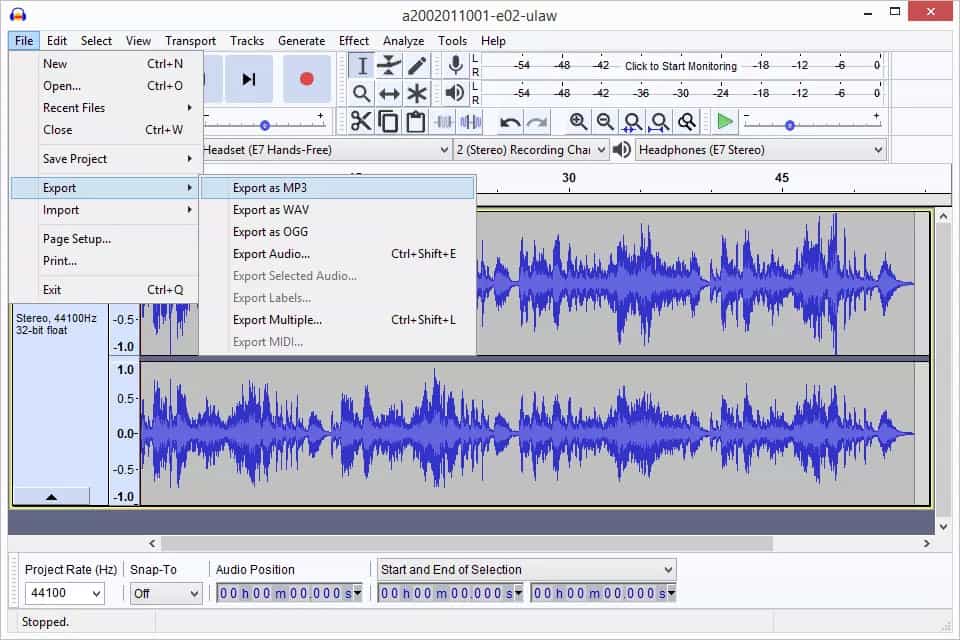
Because you are recording the audio output of your computer, the quality is limited to the playback quality of your system. It will not be a perfect, lossless replica of the source file. Also, Audacity records in real-time, meaning you must play the entire song at normal speed to capture it.
Method 2: Use Windows Voice Recorder
Windows includes a built-in recording tool. Follow these steps:
- Right-click the Speaker icon in your system tray and select Sounds (or "Sound settings" > "More sound settings").
- Go to the Recording tab.
- Right-click in the empty space below your listed devices and check Show Disabled Devices.
- If Stereo Mix appears, right-click it and select Enable.
- Right-click it again and select Set as Default Device.
- Open the Sound Recorder app.
- Start your audio/Spotify and click the Record button in the app.
While it is technically possible to force it to record system audio by enabling a "Stereo Mix" feature in your Windows sound settings, this method is often unreliable and prone to technical issues.
Part 3. How to Record Music from Spotify on Mac?
How to record from Spotify on Mac? Mac users can also record Spotify music using built-in applications.
- Open QuickTime Player.
- Select New Audio Recording.
- Configure system audio capture.
- Start recording.
- Play Spotify music.
- Save the recording.
Part 4. Better Alternative: Download Spotify Music Instead of Recording
For occasional use, recording can be sufficient. For larger music libraries, the process quickly becomes inefficient. Another approach to save Spotify songs is to convert them directly into standard audio formats. Compared with recording, conversion offers several advantages:
- Faster processing
- Batch conversion support
- Better audio quality
- Preserved song information
- Easier file management
For users with large playlists, conversion is often more practical than trying to record Spotify tracks individually. If your goal is to save Spotify music efficiently, DumpMedia Spotify Music Converter provides a streamlined solution.
With DumpMedia Spotify Music Converter, any Spotify free or Premium user can remove DRM from Spotify* and download music from Spotify to MP3, M4A, WAV, and FLAC. After that, you can get all the Spotify DRM-free downloads to listen to Spotify offline for free forever on all your devices, not to mention meeting playback issues with Spotify anymore.
👍More Key Features of DumpMedia Spotify Music Converter
- ✔️Access Full Music Library from Built-In Spotify Web Player
- ✔️Enjoy Swift Conversions with 35x Faster Speeds
- ✔️Preserve Metadata Info and ID3 Tags
- ✔️Keep the Original Audio Quality
- ✔️100% Clean. No Risk in Using
- ✔️Free Updates & Technical Support
🚩How to Use DumpMedia Spotify Music Converter
Step 1. Download and install the software on your computer. It works with both Windows and Mac. The interface is user-friendly, making it easy for beginners.
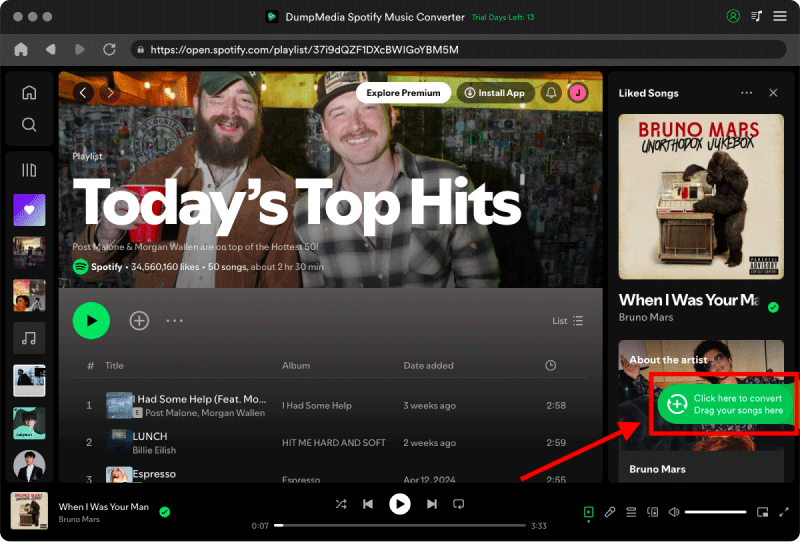
Step 2. Find the playlist, album, or specific song you want to convert. You can drag a single song onto the "+" icon on the right side of the screen. Alternatively, open an entire playlist/album and click the "Add to Convert" icon to load the entire list into the converter.
Step 3. After DumpMedia automatically parses songs, the format is set to MP3 by default on the conversion interface. If you want to change, click the "MP3" dropdown menu and choose one. Also, you can change the bitrate or the samplerate. For the best balance, choose 320kbps.

Step 4. As the settings are completed, users can process the conversion by hitting the "Convert" icon. Then DumpMedia will download Spotify songs to MP3 within seconds with its super-fast speed.
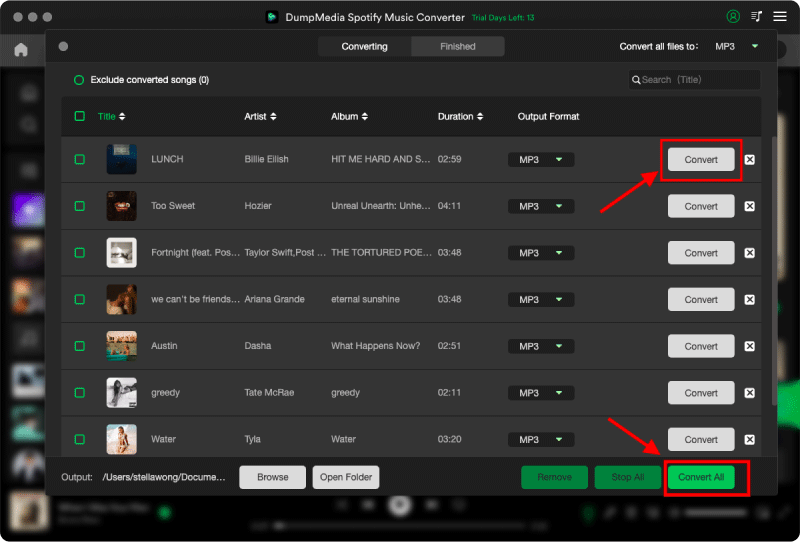
Instead of waiting for each song to play in real time, conversion processes tracks much more efficiently.
Part 5. FAQs
Is it legal to record from Spotify?
The legality depends on your location and intended use. Personal use may be treated differently from redistribution or commercial use.
Can Audacity record Spotify music?
Yes. Audacity can capture system audio and record Spotify playback.
Why is my Spotify recording silent?
This is often caused by incorrect audio source settings or operating system permissions.
Can I save Spotify songs as MP3?
Spotify does not provide direct MP3 downloads. Users typically rely on recording tools or conversion software.
What is the best way to record from Spotify?
For occasional recordings, Audacity is a popular choice. For larger collections, conversion tools are generally more efficient.
Part 6. Summary
If you only need to record a few songs occasionally, free tools like Audacity and QuickTime can help you record from Spotify with minimal setup. However, recording has clear limitations. It requires real-time playback, often results in extra editing work, and becomes impractical when dealing with large playlists.
For users looking for a faster and more organized way to save Spotify music, converting tracks directly into standard audio formats can be a more efficient alternative. Tools such as DumpMedia Spotify Music Converter simplify the process and provide greater flexibility for offline listening across multiple devices.
*DumpMedia works by decrypting and downloading Spotify songs into DRM-free files, allowing you to obtain a clean, unrestricted copy of your library for any device. Its functionality does not include the DRM removal of local audio files.