


How to Play Spotify Music on Raspberry Pi (2026 Complete Guide)
If you are trying to play Spotify music on Raspberry Pi, you will quickly notice that there is no official Spotify desktop app for Raspberry Pi OS. However, there are still several workable methods to stream or play Spotify songs on your device. In this guide, we will walk through multiple solutions, explain their limitations, and introduce a more stable offline method for long-term use.
Contents Guide Part 1. Can You Play Spotify on Raspberry Pi Directly?Part 2. Methods to Play Spotify on Raspberry PiPart 3. Best Way to Play Spotify Offline on Raspberry PiPart 4. FAQPart 5. Conclusion
Part 1. Can You Play Spotify on Raspberry Pi Directly?
If your goal is to play Spotify music on Raspberry Pi, the short answer is: not directly via an official app. Spotify does not provide a native Linux ARM client for Raspberry Pi.
However, users typically rely on the Spotify web player (via Chromium browser), Spotify Connect (remote streaming) or third-party clients like librespot. Each method allows you to stream Spotify music on Raspberry Pi, but they come with limitations in stability, performance, or usability.
Part 2. Methods to Play Spotify on Raspberry Pi
Streaming Spotify on a Raspberry Pi is a fantastic project because it turns a low-power device into a dedicated, "always-on" high-quality music streamer. Here are some effective methods you can try.
1. Spotify Web Player (Browser Method)
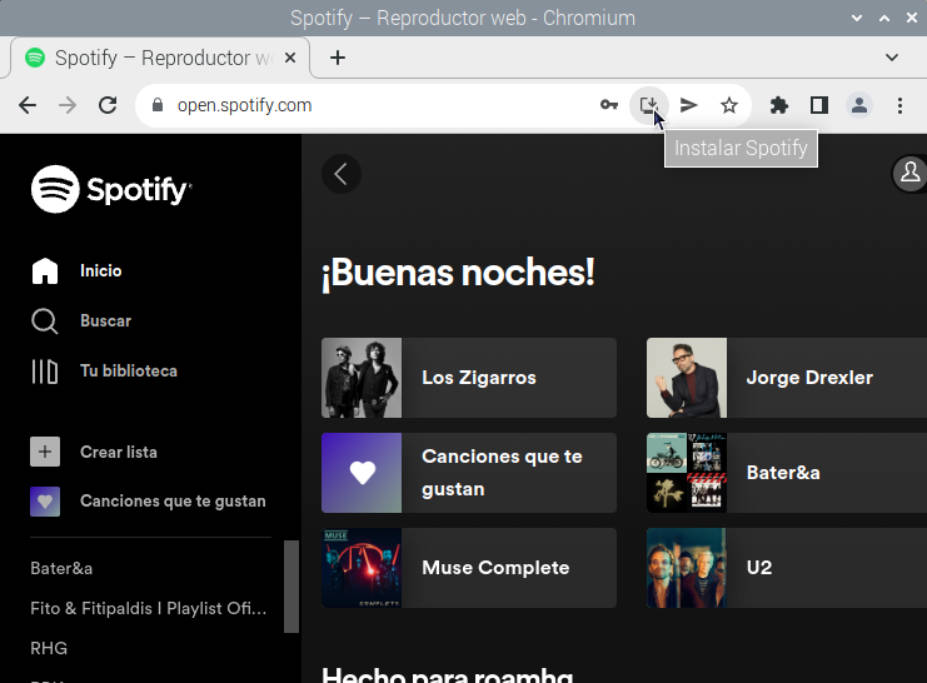
This is the simplest way to play Spotify music on Raspberry Pi, as it gives you the full desktop-like interface, including playlists, search, and algorithmic recommendations. However, it is the most resource-heavy method. Running Chromium on a Raspberry Pi (especially on older models like the 3 or 4) can be sluggish.
Here's what to do:
- Launch the Chromium web browser from the main menu.
- Navigate to the Spotify web player. Sign in to your account.
- Click the three dots in the top right corner of Chromium. Go to Settings > System. Ensure "Use graphics acceleration when available" is toggled ON.
- Once logged in, click the three dots in Chromium.
- Go to More Tools > Create Shortcut.
- Check "Open as window" and click Create. This will put an icon on your desktop that launches Spotify in its own window without the browser address bar.
2. Spotify Connect (Recommended Streaming Method)
Spotify Connect allows your Raspberry Pi to act as a remote playback device controlled by your phone. Many users choose this to play Spotify music on Raspberry Pi, but it depends heavily on network conditions.
3. Librespot (Advanced Method)
Librespot is an open-source Spotify client for Raspberry Pi. Since the Raspberry Pi isn't rendering a heavy web browser, it uses almost 0% of your CPU for the interface. Although it allows you to play Spotify music on Raspberry Pi, it is not beginner-friendly.
Part 3. Best Way to Play Spotify Offline on Raspberry Pi
All streaming methods share the same weaknesses, such as internet dependency, limited control over audio files, and no true offline support. If your goal is stable long-term usage, relying only on streaming is not ideal. This is where a local playback strategy becomes more practical for users who want to consistently play Spotify music on Raspberry Pi without interruptions.
The most reliable solution is to convert Spotify music into local audio files and play them directly on Raspberry Pi. A tool like DumpMedia Spotify Music Converter allows you to convert Spotify songs and playlists to MP3, AAC, WAV, and FLAC. This method completely changes how you play Spotify music on Raspberry Pi, shifting from streaming to offline local playback. Even if the Spotify app is not working on your device, you can play Spotify songs on MP3 players, phones, car stereos, or other devices immediately.
🏆Key Features of DumpMedia Spotify Music Converter
- 🎵 Convert multiple songs simultaneously instead of processing tracks one by one.
- 🎵 Keep important information, such as artist names, album titles, and cover artwork.
- 🎵 Once logged into Spotify, you can easily access your existing playlists on Spotify.
- 🎵 Maintain excellent sound quality after conversion.
- 🎵 Convert large playlists efficiently and save time.
How to Stream Spotify on Raspberry Pi Step-by-Step
Step 1. Download and install DumpMedia Spotify Music Converter on your Mac/PC. Launch it, and you will see the interface. Use your Spotify Premium/Free account to log in.
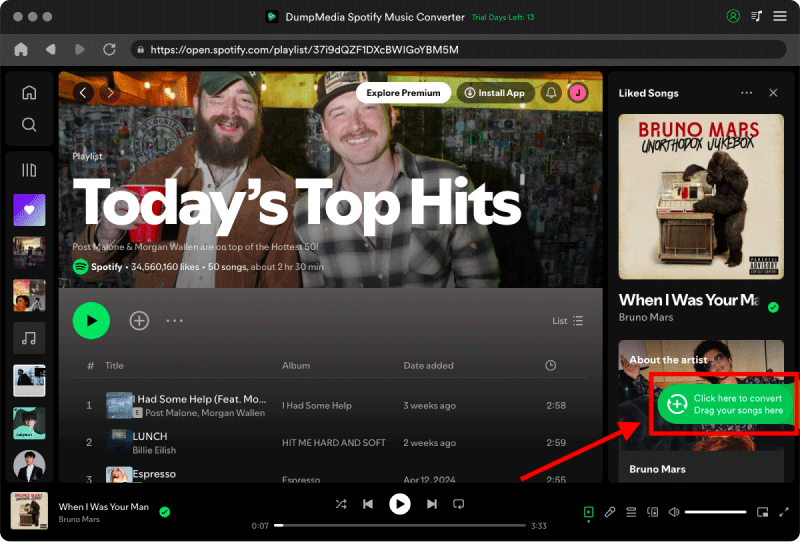
Step 2. Browse the music library and find the playlist you like. Then, click the "Add to Convert" button on the cover or simply drag the music to the "+" button to convert.
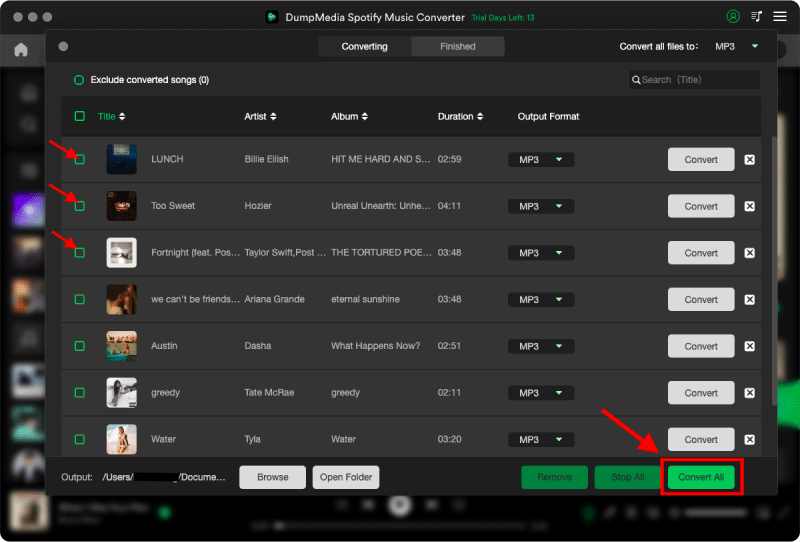
Step 3. Now, you can effortlessly select "MP3" as the output format from the dropdown. Additionally, you can also customize the output bitrate and sample rate based on your preference.

Step 4. As the settings are completed, users can process the conversion by hitting the "Convert" icon. Then DumpMedia will download Spotify songs to MP3 within seconds with its super-fast speed.
Step 5. Move converted files to Raspberry Pi storage or external drive. Use VLC or any local media player to play Spotify music on Raspberry Pi without internet.
Part 4. FAQ
1. Can I install Spotify on Raspberry Pi?
No official Spotify desktop app exists for Raspberry Pi OS. You must rely on browser, Connect, or third-party tools.
2. What is the best way to play Spotify on Raspberry Pi?
Streaming works, but offline playback using converted files is more stable for long-term use.
3. Does Spotify Connect work on Raspberry Pi?
Yes, but it requires another device and stable internet connection.
4. Is Raspberry Pi powerful enough for Spotify streaming?
Yes for basic streaming, but performance may vary depending on model and method.
5. Can I listen to Spotify offline on Raspberry Pi?
Not directly. You need to convert music into local files first.
Part 5. Conclusion
While there are several ways to play Spotify music on Raspberry Pi, most streaming-based solutions depend heavily on internet stability and system performance. If you want a more reliable and long-term solution, converting Spotify music into local files using DumpMedia Spotify Music Converter is the most practical approach for consistent playback on Raspberry Pi.