


How to Download Spotify Songs Free? [Best Method Updated]
Many users search “download Spotify songs free” hoping to grab tracks they can keep forever. You may have tried Spotify offline download, browser add-ons, or “free online converters.” But here’s the hard truth: none of those methods give you real MP3 files you own. Browser tools or online converters often fail, produce poor-quality audio, or simply download YouTube copies rather than the original Spotify tracks.
If you truly want to own your music, listen offline on any device, build a personal archive, or use songs in your own videos, you need more than “free tricks.” You need a reliable tool that converts Spotify streams into real, DRM-free audio files. Today, we're going to share some tips on how to get Spotify songs for free. Let's find out how you can get Spotify songs for free forever, without having to pay for Spotify Premium.
Contents Guide Method 1: Download Spotify Songs for Free Using Desktop Music ConverterMethod 2: Download Spotify Songs for Free Using Audio Recording SoftwareMethod 3: Download Spotify Songs for Free Using Online Conversion SitesFAQs About Downloading Spotify Songs for FreeConclusion
Method 1: Download Spotify Songs for Free Using Desktop Music Converter
Only Spotify Premium allows you to download songs and podcasts to your device and listen anywhere, anytime, regardless if you have a data signal or Wi-Fi. It’s important to note that with offline listening you still need the Spotify app.
The song files are not stored on a separate file to be played in a different app because all songs are DRM-protected. So, how to download Spotify songs free and play them on any device you want?
Fortunately, professional desktop Spotify converters can help you a lot. DumpMedia Spotify Music Converter is considered to be the best Spotify downloader overall. With it, you can easily download songs, playlists, and albums from Spotify, even without a premium subscription.
DumpMedia Spotify Music Converter can also convert OGG format Spotify songs to DRM-free MP3, M4A, WAV, FLAC, AIFF, AAC, and ALAC without quality loss. So you can easily keep Spotify music after unsubscription, or listen to Spotify music offline using any media device you own.
🏅More Amazing Features of DumpMedia Spotify Music Converter:
- ⭐Integration with Spotify Web Player
- ⭐Work for Both Spotify Premium and Spotify Free Users
- ⭐Provide Mainstream and Lossless Formats
- ⭐Offer up to 35x Faster Conversion Speed
- ⭐Allow You to Customize Output Settings
- ⭐Preserve All Metadata Info
- ⭐100% Clean. No Risk in Using
How to download Spotify songs free using DumpMedia Spotify Music Converter? The steps are typically simple, you just need to download the program on your computer and follow the instructions below.
Step 1. Download and install DumpMedia Spotify Music Converter to your Mac/PC. Launch it and you will see the interface. Use your Spotify Premium/Free account to log in.
Step 2. After you enter the built-in Spotify web player on DumpMedia, you can directly search for the songs you want to convert, drag and drop them to the "+" button, and add them to the converting list.
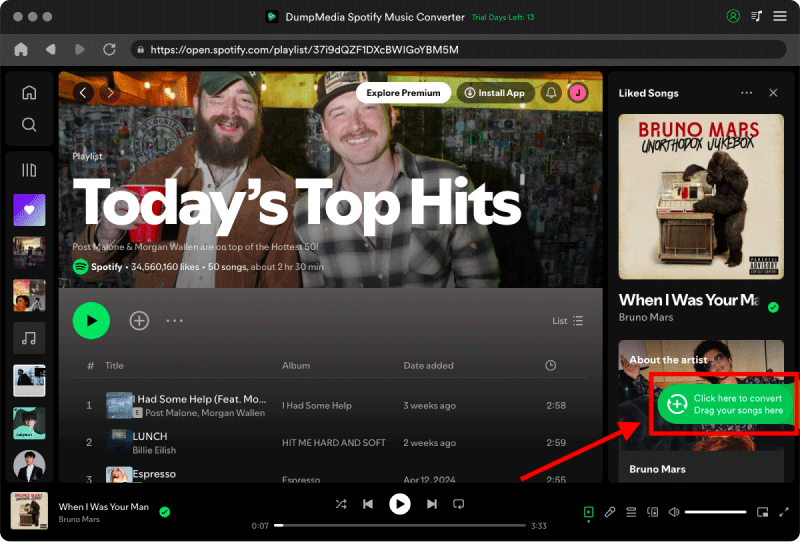
Step 3. Select your preferred output format and adjust other settings like output quality, sample rate, and bitrate according to your preferences. Choose a folder where the files will be saved.

Step 4. Click on the "Convert" button to begin the conversion process. DumpMedia Spotify Music Converter will swiftly convert the Spotify songs to your chosen output format, saving them to your specified location on your computer.
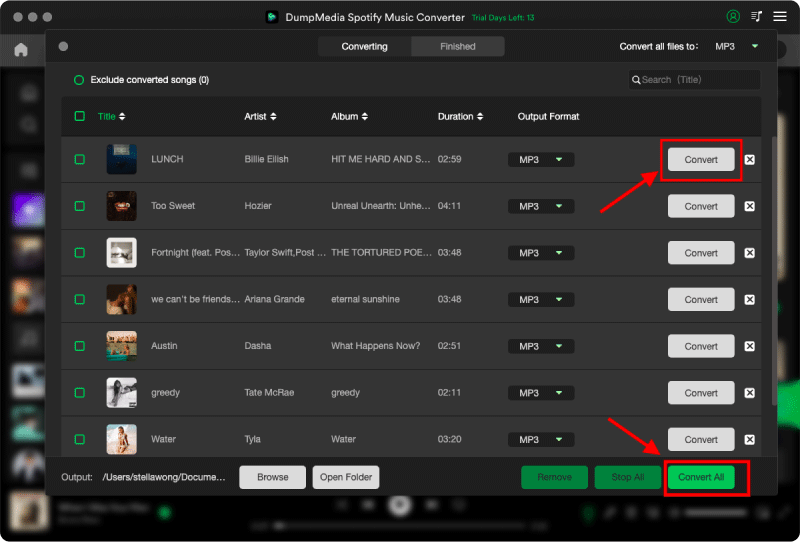
DumpMedia Spotify Music Converter provides a user-friendly interface and efficient conversion process, making it a reliable tool for downloading and converting Spotify songs for offline listening. However, it's important to note that the tool should be used for personal use only.
Method 2: Download Spotify Songs for Free Using Audio Recording Software
Another method to download Spotify songs free is by using audio recording software. This approach involves playing the desired song on Spotify while simultaneously recording the audio output using specialized software.
Programs like Audacity, OBS Studio, or streaming audio recorders can capture the audio stream directly from your computer's sound card. Keep in mind that this method requires manual playback of each song, making it suitable for downloading individual tracks rather than entire playlists.
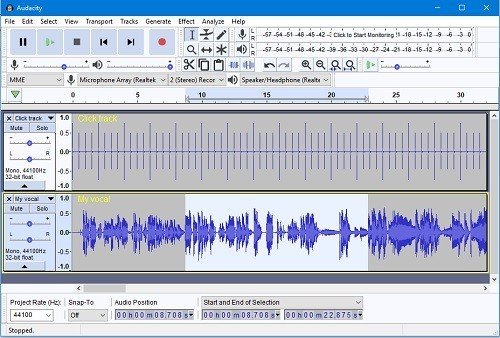
Audacity
Audacity is a widely used and feature-rich audio recording and editing software available for Windows, macOS, and Linux. It offers a simple interface and powerful recording capabilities. With Audacity, you can record any sound playing on your computer, including Spotify songs. Simply play the desired track on Spotify and hit the record button in Audacity to start capturing the audio.
OBS Studio
OBS Studio is primarily known as live streaming software, but it can also be used for audio recording purposes. It allows you to capture the audio output from your computer, making it suitable for recording Spotify songs. OBS Studio is available for Windows, macOS, and Linux and offers a range of customization options to optimize your recording settings.
Streaming Audio Recorders
Several dedicated streaming audio recorders are designed specifically for recording audio from streaming platforms like Spotify. Examples include Audials One. These tools typically provide a user-friendly interface and additional features like automatic song splitting, ID3 tag identification, and audio format customization.
Limitation:
While this approach costs nothing and avoids DRM restrictions entirely, it comes with several limitations that users should consider. Because the recording is done in real time, you must play the entire track from beginning to end, making the process slow and inconvenient for large playlists or albums. The recorded audio may also lose quality due to background noise, system notifications, or incorrect audio settings.
Additionally, recorded files do not include metadata such as artist names, titles, or album art, so users need to rename everything manually. This method is only practical for users who occasionally need to capture a single track and don’t mind spending extra time editing and cleaning up recordings.
If your goal is true flexibility and ownership of your music, the converter method is the clearest and most reliable path.
Method 3: Download Spotify Songs for Free Using Online Conversion Sites
Online conversion sites offer a convenient way to download spotify songs free by converting them into downloadable formats. Websites like YouTube to MP3 converters or Spotify to MP3 converters enable you to enter the URL of a Spotify song or playlist and convert it into a downloadable audio file.
However, it's important to note that the legality of these conversion sites varies, and it's crucial to respect copyright laws. Ensure that you only use these services for personal use and avoid distributing copyrighted material.
YTMP3.cc
While primarily known as a YouTube to MP3 converter, YTMP3.cc also supports converting Spotify songs. Copy the Spotify song or playlist URL, paste it into the converter, select the MP3 format, and initiate the conversion. Once the process is complete, you can download the MP3 file to your device.
SpotiSongDownloader
SpotiSongDownloader is a versatile online conversion site that supports various formats, including MP3. It allows you to convert Spotify songs by entering the URL, selecting the format (MP3), and converting the file. The website provides options to adjust the audio quality and also offers a browser extension for easy conversion.
Limitation:
It’s important to understand how these online tools actually work. In most cases, they do not extract audio directly from Spotify. Instead, they search for a matching track on other sources, often YouTube, and provide that version as an MP3 file. As a result, the downloaded audio may differ from the original Spotify track, and the quality may be inconsistent or much lower than expected. These sites also tend to be unstable, frequently going offline due to copyright restrictions, and may expose users to intrusive ads or unsafe pop-ups.
Furthermore, they typically cannot handle full playlists or album downloads reliably. This method can be acceptable for quick access to one or two songs, but it’s not suitable for users who need accurate Spotify audio, high-quality output, or long-term reliability.
FAQs About Downloading Spotify Songs for Free
1. Can I download Spotify songs as MP3 for free?
Spotify does not provide MP3 downloads directly, even with a Premium subscription. You can only download songs for offline playback inside the Spotify app. To get real MP3 files you can keep permanently, you must use a third-party converter or recorder.
2. Is it possible to download Spotify playlists without Premium?
Yes. While Spotify Free users cannot download music within the app, they can use a music converter to save playlists, albums, or tracks as local audio files. These tools work regardless of account level.
3. Do online Spotify-to-MP3 websites really work?
Most of them do not download real Spotify audio. They typically pull alternative audio sources such as YouTube versions, which may have lower quality or inaccurate metadata. These sites can also be unstable or shut down frequently.
4. Is downloading Spotify music with a converter legal?
Downloading Spotify songs for personal use is generally acceptable under format-shifting rules in many countries. However, sharing or redistributing converted files is not allowed.
Conclusion
In this comprehensive guide, we have explored various methods to download Spotify songs free and enjoy them offline without a premium Spotify subscription. By leveraging the methods discussed in this guide, including DumpMedia Spotify Music Converter, you can enhance your music experience, create offline playlists, and enjoy your favorite Spotify songs anytime, anywhere, without the need for a premium subscription.