


Download Podcast to MP3: Best Spotify Solution
Looking for ways to download podcast to MP3 so you can listen offline anytime? Whether you're using Spotify or other platforms, downloading podcasts as MP3 files gives you full control, you can play them on any device, keep them permanently, and avoid app restrictions. In this guide, we’ll show you both free and professional methods to download Spotify podcasts to MP3.
Contents Guide Part 1: Can You Download Spotify Podcast to MP3? Part 2: Free & Online Methods to Download Spotify Podcast to MP3 Part 3: Best Way to Download Spotify Podcast to MP3Part 4: Free/Online Methods vs DumpMediaPart 5: FAQsPart 6. Conclusion
Part 1: Can You Download Spotify Podcast to MP3?
While Spotify technically allows you to download podcasts for offline listening, it does not support direct MP3 exports because the files are encrypted with DRM and stored exclusively within the app. Consequently, you cannot truly download podcast to MP3 from Spotify using its built-in Premium features, as the platform restricts your access to the raw audio files.
Part 2: Free & Online Methods to Download Spotify Podcast to MP3
If you want to download podcast to MP3 for free, there are some workarounds, but they come with limitations.
Method 1: Online Podcast Downloaders
Some websites allow you to paste podcast links and convert them. Online podcast downloaders remain a popular "quick-fix" for users who want to grab a single episode without the commitment of installing desktop software. These web-based utilities, such as PodcastToMP3.com, Spotify-downloader, and pastedownload.com, operate by parsing the Spotify URL you provide and fetching the audio from their own servers or alternative databases.
Pros:
- No installation required
- Easy to use
Cons:
- Most do NOT support Spotify links
- Limited success rate
- Possible quality loss
Method 2: Recording Tools
If online downloaders fail to bypass Spotify's encryption, using dedicated recording software is the most reliable "universal" workaround. This method involves playing the podcast episode on your computer while a program captures the system's audio output directly, essentially "re-digitizing" the sound into a new, DRM-free file.
Pros:
- Monitor volume levels in real-time
Cons:
- Real-time recording (slow)
- Lower audio quality
- Manual process
Part 3: Best Way to Download Spotify Podcast to MP3
If you want a reliable way to download podcast to MP3 from Spotify, the best solution is to use a dedicated tool. DumpMedia Spotify Music Converter simplifies the conversion process by stripping DRM protection* while maintaining 100% original audio quality. Whether you’re looking to back up a single track, a podcast, or a massive playlist, DumpMedia ensures your music is ready for most media devices in just a few clicks.
🏅More Amazing Features
- ⭐Convert Spotify Music to MP3, WAV, FLAC
- ⭐Integration with Spotify web player
- ⭐Work for both Spotify Premium and Spotify Free users
- ⭐Provide batch conversion at up to 35x speed
- ⭐Retain ID3 tags like artist, cover, art, etc.
- ⭐Preserve the original audio quality
- ⭐100% clean. No risk in using
How to Convert Spotify Podcast to MP3
Step 1. Download and install DumpMedia Spotify Music Converter to your Mac/Windows. Launch it and you will see the interface. Use your Spotify Premium/Free account to log in.
Step 2. Now you can navigate to the podcast that you wish to download. You can directly drag it to the convert list.

Step 3. On the conversion interface, you can choose output format as MP3, and set Sample Rate or Bitrate on Preference. Also choose a folder where the files will be saved.

Step 4. Finally, tap the "Convert" button at the bottom of the page, and the software will begin the conversion process.

This is the most efficient way to download podcast to MP3 without restrictions.
Part 4: Free/Online Methods vs DumpMedia
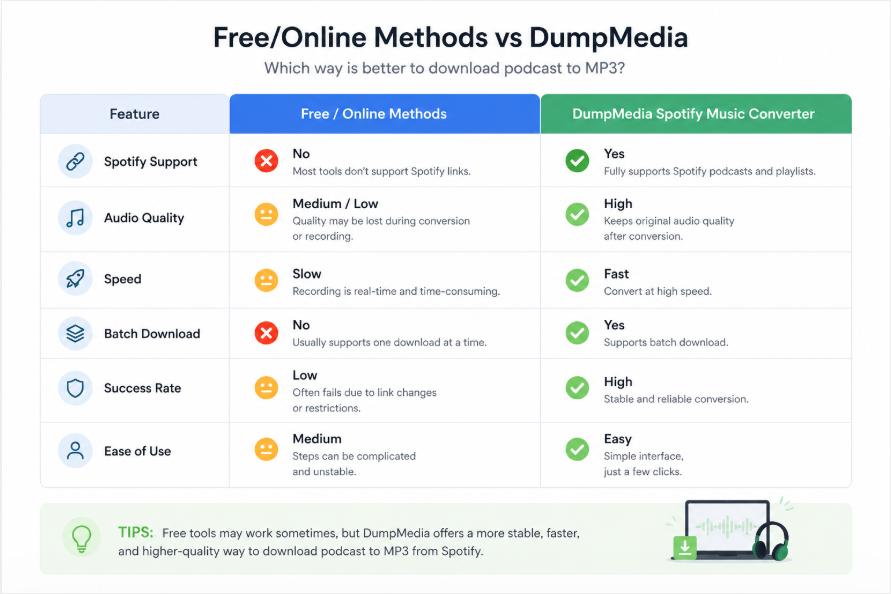
While free tools can sometimes help you download podcast to MP3, they cannot match the reliability and quality of a dedicated solution.
Part 5: FAQs
Can I download podcast to MP3 from Spotify directly?
No. Spotify does not allow direct MP3 downloads due to DRM protection.
Is there a free way to download a podcast to MP3?
Yes, but free methods have limitations and often don’t support Spotify.
What is the best way to download Spotify podcast to MP3?
A dedicated tool like DumpMedia Spotify Music Converter provides the most reliable solution.
Is it safe to use a podcast converter?
Yes, as long as you use trusted software and download content for personal use.
Part 6. Conclusion
Downloading podcasts as MP3 files gives you complete flexibility, but not all methods are equally effective. If you want a fast, stable, and high-quality way to download podcast to MP3, using a professional solution like DumpMedia Spotify Music Converter is the best choice. Start converting your favorite podcasts today and enjoy them without limitations.
*DumpMedia works by decrypting and downloading Spotify songs into DRM-free files, allowing you to obtain a clean, unrestricted copy of your library for any device. Its functionality does not include the conversion of local audio files.