


How to Change Spotify Playback Speed: Podcasts, Audiobooks and Music Explained
Whether you want to speed up spoken content or slow down audio for easier listening, playback speed controls can significantly improve the listening experience. However, there is one important fact many users don't realize: Spotify currently allows playback speed adjustments only for podcasts and audiobooks. If you're trying to change Spotify playback speed for music tracks, Spotify does not provide a built-in option. In this guide, you'll learn what Spotify speed controls can and cannot do, how to adjust playback speed for podcasts and audiobooks, and what alternatives are available if you want more control over your Spotify music.
Contents Guide Part 1. Can You Change Playback Speed on Spotify?Part 2. How to Change Playback Speed for Spotify Podcasts and Audiobooks?Part 3. Bonus: Download Spotify Songs for Flexible PlaybackPart 4. Best Alternatives to Change Spotify Song SpeedPart 5. FAQsPart 6. Final Thoughts
Part 1. Can You Change Playback Speed on Spotify?
The short answer is yes, but only for certain types of content.
Many users searching for Spotify playback speed settings expect all content to support speed adjustment. Unfortunately, Spotify has different rules depending on the type of media.
If you're wondering whether you can change Spotify playback speed for songs, the answer is currently no. Spotify only provides a Spotify speed control feature for spoken-word content such as podcasts and audiobooks.
Part 2. How to Change Playback Speed for Spotify Podcasts and Audiobooks?
It is not currently possible to natively change the playback speed for music tracks within the Spotify app or web player. Spotify reserves the playback speed control feature exclusively for podcasts and audiobooks. If you are listening to a podcast or an audiobook, follow these steps for your specific device:
On Mobile (iOS & Android)
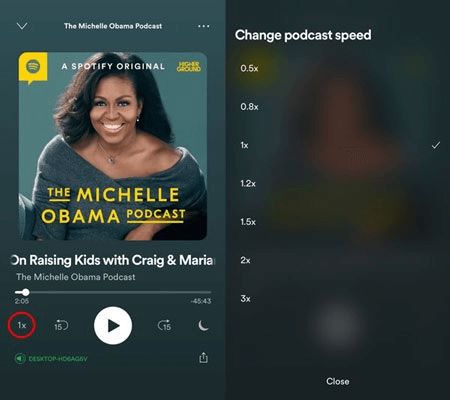
Step 1. Open the Spotify app and start playing the podcast episode or your audiobook.
Step 2. Tap the Now Playing bar at the bottom of the screen to expand the player to full screen.
Step 3. Look for the "1x" button (or the current speed indicator) on the screen.
Step 4. How to change Spotify playback speed for podcasts and audiobooks? Tap or click the button to cycle through the available speed options, typically ranging from 0.5x to 3.5x.
On Desktop / Web Player
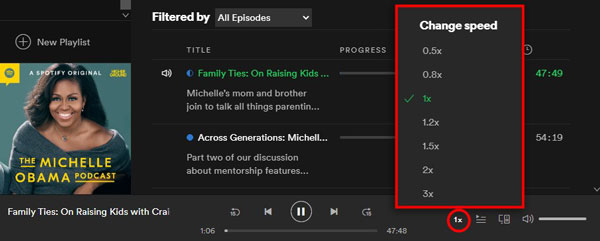
Step 1. Open the Spotify desktop app or the Web Player.
Step 2. Start playing the podcast episode or your favorite audiobook.
Step 3. In the Now Playing bar (at the bottom), look for the "1x" button next to the volume or playback controls. Click the button to select your desired speed.
Part 3. Bonus: Download Spotify Songs for Flexible Playback
Although Spotify provides playback controls for spoken content, there is currently no official method to speed up or slow down Spotify music. If your goal is to change Spotify playback speed for songs, you'll need an alternative approach. The most practical solution is to download your Spotify tracks and play them using a compatible media player that supports speed adjustment.
If you want greater control over your listening experience, DumpMedia Spotify Music Converter can help. DumpMedia allows users to convert Spotify songs into popular audio formats such as MP3, FLAC, WAV, or AAC. In this way, you can play Spotify songs offline on another music player immediately and change the playback speed you want.
🏆Why Use DumpMedia Spotify Music Converter
- 🎵 Integration with Spotify web player
- 🎵 Keep original sound quality
- 🎵 Batch download playlists and albums
- 🎵 Fast conversion speed
- 🎵 Preserve song metadata and ID3 tags
- 🎵 Support offline playback on any device
Convert Spotify Music to MP3 Step by Step
Step 1. Download and install the software on your computer. It works with both Windows and Mac. The interface is user-friendly, making it easy for beginners.
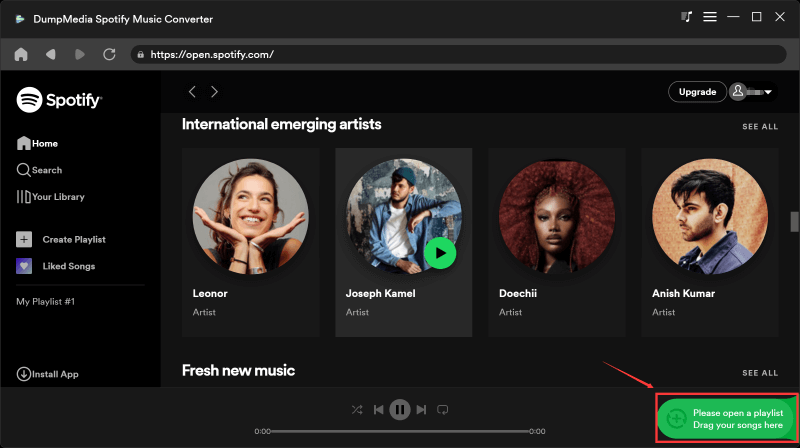
Step 2. Find the playlist, album, or specific song you want to convert. You can drag a single song onto the "+" icon on the right side of the screen. Alternatively, open an entire playlist/album and click the "Add to Convert" icon to load the entire list into the converter.
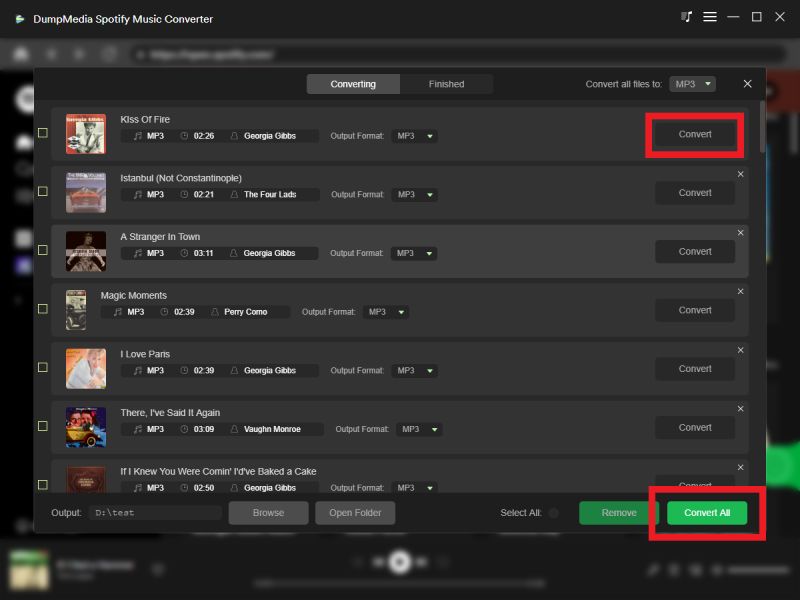
Step 3. After DumpMedia automatically parses songs, the format is set to MP3 by default on the conversion interface. If you want to change, click the "MP3" dropdown menu and choose one. Also, you can change the bitrate or the samplerate. For the best balance, choose 320kbps.

Step 4. As the settings are completed, users can process the conversion by hitting the "Convert" icon. Then DumpMedia will download Spotify songs to MP3 within seconds with its super-fast speed.
Once your songs are stored on your computer, you can use media players that support playback speed adjustment.
Part 4. Best Alternatives to Change Spotify Song Speed
If your goal is to adjust song playback speed, consider these options after downloading your music with DumpMedia Spotify Music Converter.
- VLC Media Player: VLC includes built-in playback speed controls and supports a wide variety of audio formats.
- Audacity: Audacity allows you to permanently modify audio tempo and playback speed.
These tools can be useful if you frequently want to speed up Spotify songs or slow them down for practice, study, or analysis.
Part 5. FAQs
Can I change Spotify playback speed for music?
No. Spotify currently supports playback speed controls only for podcasts and audiobooks.
Why is the Spotify speed button missing?
The speed button only appears when playing supported content such as podcasts or audiobooks.
Does Spotify Premium allow song speed adjustment?
No. Even Spotify Premium subscribers cannot adjust playback speed for music tracks.
Can I speed up Spotify songs on iPhone?
Not within the Spotify app. You'll need to use downloaded files and a compatible media player.
Can downloaded Spotify songs be played at different speeds?
Yes. Once downloaded and stored locally, many media players allow playback speed adjustments.
What's the best way to listen to Spotify songs offline?
Downloading tracks using DumpMedia Spotify Music Converter allows offline playback through compatible media players.
Part 6. Final Thoughts
If you're trying to change Spotify playback speed, it's important to understand Spotify's current limitations. While the platform supports Spotify podcast speed and audiobook playback adjustments, music tracks do not currently include built-in speed controls.
For users who want more flexibility, downloading songs with DumpMedia Spotify Music Converter provides an alternative way to enjoy offline playback and use compatible players that support custom speed settings. This approach gives you greater control over how and where you listen to your favorite Spotify music.