


How to Play Spotify Offline Without Issues
Many Spotify users want to play Spotify offline while traveling, commuting, working out, or saving mobile data. Although Spotify officially supports offline playback for Spotify Premium users, many people quickly realize that Spotify's offline mode still comes with several limitations. In this guide, we will explain how to play Spotify songs offline officially, why Spotify offline mode sometimes fails, and the best way to enjoy flexible offline Spotify playback across multiple devices.
Contents Guide Part 1. Can You Play Spotify Music Offline Officially?Part 2. Best Way to Play Spotify Music Offline Without RestrictionsPart 3. FAQsPart 4. Conclusion
Part 1. Can You Play Spotify Music Offline Officially?
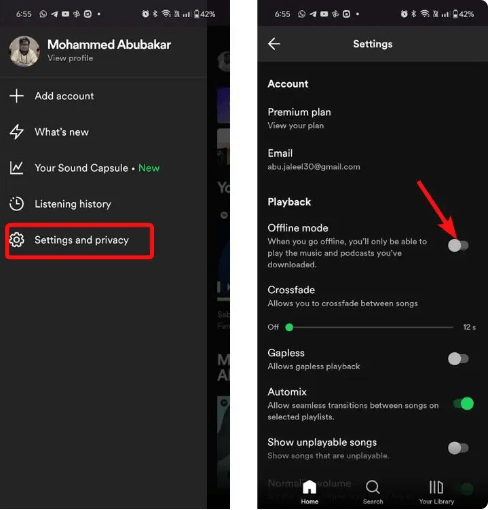
Yes. Spotify Premium subscribers can officially play Spotify offline using Spotify Offline Mode. However, Spotify offline playback is not the same as owning standard MP3 music files.
How Spotify Offline Mode Works
When users play Spotify offline officially:
- Songs remain encrypted
- Music stays inside the Spotify app
- Spotify Premium is required
- Periodic online verification is necessary
This means Spotify offline playback still depends heavily on Spotify authorization systems.
Spotify Offline Mode Limitations
Although Spotify Offline Mode is convenient, there are still several restrictions, such as Spotify app dependency, Premium subscription requirement, and limited device compatibility. These limitations are why many users search for better ways to play Spotify offline.
Part 2. Best Way to Play Spotify Music Offline Without Restrictions
Many users searching "play Spotify offline" actually want more than Spotify’s official offline mode. People want music playback without internet verification. Some users prefer local media players instead of streaming apps. This is why local MP3 playback has become increasingly popular among Spotify users.
One of the most popular solutions for users who want to play Spotify offline more flexibly is DumpMedia Spotify Music Converter. This software allows users to convert Spotify songs into local audio formats for stable offline playback. Even if Spotify is not responding on your device, you can play Spotify songs offline on another music player immediately.
🏆Why Choose DumpMedia Spotify Music Converter
- Download Spotify music to MP3, WAV, FLAC, and AAC
- Keep original sound quality
- Batch download playlists and albums
- Fast conversion speed
- Preserve song metadata and ID3 tags
- Support offline playback on any device
For users who want to play Spotify offline permanently, local audio playback provides much greater flexibility than Spotify Offline Mode alone.
Play Spotify Music Offline Step by Step
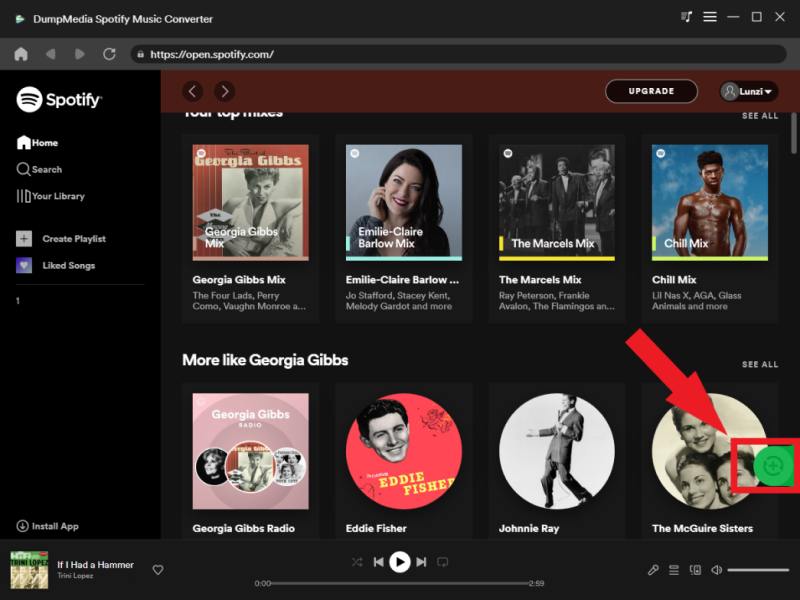
Step 1. Download and install DumpMedia Spotify Music Converter on your Mac/PC. Launch it, and you will see the interface. Use your Spotify Premium/Free account to log in.
Step 2. Find the playlist, album, or specific song you want to convert. You can drag a single song onto the "+" icon on the right side of the screen. Alternatively, open an entire playlist/album and click the "Add to Convert" icon to load the entire list into the converter.
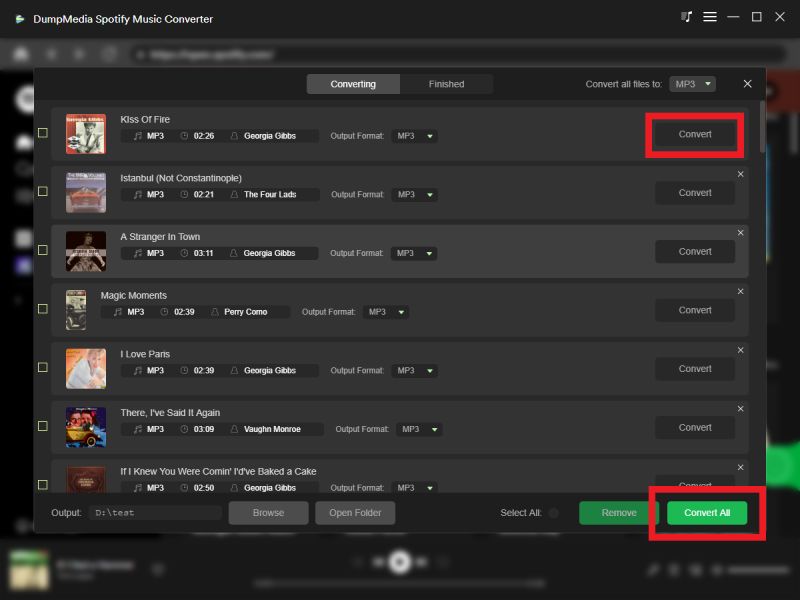
Step 3. Select MP3 (most compatible). Also, you can change the bitrate or the samplerate. For the best balance, choose 320kbps.

Step 4. As the settings are completed, users can process the conversion by hitting the "Convert" icon. Then DumpMedia will download Spotify songs to MP3 within seconds with its super-fast speed.
After conversion, your Spotify music can be played offline across many devices without Spotify app dependency.
Part 3. FAQs
Can you play Spotify offline?
Yes. Spotify Premium users can officially use Spotify Offline Mode.
Do you need Premium to play Spotify songs offline?
Yes. Official Spotify offline playback requires a Premium subscription.
Why are my Spotify offline songs not playing?
Offline songs may fail because of verification errors, cache corruption, or app issues.
Can Spotify downloads expire?
Yes. Spotify offline downloads still depend on account verification and subscription status.
Can I play Spotify offline without the Spotify app?
Many users use DumpMedia Spotify Music Converter to enable more flexible offline playback.
Part 4. Conclusion
Spotify officially allows users to play Spotify offline using Offline Mode, but official downloads still come with DRM restrictions, app dependency, and Premium verification requirements. For users who want more stable and flexible offline listening, local MP3 playback provides a much more reliable experience. With DumpMedia Spotify Music Converter, users can convert Spotify songs into local audio files and enjoy offline playback anytime across multiple devices.