


How Do I Share an Audible Book With Someone in 2026?
Now, sharing audiobooks is more restricted than in the past. Older programs like Audible’s "Send This Book" have been discontinued, and DRM protection prevents files from being played outside the Audible app. How do I share an Audible book with someone ?
Whether your goal is to let a family member enjoy a title, back up your purchases, or listen on multiple personal devices, this guide explains everything you need to know. We cover official sharing methods, what still works today, and how tools like DumpMedia Audible Converter can help you manage your own content legally and flexibly.
Contents Guide Method 1. Share Audible Books By Amazon HouseholdMethod 2. Share Audible Books By Audible SampleBonus: Convert Audible Books for Flexible Personal Use Frequently Asked Questions (FAQ)Conclusion
Method 1. Share Audible Books By Amazon Household
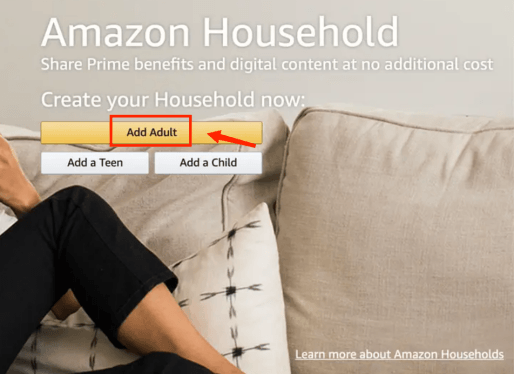
How do I share an Audible book with someone? Amazon Household allows you to share purchased Audible books with family members while staying fully compliant with Audible’s terms of service. This is the only official way to fully share content.
Who Can Use Amazon Household?
- Two adult accounts (each with a valid payment method)
- Up to four teen accounts
- Up to four child accounts
What You Can Share
- Audible purchases
- Kindle books
- Apps and select Amazon content
This ensures your family can listen to your audiobooks without having to buy multiple copies, while keeping DRM protections intact.
How to Set Up Amazon Household for Audible Sharing
- Sign in to your Amazon account.
- Navigate to Amazon Household in your account settings.
- Add a second adult to the household by sending an invitation email.
- How do I share an Audible book with someone? Follow the instructions to merge payment methods and share eligible content.
- Family members can access shared Audible books via the Audible app on their own devices.
Pros
- Fully legal and supported by Amazon
- Family members can access all shared audiobooks in full
- Maintains DRM protection and account security
- No additional fees beyond owning the original purchase
Cons
- Limited to household members; you cannot share books with friends or colleagues outside your Amazon Household
- Requires both adults to link payment methods, which can be inconvenient for some
- Only works for content eligible for household sharing; some promotions or bundles may not be included
Method 2. Share Audible Books By Audible Sample
Audible allows you to share short samples of audiobooks with anyone, including friends or colleagues. While this does not provide full access, it is still a legal and simple way to introduce someone to a book or let them preview it before purchase.
How to Share an Audible Sample
- Open the Audible app on your device.
- Navigate to the audiobook you want to share.
- Tap the Share button.
- Choose a sharing method: Email, SMS, WhatsApp, or social media.
- The recipient receives a link to a sample segment (usually the first 5–10 minutes).
Pros
- Completely legal and safe
- Can be shared with anyone, regardless of location
- No additional setup or account merging required
Cons
- Only includes a short sample, not the full book
- Cannot be used as a replacement for full audiobook sharing
- Limited in practical use if your goal is to fully provide content to family or friends
Sharing samples is ideal for recommending books, giving friends a preview, or letting someone “test” a title before they purchase. It’s also the easiest way to share content instantly without changing account settings.
Bonus: Convert Audible Books for Flexible Personal Use
Many users searching how do I share an Audible book with someone face limitations, such as DRM preventing playback outside Audible. With DRM, they can't listen on personal devices offline, make backup copies, or play books in a car or on non-Audible devices. DumpMedia Audible Converter addresses these issues by converting AA/AAX files into MP3, M4A, FLAC, or WAV, preserving chapters, metadata, album artwork, etc. This allows legal, personal use across devices while respecting copyright.
How to Convert Audible Books for Personal Use
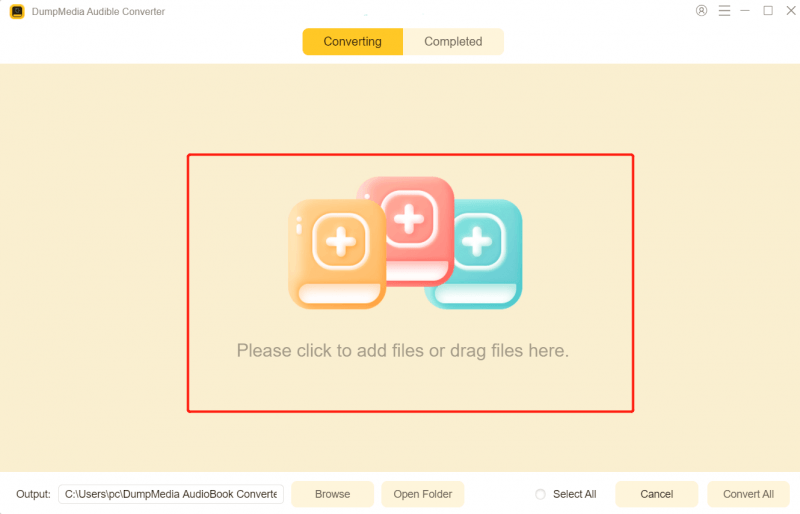
Step 1: Download and install DumpMedia Audible Converter on your device
Step 2: Drag and drop the Audible books you want to convert or you can just add the book you want to convert.
Step 3: Select the format you prefer

Step 4: Hit the Convert button
Frequently Asked Questions (FAQ)
1. How do I share an Audible book with someone?
You can use Amazon Household to share full audiobooks with family members. For personal flexibility across devices, convert Audible files to MP3 using DumpMedia Audible Converter.
2. Is the “Send This Book” feature still available?
No. Audible discontinued this program; it no longer works.
3. Is converting Audible books to MP3 legal?
Yes, for personal use such as offline listening, backups, or household playback.
4. What is the best tool to convert Audible books?
DumpMedia Audible Converter reliably converts AA/AAX files to MP3 or M4A while preserving metadata and chapters.
Conclusion
If you are wondering how do I share an Audible book with someone, official options are limited to family sharing via Amazon Household or sharing samples. For personal flexibility, such as listening on multiple devices, backing up content, or household playback outside the Audible app, DumpMedia Audible Converter provides a practical solution.
By converting your audiobooks to MP3 or other DRM-free formats, you can legally manage your own content, maintain high-quality audio, and make playback convenient for personal and household use.