


How to Delete Spotify Account: A Complete Guide (2026)
Spotify is one of the world's most popular music streaming platforms, but there may come a time when you decide it's no longer the right fit. Perhaps you're switching to another music service, reducing subscription costs, protecting your privacy, or simply no longer using your account.
If you're wondering how to delete Spotify account safely, you're in the right place. This guide explains how to close your Spotify account on both desktop and mobile devices, what happens after deletion, how to cancel Spotify Premium first, and how to back up your favorite music before closing your account.
Contents Guide Part 1. What Happens When You Delete Your Spotify Account?Part 2. Cancel Spotify Premium Before Deleting Your AccountPart 3. How to Close Spotify Account on Desktop/Mobile?Part 4. Can You Recover a Deleted Spotify Account?Part 5. Back Up Your Spotify Music Before Deleting Your AccountPart 6. FAQsPart 7. Final Thoughts
Part 1. What Happens When You Delete Your Spotify Account?
Before following the steps for how to delete Spotify account, you should understand the consequences.
When your Spotify account is permanently closed:
- Your playlists will no longer be accessible.
- Your saved songs, albums, and podcasts will be removed.
- Your followers and following list will disappear.
- Your listening history will no longer be available.
- Your username cannot be reused to create a new Spotify account.
- Your account will eventually be permanently deleted after Spotify's recovery window expires.
If you're a Spotify Premium subscriber, you should also ensure your subscription is canceled before deleting your account to avoid future charges.
For many users, the biggest concern is losing carefully curated playlists. If you have playlists you'd like to keep, it's a good idea to back them up before proceeding. We'll cover that later in this guide.
Part 2. Cancel Spotify Premium Before Deleting Your Account
If you're a Premium subscriber, it's recommended to cancel your subscription before permanently closing your account. This helps prevent future billing and ensures your subscription is properly terminated.
How to Cancel Spotify Premium
- Sign in to your Spotify account on the Spotify website.
- Click your profile icon and go to Account.
- Select Your Plan.
- Click Change Plan.
- Scroll down and choose Cancel Premium.
- Confirm your cancellation.
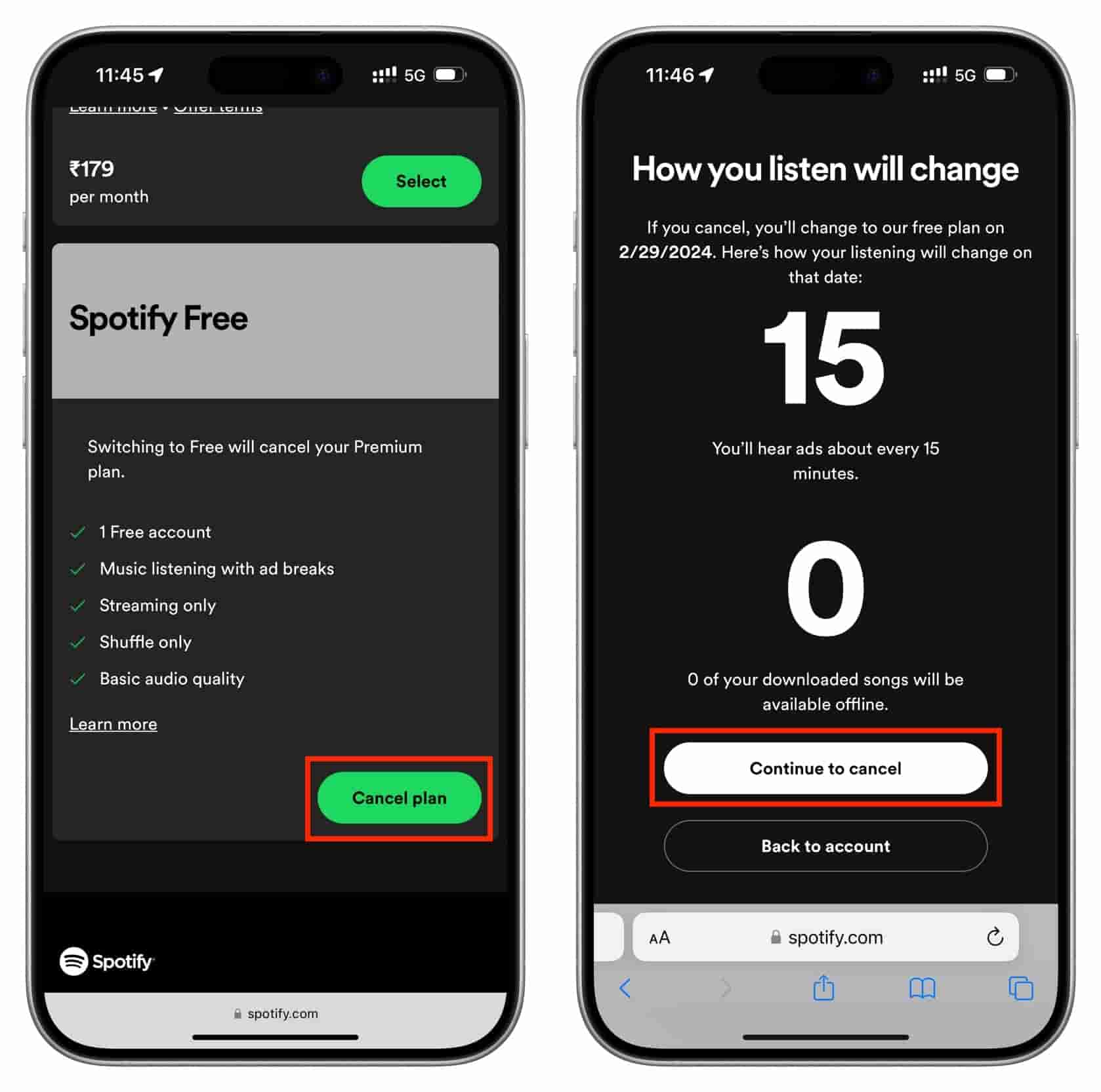
After cancellation, you'll continue enjoying Premium benefits until the end of your current billing cycle. Once the subscription expires, your account will automatically switch to Spotify Free.
Note: If you subscribed through Apple, Google Play, or another third-party provider, you'll need to cancel your subscription through that provider instead of Spotify.
Part 3. How to Close Spotify Account on Desktop/Mobile?
Close Spotify Account on Desktop
If you have a Spotify Free account, you can close it through Spotify's official account management process.
- Open your web browser and sign in to your Spotify account using your email address or your preferred login method.
- Navigate to Spotify's account support page and choose the option related to closing your account.
- Spotify will ask you to confirm that you understand what will happen after your account is deleted. Read the information carefully before continuing.
- Follow the on-screen instructions and confirm that you want to permanently close your Spotify account.
- Spotify usually sends a confirmation email. Open the email and click the verification link to complete the account deletion request. Once confirmed, your account will enter Spotify's deletion process.
Delete Spotify Account on Mobile
Many users search for how to delete Spotify account using an Android phone or iPhone. However, you cannot permanently delete your Spotify account directly from the Spotify mobile app. Instead, you'll need to use a mobile web browser.
- Open Chrome, Safari, or another mobile browser.
- Visit Spotify's official website and sign in to your account.
- Access the account support page.
- Select Close Account.
- Follow the verification steps sent to your email address.
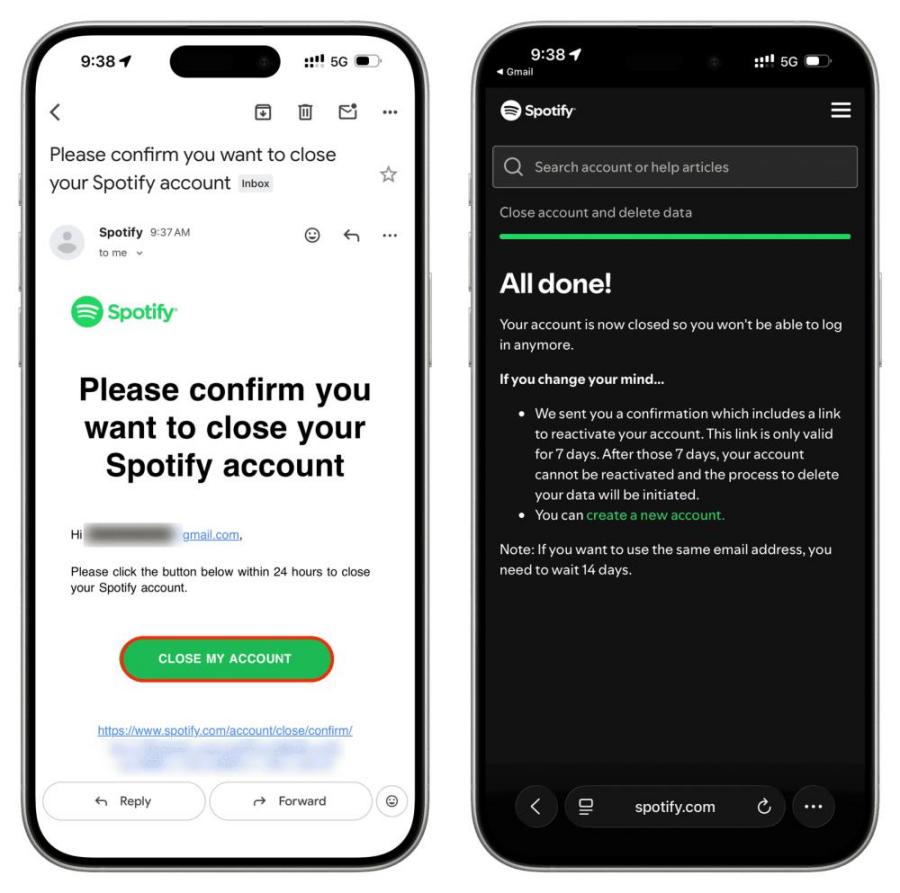
The process is almost identical to deleting your account on a desktop computer.
Part 4. Can You Recover a Deleted Spotify Account?
If you accidentally delete your account, don't panic. In many cases, Spotify provides a limited recovery period. If your account is still within the recovery window, Spotify will send you a recovery email after you request account deletion. Simply follow the instructions in the email to reactivate your account.
However, once the recovery period expires and your account is permanently deleted, you won't be able to restore:
- Playlists
- Saved songs
- Podcasts
- Followers
- Listening history
- Profile information
For this reason, it's worth considering whether there's anything you want to keep before deleting your account.
Part 5. Back Up Your Spotify Music Before Deleting Your Account
One of the biggest concerns when learning how to delete Spotify account is losing access to your favorite music. Although playlists can sometimes be recreated manually, rebuilding a carefully curated music library can take hours, or even years. If there are songs or playlists you want to keep for personal offline listening, backing them up before deleting your account is a smart decision.
DumpMedia Spotify Music Converter is designed to help users save Spotify songs, albums, and playlists in widely supported audio formats for personal offline use. With DumpMedia, you can convert Spotify songs, albums, and playlists into widely supported formats such as MP3, WAV, FLAC, AAC, and M4A. After conversion, you can easily import the files into any device and enjoy uninterrupted playback. Even if the Spotify app is not working on your device, you can play Spotify songs offline on MP3 players, phones, car stereos, or other devices immediately.
🏆More Features of DumpMedia Spotify Music Converter
- Built-in Spotify player - to directly log into your Spotify library and choose all songs you like.
- Original sound quality retained - keep a better quality status to save Spotify's original music effects.
- Keep ID3 Tags and metadata information - extract music files with original ID3 tags as well as metadata information.
- Batch playlist downloading speed - ensure ultra-fast playlist downloading speed, which can accelerate faster and facilitate higher music download efficiency.
- Customize output settings - to choose your favorite bitrate and sample rate based on your needs.
If you're planning to close your Spotify account, using DumpMedia beforehand lets you keep your favorite music available for personal listening without relying on your Spotify library.
Back Up Spotify Music with DumpMedia
Step 1. Download and install DumpMedia Spotify Music Converter on your Mac/PC. Launch it, and you will see the interface. Use your Spotify Premium/Free account to log in.
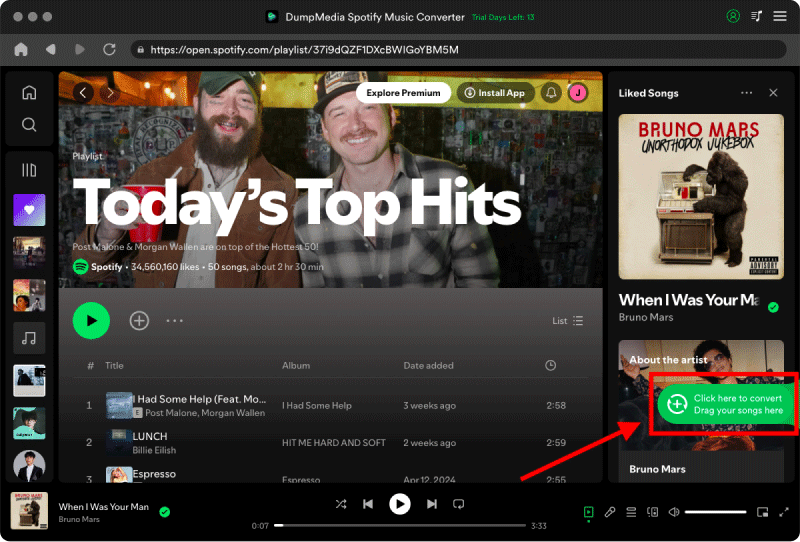
Step 2. Search for Spotify songs, playlists, or albums. Simply click "Add to Convert" to add them to the conversion list.
Step 3. Select your preferred format, such as MP3 or FLAC. MP3 is recommended for maximum compatibility across different devices. Also, you can change the bitrate or the samplerate. For the best balance, choose 320kbps.
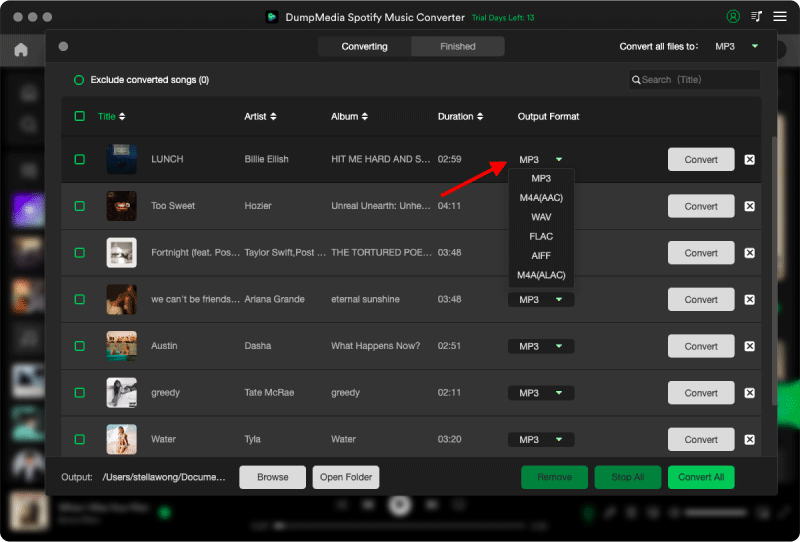
Step 4. Click Convert. The software will automatically process the entire playlist while preserving the original audio quality and ID3 tags.
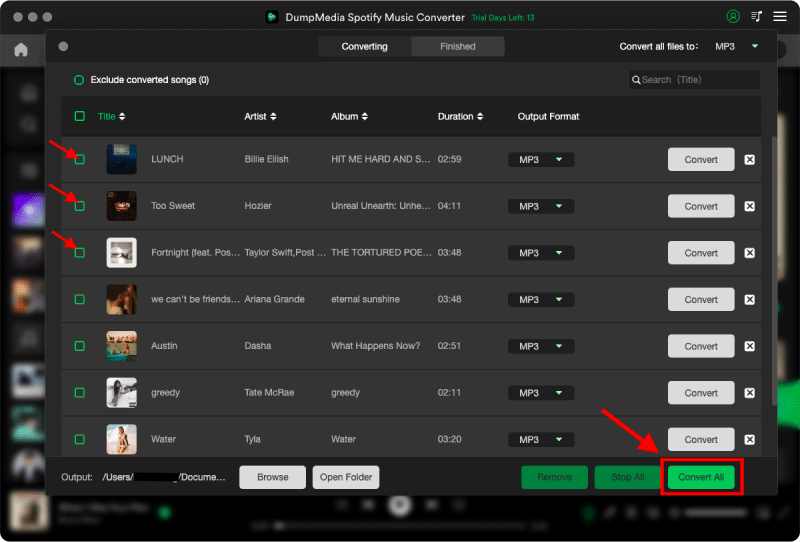
Step 5. You can now back up the converted files to your desired location.
Part 6. FAQs
How do I permanently delete my Spotify account?
You can permanently delete your Spotify account through Spotify's official account management process on its website. The Spotify mobile app does not support permanent account deletion.
Can I delete my Spotify account without canceling Premium?
If you have an active Premium subscription, Spotify may require you to cancel it before completing the account deletion process. If your subscription is managed by a third-party provider, you'll also need to cancel it through that provider.
Can I recover my Spotify account after deleting it?
Spotify usually provides a limited recovery period. During that time, you may be able to restore your account using the recovery email sent by Spotify. After the recovery period ends, the deletion becomes permanent.
Can I keep my downloaded Spotify songs after deleting my account?
No. Spotify's official offline downloads are tied to your account and subscription. If you delete your account, those downloads will no longer be accessible through Spotify.
How can I keep my favorite Spotify music before deleting my account?
If you'd like to preserve your favorite songs or playlists for personal offline listening, you can back them up before deleting your account. Tools such as DumpMedia Spotify Music Converter allow you to convert Spotify music into common audio formats that can be stored locally and played on compatible devices.
Part 7. Final Thoughts
Understanding how to delete Spotify account is more than simply following a few steps. If you're a Premium subscriber, remember to cancel your subscription first to avoid unnecessary charges. If your favorite playlists are important to you, consider backing them up before completing the deletion process. DumpMedia Spotify Music Converter provides a convenient way to save Spotify songs, albums, and playlists in widely supported formats for personal offline listening, helping you preserve your music collection even after leaving the Spotify platform.