


Pandora Downloader on iPhone: Pandora Music Download Guide
Finding a reliable Pandora downloader on iPhone can be challenging. While Pandora offers offline listening for Premium subscribers, many users want more flexibility, such as downloading Pandora music as MP3 files, keeping songs permanently, or transferring tracks between devices. In this guide, we'll explain how Pandora downloads work on iPhone, why most downloader apps fail, and how to save Pandora music and enjoy it on your iPhone anytime.
Contents Guide Part 1. Can You Download Pandora Music on iPhone?Part 2. Why Most Pandora Downloader Apps for iPhone Don't Work?Part 3. Best Way to Download Pandora Music for iPhonePart 4. FAQsPart 5. Conclusion
Part 1. Can You Download Pandora Music on iPhone?
Yes, but with limitations. Pandora Premium subscribers can download playlists, albums, and stations for offline listening through the Pandora app. However, these downloads remain protected and can only be played inside Pandora. Offline content remains tied to your Pandora account. In this case, songs cannot be exported as MP3 files and cannot be transferred to other apps or devices. Also, downloads disappear if the subscription expires.
As a result, many users begin looking for a Pandora downloader on iPhone that offers more flexibility.
Part 2. Why Most Pandora Downloader Apps for iPhone Don't Work?
Many websites claim to offer a Pandora downloader on iPhone, but most solutions have significant limitations.
App Store Restrictions: Apple's App Store policies prevent apps from directly downloading and exporting copyrighted streaming content.
DRM Protection: Pandora music is protected by digital rights management (DRM), making direct downloads difficult.
No MP3 Export: Even when songs are available offline, Pandora does not allow users to save them as standard audio files.
These restrictions explain why a true Pandora downloader on iPhone is difficult to find.
Part 3. Best Way to Download Pandora Music for iPhone
If you're looking for a Pandora downloader on iPhone that allows permanent music storage, the best approach is to use DumpMedia Pandora Music Converter. Although DumpMedia is a desktop application for Windows and Mac, it solves the limitations that iPhone users face. With DumpMedia Pandora Music Converter, you can convert Pandora songs into commonly supported formats and transfer downloaded songs to your iPhone. You can listen to Pandora offline on your iPhone anytime.
🏆Features of DumpMedia Pandora Music Converter
- Save you valuable time with efficient 35X faster batch conversion for Pandora playlists.
- Convert and download Pandora music to MP3, M4A, FLAC, WAV, AIFF, and ALAC.
- Ensure optimal quality with customizable bitrate and sample rate, up to 320kbps and 48kHz.
- Preserve song lyrics files and ID3 tags for easier library management.
- Support preset output file title and archive rules.
This makes it one of the most practical solutions for users searching for a Pandora downloader on iPhone.
Download Pandora Music and Transfer It to iPhone
Step 1. Download and install the software on your computer. It works with both Windows and Mac. The interface is user-friendly, making it easy for beginners.
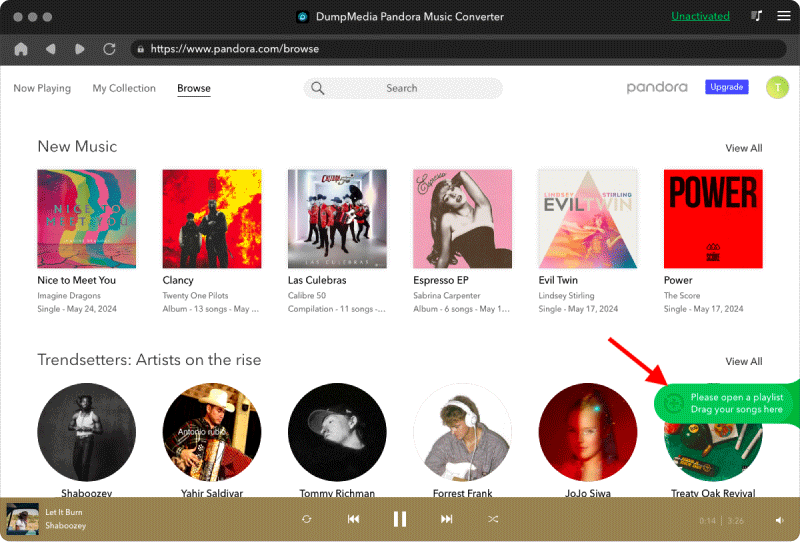
Step 2. Open the built‑in Pandora web player inside DumpMedia and log in with your Pandora account. Browse Pandora and drag the songs, albums, or playlists you want to download into the converter.
Step 3. Choose MP3 as the output format and start downloading.
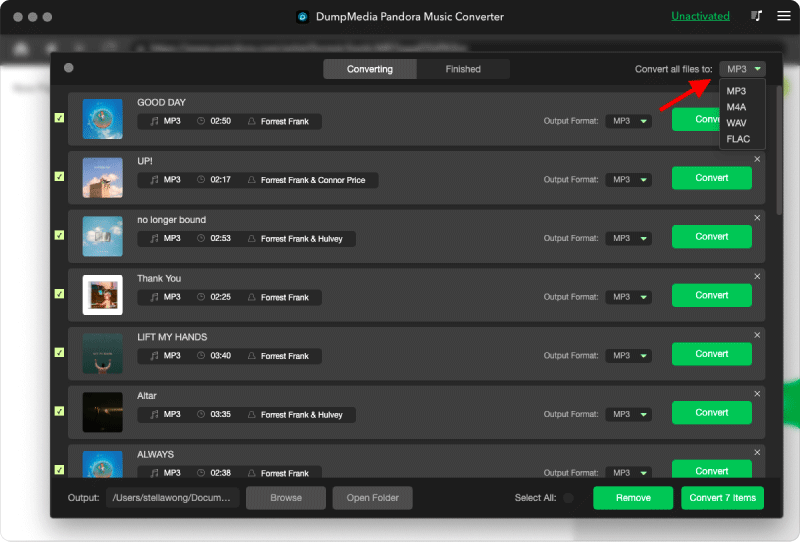
Step 4. Click Convert and download songs directly as MP3 files.
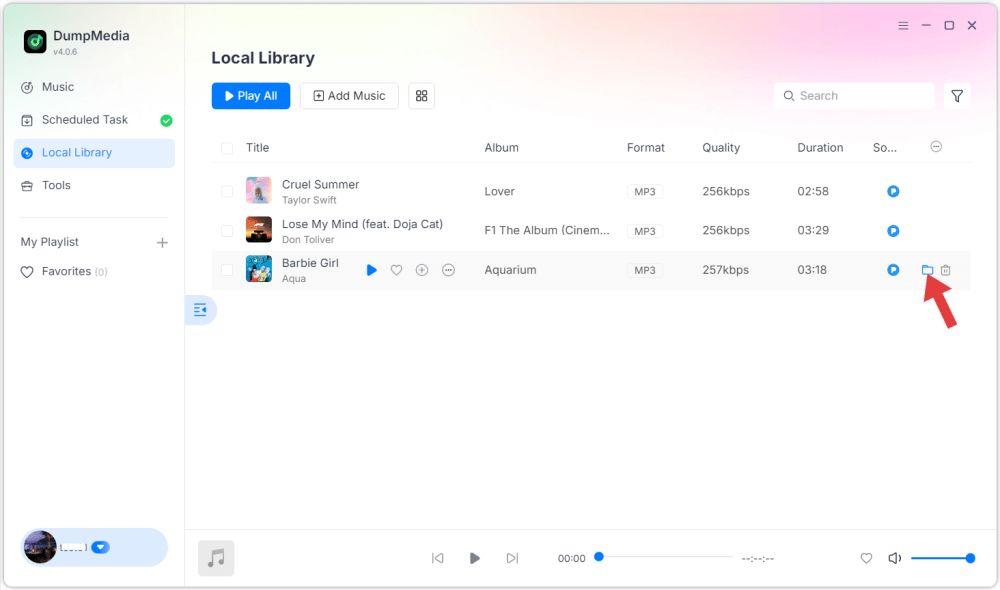
Step 5. Use iTunes, Finder, or another file transfer method to move the downloaded songs to your iPhone. Once transferred, you can listen offline without opening Pandora.
For many users, this is the most effective Pandora downloader on iPhone workflow available today.
Part 4. FAQs
Is there a Pandora downloader app for iPhone?
No official iPhone app can export Pandora songs as MP3 files due to App Store restrictions and DRM protection.
Can I download Pandora music to MP3 on iPhone?
Not directly on iPhone. Most users download and convert Pandora music on a computer before transferring the files to their iPhone.
Can I listen to Pandora offline without Premium?
Officially, offline listening requires Pandora Plus or Pandora Premium. Alternative download methods may provide additional flexibility.
What is the best Pandora downloader on iPhone?
Because of iOS limitations, the most reliable solution is typically a desktop-based tool such as DumpMedia Pandora Music Converter combined with file transfer to iPhone.
Part 5. Conclusion
While many users search for a Pandora downloader on iPhone, Apple's restrictions and Pandora's DRM protection make direct iPhone downloads difficult. For users who want permanent access to their music, DumpMedia Pandora Music Converter provides a practical solution. By downloading Pandora music on a Windows or Mac computer and transferring the files to your iPhone, you can enjoy your favorite songs offline anytime without the limitations of streaming downloads.