


How to Convert Pandora Songs to MP3 in 2026: Step-by-Step Guide
Pandora is one of the most popular music streaming platforms, but its songs are often protected by subscription restrictions, preventing offline access and flexible playback. Many users ask: how to convert Pandora songs to MP3 so they can listen anywhere without worrying about subscription expiration. In this guide, we’ll explain why you might want to convert Pandora music to MP3, the best tools for the job, and a step-by-step process to get your music offline permanently.
Contents Guide Part 1. Can You Directly Download Pandora Songs to MP3?Part 2. Best Tool to Convert Pandora Music to MP3Part 3. How to Convert Pandora Music to MP3 Step by Step?Part 4. FAQPart 5. Conclusion
Part 1. Can You Directly Download Pandora Songs to MP3?
Pandora allows offline listening for Premium users, but downloaded songs are tied to your account and subscription. Pandora (like Spotify and Apple Music) uses DRM (Digital Rights Management) to ensure you only listen as long as you have an active subscription. Offline tracks cannot be transferred to other devices or backed up permanently. To get Pandora songs into a physical MP3 format, you have to use unofficial methods.
Part 2. Best Tool to Convert Pandora Music to MP3
How to convert Pandora music to MP3? The most reliable solution is DumpMedia Pandora Music Converter. This tool helps users convert Pandora songs to MP3, FLAC, M4A, and WAV in one click. So you can save playlists locally and keep music after subscription changes. Instead of depending entirely on streaming access, users can build long-term music collections from their Pandora playlists. Even if the Pandora app is not working on your device, you can play Pandora songs offline on another music player immediately.
🏅Why Choose DumpMedia Pandora Music Converter:
- ⭐Integration with Pandora web player
- ⭐Work for both Pandora Premium and Free users
- ⭐Provide batch conversion at up to 35x speed
- ⭐Retain ID3 tags like artist, cover, art, etc.
- ⭐Preserve the original audio quality
- ⭐100% clean. No risk in using
This tool makes it easy to convert Pandora songs to MP3 without complicated setups or technical knowledge.
Part 3. How to Convert Pandora Music to MP3 Step by Step?
Follow these simple steps to convert Pandora songs to MP3 with DumpMedia Pandora Music Converter:
Step 1. Download and install DumpMedia Pandora Music Converter on your Mac/PC. Launch it, and you will see the interface. Use your Pandora Premium/Free account to log in.
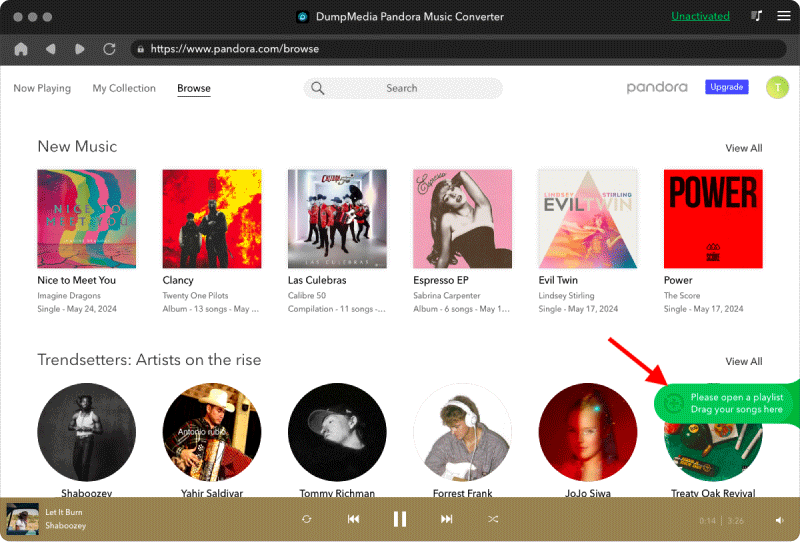
Step 2. Then, directly drag the songs or the playlists to the floating "+" icon for adding to the conversion queue to prepare for the download.
Step 3. Once you are satisfied with the songs that you have selected, you can choose which audio file format you prefer.
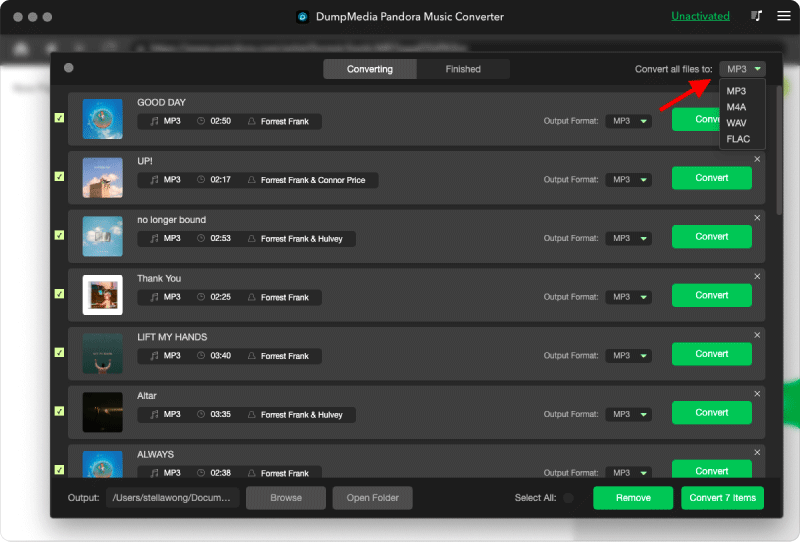
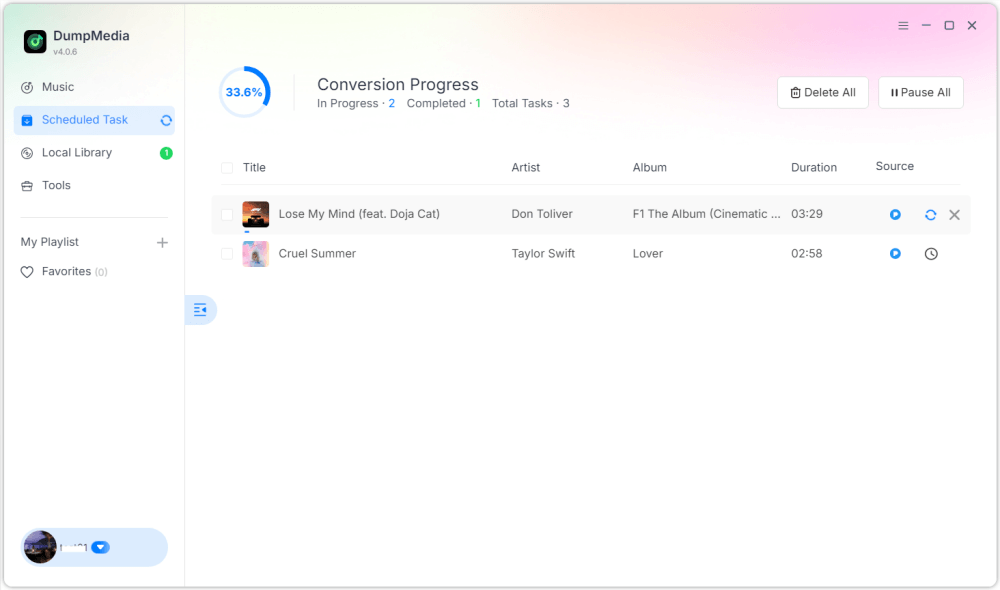
Step 4. As the settings are completed, users can process the conversion by hitting the "Convert" icon. Then DumpMedia will perform to convert Pandora songs to MP3 within seconds with its super-fast speed.
Part 4. FAQ
Q1: Can I convert Pandora songs to MP3 for free?
Yes, some tools offer free trials, but premium converters like DumpMedia provide faster speeds and batch conversion.
DumpMedia frequently launches promotional campaigns; you can contact DumpMedia customer support to inquire about additional discounts and offers.
Q2: Is it legal to convert Pandora songs to MP3?
Converting for personal offline use is generally considered acceptable, but distribution or commercial use may violate copyright laws.
Q3: Can I convert entire Pandora playlists to MP3 at once?
Yes. DumpMedia Pandora Music Converter supports batch conversion for playlists and albums.
Q4: Will the MP3 retain song information?
Yes, the converter preserves metadata including title, artist, album, and artwork.
Part 5. Conclusion
Converting Pandora songs to MP3 is the best way to enjoy your favorite music offline, maintain permanent backups, and have full control over playback across devices. How to convert Pandora songs to MP3? Using DumpMedia Pandora Music Converter, you can quickly and easily convert songs, albums, and playlists into MP3 without losing quality or metadata. Start converting today to keep your Pandora music collection forever.