


How to Share Audible Audiobooks with Friends/Famlily in 2026
Audible audiobooks are very entertaining. What’s more, is that they are very easy to use since you don’t have to carry heavy paperback books just to listen to or read a story. Now, with Audible audiobooks, everything would be much more entertaining. But of course, you can’t just let yourself enjoy these audiobooks alone, right?
So, if you want to share Audible books with your family, you can always do so by following several methods. And among these methods is the greatest method of them all. Learn how to share Audible books with family by reading this article.
Contents Guide Part 1. Two Official Ways to Share Audible Audiobooks with FamilyPart 2. Alternative Way to Share Audible Audiobooks with Anyone without LimitPart 3. Summary
Part 1. Two Official Ways to Share Audible Audiobooks with Family
Before we go to the best method, let us first introduce to you how to share Audible books with family using the Audible app which is the official way. Sharing your favorite Audible audiobooks with your family and friends is very easy using the Audible app.
Although these methods will require you to be a subscriber to the Audible app itself. So, if you are not subscribed to a plan in Audible, then you are not allowed to follow these two methods.
Method #1: Share Audible Books with Friends through the 'Send this Book' Feature
This is by far the easiest way to share an Audible book with your family and friends using the Audible app. Just simply follow these steps:
- Run the Audible app and log in to your Audible account (again, you will have to be a subscribed user in Audible to proceed with this method)
- Go to your Library and see all the available audiobooks you have purchased
- Click the More icon or the three-dot menu next to a book you have chosen
- Simply click the button with the label Send This Book
- Choose the method you want to use to share your book and click Send to confirm
Method#2: Share Audible Books with Family via Amazon Household Sharing
Amazon is also a great app that you can use to send Audible books to your family and friends. However, this method may take up lots of your time and effort. But if you insist, here is the step-by-step guide on how to do it:
- Build an Amazon Household Sharing Account
- Click Manage your Content and Devices and tap on Preferences
- Click Households and Family Library and tap on Learn More about Households
- Add Adult, click Continue, and select Sign up together on this device
- Enter the email and the password you want to use and click Verify Account
- Check the terms and conditions and simply tap on Create Household
- Now to send your audiobooks you need to tap on Manage Your Content And Devices
- Select the Content button and choose Show Family Library
- Choose the audiobook you want to share and click Add to Library
Once it has finished, users of the same Household account will now be able to see the audiobooks you have shared with them.
Part 2. Alternative Way to Share Audible Audiobooks with Anyone Without Limit
Now if you want to use an alternative way that is way faster and easier, you can always use this special method we love to use. And that is no other than using the DumpMedia Audible Converter. If you do not know anything about the DumpMedia Audible Converter, then we are willing to teach you a thing or two about this converter.
For one, with the DumpMedia Audible Converter, you can get to share Audible books with family even without paying for an Audible account or purchasing a book from the Audible app. With this converting tool, you can remove the DRM restrictions from your Audible book and convert it to a certain format of your choice.
You can even choose a format that is mostly used by your device or MP3 player so you can continue listening to it whenever or wherever you are. The DumpMedia Audible Converter can also promise you a service and performance like no one else with how high the quality of their converted audio is. DumpMedia Auble Converter is also an authorized and safe converter so you don’t have to worry about your device's safety and your computer’s information.
To learn how to use the DumpMedia Audible Converter all you need to do is follow this:
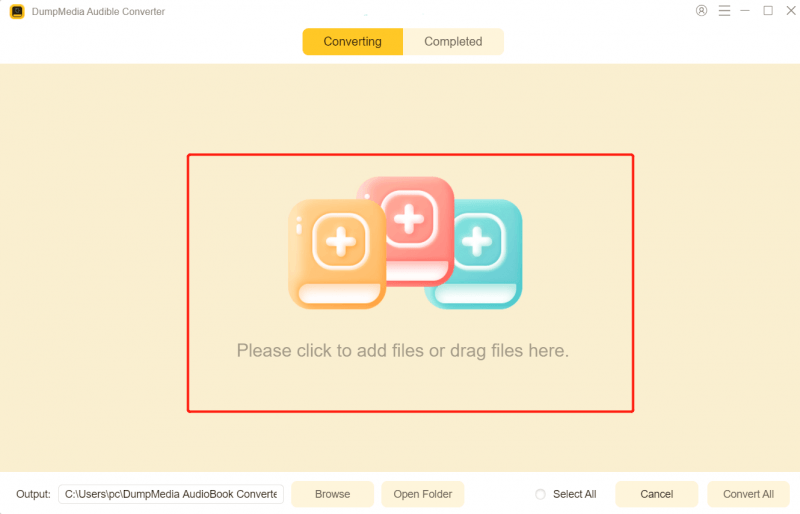
- Run the DumpMedia Audible Converter
- Log in to your account and select the audible books you want to convert
- Choose the format you like to use and select the destination folder
- Click Convert and wait for it to finish

And just like that, you now have Audible books stored on your computer forever. If you want to share them with your family and friends, you can just use a USB cable to transfer these Audible books to your devices so you can continue listening to Audible books without even paying for any book at all. The DumpMedia Audible Converter is a truly magnificent converter that you surely would not want to miss. So, if I were you, I would download and install it on my device now!
Part 3. Summary
Just like that, you can now continue and learn how to share Audible books with family using the different methods we have prepared for you above. Of course, using these methods is all possible but if you want to save lots of your time and effort, you can always download and install the DumpMedia Audible Converter.
This converting tool can help remove the DRM restrictions from any Audible book and even help you convert it into a format of your choice. So, to make sure that everything is nicely converted and can be shared with your family, try out the DumpMedia Audible Converter now. We guarantee you that this converter is safe to use.