


How to Download Purchased Music from iTunes (Convert and Enjoy Anywhere)
Have you ever purchased music from iTunes and wanted to play it on any device or offline without limitations? Many users face the challenge of how to download purchased music from iTunes because iTunes songs are often protected by DRM and are in formats not compatible with non-Apple devices. Fortunately, with the right tools, you can convert and enjoy your purchased iTunes music anywhere. In this guide, we will provide a step-by-step process using DumpMedia to enjoy your music freely.
Contents Guide Part 1. Why You Can’t Directly Download Purchased iTunes Music to MP3Part 2. Download Purchased Music from iTunes [Mac/Windows/iOS]Part 3. How to Convert Purchased iTunes Music to MP3Part 4. FAQs About Downloading Purchased Music from iTunesPart 5. Summary
Part 1. Why You Can’t Directly Download Purchased iTunes Music to MP3
iTunes purchases are protected by Apple’s DRM technology. Even if you can download them via the iTunes app, these files are encrypted and limited to Apple devices. Here’s why direct downloads are not sufficient:
- DRM Protection: Purchased songs can only be played in iTunes or Apple Music apps.
- File Format Limitations: iTunes files may be in AAC or M4P formats that are incompatible with most MP3 players, car stereos, or Android devices.
- Device Restrictions: Direct downloads cannot be freely transferred to other devices without conversion.
Because of these limitations, many users search for solutions on how to download purchased music from iTunes and play them on non-Apple platforms.
What You Need to Download and Convert iTunes Purchased Music
To fully enjoy your iTunes library on any device, you need Any Music Converter. While DumpMedia Apple Music Converter cannot directly link your iTunes account, Any Music Converter can convert your purchased iTunes songs to USB-friendly or universally compatible formats like MP3, AAC, or FLAC.
Key Features of DumpMedia Any Music Converter
- Convert Music to Popular Audio Formats
- Remove DRM from Apple Music, Spotify, and more
- High Compatibility with Any Devices
- Batch Conversion for Music Library
- Preserve Original Audio Quality
Part 2. Download Purchased Music from iTunes [Mac/Windows/iOS]
Below we will introduce in detail how to download purchased music from iTunes on computer or mobile phone.
On Mac
- On your Mac computers, open the iTunes app
- Then, select the iTunes Store from the sidebar
- If you see that the iTunes Store is not available go to your Music Preference, click General, and make sure that the iTunes Store is enabled, then click OK
- On your iTunes Store, tap the Quick Links button and select Purchased
- Then tap the Music category
- You will then see all your purchased music and they will all be categorized by song, artist, or album
- Click the Download button beside a song or album and wait for it to finish
- After that, you will now be able to use your purchased music on your iTunes app
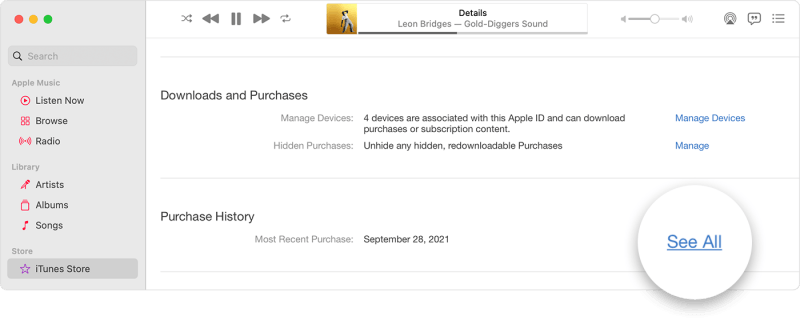
On Windows
- Open your iTunes Music app on your computer
- On the top left corner of the window select Music
- Then choose Store
- On the top right corner tap the word Quick Links and then choose Purchased
- Then select the Music category
- Again, it will show you all of your purchased music on iTunes and are listed by song, artist, or album
- Select the songs or albums you want to download and tap the Download button beside it
On iOS
- On your iOS device, open your Apple Music app
- At the bottom part, click the Library category
- Select any from the Songs, Artists, or Albums category
- There, you will see all the available music you can download
- Next to a song, tap the red cloud icon to download it
Part 3. How to Convert Purchased iTunes Music to MP3
Have you now learned how to download purchased music from iTunes? Next, let's convert these files into a format suitable for playback on any device!
Step 1. First, download and install DumpMedia Any Music Converter on your computer. This software provides a user-friendly interface for converting songs and playlists efficiently.
Step 2. Launch the converter and log in to your DumpMedia paid account. Choose "Tools > Format Converter".
Step 3. Select the downloaded iTunes. Select your desired output format (MP3 is recommended for maximum compatibility). Click "Convert" to process the songs.
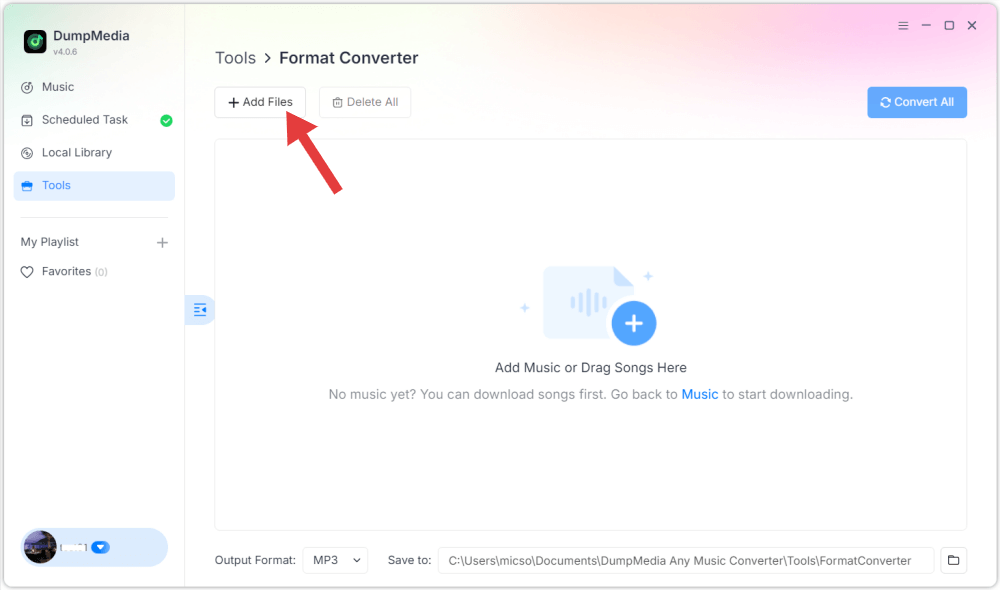
By following these steps, you finally convert purchased iTunes music to MP3 and enjoy your collection freely.
Part 4. FAQs About Downloading Purchased Music from iTunes
Q: Can I download purchased music from iTunes directly to play on non-Apple devices?
A: No. Due to DRM and format restrictions, iTunes purchased songs must be converted first. Using Any Music Converter will allow you to convert them to universally compatible formats.
Q: How do I convert iTunes songs to MP3?
A: Import your iTunes tracks into DumpMedia Any Music Converter, choose MP3 as the output format, and convert. After conversion, the songs can be played on any device.
Q: Is it legal to convert purchased iTunes music for personal use?
A: Yes, in most regions, converting purchased music for personal offline use is allowed. Ensure you comply with local copyright regulations.
Q: How can I play my iTunes music on a car stereo?
A: Convert your iTunes music to MP3 or AAC using Any Music Converter and copy the files to a USB drive. Insert the USB into your car stereo to play music.
Q: Which format is recommended for universal compatibility?
A: MP3 is the most compatible format for all devices, including car stereos, smartphones, and MP3 players.
Part 5. Summary
Purchasing music from iTunes is convenient, but playing it on non-Apple devices or offline requires conversion due to DRM and file format restrictions. By using DumpMedia Any Music Converter to convert purchased iTunes songs, you can enjoy your music anywhere without limitations.
If you want to solve the question of how to download purchased music from iTunes efficiently, DumpMedia provides the safest and easiest solution. Download and convert your iTunes purchases today to enjoy your music freely on any device.