


How to Download Music to MP3 Player from YouTube in 2026
YouTube Music is a music streaming service that allows users to listen to millions of songs and music videos. It is available on YouTube and as a standalone app on mobile devices. However, there is no MP3 player compatible with YouTube Music. The only devices that can use YouTube Music are mobile devices, such as Android or iPhone phones and tablets.
If you want to listen to YouTube Music on your MP3 players, you need to download it and then transfer it to your MP3 devices with a USB cable. In this article, we are gonna provide you with a guide on how to download YouTube Music for MP3 players.
Contents Guide Part 1. What File Formats Does MP3 Players Support?Part 2. How to Download YouTube Music for MP3 PlayersPart 3. Transfer Downloaded Music to MP3 PlayerPart 4. FAQs about Downloading YouTube MusicPart 5. Summary
Part 1. What File Formats Does MP3 Players Support?
MP3 players, despite their name, can support various file formats such as MP3, WMA, WAV, and FLAC. Do you know what their names stand for? Let’s have a look one by one.
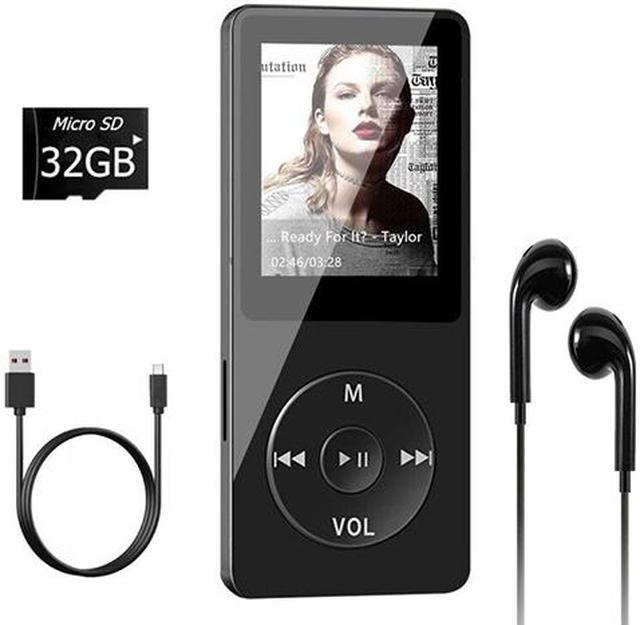
MP3 is a digital multimedia container and an audio encoding and storage format. WMA is a Microsoft-developed audio format native to Windows Media Player. WAV is a lossless, uncompressed CD-quality music format, while FLAC is a compressed but lossless audio format developed by the Xiph.Org Foundation.
However, it's important to note that different MP3 players may have different specifications and supported formats. It's also worth mentioning that MP3 players don't support DRM-protected YouTube music.
Due to DRM protection, people have to deal with copyright issues and crack audio files saved in encrypted AAC and OPUS formats to download YouTube music. Additionally, a YouTube Music or YouTube premium account is also required to finish the download process.
Because of such restrictions, you are not able to download YouTube Music to MP3 players directly. Luckily, some third-party tools could help.
Part 2. How to Download YouTube Music for MP3 Players
As discussed in the first part, since YouTube Music songs are DRM-protected, you cannot directly download YouTube Music to your MP3 player for use. So, if you want to listen to YouTube Music offline on any device, you have to remove the DRM first. Fortunately, there are professional YouTube Music converters that can help you download DRM-free songs from YouTube Music. Among these tools, our most recommended one is the DumpMedia YouTube Music Converter.
DumpMedia YouTube Music Converter helps users download YouTube Music to MP3. In this way, you can save songs permanently, keep playlists offline forever and transfer music to any device. Even if the YouTube Music app is not working on your device, you can play YouTube Music songs offline on another music player immediately.
🏅Why Choose DumpMedia YouTube Music Converter:
- ⭐Integration with the YouTube Music web player
- ⭐Work for both YouTube Music Premium and Free users
- ⭐Provide batch conversion at up to 35x speed
- ⭐Retain ID3 tags like artist, cover, art, etc.
- ⭐Preserve the original audio quality
- ⭐100% clean. No risk in using
Convert YouTube Music to MP3 Step by Step
Step 1. Download and install DumpMedia Pandora Music Converter on your Mac/PC. Launch it, and you will see the interface. Use your Pandora Premium/Free account to log in.
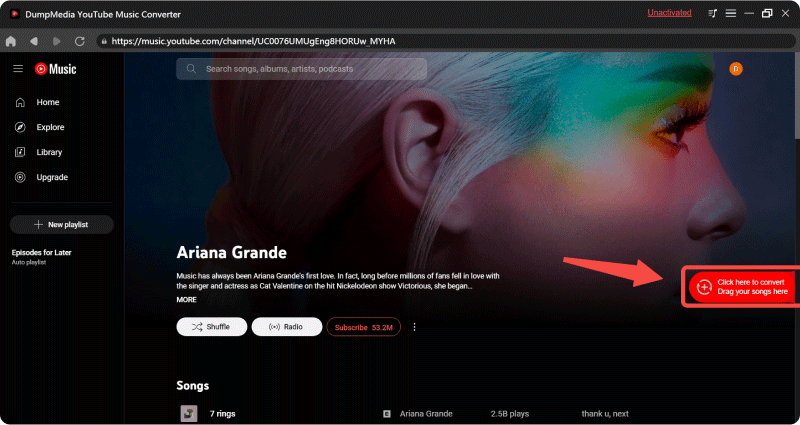
Step 2. Then, directly drag the songs or the playlists to the floating "+" icon for adding to the conversion queue to prepare for the download.
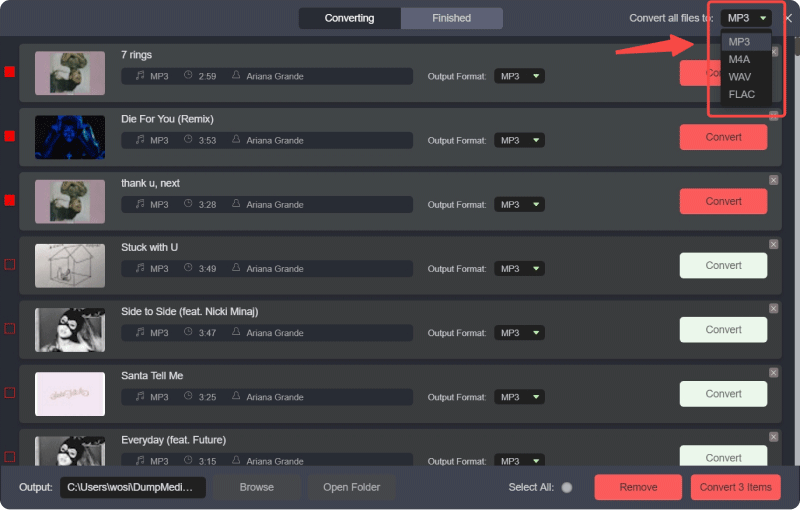
Step 3. Once you are satisfied with the songs that you have selected, you can choose which audio file format you prefer.
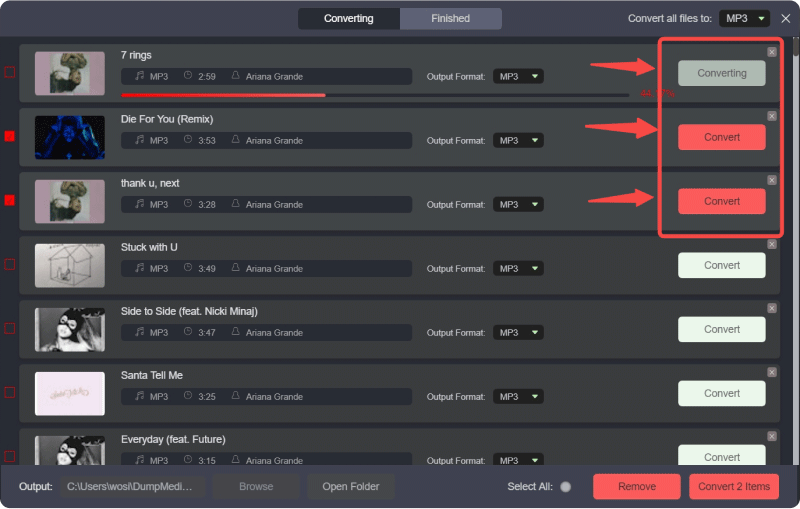
Step 4. As the settings are completed, users can process the conversion by hitting the "Convert" icon. Then DumpMedia will convert YouTube songs to MP3 within seconds with its super-fast speed.
Part 3. Transfer Downloaded Music to MP3 Player
Once you download YouTube Music to your computer, you can create playlists and adjust the order of songs in the album to your liking. In this part, we will teach you how to transfer YouTube music to an MP3 player after removing DRM using DumpMedia YouTube Music Converter.
Tools required:
- DRM-free songs
- USB cable
To connect your MP3 player to your computer using a USB cable, you can follow these steps:
- Unlock your device and tap the "Charge this device via USB" notification.
- Select File Transfer under "Use USB for". A file transfer window will appear on your computer.
- Use your device's file manager to access files on your PC and transfer them to your device.
Part 4. FAQs about Downloading YouTube Music
Q1. What are the most commonly supported MP3 players?
The most commonly supported MP3 players include Apple iPod, Samsung Galaxy Player, Sony Walkman, and Amazon Kindle.
Q2. Can I convert YouTube Music to MP3?
Yes, you can. With DumpMedia YouTube Music Converter, you can download YouTube Music to MP3, AAC, WAV, FLAC, AIFF, and ALAC formats on your local drive. It can also save YouTube Music Videos as MP4 Files.
Q3. Can I download YouTube Music to an MP3 player?
Yes, you can. To do this, you'll need to convert YouTube music to the MP3 format and then transfer it to your MP3 player. This method provides you with complete control over your music library.
Q4. Is it legal to download YouTube Music?
Downloading YouTube Music to MP3 for personal use is legal. However, distributing all YouTube downloads and sharing them with others is forbidden.
Part 5. Summary
All in all, in this article, we’ve discussed how to download music to MP3 players from YouTube. Due to DRM protection, you can not download YouTube music directly to MP3 players. Here, we recommend you to the DumpMedia YouTube Music Converter.
*DumpMedia works by decrypting and downloading YouTube Music songs into DRM-free files, allowing you to obtain a clean, unrestricted copy of your library for any device. Its functionality does not include the DRM removal of local audio files.