


Pandora Plus: How to Enjoy Pandora Music Offline
Pandora Plus is a popular subscription tier offered by Pandora that allows music lovers to enjoy a more personalized, uninterrupted listening experience. With Pandora Plus, users get ad-free streaming, unlimited skips, and the ability to replay songs they love. In this guide, we’ll dive into what Pandora Plus offers, how it differs from the free version, and practical ways to enjoy Pandora music offline, including tips for managing your songs and playlists efficiently.
Contents Guide Part 1. What is Pandora Plus?Part 2. Why Pandora Offline Listening Matters?Part 3. How to Get More from Your Pandora Music?Part 4. Conclusion
Part 1. What is Pandora Plus?
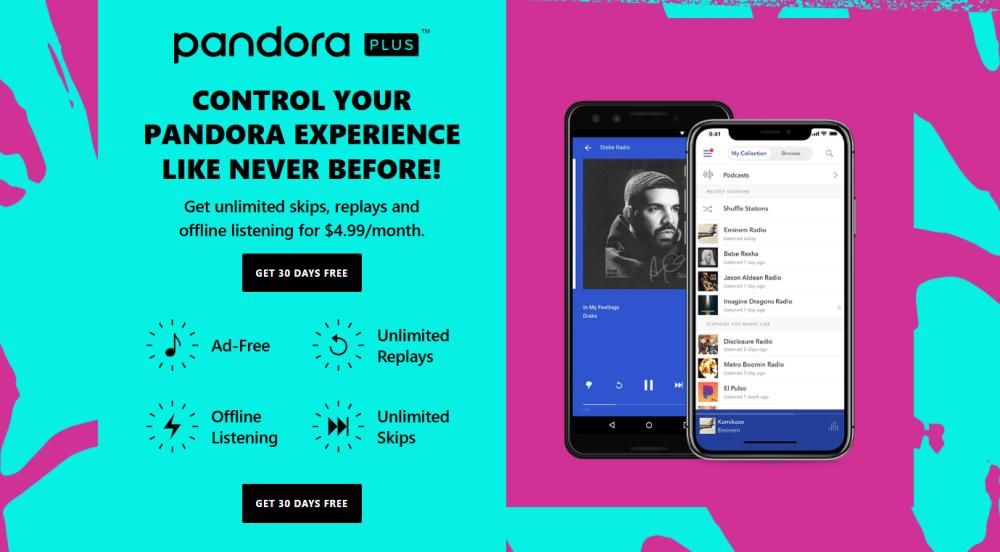
Pandora Plus is a subscription tier that sits between the free Pandora plan and Pandora Premium. While the free plan offers limited skips and occasional advertisements, Pandora Plus enhances the experience in several ways:
- Offline Listening – Pandora Plus allows users to download their favorite stations and playlists for offline playback. This feature is particularly useful for commuting, traveling, or places with poor network coverage.
- Unlimited Skips – With Pandora Plus, you’re no longer constrained by the limited number of song skips per hour that the free plan imposes.
- Ad-Free Experience – Enjoy continuous music without interruptions, enhancing your listening pleasure.
- Personalized Stations – Pandora Plus leverages Pandora’s Music Genome Project to create stations tailored to your tastes, which improves with every like, skip, and thumbs-up interaction.
For many users, Pandora Plus provides the perfect balance between cost and functionality, offering just enough features for a rich music experience without the higher price of Pandora Premium.
Part 2. Why Pandora Offline Listening Matters?
One of the key features of Pandora Plus is offline listening. Many users underestimate the convenience of downloading music in advance, but it can dramatically improve your listening experience. Whether you’re on a plane, in a subway, or traveling abroad, offline playback ensures you always have access to your favorite songs.
Limitations of Pandora Plus Offline Playback
Despite its advantages, Pandora Plus does have limitations. Songs downloaded via Pandora Plus remain locked within the Pandora app and cannot be transferred to other devices or media players. Also, offline playback is only available as long as your Pandora Plus subscription is active. Once it expires, downloaded music will no longer be playable.
For users who want more flexibility with their music, such as exporting songs to other devices or permanent storage, Pandora Plus alone might not meet all needs.
Part 3. How to Get More from Your Pandora Music?
For those who want even more flexibility than Pandora Plus offers, such as saving songs permanently or transferring music to different devices, desktop tools can be very useful. While Pandora Plus allows offline listening within the app, it doesn’t provide true ownership of music files. This is where desktop Pandora downloaders come in handy.
A popular solution among users looking for these features is DumpMedia Pandora Music Converter, a desktop application for Windows and Mac. While it is not an official Pandora product, it enables users to legally access their Pandora music offline and enjoy greater flexibility compared to the mobile app alone.
🏆Features of DumpMedia Pandora Music Converter
- Save you valuable time with efficient 35X faster batch conversion for Pandora playlists.
- Convert and download Pandora music to MP3, M4A, FLAC, WAV, AIFF, and ALAC.
- Ensure optimal quality with customizable bitrate and sample rate, up to 320kbps and 48kHz.
- Preserve song lyrics files and ID3 tags for easier library management.
- Support preset output file title and archive rules.
Download Pandora Music to MP3
Step 1. Download and install the software on your computer. It works with both Windows and Mac. The interface is user-friendly, making it easy for beginners.
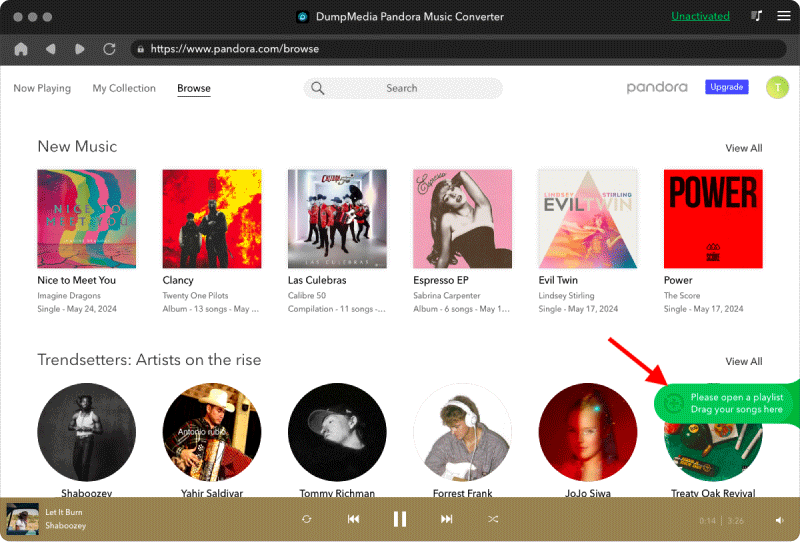
Step 2. Open the built‑in Pandora web player inside DumpMedia and log in with your Pandora Plus/Premium/Free account. Browse Pandora and drag the songs, albums, or playlists you want to download into the converter.
Step 3. Choose MP3 as the output format and start downloading.
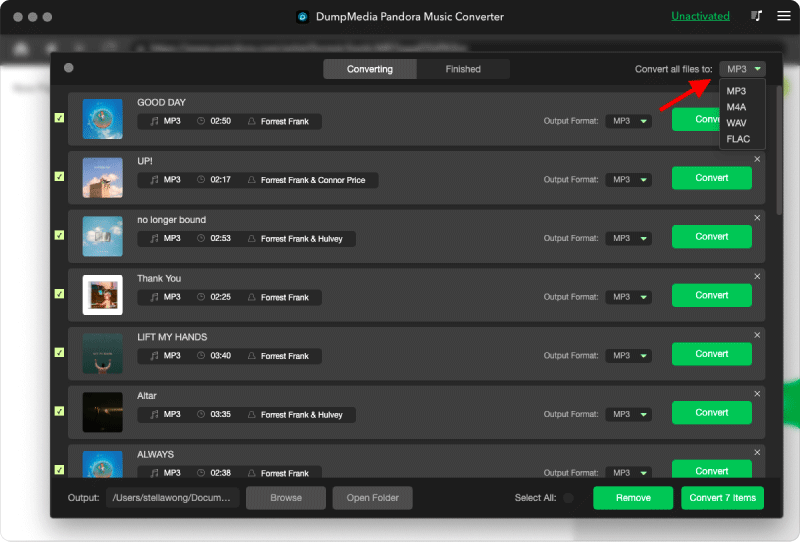
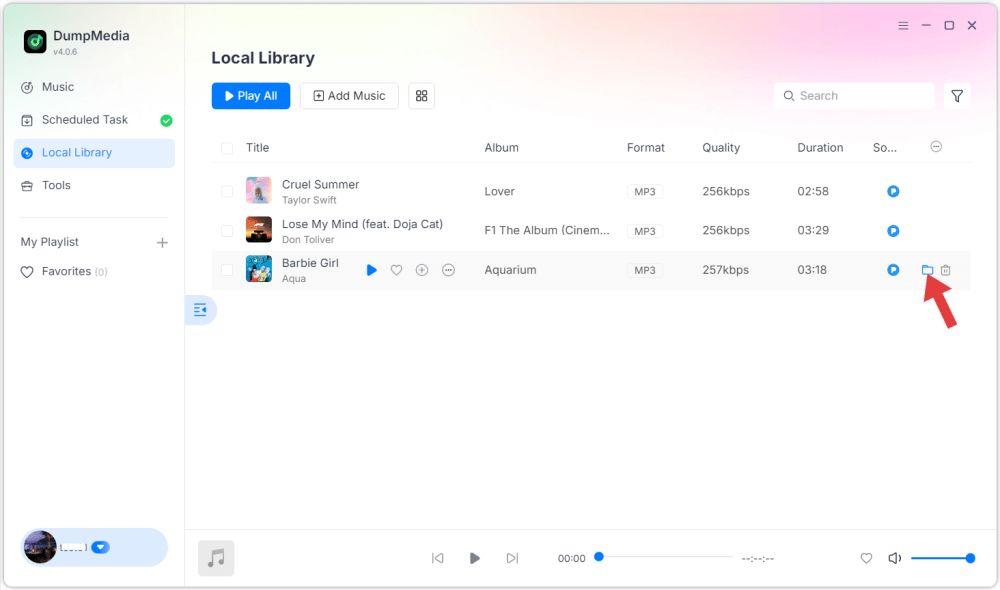
Step 4. Click Convert and download songs directly as MP3 files.
Part 4. Conclusion
Pandora Plus offers an excellent streaming experience with offline listening, unlimited skips, and ad-free playback. However, it does have some restrictions that may limit how you use your music. For users who want to save songs permanently, transfer music to other devices, or maintain a flexible offline library, desktop solutions like DumpMedia Pandora Music Converter can provide additional freedom while complementing the benefits of Pandora Plus.