


Pandora Plus Cost in 2026: Is It Worth Paying For?
Many users searching for Pandora Plus cost are trying to decide whether the subscription is worth paying for compared to Pandora Free or Pandora Premium. In this guide, we will explain everything about Pandora Plus price, features, limitations, and offline playback options.
Contents Guide Part 1. How Much Does Pandora Plus Plan Cost?Part 2. What Is Included in Pandora Plus?Part 3. Is Pandora Plus Worth It?Part 4. Best Way to Keep Pandora Music PermanentlyPart 5. FAQsPart 6. Final Thoughts
Part 1. How Much Does Pandora Plus Plan Cost?
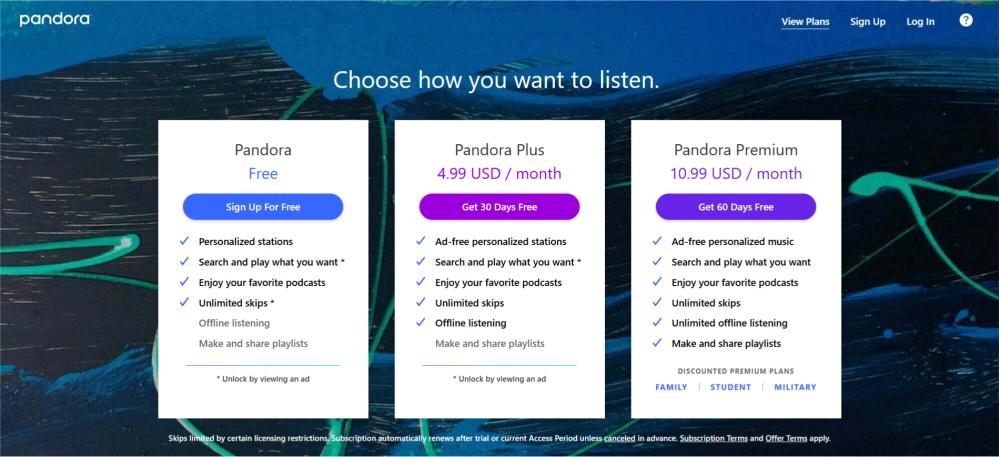
If you are researching Pandora Plus cost, the standard pricing is usually around:
- Pandora Plus Monthly: Around $4.99/month
- Pandora Plus Annual: May vary depending on promotions
- Free Trial: Usually available for new users
Prices may change slightly depending on region, platform billing, or promotional discounts.
Compared to Pandora Premium, Pandora Plus is considered a lower-cost subscription option for users who mainly want ad-free radio listening.
Part 2. What Is Included in Pandora Plus?
Understanding what you actually get helps users evaluate Pandora Plus cost more accurately. Pandora Plus typically includes:
- ad-free personalized stations
- unlimited skips
- replay support
- higher audio quality
- offline station listening
For casual listeners, these features may already provide a much better experience than Pandora Free.
Pandora Plus vs Pandora Premium
One of the biggest questions related to Pandora Plus cost is whether users should upgrade to Premium instead.
Pandora Plus
- cheaper monthly subscription
- personalized radio stations
- limited offline functionality
- fewer playlist controls
Pandora Premium
- full on-demand playback
- playlist creation
- complete offline downloads
- more user control
Users who only want improved radio listening may prefer Pandora Plus, while heavy music listeners often choose Premium.
Part 3. Is Pandora Plus Worth It?
Whether Pandora Plus is worth paying for depends on your listening habits. Pandora Plus may be worth it if you:
- listen to radio stations regularly
- want fewer ads
- need basic offline playback
- prefer lower monthly costs
However, many users researching Pandora Plus cost eventually realize that subscription-based downloads still come with restrictions.
Part 4. Best Way to Keep Pandora Music Permanently
Even if Pandora Plus allows offline listening, downloaded songs remain subscription-dependent. The downloaded music may stop working after cancellation, and offline stations cannot be transferred freely. This means users never fully own the downloaded music. As a result, some users looking into Pandora Plus cost begin searching for permanent offline alternatives.
If you want to keep Pandora songs after your subscription ends, converting music into local audio files is often the easiest solution. DumpMedia Pandora Music Converter helps users convert Pandora songs to MP3, FLAC, M4A, and WAV. You can save playlists permanently and listen Pandora offline without subscription restrictions. This is why some users comparing Pandora Plus cost eventually prefer permanent offline playback solutions.
🏅Why Choose DumpMedia Pandora Music Converter:
- ⭐Integration with Pandora web player
- ⭐Work for both Pandora Premium and Free users
- ⭐Provide batch conversion at up to 35x speed
- ⭐Retain ID3 tags like artist, cover, art, etc.
- ⭐Preserve the original audio quality
- ⭐100% clean. No risk in using
Convert Pandora Music to MP3 Step by Step
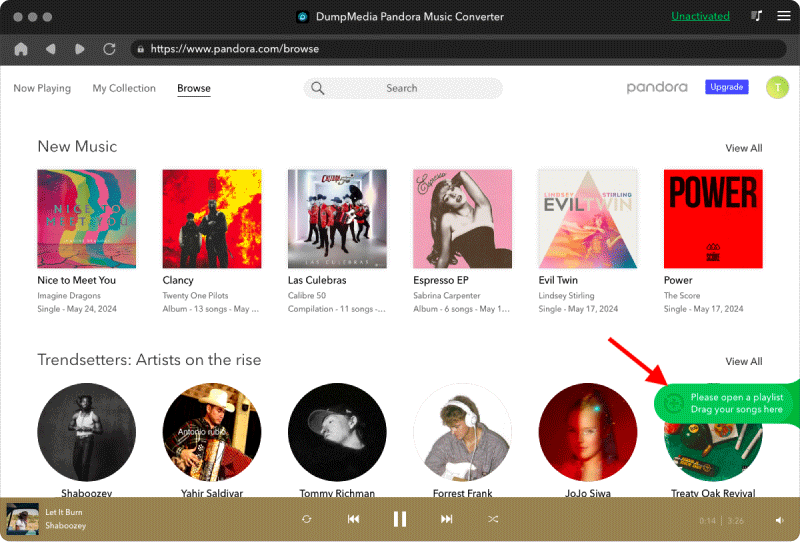
Step 1. Download and install DumpMedia Pandora Music Converter on your Mac/PC. Launch it, and you will see the interface. Use your Pandora Premium/Free account to log in.
Step 2. Then, directly drag the songs or the playlists to the floating "+" icon for adding to the conversion queue to prepare for the download.
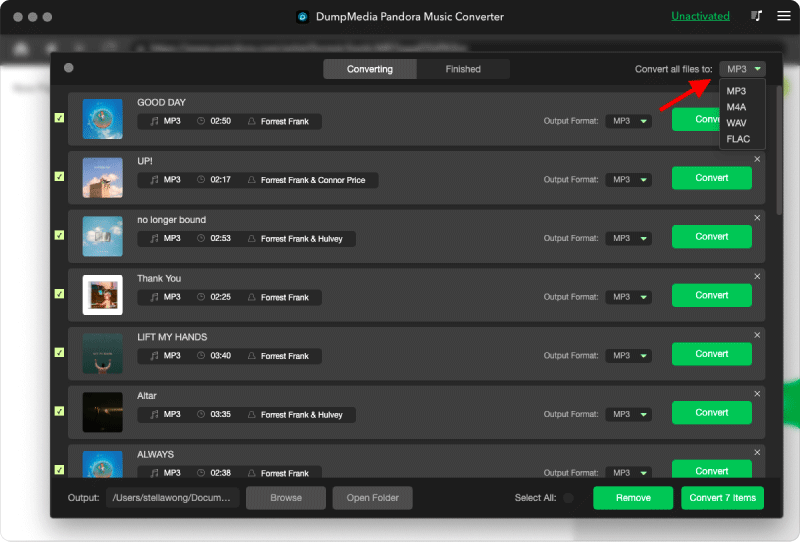
Step 3. Once you are satisfied with the songs that you have selected, you can choose which audio file format you prefer.
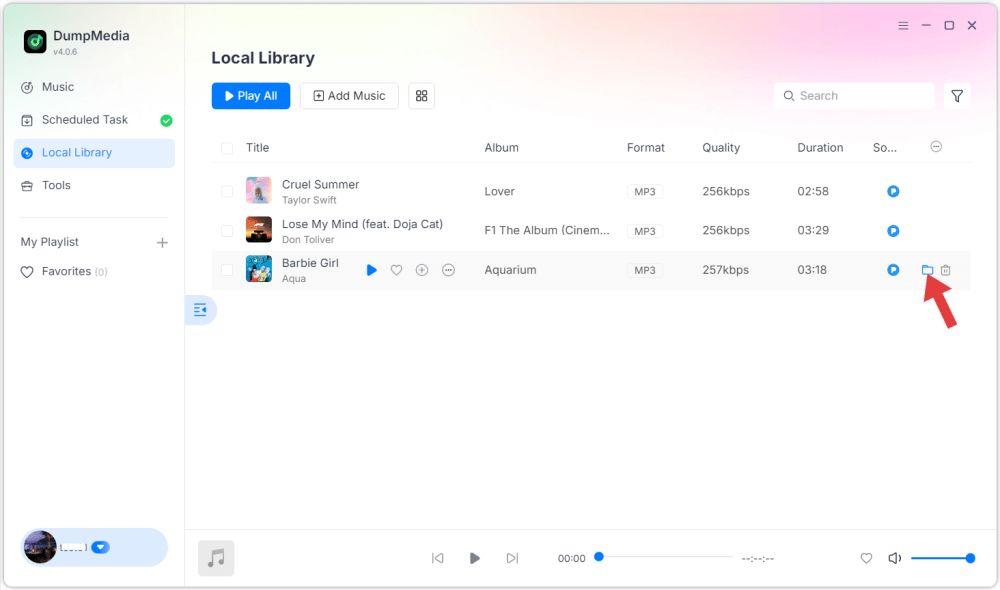
Step 4. As the settings are completed, users can process the conversion by hitting the "Convert" icon. Then DumpMedia will convert Pandora songs to MP3 within seconds with its super-fast speed.
Part 5. FAQs
How much is Pandora Plus monthly?
Pandora Plus usually costs around $4.99 per month.
Does Pandora Plus include offline listening?
Yes, Pandora Plus supports limited offline station listening.
What happens after canceling Pandora Plus?
Downloaded offline content may become unavailable once the subscription ends.
Can Pandora Plus downloads be kept permanently?
Standard Pandora downloads remain subscription-dependent, but converted local audio files can remain playable permanently.
Part 6. Final Thoughts
Understanding the Pandora Plus cost is important before choosing a streaming subscription plan. Pandora Plus provides affordable ad-free listening and offline features, but downloaded songs still depend on an active subscription. Users who want permanent offline access often prefer converting Pandora music into local MP3 files for greater playback freedom and long-term music storage.