


The Best Music Converter in 2026: Top 5 Tools Compared
Finding the best music converter can be challenging with so many options available. Whether you want to convert streaming music, remove DRM, or download songs as MP3 files, choosing the right tool makes a huge difference in quality, speed, and usability. In this guide, we’ve tested and compared the top music converter tools to help you find the perfect option for your needs.
Contents Guide Part 1: How We Picked the Top Music Converter?Part 2: Top 5 Best Music Converters You Should Try Part 3: Comparison (Quick Overview)Part 4: Which Is the Top Music Converter for You?Part 5: FAQsPart 6: Conclusion
Part 1: How We Picked the Top Music Converter?
Before choosing the best music converter, here are the key factors to consider:
- 🎵 Audio Quality – Does it preserve original sound quality?
- ⚡ Conversion Speed – Fast batch processing or slow real-time?
- 🔒 DRM Removal – Can it handle protected content?
- 📱 Platform Support – Spotify, Apple Music, etc.
- 🧭 Ease of Use – Beginner-friendly interface
The best music converter should balance all these factors.
Part 2: Top 5 Best Music Converters You Should Try
🥇 #1 DumpMedia Any Music Converter (Best Overall)
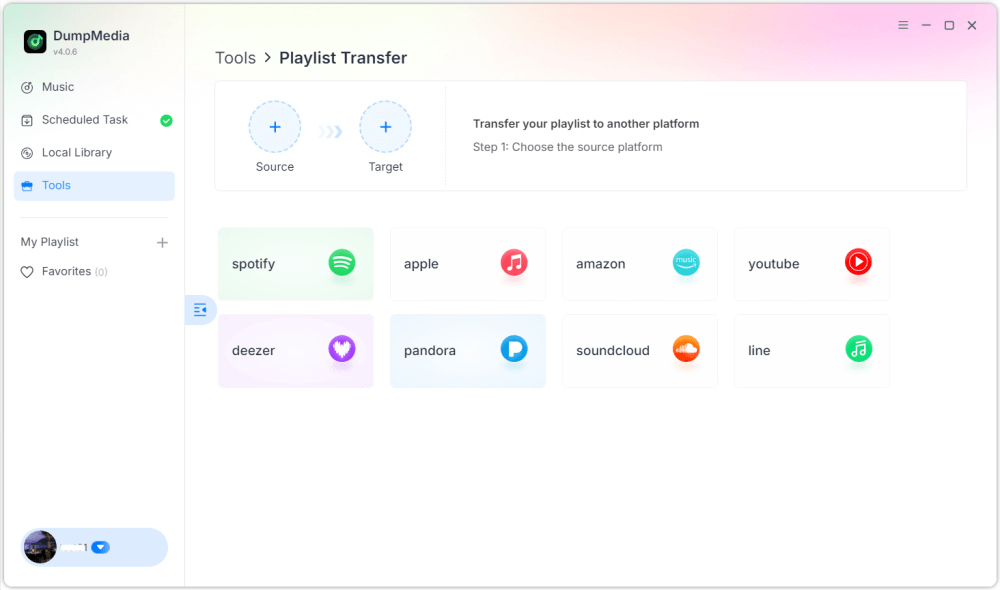
If you're looking for the best music converter with the best balance of performance and usability, DumpMedia is the top choice. DumpMedia Any Music Converter is a versatile all-in-one solution that supports music extraction from a wide array of streaming platforms. Whether your library is hosted on Spotify, Apple Music, Amazon Music, or other major services, it handles them with ease.
DumpMedia delivers high-quality MP3 output (up to 320kbps), ensuring that your converted files maintain the clarity and depth of the original digital stream. With its advanced batch conversion technology, you can process entire discographies or massive playlists simultaneously. Its high-speed engine significantly reduces the time spent waiting for files to render. By the end of 2025, DumpMedia Any Music Converter also introduced new features, such as playlist transfer and local file format conversion.
✅ Pros:
- Supports multiple platforms
- High-quality MP3 output
- Fast batch conversion
- Stable and user-friendly
❌ Cons:
- Not fully free
🥈 #2 AMusicSoft Any Music Converter
AMusicSoft Any Music Converter is a robust and highly capable alternative, known for its focus on speed and its ability to handle multiple streaming sources with precision. It can handle large libraries of tracks in a fraction of the time it takes for real-time recording methods. Beyond just MP3, this tool supports a variety of output formats, including M4A, WAV, and FLAC. This makes it an excellent choice for users who want to maintain high-fidelity audio or need specific files for different devices.
✅ Pros:
- Good compatibility
- Decent speed
❌ Cons:
- Interface not as intuitive
- Limited advanced features
🥉 #3 TuneFab All-in-One Music Converter
TuneFab All-in-One Music Converter is one of the best music converters for users who want to manage content from a vast array of streaming services in a single application. It has gained popularity for its integrated approach, bundling several specialized converters into one comprehensive interface. This software is a true "all-in-one" solution, supporting major platforms including Spotify, Apple Music, Amazon Music, Tidal, Deezer, Pandora, and even Audible for audiobooks.
✅ Pros:
- Multi-platform support
- Good output quality
❌ Cons:
- Slightly slower performance
#4 NoteBurner Music One
NoteBurner Music One is recognized as one of the most comprehensive and powerful all-in-one music converters on the market. It is designed specifically for users who need a centralized solution to archive music from a vast array of streaming platforms while maintaining professional-grade audio quality. It is capable of converting music from over 15 major services, including Spotify, Apple Music, Amazon Music, Tidal, YouTube Music, Deezer, Pandora, and even social platforms like SoundCloud and TikTok.
✅ Pros:
- Reliable performance
- Supports multiple services
❌ Cons:
- Higher price
- Resource-heavy
#5 TuneSolo All-in-One Music Converter
TuneSolo All-in-One Music Converter is a budget-friendly option among the best music converter tools. The software boasts impressive performance, offering a maximum conversion speed of up to 16X on certain platforms, significantly reducing wait times for large libraries. The tool automatically retains all essential ID3 tags and metadata information, such as the title, artist, album, and artwork, keeping your local music library perfectly organized.
✅ Pros:
- Easy to use
- Affordable
❌ Cons:
- Fewer advanced features
Part 3: Comparison (Quick Overview)
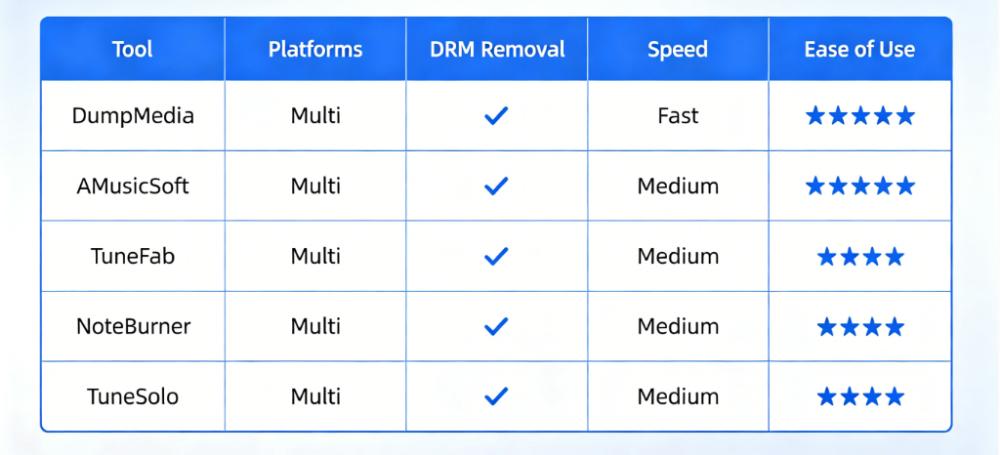
This comparison helps you quickly identify the best music converter based on your needs.
Part 4: Which Is the Top Music Converter for You?
Choosing the best music converter depends on your situation:
- 🧑💻 Beginners → Easy-to-use tools
- 🎧 Audiophiles → High-quality output
- ⚡ Power users → Fast batch conversion
For most users, DumpMedia Any Music Converter is the best music converter due to its balance of speed, quality, and ease of use.
Part 5: FAQs
What is the best music converter?
Based on performance and usability, DumpMedia Any Music Converter is one of the best options.
Is there a free music converter?
Yes, but free tools often have limitations in speed and quality.
Can music converters remove DRM?
Many of the best music converter tools support DRM removal or workaround solutions.
*DumpMedia works by decrypting and downloading songs into DRM-free files, allowing you to obtain a clean, unrestricted copy of your library for any device. Its functionality does not include the conversion of local audio files.
Which converter is best for beginners?
Tools with simple interfaces like DumpMedia are ideal.
Part 6: Conclusion
Choosing the best music converter depends on your needs, but having a reliable, high-quality tool makes all the difference. While several tools offer similar features, some stand out for their performance and ease of use. If you want a fast, stable, and beginner-friendly solution, DumpMedia Any Music Converter is the best music converter to start with.