


Free Tunes for All: Guide to Download Deezer Music for Free
Are you a music enthusiast searching for a convenient way to download your favorite tracks from Deezer without spending a dime? Look no further! In this introduction, we delve into the world of downloading Deezer music for free. Deezer, a popular music streaming platform, offers an extensive library of songs across various genres. However, it restricts offline access to its premium subscribers.
Fortunately, with the right tools and techniques, you can bypass these limitations and enjoy your beloved tunes offline without any cost. Join us as we explore reliable methods and helpful tips to effortlessly download Deezer music for free, allowing you to create your personalized offline playlist and enjoy an uninterrupted musical experience. Let's dive into the world of free music downloads from Deezer!
Contents Guide Part 1. Understanding Deezer and its LimitationsPart 2. Methods for Downloading Deezer Music for FreePart 3. Conclusion
Part 1. Understanding Deezer and its Limitations
Deezer is a popular music streaming service that offers a vast collection of songs from various genres. It provides users with access to millions of tracks, albums, and playlists, making it a go-to platform for music lovers. With Deezer, you can discover new artists, create personalized playlists, and enjoy high-quality audio streaming.
In addition to this, it provides features such as radio stations, curated playlists, display of song lyrics, and tailored suggestions depending on the music you listen to. Deezer features a vast variety of music that can accommodate your preferences, regardless of whether you like pop, rock, hip-hop, or classical.
Deezer’s Free Version Subscription Limitations:
Although Deezer does have a free version, this version does have some restrictions attached to it. There are advertisements that play in the background of the free edition of Deezer, which can be distracting. It also prevents you from listening to music offline, which means that if you do not have a premium subscription, you cannot download songs to play offline.
Additionally, the audio quality of the free edition is limited to basic streaming, which may not provide audiophiles with the greatest possible listening experience. These limits can be a disadvantage for users who want to listen to their favorite songs offline or who do not want to be disturbed by advertisements while they are listening to music.
Importance of Alternative Methods to Download Deezer Music for Free:
Alternative methods to download Deezer music for free are essential for users who want to overcome the limitations of the free version. These methods include using third-party websites or applications that allow you to rip or download songs from Deezer.
However, it's crucial to note that these methods may infringe upon Deezer's terms of service or copyright laws, and they might be considered illegal or unethical. It's important to respect the rights of artists and creators by supporting them through legal means, such as subscribing to Deezer's premium service, which offers offline listening and ad-free music.
Part 2. Methods for Downloading Deezer Music for Free
Looking for a reliable and user-friendly solution to download music from Deezer? Below are some methods that will help you get and download Deezer music for free and enjoy your fave Deezer music.
Method 01. DumpMedia DeezPlus
DumpMedia DeezPlus is a powerful software that allows you to download your favorite songs, albums, and playlists from Deezer effortlessly. It provides an efficient and convenient way to enjoy your favorite tracks offline, without any limitations or restrictions.
DumpMedia DeezPlus offers a range of impressive features. Firstly, it supports batch downloading, which means you can download multiple songs simultaneously, saving you time and effort. Additionally, it preserves the original audio quality of the songs, ensuring a high-fidelity listening experience. You can choose from various audio formats, including MP3, FLAC, AAC, and more, depending on your preference.
The software boasts a user-friendly interface, making it accessible to users of all skill levels. To browse and make efficient use of its capabilities, you do not need to be someone who is knowledgeable in technology. With just a few simple clicks, you can start downloading your desired music from Deezer hassle-free.
DumpMedia DeezPlus is compatible with both Windows and Mac operating systems, offering flexibility and convenience to users across different platforms. Whether you're using a desktop computer or a laptop, you can enjoy the benefits of DumpMedia DeezPlus and build your offline music library with ease.
Here’s a Step by Step Guide on how to make use of it:
- Navigate first into the official DumpMedia website and download the software suitable for your operating system. Once the download process is done, follow such installation instructions to install the software on your computer.
- Open DumpMedia DeezPlus and you will be prompted to log in to your Deezer account. Enter your Deezer credentials (email address and password) to proceed.
- Use the built-in search feature within DumpMedia DeezPlus to find the songs, albums, or playlists you want to download. Simply enter the name of the track or artist in the search bar and click on the search icon.
- Once you have found the desired music, select the songs, albums, or playlists you wish to download. You can choose to download individual songs or entire playlists for offline listening. Customize the audio format and quality settings according to your preference.
- After selecting the desired settings, click on the "Download" button to initiate the download process. DumpMedia DeezPlus will start downloading the selected music from Deezer to your local storage.
- Once the download process is complete, you can access your downloaded music files in the designated folder on your computer. You can now enjoy your favorite Deezer tracks offline, anytime and anywhere.
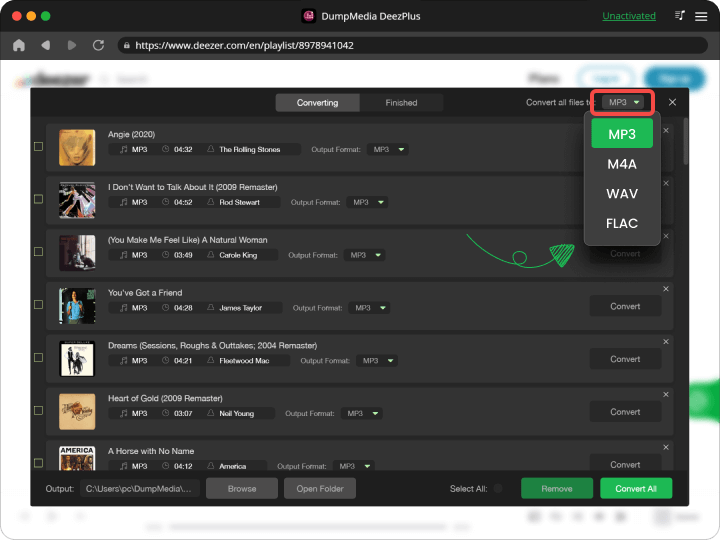
With DumpMedia DeezPlus, downloading music from Deezer has never been easier. Enjoy the convenience of building your personalized offline music library with this powerful software.
Method 02: Using Online Deezer Downloaders
In the quest to download music from Deezer without the need for additional software installation, online Deezer downloaders come to the rescue. These online tools provide a convenient and hassle-free way to download your favorite tracks directly from Deezer's vast music library. By simply accessing these websites, you can easily convert and save your desired songs for offline listening, all within a few clicks.
There are several online Deezer downloaders available that provide convenient options for downloading music from Deezer. Here are a few convenient ones:
- DeezerDownload is a popular online tool that allows you to download music from Deezer by simply entering the Deezer track or playlist URL. It supports various output formats like MP3 and FLAC, and you can choose the desired audio quality. The tool quickly converts and downloads the music files to your device.
- SMLoadr: SMLoadr is an open-source command-line tool that can be used as an online Deezer downloader. It provides a more advanced option for users comfortable with command-line interfaces. SMLoadr supports batch downloading and allows you to specify output formats, audio quality, and other settings.
- Deezloader Remix is a widely-used online Deezer downloader that offers an intuitive interface and a range of features. It allows you to download individual tracks, albums, or entire playlists from Deezer. Deezloader Remix supports multiple output formats and audio quality options.
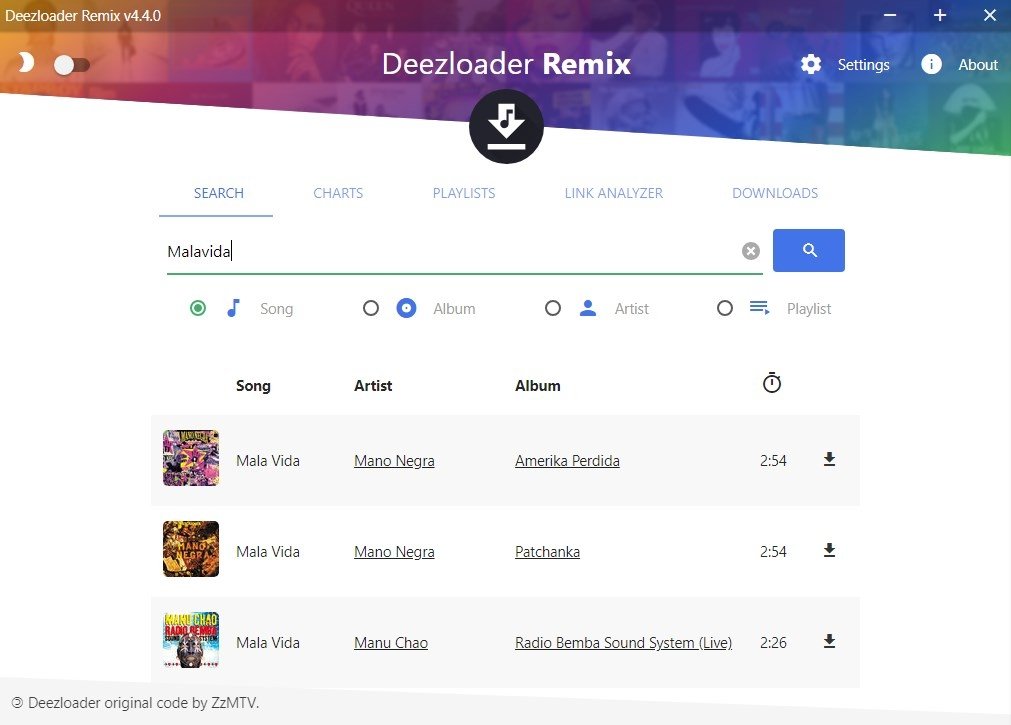
Online Deezer downloaders typically work by utilizing the URL of the Deezer track or playlist you want to download. Here's how it typically works:
- Copy the URL of the song or playlist from Deezer.
- Paste the URL into the provided field on the online Deezer downloader website.
- Select your desired output format and quality options.
- Click on the download button to initiate the conversion and downloading process.
These online tools offer several advantages:
- Convenience: Online Deezer downloaders eliminate the need for software installation, making them easily accessible on any device with an internet connection.
- User-friendly interface: Most online Deezer downloaders have intuitive interfaces, making them beginner-friendly and easy to navigate.
- Wide format compatibility: These tools usually support a variety of audio formats, allowing you to choose the format that suits your needs.
- Quick conversion and download speed: These online tools often provide fast conversion and download speeds, enabling you to save time.
- Platform compatibility: Online Deezer downloaders can be used on multiple platforms, including Windows, Mac, and mobile devices.
However, it's important to note that while online Deezer downloaders may be convenient, they may have limitations and legal implications. Some of these tools may infringe on Deezer's terms of service or violate copyright laws. It's crucial to respect the rights of artists and creators by using these tools responsibly and for personal use only. Additionally, ensure that you choose reputable and reliable online Deezer downloaders to minimize any potential risks.
Method 03: Utilizing Browser Extensions
If you're seeking a hassle-free method to download music from Deezer directly within your browser, browser extensions come to the rescue. These handy tools integrate seamlessly into your browser, allowing you to download Deezer music for free with just a few clicks. By leveraging the power of browser extensions, you can easily save your favorite songs for offline listening without the need for additional software or online tools.
Popular Browser Extensions and Their Features:
- Deezify is a popular browser extension for Chrome and Firefox that enables users to download music from Deezer effortlessly. It automatically detects the currently playing track on Deezer and provides a download button, allowing you to save it in various audio formats like MP3 or FLAC. Deezify also offers options to customize the output quality and tags of the downloaded tracks.
- Deezerify is a browser extension specifically designed for Google Chrome. Similar to Deezify, it detects the playing track on Deezer and provides a download button for one-click downloading. It supports various audio formats and allows you to specify the output quality.
- Tampermonkey (with user scripts): Tampermonkey is a browser extension available for Chrome, Firefox, Safari, and other browsers. By installing user scripts specific to Deezer, such as "Deezer Download Links" or "Deezer+," you can enhance your Deezer experience by adding download buttons or additional features to the Deezer website.
- DZR Music is a browser extension compatible with Chrome, Firefox, and Opera. It integrates directly into Deezer's interface, providing a download button for individual tracks or entire playlists. DZR Music supports various output formats and allows you to customize the audio quality.
- AudioPick is a browser extension available for Chrome that allows you to download audio from various sources, including Deezer. It detects audio playback on Deezer and provides a download button, enabling you to save the currently playing track.
- Audacity (with Extension): Audacity, a popular audio editing software, can also be used as an online Deezer downloader with the help of specific extensions. These extensions enable you to record and save Deezer music as audio files. Audacity provides more advanced editing features, making it useful for users who want additional control over their downloaded tracks.
- FvdTube: FvdTube is a browser extension available for Chrome and Firefox. It allows you to download videos and music from various websites, including Deezer. With FvdTube, you can download Deezer tracks in different formats and quality options.
- SoundTake is a browser extension designed specifically for downloading audio from music streaming platforms like Deezer and SoundCloud. It integrates seamlessly into Chrome and Firefox and provides a straightforward method to download Deezer tracks.
These browser extensions provide a user-friendly experience, making downloading music from Deezer a breeze. However, always exercise caution and ensure that you adhere to copyright laws and respect the rights of artists while using these extensions.
Part 3. Conclusion
The free version of Deezer comes with limitations such as ads, no offline listening, and standard audio quality. These restrictions can hinder the seamless and uninterrupted music experience that users desire. To overcome these limitations, alternative methods are crucial.
Three methods discussed are online Deezer downloaders, browser extensions, and third-party software. Online Deezer downloaders offer convenience, wide format compatibility, and quick conversion speeds. Browser extensions integrate directly into your browser, providing a simple way to download Deezer music with just a few clicks. Third-party software like XYZ Music Downloader and DumpMedia DeezPlus offers powerful features such as batch downloading, preserving original audio quality, and user-friendly interfaces.
These methods provide the convenience and freedom to download Deezer music for free, enabling users to create their offline music libraries. DumpMedia DeezPlus stands out as an exceptional software solution, delivering a seamless Deezer music downloading experience with its advanced features.