


OverDrive vs Audible: Which Audiobook Service Is Better?
When choosing an audiobook platform, many listeners compare OverDrive vs Audible to determine which service offers the best value. Both platforms provide access to thousands of audiobooks, but they operate in very different ways. In this comprehensive comparison, we'll examine audiobook selection, pricing, ownership, offline listening, and overall user experience to help you decide which platform best suits your needs.
Contents Guide Part 1. Audible vs Overdrive: OverviewPart 2. Audible vs Overdrive: Detailed ComparisonPart 3. Which Is Better for Audiobook Lovers?Part 4. How to Get More Flexibility with Audible Audiobooks?Part 5. FAQsPart 6. Conclusion
Part 1. Audible vs Overdrive: Overview
OverDrive
OverDrive is a digital lending platform for public libraries, schools, and institutions that allows users with a valid library card to borrow a variety of materials, including audiobooks, ebooks, magazines, and educational content. While one of its primary advantages is that it is free to use, it operates with constraints such as loan periods, waitlists, limited availability, and automatic expiration, all of which are critical factors when evaluating OverDrive vs Audible.
Audible
As a subsidiary of Amazon and one of the world's largest audiobook providers, Audible offers an extensive library featuring millions of titles, exclusive content, Audible Originals, and unique membership benefits, all while providing an ownership model that allows users to build a permanent personal collection, which remains one of the most significant differences in the OverDrive vs Audible comparison.
Part 2. Audible vs Overdrive: Detailed Comparison
This comparison explores the core differences in accessibility, content ownership, and user experience to help you decide which service best fits your reading habits and financial preferences.
Audiobook Selection
Content availability is often a decisive factor in the OverDrive vs Audible debate. OverDrive's catalog is determined by your local library’s licensing agreements, which can result in long waitlists for popular titles, regional availability restrictions, and delays in accessing new releases. In contrast, Audible provides a much larger and more consistent library, offering immediate access to a vast selection of bestsellers, exclusive productions, and original audio content. For those prioritizing sheer catalog size and instant availability, Audible maintains a clear advantage over OverDrive's library-dependent model.
Pricing
Pricing is one of the most frequently discussed aspects of OverDrive vs Audible.
OverDrive is usually free through participating libraries. Users only need a library card and access to a participating institution. This makes OverDrive extremely attractive for budget-conscious listeners.
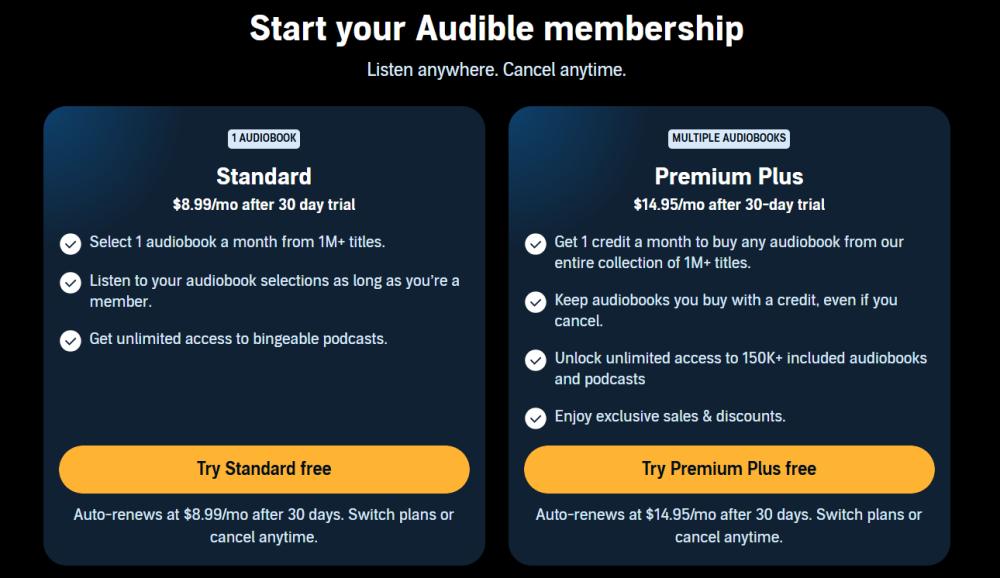
Audible operates on a subscription model. Membership benefits often include monthly credits, discounted purchases, and access to member-exclusive content.
- Audible Plus: $7.95/month
- Audible Standard: $8.99/month
- Audible Premium Plus: $14.95/month
- Premium Plus (2 credits): $22.95/month
Although Audible requires payment, many users find the additional features worthwhile.
Offline Listening
Both platforms support offline listening. However, the experience differs significantly.
- OverDrive Offline Downloads: Users can download borrowed audiobooks for offline listening during the loan period. Once the loan expires, downloads become unavailable.
- Audible Offline Downloads: Audible allows users to download purchased audiobooks directly to supported devices. Downloads remain available within the Audible ecosystem.
When discussing OverDrive vs Audible, Audible generally provides greater long-term flexibility for frequent listeners.
Ownership and Access
Ownership is arguably the biggest difference between the two services. With OverDrive, audiobooks are borrowed. Access is temporary. You never permanently own the borrowed content. With Audible, purchased books remain in your library. For users who regularly listen to audiobooks, ownership often becomes a key factor in choosing between OverDrive vs Audible.
Part 3. Which Is Better for Audiobook Lovers?
The answer depends on your listening habits.
Choose OverDrive If:
- You prefer free access
- Your local library has a strong catalog
- You listen occasionally
- Ownership is not important
Choose Audible If:
- You listen frequently
- You want the latest releases
- You enjoy exclusive content
- You prefer building a personal library
For many dedicated audiobook fans, Audible offers a more comprehensive experience.
Part 4. How to Get More Flexibility with Audible Audiobooks?
While Audible provides long-term access to purchased books, users may still want additional flexibility when managing their audiobook collections. For example, some listeners prefer multiple playback devices. This is where audiobook conversion tools can be useful. DumpMedia Audible Converter is designed to help users manage their Audible audiobook collections more flexibly.
🏅 Why Choose DumpMedia Audible Converter
- ⭐Convert Audible AAX to MP3, WAV, AAC, and more
- ⭐Integration with Audible web player
- ⭐Provide batch conversion at up to 35x speed
- ⭐Retain ID3 tags like artist, cover, art, etc.
- ⭐Preserve the original audio quality
- ⭐100% clean. No risk in using
For Audible users who value long-term accessibility, these capabilities can improve audiobook management and listening flexibility. Even if the Audible app is not working on your device, you can play audiobooks on another media player immediately.
Play Audible Offline Step by Step
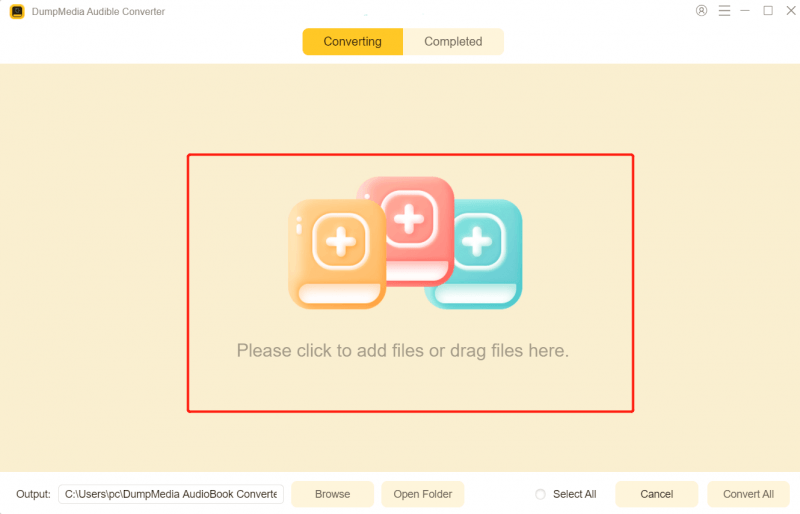
Step 1. Download and install DumpMedia Audible Converter on your Mac/PC. Launch it, and you will see the interface. Use your Audible account to log in.
Step 2. Find the audiobooks you want to convert. You can drag it onto the "+" icon on the right side of the screen. Alternatively, open an entire playlist/album and click the "Add to Convert" icon to load the entire list into the converter.
Step 3. Select MP3 (most compatible). Also, you can change the bitrate or the samplerate. For the best balance, choose 320kbps.
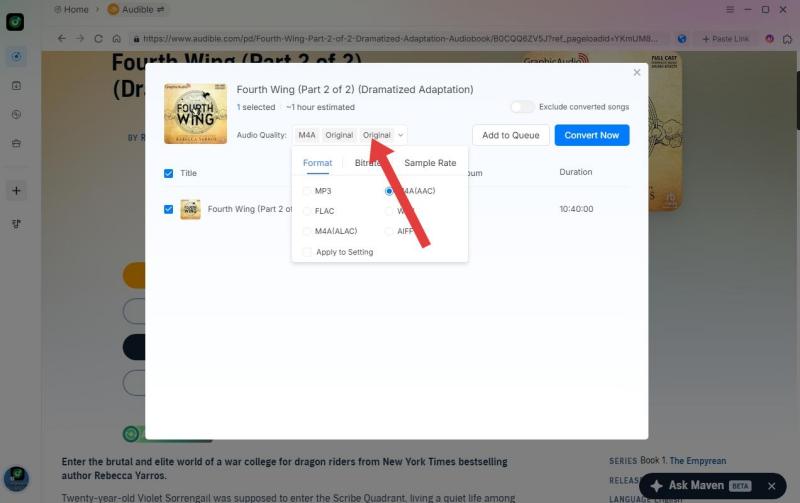
Step 4. As the settings are completed, users can process the conversion by hitting the "Convert" icon. Then DumpMedia will download Audible books to MP3 within seconds with its super-fast speed.

Part 5. FAQs
Is OverDrive better than Audible?
Not necessarily. OverDrive is ideal for free borrowing, while Audible is often preferred for ownership and content selection.
Is OverDrive completely free?
In most cases, yes. Access is typically provided through participating libraries and institutions.
Can I keep OverDrive audiobooks forever?
No. Borrowed audiobooks expire at the end of the lending period.
Does Audible have more audiobooks than OverDrive?
Audible generally offers a larger and more consistent catalog, including exclusive content.
Which platform is better for offline listening?
Both support offline listening, but Audible provides longer-term access to purchased content.
Part 6. Conclusion
The OverDrive vs Audible debate highlights two very different approaches to audiobook listening. For occasional listeners, OverDrive may provide everything needed at no cost. For serious audiobook enthusiasts, Audible's larger catalog and ownership model often make it the preferred choice. And for users looking to manage Audible collections with greater flexibility, tools such as DumpMedia Audible Converter can help enhance the overall audiobook experience.
*DumpMedia works by decrypting and downloading Audible audiobooks into DRM-free files, allowing you to obtain a clean, unrestricted copy of your library for any device. Its functionality does not include the DRM removal of local audio files.