


Tidal vs. Apple Music: Welcher Dienst ist besser? Ein umfassender Vergleich
Bei der Auswahl eines Musikstreaming-Dienstes vergleichen viele Nutzer die verschiedenen Aspekte. Tidal gegen Apple Music Um die beste Option zu finden, bieten beide Plattformen Millionen von Songs, hochwertiges Streaming und exklusive Funktionen. Sie unterscheiden sich jedoch deutlich in Audioqualität, Preisgestaltung, Kompatibilität und Benutzerfreundlichkeit. In diesem Leitfaden erläutern wir die wichtigsten Unterschiede zwischen Tidal und Apple Music und helfen Ihnen bei der Entscheidung, welche Plattform am besten zu Ihren Bedürfnissen passt.
Inhaltsverzeichnis Teil 1: Überblick über Tidal und Apple MusicTeil 2: Tidal Music vs. Apple Music: Vollständiger VergleichTeil 3: Welches sollten Sie wählen?Teil 4: Was, wenn Sie mehr Kontrolle über Ihre Musik wünschen?Teil 5: Der beste Weg, Apple Music herunterzuladen MP3Teil 6: Häufig gestellte FragenTeil 7: Fazit
Teil 1: Überblick über Tidal und Apple Music
Was ist Gezeiten?
Tide- ist bekannt für sein hochauflösendes Audio-Streaming und seine künstlerorientierte Plattform. Es bietet HiFi- und verlustfreie Audioqualität und ist daher bei Audiophilen sehr beliebt.
Was ist Apple-Musik?
Apple Music Apples Musikstreaming-Dienst ist eng mit iOS-Geräten und dem Apple-Ökosystem verknüpft. Er bietet eine große Musikbibliothek und ein nahtloses Benutzererlebnis auf allen Apple-Geräten.
Teil 2: Tidal Music vs. Apple Music: Vollständiger Vergleich
Beim Vergleich von Tidal und Apple Music ist es wichtig, über die grundlegenden Funktionen hinauszublicken und zu verstehen, wie sich die einzelnen Plattformen im realen Einsatz schlagen.
Audio-Qualität
Einer der größten Unterschiede zwischen Tidal und Apple Music ist die Audioqualität.
- Tidal bietet HiFi-, FLAC- und hochauflösende Audioformate und ist damit eine Top-Wahl für Audiophile.
- Apple Music bietet verlustfreies Audio und räumliches Audio mit Dolby Atmos-Unterstützung.
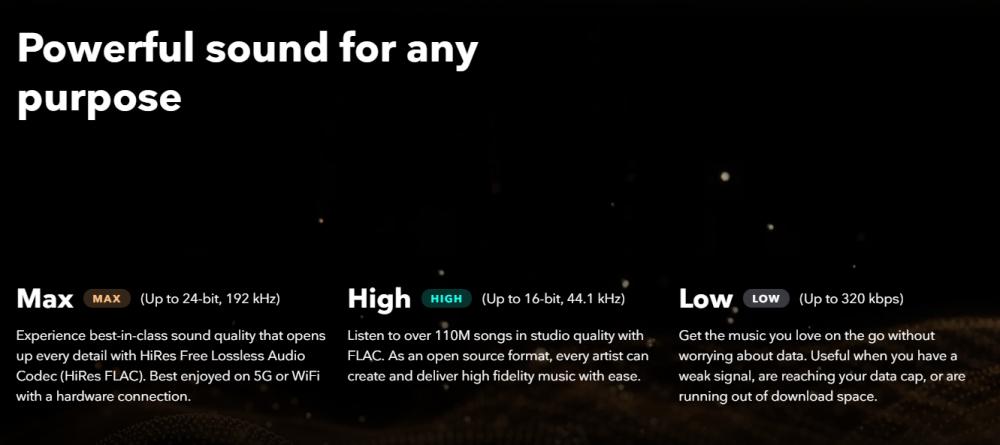
Fazit: Im Vergleich zwischen Tidal und Apple Music bieten beide Plattformen einen hervorragenden Klang, aber Tidal hat in puncto Klangtreue leicht die Nase vorn, insbesondere für Nutzer mit High-End-Geräten.
Musikbibliothek
Ein weiterer entscheidender Faktor bei Tidal im Vergleich zu Apple Music ist die Größe des Musikkatalogs.
- Beide Plattformen bieten über 100 Millionen Musiktitel.
- Apple Music bietet tendenziell eine bessere Integration von Mainstream- und regionalen Inhalten.
- Tidal konzentriert sich stärker auf kuratierte Inhalte und exklusive Künstlerangebote.
Fazit: Was die Größe der Musikbibliothek angeht, sind Tidal und Apple Music nahezu gleichauf, Apple Music hat jedoch einen leichten Vorteil in puncto Zugänglichkeit.
AnzeigenPreise
Der Preis spielt eine wichtige Rolle bei der Wahl zwischen Tidal und Apple Music.
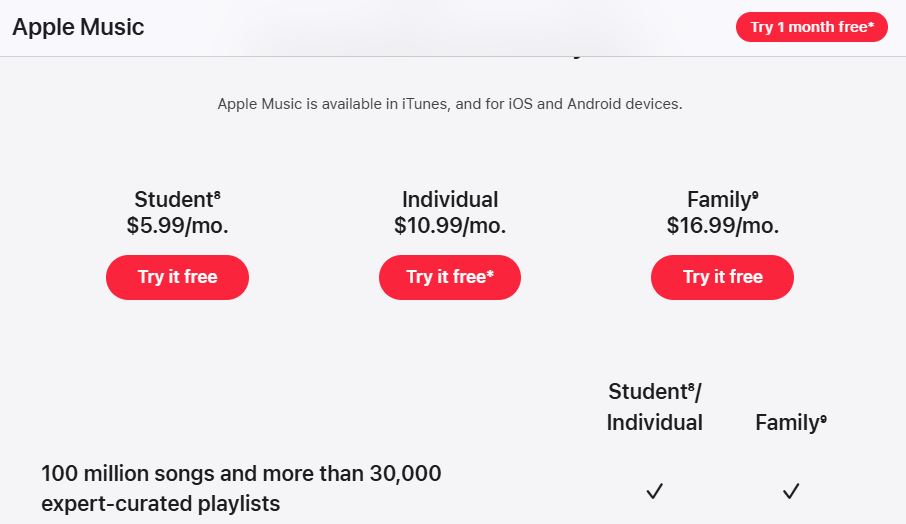
Apple Music bietet ein einfacheres Abo-Modell. Das Standard-Einzelabo kostet 10.99 € pro Monat. Für Sparfüchse ist das Studentenabo mit 5.99 € pro Monat weiterhin eine attraktive Option und beinhaltet oft Apple TV+ als kostenlosen Bonus. Familien können das Familienabo für 16.99 € pro Monat wählen, mit dem bis zu sechs Einzelkonten in einem Abo genutzt werden können. Viele Nutzer entscheiden sich außerdem für Apple One, das ab 19.95 € pro Monat erhältlich ist und Musik mit iCloud-Speicher und weiteren Diensten kombiniert.
Tidal hat seine bisher teuren Hi-Res-Abos zu einem einzigen, attraktiven Angebot zusammengefasst, das direkt mit Apple Music und Amazon Music konkurriert. Das Einzelabo kostet aktuell 10.99 $ pro Monat. Für Haushalte gibt es das Familienabo für 16.99 $ pro Monat, das bis zu sechs Mitglieder umfasst. Das Studentenabo ist weiterhin deutlich reduziert und kostet 5.49 $ pro Monat. Ein besonderes Merkmal des aktuellen Tidal-Preismodells ist die DJ-Erweiterung, die zusätzlich 9.00 $ pro Monat kostet.
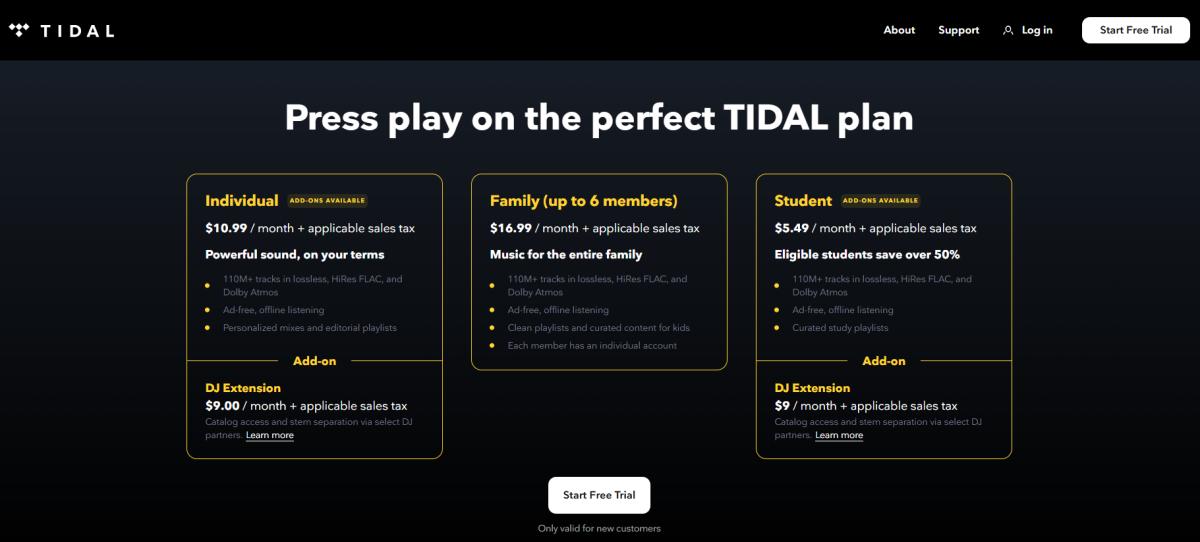
Hinweis: Tidal bietet keine kostenlose, werbefinanzierte Version oder spezielle Rabatte für Militärangehörige/Ersthelfer mehr an, da diese im Zuge der Vereinfachung des Abonnementmodells abgeschafft wurden.
Fazit: Für die meisten Nutzer ist die Entscheidung zwischen Tidal und Apple Music letztendlich eine Frage der Einfachheit versus Flexibilität, wobei Apple Music einfacher zu handhaben ist.
Gerätekompatibilität
Gerätekompatibilität ist ein weiterer wichtiger Aspekt bei Tidal im Vergleich zu Apple Music. Apple Music funktioniert nahtlos auf iPhone, iPad, Mac und Apple Watch. Tidal unterstützt eine größere Bandbreite an Geräten von Drittanbietern.
Fazit: In diesem Vergleich ist Apple Music ideal für Apple-Nutzer, während Tidal besser für die plattformübergreifende Nutzung geeignet ist.
Benutzererfahrung
In puncto Benutzerfreundlichkeit zeigen Tidal und Apple Music deutliche Unterschiede.
Apple Music setzt auf ein klares, magazinartiges Design mit Fokus auf redaktionell ausgewählte Inhalte. Das minimalistische Design mit großer Typografie und ausdrucksstarken Albumcovern fügt sich nahtlos in das Apple-Ökosystem ein. Mit der Funktion „Apple Music Sing“ bietet Apple ein herausragendes visuelles Erlebnis: Karaoke-Songtexte in Echtzeit, die sich anpassen lassen, und hochwertige Musikvideos, die direkt in die Künstlerseiten integriert sind.
Tidal legt den Fokus stärker auf die Entdeckung neuer Inhalte und die Interaktion mit Künstlern. Für Nutzer externer Hardware bietet Tidal einen deutlich umfangreicheren „Credit“-Bereich als Apple, in dem alle an einem Track beteiligten Produzenten, Toningenieure und Studiomusiker aufgeführt werden. Tidal bietet exklusive Dokumentationen, Live-Konzertstreams und „Daily Discovery“-Mixe, die im Vergleich zu Apples breiterem Pop-Fokus eher auf Indie, Hip-Hop und R&B ausgerichtet sind.
Fazit: Für den durchschnittlichen Nutzer ist Tidal im Vergleich zu Apple Music aufgrund der reibungsloseren Benutzererfahrung oft die bessere Wahl.
Teil 3: Welches sollten Sie wählen?
Nach der Analyse aller Aspekte von Tidal und Apple Music hängt die endgültige Entscheidung von Ihren Prioritäten ab.
Wähle Tidal, wenn:
- Sie legen Wert auf hochauflösendes Audio.
- Sie verwenden hochwertige Audiogeräte
- Sie bevorzugen Inhalte mit Fokus auf Künstler.
Wähle Apple Music, wenn:
- Sie befinden sich im Apple-Ökosystem.
- Sie wünschen sich ein einfaches und reibungsloses Erlebnis
- Sie bevorzugen eine bessere Integration über verschiedene Geräte hinweg.
Teil 4: Was, wenn Sie mehr Kontrolle über Ihre Musik wünschen?
Nach einem Vergleich von Tidal und Apple Music entscheiden sich einige Nutzer für Apple Music, erkennen aber bald dessen Grenzen.
Problem: Eingeschränkte Kontrolle über die Musik
Apple Music-Nutzer stehen vor folgenden Problemen:
- Lieder können nicht konvertiert werden MP3
- Musik kann nicht frei übertragen werden
- Songs können nicht dauerhaft außerhalb der App gespeichert werden.
Um diese Einschränkungen zu beseitigen, können Sie ein professionelles Tool verwenden wie DumpMedia Apple Musikkonverter.
Teil 5: Der beste Weg, Apple Music herunterzuladen MP3
Im Gegensatz zu den Basismethoden DumpMedia Apple Musikkonverter wurde speziell für Apple Music-Nutzer entwickelt, die die volle Kontrolle über ihre Musikbibliothek wünschen. Es ermöglicht Nutzern, ihre Apple Music-Bibliothek in verschiedene Audioformate konvertieren, wie zum Beispiel MP3Die Dateien sind in den Formaten AAC, WAV und FLAC verfügbar und können offline auf jedem Gerät abgespielt werden. Selbst wenn die Apple Music App auf Ihrem Gerät nicht funktioniert, können Sie die Dateien sofort mit einem anderen Musikplayer abspielen.
Was macht DumpMedia die beste Wahl?
- Apple Music ohne Qualitätsverlust konvertieren
- DRM-Schutz vollständig entfernen*
- Stapelkonvertierung von Wiedergabelisten und Alben
- Behalten Sie ID3-Tags und Metadaten
- Schnelle und stabile Konvertierung
Kostenlos Herunterladen Kostenlos Herunterladen
So laden Sie Apple Music-Songs herunter MP3 (Schritt für Schritt)
So genießen Sie Apple Music für immer >>>

Teil 6: Häufig gestellte Fragen
Ist Tidal besser als Apple Music?
Das hängt von Ihren Bedürfnissen ab. Tidal punktet mit hervorragender Audioqualität, während Apple Music eine bessere Benutzerfreundlichkeit bietet.
Kann ich Apple Music herunterladen als MP3?
Nicht direkt. Apple Music verwendet DRM-Schutz, daher benötigen Sie ein Tool wie DumpMedia Apple Musikkonverter.
Welches ist günstiger, Tidal oder Apple Music?
Apple Music bietet im Allgemeinen eine einfachere und günstigere Preisgestaltung.
Ist verlustfreies Audio auf beiden Plattformen verfügbar?
Ja, sowohl Tidal als auch Apple Music unterstützen verlustfreie Audioformate.
Teil 7: Fazit
Im Vergleich von Tidal und Apple Music bieten beide Plattformen hervorragende Funktionen und große Musikbibliotheken. Wer sich jedoch für Apple Music entscheidet und mehr Flexibilität wünscht, beispielsweise das Herunterladen von Songs als … MP3 Oder wenn Sie sie dauerhaft behalten möchten, benötigen Sie eine zusätzliche Lösung. In diesem Fall DumpMedia Der Apple Music Converter bietet eine praktische Möglichkeit, Ihre Musik freizuschalten und ohne Einschränkungen zu genießen.
Kostenlos Herunterladen Kostenlos Herunterladen
*DumpMedia Das Programm entschlüsselt und lädt Apple Music-Titel in DRM-freie Dateien herunter, sodass Sie eine uneingeschränkte Kopie Ihrer Musikbibliothek für jedes Gerät erhalten. Lokale Audiodateien können nicht konvertiert werden.

30 % Rabatt >>>