


Apple Music-Song in Ihrer Region nicht verfügbar? 5 einfache Lösungsansätze
Die Fehlermeldung „Apple Music-Titel in Ihrer Region nicht verfügbar“ kann ärgerlich sein, besonders wenn Sie gerade Ihren Lieblingssong abspielen möchten. Dieses Problem tritt in der Regel aufgrund von Lizenzbeschränkungen, Kontoeinstellungen oder regionalen Einschränkungen auf. Die gute Nachricht: Es gibt mehrere Möglichkeiten, das Problem zu beheben. In diesem Leitfaden erklären wir die Ursachen dieses Fehlers und zeigen Ihnen praktische Lösungen, die tatsächlich funktionieren.
Inhaltsverzeichnis Teil 1: Warum Apple Music „In deiner Region nicht verfügbar“ anzeigt Teil 2: So behebst du das Problem „Apple Music-Song in deiner Region nicht verfügbar“ Teil 3: Was tun, wenn der Song weiterhin nicht verfügbar ist? Teil 4: So greifst du am besten auf Apple Music-Songs ohne Regionsbeschränkungen zu Teil 5: Häufig gestellte Fragen Teil 6: Zusammenfassung
Teil 1: Warum Apple Music „In Ihrer Region nicht verfügbar“ anzeigt
Wenn bei Apple Music die Fehlermeldung „Song in Region nicht verfügbar“ angezeigt wird, liegt dies in der Regel an einem der folgenden Gründe:
1. Lizenzbeschränkungen
Die Verfügbarkeit von Musik variiert aufgrund von Urheberrechtsvereinbarungen je nach Land. Ein in einer Region verfügbares Lied kann in einer anderen Region gesperrt sein.
2. Apple-ID-Regionseinstellungen
Ihre Apple-ID bestimmt, auf welche Inhalte Sie zugreifen können. Wenn die Region Ihres Accounts nicht mit Ihrem tatsächlichen Standort übereinstimmt, wird Ihnen möglicherweise die Meldung angezeigt, dass der Song in Ihrer Region nicht verfügbar ist.
3. Abonnement- oder Synchronisierungsprobleme
Abgelaufene Abonnements oder Synchronisierungsprobleme können diesen Fehler ebenfalls auslösen.
4. Von Künstlern oder Labels entfernte Inhalte
Manchmal werden Lieder entfernt oder ersetzt, was dazu führen kann, dass ein Lied in Apple Music in der Region nicht verfügbar ist.
Teil 2: So beheben Sie das Problem „Apple Music-Song in Ihrer Region nicht verfügbar“
Hier sind bewährte Methoden, um das Problem „Apple Music-Song in der Region nicht verfügbar“ zu beheben:
Lösung 1: Apple-ID-Region ändern
Durch die Aktualisierung Ihrer Apple-ID-Region können diese geografischen Beschränkungen häufig behoben werden.
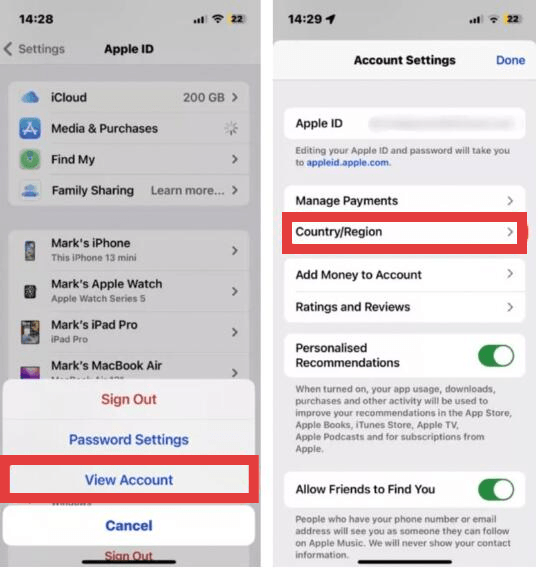
- Auf iPhone/iPad: Öffnen Sie die Einstellungen-App, tippen Sie oben auf Ihren Namen und wählen Sie „Medien & Käufe“. Tippen Sie auf „Account anzeigen“ (möglicherweise müssen Sie sich mit Ihrem Konto authentifizieren). Gesicht ID oder Ihr Passwort). Auf dem Mac: Öffnen Sie die Apple Music App, wählen Sie in der Menüleiste „Account“ und anschließend „Account-Einstellungen“.
- Wählen Sie Land/Region aus und tippen Sie anschließend auf „Land oder Region ändern“.
- Wählen Sie Ihren neuen Standort aus der Liste. Lesen Sie die Allgemeinen Geschäftsbedingungen, tippen Sie auf „Zustimmen“ und geben Sie eine gültige Zahlungsmethode und Rechnungsadresse für die jeweilige Region ein.
Fix 2: Verwenden Sie ein VPN
Wie behebt man das Problem, dass ein Apple Music-Song in der Region nicht verfügbar ist? Wenn regionale Lizenzbestimmungen das Streamen bestimmter Titel verhindern, kann ein Virtual Private Network (VPN) helfen, diese geografischen Beschränkungen zu umgehen. Indem Ihre Internetverbindung über einen Server in einem anderen Land geleitet wird, verschleiert ein VPN Ihre tatsächliche IP-Adresse und erweckt den Eindruck, als würden Sie von einer Region aus auf Apple Music zugreifen, in der die Inhalte legal verfügbar sind.
Diese Methode ist zwar effektiv, aber nicht perfekt. Es kann zu langsameren Streaming-Geschwindigkeiten, höherer Latenz oder häufigem Puffern während der Wiedergabe kommen, was das Hörerlebnis beeinträchtigen kann. Außerdem ist Apple Music stark an die Region Ihrer Apple-ID und nicht nur an Ihre IP-Adresse gebunden. Das bedeutet, dass ein VPN allein nicht immer funktioniert, es sei denn, Ihre Kontoeinstellungen stimmen mit dem gefälschten Standort überein.
Lösung 3: Suche nach alternativen Versionen
Manchmal existiert dasselbe Lied in einer anderen Version oder auf einem anderen Album.
Lösung 4: Synchronisieren Sie Ihre Bibliothek erneut.
Falls in Ihrer Apple Music-Mediathek Titel fehlen oder ausgegraute Titel angezeigt werden, kann eine erneute Synchronisierung Ihres Accounts die Verbindung zu den Apple-Servern aktualisieren und die Diskrepanzen in Ihrer Mediathek beheben. Dadurch wird die App quasi gezwungen, ihren Index neu zu erstellen und Ihren Abonnementstatus erneut zu überprüfen.
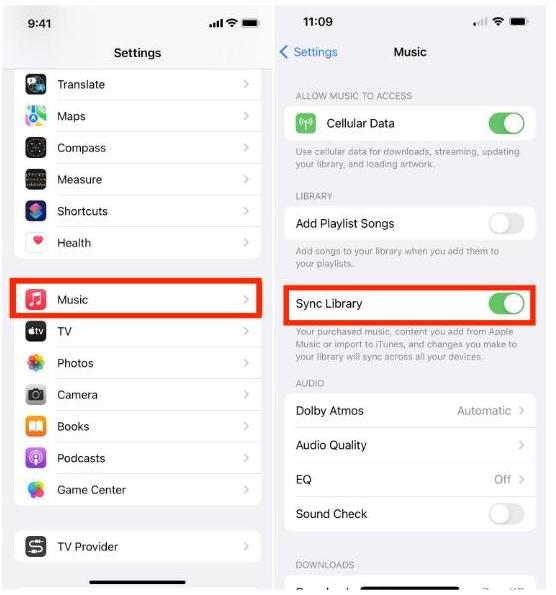
- Auf dem Handy: Zurück Nach Einstellungen > Musik ermöglichen, die Bibliothek synchronisieren ist umgeschaltet ON. Falls es bereits eingeschaltet war, versuchen Sie, es auszuschalten, einige Sekunden zu warten und es dann wieder einzuschalten, um einen neuen Scan auszulösen..
- Auf dem Desktop: Öffne die Musik-App und gehe zu Einstellungen (oder Präferenzen) > Allgemeinund stellen Sie sicher Bibliothek synchronisieren wird geprüft. Sie können ein Update auch manuell auslösen, indem Sie zu Reichen Sie das > Bibliothek > Cloud-Bibliothek aktualisieren.
Lösung 5: Abonnementstatus prüfen
Eine weitere Lösung besteht darin, zu überprüfen, ob Ihr Apple Music-Abonnement noch aktiv ist. Bei einer fehlgeschlagenen Zahlung oder einem Ablauf des Abonnements schränkt Apple Music den Zugriff auf den Streaming-Katalog und alle für die Offline-Nutzung heruntergeladenen Titel umgehend ein.
Mit diesen Methoden lassen sich viele Fälle lösen, in denen ein Apple Music-Song in der Region nicht verfügbar ist, jedoch nicht alle.
Teil 3: Was, wenn das Lied immer noch nicht verfügbar ist?
Selbst nach Ausprobieren aller Lösungsansätze kann die Fehlermeldung „Apple Music-Song in Region nicht verfügbar“ weiterhin erscheinen. Dies liegt daran, dass einige Songs in bestimmten Regionen dauerhaft gesperrt sind und Lizenzbeschränkungen nicht ohne Weiteres umgangen werden können. Viele Nutzer fragen sich daher: „Gibt es eine Möglichkeit, dieses Problem vollständig zu vermeiden?“
Teil 4: Der beste Weg, um ohne Regionsbeschränkungen auf Apple Music-Songs zuzugreifen
Anstatt sich immer wieder mit dem Problem herumzuschlagen, dass ein Song in Apple Music in der Region nicht verfügbar ist, ist es langfristig besser, die Musik DRM-frei zu speichern. MP3 Dateien. Durch die Aufhebung der digitalen Beschränkungen, die an den Standort Ihres Kontos gebunden sind, können Sie sicherstellen, dass Ihre Musikbibliothek unabhängig von regionalen Lizenzänderungen oder Reisen zugänglich bleibt.
Für diesen Zweck, DumpMedia Apple Musikkonverter ist eine sehr empfehlenswerte Lösung. Sie wurde speziell entwickelt, um die technischen Beschränkungen von Apples FairPlay DRM* zu umgehen und Ihnen so die dauerhafte lokale Speicherung Ihrer Musik zu ermöglichen.
Kostenloser Download Kostenloser Download
Hauptmerkmale und Vorteile
- Permanenter Offline-Zugriff: Sobald Lieder werden umgewandelt in MP3Sie sind nicht mehr von einem aktiven Apple Music-Abonnement oder der Verfügbarkeit regionaler Server abhängig. Sie können sie dauerhaft auf Ihrer persönlichen Hardware speichern.
- Verlustfreie Qualitätskonvertierung: Das Tool wurde entwickelt, um die ursprüngliche Audioqualität zu erhalten und sicherzustellen, dass Ihre MP3M4A- oder FLAC-Exporte klingen genauso klar wie der Originalstream.
- Hochgeschwindigkeits-Stapelverarbeitung: Sie können ganze Wiedergabelisten oder Alben auf einmal konvertieren – und das bis zu 10-mal schneller als mit herkömmlichen Aufnahmemethoden –, wodurch Sie viel Zeit sparen.
- Aufbewahrung von Metadaten: Es behält automatisch die wichtigsten ID3-Tags bei, darunter Songtitel, Künstlername, Albumcover und Genre, sodass Ihre lokale Bibliothek perfekt organisiert bleibt.
- Universelle Kompatibilität: Da die Ausgabe standardmäßig ist MP3Sie können Ihre Musik auf jedes beliebige Gerät übertragen, einschließlich MP3 Abspielgeräte, Autoradios und Smart Speaker anderer Hersteller als Apple, ohne dass die Apple Music App benötigt wird.
Anleitung von DumpMedia Apple Musikkonverter
Schritt 1: Laden Sie die Software herunter und installieren Sie sie auf Ihrem Computer. Sie funktioniert mit beiden WinWindows und Mac. Die Benutzeroberfläche ist benutzerfreundlich und daher auch für Anfänger leicht zu bedienen.
Kostenloser Download Kostenloser Download
Schritt 2: Öffnen Sie den integrierten Apple Music Webplayer in DumpMedia Melden Sie sich mit Ihrem Apple Music-Konto an. Durchsuchen Sie Apple Music und ziehen Sie die gewünschten Songs, Alben oder Playlists in den Konverter.

Schritt 3: Im Einstellungsfenster auswählen MP3 als Ausgabeformat, um ein MP3 Download der ausgewählten Titel.

Schritt 4: Klicken Sie auf „Konvertieren“ und laden Sie Songs direkt herunter als MP3 Dateien.

Teil 5: Häufig gestellte Fragen
Warum zeigt Apple Music an, dass der Song in der Region nicht verfügbar ist?
Das liegt in der Regel an Lizenzbeschränkungen oder Kontoeinstellungen.
Kann ich das Problem, dass ein Apple Music-Song in meiner Region nicht verfügbar ist, dauerhaft beheben?
Manche Fälle lassen sich beheben, aber nicht alle. Einige Lieder sind regional gesperrt.
Gibt es eine Möglichkeit, dieses Problem in Zukunft zu vermeiden?
Ja. Lieder konvertieren in MP3 stellt sicher, dass Sie nicht mehr mit regionalen Beschränkungen konfrontiert werden.
Was ist die beste Lösung?
Die Verwendung von DumpMedia Der Apple Music Converter ist die zuverlässigste Methode, um Ihre Musik jederzeit verfügbar zu halten.
Teil 6. Zusammenfassung
Die Fehlermeldung „Apple Music: Song in Region nicht verfügbar“ kann ärgerlich sein, lässt sich aber in vielen Fällen mit einfachen Anpassungen beheben. Für langfristigen Komfort reicht es jedoch möglicherweise nicht aus, sich ausschließlich auf Streaming-Plattformen zu verlassen. Wer die volle Kontrolle über seine Musik behalten und Regionsbeschränkungen komplett umgehen möchte, kann seine Songs konvertieren. MP3 ist die beste Lösung. Probieren Sie es aus. DumpMedia Laden Sie Apple Music Converter noch heute herunter und genießen Sie Ihre Musik ohne Einschränkungen.
Kostenloser Download Kostenloser Download
*DumpMedia Das Programm entschlüsselt und lädt Apple Music-Titel in DRM-freie Dateien herunter, sodass Sie eine uneingeschränkte Kopie Ihrer Musikbibliothek für jedes Gerät erhalten. Lokale Audiodateien können nicht konvertiert werden.