


Apple Music-låten är inte tillgänglig i regionen? Åtgärda det på 5 enkla sätt
Att se felet "Apple Music-låten är inte tillgänglig i regionen" kan vara frustrerande, särskilt när du försöker spela din favoritlåt. Problemet uppstår vanligtvis på grund av licensrestriktioner, kontoinställningar eller regionala begränsningar. Den goda nyheten är att det finns flera sätt att åtgärda problemet med att Apple Music-låten inte är tillgänglig i din region. I den här guiden förklarar vi varför det här felet uppstår och visar dig praktiska lösningar som faktiskt fungerar.
Innehållsguide Del 1: Varför Apple Music säger ”Inte tillgänglig i din region” Del 2: Hur man åtgärdar ”Apple Music-låt är inte tillgänglig i din region” Del 3: Vad händer om låten fortfarande inte är tillgänglig? Del 4: Bästa sättet att komma åt Apple Music-låtar utan regionsbegränsningar Del 5: Vanliga frågor Del 6. Sammanfattning
Del 1: Varför Apple Music säger "Inte tillgängligt i din region"
Om du stöter på felet "Apple Music-låten är inte tillgänglig i regionen" beror det vanligtvis på någon av följande orsaker:
1. Licensbegränsningar
Musikens tillgänglighet varierar beroende på land på grund av upphovsrättsavtal. En låt som är tillgänglig i en region kan vara blockerad i en annan.
2. Apple ID-regioninställningar
Ditt Apple-ID avgör vilket innehåll du har åtkomst till. Om din kontoregion inte matchar din faktiska plats kan du se meddelandet att Apple Music-låten inte är tillgänglig i regionen.
3. Problem med prenumeration eller synkronisering
Utgångna prenumerationer eller synkroniseringsproblem kan också utlösa det här felet.
4. Innehåll borttaget av artister eller skivbolag
Ibland tas låtar bort eller ersätts, vilket kan leda till att Apple Music-låten inte är tillgänglig i regionen.
Del 2: Hur man fixar "Apple Music-låten är inte tillgänglig i din region"
Här är beprövade sätt att fixa Apple Music-låten som inte är tillgänglig i regionen:
Åtgärd 1: Ändra Apple ID-region
Att uppdatera din Apple-ID-region kan ofta lösa dessa geografiska begränsningar.
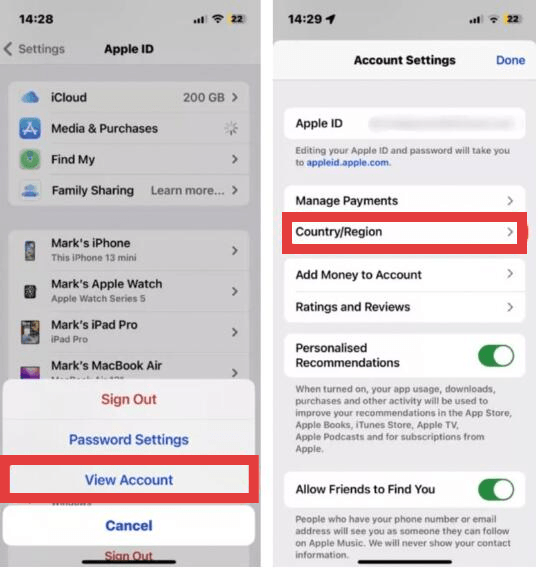
- På iPhone/iPad: Öppna appen Inställningar, tryck på ditt namn högst upp och välj Media och köp. Tryck på Visa konto (du kan behöva autentisera med Ansikts-ID eller ditt lösenord). På Mac: Öppna Apple Music-appen, välj Konto i menyraden och välj Kontoinställningar.
- Välj Land/Region och tryck sedan på Ändra land eller region.
- Välj din nya plats från listan. Läs igenom villkoren, tryck på Godkänn och ange en giltig betalningsmetod och faktureringsadress för den specifika regionen.
Fix 2: Använd ett VPN
Hur åtgärdar man problemet med att Apple Music-låten inte är tillgänglig i regionen? När regionala licenser hindrar dig från att streama specifika låtar kan ett virtuellt privat nätverk (VPN) fungera som ett kraftfullt verktyg för att kringgå dessa geografiska barriärer. Genom att dirigera din internetanslutning via en server i ett annat land maskerar ett VPN din faktiska IP-adress och får det att se ut som om du använder Apple Music från en region där innehållet är lagligt tillgängligt.
Även om den är effektiv är den här metoden inte en perfekt lösning. Du kan uppleva långsammare streaminghastigheter, högre latens eller frekvent "buffring" under uppspelning, vilket kan försämra lyssningsupplevelsen. Apple Music är dessutom starkt kopplat till regionen för ditt Apple-ID snarare än bara din IP-adress. Det betyder att enbart ett VPN kanske inte alltid fungerar om inte dina kontoinställningar också överensstämmer med den förfalskade platsen.
Åtgärd 3: Sök efter alternativa versioner
Ibland finns samma låt i en annan version eller ett annat album.
Åtgärd 4: Synkronisera ditt bibliotek igen
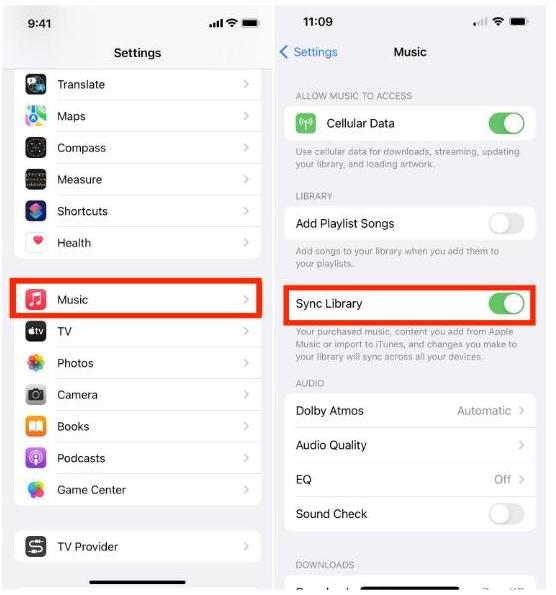
Om det saknas låtar i ditt Apple Music-bibliotek eller om det visas nedtonade spår kan en ny synkronisering av ditt konto uppdatera anslutningen till Apples servrar och lösa avvikelser i biblioteket. Denna process tvingar i huvudsak appen att återskapa sitt index och verifiera din prenumerationsstatus.
- På mobilen: Gå till Inställningar > Music och se till Synkronisera biblioteket är växlad ON. Om den redan var påslagen, försök att stänga av den, vänta några sekunder och slå på den igen för att utlösa en ny skanning..
- På skrivbordet: Öppna Musik-appen, gå till Inställningar (eller inställningar) > Allmäntoch se till Synkronisera biblioteket är kontrollerad. Du kan också manuellt utlösa en uppdatering genom att gå till Fil > Bibliotek > Uppdatera molnbiblioteket.
Åtgärd 5: Kontrollera prenumerationsstatus
En annan lösning är att kontrollera att din Apple Music-prenumeration fortfarande är aktiv. Om en betalning misslyckas eller om prenumerationen upphör begränsar Apple Music omedelbart åtkomsten till streamingkatalogen och alla låtar som laddats ner för offlineanvändning.
Dessa metoder kan lösa många fall där Apple Music-låtar inte är tillgängliga i regionen, men inte alla.
Del 3: Vad händer om låten fortfarande inte är tillgänglig?
Även efter att du har provat alla lösningar kan du fortfarande se felet "Apple Music-låten är inte tillgänglig i regionen". Detta händer eftersom vissa låtar är permanent begränsade i vissa regioner och licensbegränsningar inte enkelt kan kringgås. Vid det här laget frågar många användare: "Finns det ett sätt att undvika detta problem helt?"
Del 4: Bästa sättet att komma åt Apple Music-låtar utan regionsgränser
Istället för att upprepade gånger hantera problemet med att Apple Music-låten inte är tillgänglig i regionen, är en bättre långsiktig lösning att spara din musik som DRM-fri. MP3 filer. Genom att ta bort de digitala begränsningarna som är knutna till din kontos plats kan du säkerställa att ditt musikbibliotek förblir tillgängligt oavsett regionala licensändringar eller resor.
För detta ändamål, DumpMedia Apple Music Converter är en starkt rekommenderad lösning. Den är specifikt utformad för att kringgå de tekniska begränsningarna i Apples FairPlay DRM*, vilket gör att du kan behålla en permanent lokal samling av din musik.
Gratis nedladdning Gratis nedladdning
Viktiga funktioner och fördelar
- Permanent offlineåtkomst: När låtar konverteras till MP3, de är inte längre beroende av en aktiv Apple Music-prenumeration eller regional servertillgänglighet. Du kan behålla dem för alltid på din personliga hårdvara.
- Förlustfri kvalitetskonvertering: Verktyget är konstruerat för att bevara den ursprungliga ljudkvaliteten, vilket säkerställer att din MP3, M4A- eller FLAC-exporter låter lika tydligt som den ursprungliga strömmen.
- Höghastighetsbatchbearbetning: Du kan konvertera hela spellistor eller album på en gång med hastigheter upp till 10 gånger snabbare än vanliga inspelningsmetoder, vilket sparar avsevärt tid.
- Bevarande av metadata: Den behåller automatiskt viktiga ID3-taggar, inklusive låttitel, artistnamn, albumomslag och genre, vilket håller ditt lokala bibliotek perfekt organiserat.
- Universal kompatibilitet: Eftersom utgången är standard MP3, kan du överföra din musik till vilken enhet som helst, inklusive MP3 spelare, bilstereo och smarta högtalare som inte kommer från Apple, utan att behöva Apple Music-appen.
Så här använder du DumpMedia Apple Music Converter
Steg 1. Ladda ner och installera programvaran på din dator. Den fungerar med båda Windows och Mac. Gränssnittet är användarvänligt, vilket gör det enkelt för nybörjare.
Gratis nedladdning Gratis nedladdning
Steg 2. Öppna den inbyggda Apple Music-webbspelaren inuti DumpMedia och logga in med ditt Apple Music-konto. Bläddra bland Apple Music och dra de låtar, album eller spellistor du vill ladda ner till konverteraren.

Steg 3. I inställningspanelen väljer du MP3 som utdataformat för att möjliggöra en MP3 nedladdning av dina valda låtar.

Steg 4. Klicka på Konvertera och ladda ner låtar direkt som MP3 filer.

Del 5: vanliga frågor
Varför säger Apple Music att låten inte är tillgänglig i regionen?
Det beror vanligtvis på licensbegränsningar eller kontoinställningar.
Kan jag fixa Apple Music-låten som inte är tillgänglig i regionen permanent?
Du kan åtgärda vissa fall, men inte alla. Vissa låtar är regionlåsta.
Finns det något sätt att undvika detta problem i framtiden?
Ja. Konverterar låtar till MP3 säkerställer att du inte kommer att stöta på regionbegränsningar igen.
Vilken är den bästa lösningen?
Använda DumpMedia Apple Music Converter är det mest pålitliga sättet att hålla din musik tillgänglig.
Del 6. Sammanfattning
Felet att Apple Music-låten inte är tillgänglig i regionen kan vara frustrerande, men i många fall kan det åtgärdas med enkla justeringar. Men för långsiktig bekvämlighet kanske det inte räcker att enbart förlita sig på streamingplattformar. Om du vill ha full kontroll över din musik och helt undvika regionbegränsningar kan du konvertera dina låtar till MP3 är den bästa lösningen. Försök DumpMedia Apple Music Converter idag och njut av din musik utan begränsningar.
Gratis nedladdning Gratis nedladdning
*DumpMedia fungerar genom att dekryptera och ladda ner Apple Music-låtar till DRM-fria filer, vilket gör att du kan få en ren, obegränsad kopia av ditt bibliotek för vilken enhet som helst. Dess funktionalitet inkluderar inte konvertering av lokala ljudfiler.