


Gratis borttagning av Apple Music DRM: Vad som fortfarande fungerar år 2026
Många användare söker efter Apple Music DRM-borttagning gratis lösningar efter att ha upptäckt att nedladdade Apple Music-låtar inte kan kopieras, överföras eller lagras permanent som standard MP3 filer. I den här guiden kommer vi att förklara den nuvarande verkligheten med gratis DRM-borttagningsmetoder, varför många gratis DRM-verktyg inte längre fungerar tillförlitligt och hur användare idag njuter av mer flexibel offline-uppspelning.
Innehållsguide Del 1. Vad är Apple Music DRM?Del 2. Är det fortfarande möjligt att ta bort Apple Music DRM?Del 3. Bättre alternativ till Apple Music DRM-borttagningDel 4. Vanliga frågorDel 5. Slutsats
Del 1. Vad är Apple Music DRM?
Innan vi diskuterar gratisverktyg för borttagning av Apple Music DRM är det viktigt att förstå hur Apple Music DRM fungerar.
Så här fungerar Apple Musics DRM
Apple Music använder DRM (Digital Rights Management) teknik för att skydda sitt strömmande innehåll. Detta skydd gör det möjligt för Apple att förhindra obehörig delning, reglera prenumerationsbaserad åtkomst och begränsa uppspelning på enheter som inte stöds, och därmed helt skydda upphovsrättsskyddad musik.
Vad är skyddade AAC-filer?
De flesta Apple Music-låtar levereras som skyddade AAC-ljudfiler. Till skillnad från traditionella MP3Dessa filer kräver Apple-auktorisering, är beroende av en aktiv prenumeration och fungerar bara i appar som stöds, vilket innebär att de inte kan överföras fritt. Detta restriktiva ekosystem är just anledningen till att många användare söker efter gratis metoder för borttagning av Apple Music DRM för att återfå kontrollen över sitt musikbibliotek.
Del 2. Är det fortfarande möjligt att ta bort Apple Music DRM?
Många användare undrar om gratisverktyg för borttagning av Apple Music DRM fortfarande fungerar.
Äldre DRM-borttagningsverktyg
Flera äldre programvaruverktyg påstod sig en gång erbjuda gratisfunktioner för borttagning av Apple Musics DRM. Vissa försökte låsa upp uppspelningsbegränsningar.
Uppdateringar av Apples DRM-system
Apple förbättrar kontinuerligt sina system för innehållsskydd. Som ett resultat har det blivit allt svårare att underhålla helt kostnadsfria lösningar för borttagning av DRM.
Del 3. Bättre alternativ till Apple Music DRM-borttagning
Istället för att förlita sig på opålitlig gratis DRM-borttagningsprogramvara föredrar många användare nu att ladda ner Apple Music-låtar i lokala ljudformat för mer flexibel uppspelning. En populär lösning är DumpMedia Apple Music ConverterIstället för att direkt ta bort DRM från skyddade filer, hjälper den här programvaran användare att ladda ner Apple Music-låtar för lokal offline-uppspelning på flera enheter.
Gratis nedladdning Gratis nedladdning
🏆Viktiga funktioner hos DumpMedia Apple Music Converter
- 🎶Ladda ner Apple Music till MP3, WAV, FLAC och AAC
- 🎶Behåll originalljudkvaliteten
- 🎶Batch-nedladdning av spellistor och album
- 🎶Snabb konverteringshastighet
- 🎶Bevara låtmetadata och ID3-taggar
- 🎶Stöd för offlineuppspelning på alla enheter
Denna flexibilitet är en anledning till att många användare föredrar lokala uppspelningslösningar istället för traditionella Apple Music DRM-borttagningsverktyg utan kostnad. Även om Apple Music-appen fungerar inte på din enhet kan du spela Apple Music-låtar offline på en annan musikspelare direkt.
Hur man konverterar Apple Music för stabil offline-uppspelning
Steg 1. Ladda ned och installera DumpMedia Apple Music Converter på din Mac/PC. Starta programmet så ser du gränssnittet. Använd ditt Apple Music-konto för att logga in.
Gratis nedladdning Gratis nedladdning
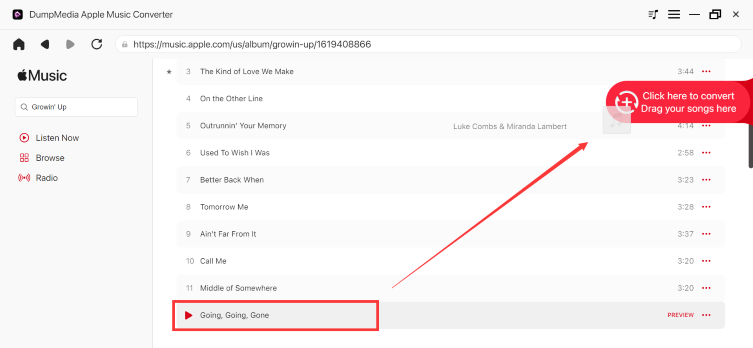
Steg 2. Hitta spellistan, albumet eller den specifika låten du vill konvertera. Du kan dra en enskild låt till "+"-ikonen på höger sida av skärmen. Alternativt kan du öppna en hel spellista/album och klicka på ikonen "Lägg till i konverter" för att ladda hela listan i konverteraren.
Steg 3. Välja MP3 (mest kompatibel). Du kan också ändra bithastighet eller samplingshastighet. För bästa balans, välj 320 kbps.

Steg 4. När inställningarna är klara kan användarna genomföra konverteringen genom att trycka på ikonen "Konvertera". DumpMedia kommer att konvertera Apple Music-låtar till MP3 inom några sekunder med sin supersnabba hastighet.

Del 4. Vanliga frågor
Är det möjligt att ta bort Apple Musics DRM-system gratis?
Vissa äldre verktyg försökte erbjuda gratisfunktioner för borttagning av Apple Music DRM, men många gratislösningar fungerar inte längre tillförlitligt på grund av Apples DRM-uppdateringar.
Varför slutar gratis DRM-borttagningsverktyg att fungera?
Apple uppdaterar ofta sina DRM-system, vilket gör många äldre verktyg inkompatibla.
Vad är skyddade AAC-filer?
Skyddade AAC-filer är DRM-skyddade Apple Music-ljudfiler med uppspelningsbegränsningar.
Kan Apple Music-låtar upphöra att gälla?
Ja. Nedladdade låtar kan sluta fungera om prenumerationerna löper ut eller om auktoriseringen misslyckas.
Kan jag lyssna på Apple Music offline permanent?
Många användare använder DumpMedia Apple Music Converter för mer flexibel lokal uppspelning.
Del 5. Slutsats
Många användare som söker efter kostnadsfria lösningar för borttagning av DRM i Apple Music försöker i slutändan övervinna uppspelningsbegränsningar, prenumerationsberoende och begränsningar för offlinelyssning som orsakas av DRM-skyddad musik. För användare som vill ha bekväm lokal lyssning på flera enheter, DumpMedia Apple Music Converter erbjuder en praktisk lösning för att ladda ner Apple Music-låtar till vanliga ljudformat för offline-uppspelning.
Gratis nedladdning Gratis nedladdning
*DumpMedia fungerar genom att dekryptera och ladda ner Apple Music-låtar till DRM-fria filer, vilket gör att du kan få en ren, obegränsad kopia av ditt bibliotek för vilken enhet som helst. Dess funktionalitet inkluderar inte DRM-borttagning av lokala ljudfiler.

30% rabatt >>>