


DRM verwijderen van iTunes Movies Free: Wat werkt er nog in 2026?
Apple gebruikt DRM-beveiliging voor films in iTunes om de afspeelautorisatie en auteursrechttoegang te controleren. Hierdoor hebben beveiligde M4V-filmbestanden vaak beperkingen voor het afspelen, apparaatbeperkingen en problemen met offline weergave. In deze handleiding leggen we uit hoe het er momenteel aan toe gaat bij het gratis verwijderen van DRM van iTunes-films, waarom de meeste gratis DRM-verwijderingsprogramma's niet meer betrouwbaar werken en hoe Apple-gebruikers tegenwoordig omgaan met DRM-beveiligde media.
Inhoudsopgave Deel 1. Wat is iTunes-film-DRM? Deel 2. Is het nog steeds mogelijk om DRM van iTunes-films te verwijderen? Deel 3. Is het nog steeds mogelijk om DRM van Apple Music te verwijderen? Deel 4. Een betere oplossing voor offline afspelen van Apple Music Deel 5. Veelgestelde vragen Deel 6. Samenvatting
Deel 1. Wat is iTunes-film-DRM?
Om te begrijpen hoe je DRM van iTunes-films gratis kunt verwijderen, is het belangrijk om eerst te begrijpen hoe Apple DRM werkt.
Hoe Apple DRM iTunes-films beschermt
Apple past DRM-technologie toe op veel aankopen en huurfilms via iTunes. Dit beveiligingssysteem helpt Apple bij:
- Voorkom ongeautoriseerd delen
- Beheer afspeelrechten
- Niet-ondersteunde apparaten beperken
- Bescherm auteursrechtelijk beschermde inhoud
Wat zijn beveiligde M4V-bestanden?
Veel films op iTunes worden opgeslagen als beveiligde M4V-bestanden. In tegenstelling tot standaard MP4-video's kunnen beveiligde M4V-bestanden alleen worden afgespeeld via geautoriseerde Apple-platforms.
Waarom DRM de weergave beperkt
DRM-beveiliging beperkt vaak:
- Bestandsoverdrachten
- Offline afspelen
- Apparaatcompatibiliteit
- Permanente toegang
- Ondersteuning voor externe spelers
Daarom gaan veel gebruikers op zoek naar manieren om gratis DRM van iTunes-films te verwijderen.
Deel 2. Is het nog steeds mogelijk om DRM van iTunes-films te verwijderen?
Veel gebruikers vragen zich af of het nog steeds werkt om gratis DRM van iTunes-films te verwijderen. Jaren geleden beweerden verschillende gratis DRM-verwijderingsprogramma's beveiligde iTunes-filmbestanden te kunnen ontgrendelen. Sommige programma's probeerden M4V-bestanden te converteren. Tegenwoordig werken veel gratis DRM-verwijderingsoplossingen niet meer betrouwbaar. Apple werkt zijn DRM-systemen regelmatig bij, waardoor oudere programma's verouderd of incompatibel raken.
Deel 3. Is het nog steeds mogelijk om DRM van Apple Music te verwijderen?
Ja, het is absoluut mogelijk, maar de technische definitie van "hoe" het moet gebeuren is veranderd. Echte DRM-verwijdering, oftewel het verwijderen van de FairPlay-versleuteling uit een versleuteld bestand dat rechtstreeks van de streaming-app is gedownload (.m4p) zonder het bestand zelf te wijzigen, is tegenwoordig vrijwel onmogelijk. Moderne besturingssystemen en bijgewerkte versies van iTunes/Apple Music hebben deze decryptieprocessen sterk beveiligd.
Wanneer mensen het hebben over het verwijderen van DRM van Apple Music, bedoelen ze eigenlijk het downloaden van DRM-vrije kopieën of het vastleggen van de stream met behulp van speciale software.
Deel 4. Een betere oplossing voor offline afspelen van Apple Music
Voor gebruikers die flexibeler offline naar muziek willen luisteren, DumpMedia Apple Music Converter biedt een praktische oplossing. In tegenstelling tot tools voor het verwijderen van DRM van films, is deze software specifiek ontworpen voor audiobeheer en offline afspelen van Apple Music. Deze professionele converter helpt gebruikers converteer Apple Music naar MP3 en ze opslaan voor stabiele offline weergave zonder volledig afhankelijk te zijn van de Apple Music-app.
Gratis downloaden Gratis downloaden
Waarom gebruiken DumpMedia Apple Music-converter?
- 🎶Download Apple Music naar MP3, WAV, FLAC en AAC
- 🎶Behoud de originele geluidskwaliteit
- 🎶Download afspeellijsten en albums in batch
- 🎶Snelle conversiesnelheid
- 🎶Behoud songmetadata en ID3-tags
- 🎶Ondersteuning voor offline afspelen op elk apparaat
Voor gebruikers die gefrustreerd zijn door de beperkingen van streaming, biedt lokaal afspelen van muziek vaak een veel handigere ervaring. Zelfs als de Apple Music-app niet werkt op je apparaat, kun je Apple Music direct offline afspelen op een andere muziekspeler.
Download Apple Music-nummers voor offline afspelen.
Stap 1. Download en installeer DumpMedia Installeer Apple Music Converter op je Mac/pc. Start het programma en je ziet de interface. Gebruik je Apple Music-account om in te loggen.
Gratis downloaden Gratis downloaden
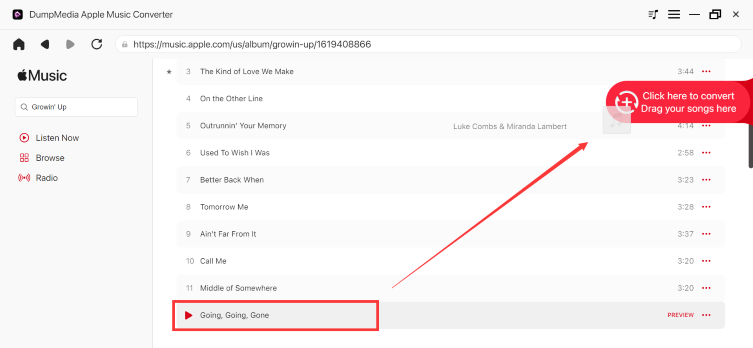
Stap 2. Zoek de afspeellijst, het album of het specifieke nummer dat u wilt converteren. U kunt een enkel nummer naar het "+" pictogram aan de rechterkant van het scherm slepen. U kunt ook een volledige afspeellijst/album openen en op het pictogram "Toevoegen aan converteren" klikken om de volledige lijst in de converter te laden.
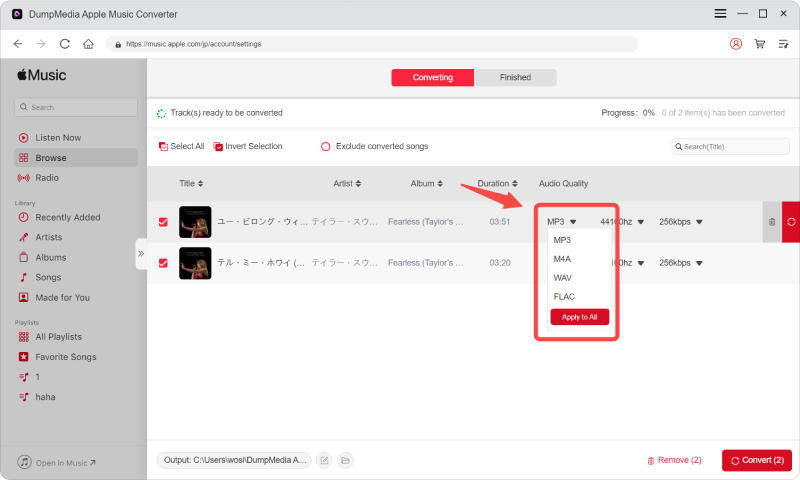
Stap 3. Selecteren MP3 (meest compatibel). Je kunt ook de bitrate of de samplefrequentie aanpassen. Kies voor de beste balans 320 kbps.
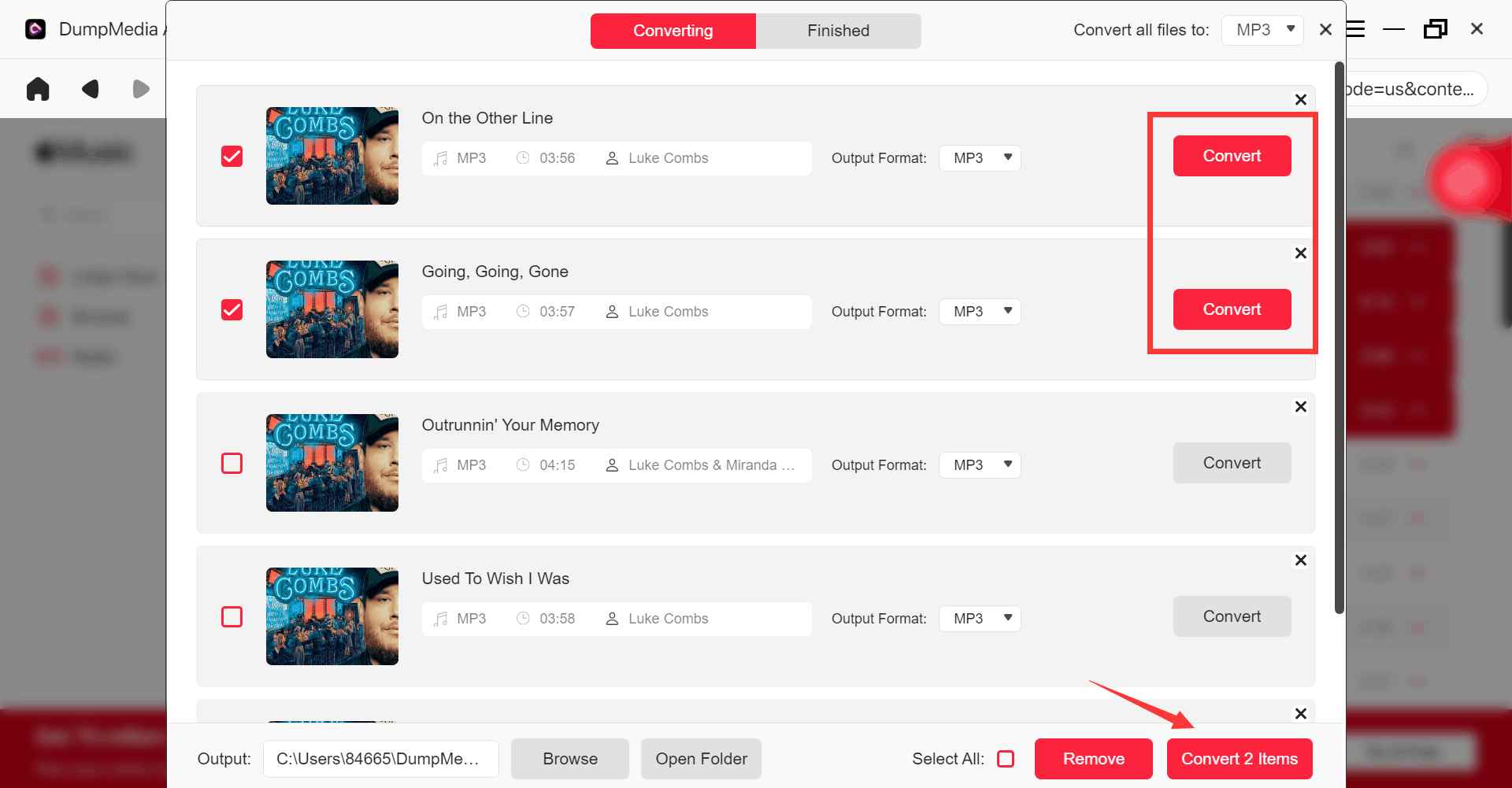
Stap 4. Zodra de instellingen zijn voltooid, kunnen gebruikers de conversie uitvoeren door op het pictogram 'Converteren' te klikken. DumpMedia zal Apple Music-nummers converteren naar MP3 Binnen enkele seconden dankzij de supersnelle snelheid.
Deel 5. Veelgestelde vragen
Is het mogelijk om de DRM van iTunes-films gratis te verwijderen?
Sommige oudere tools probeerden DRM van iTunes-films te verwijderen, maar veel gratis oplossingen werken niet meer betrouwbaar vanwege DRM-updates van Apple.
Waarom werken gratis DRM-verwijderingsprogramma's niet meer?
Apple werkt zijn DRM-systemen regelmatig bij, waardoor oudere tools incompatibel worden.
Wat zijn beveiligde M4V-bestanden?
Beveiligde M4V-bestanden zijn DRM-beveiligde iTunes-filmbestanden met afspeelbeperkingen.
Gebruikt Apple Music ook DRM?
Ja. Nummers op Apple Music kunnen ook afspeelbeperkingen bevatten die verband houden met DRM.
Kan ik Apple Music offline afspelen zonder beperkingen?
Veel gebruikers gebruiken DumpMedia Apple Music Converter voor flexibelere offline weergave.
Deel 6. Overzicht
Veel gebruikers die op zoek zijn naar manieren om gratis DRM van iTunes-films te verwijderen, proberen uiteindelijk afspeelbeperkingen, problemen met offline kijken en compatibiliteitsproblemen met apparaten op te lossen die worden veroorzaakt door DRM-beveiligde media. Hoewel gratis oplossingen voor het verwijderen van DRM van iTunes-films steeds onbetrouwbaarder zijn geworden, hebben DRM-beperkingen van het Apple-ecosysteem nog steeds invloed op veel vormen van digitale content.
Voor gebruikers die zich richten op offline luisteren met Apple Music en flexibele lokale weergave, DumpMedia Apple Music Converter biedt een handige oplossing voor het downloaden van muziek in standaard audioformaten, zodat deze offline op meerdere apparaten kan worden afgespeeld.
Gratis downloaden Gratis downloaden
*DumpMedia Deze functie werkt door Apple Music-nummers te decoderen en te downloaden naar DRM-vrije bestanden, waardoor je een schone, onbeperkte kopie van je bibliotheek krijgt voor elk apparaat. De functie omvat niet het verwijderen van DRM uit lokale audiobestanden.