


Spotify Svarar inte? Åtgärda det år 2026
Många användare stöter på det frustrerande problemet där Spotify svarar inte när du försöker spela musik, öppna spellistor eller använda offline-läge. Ibland Spotify app fryser helt, kraschar oväntat eller slutar fungera under uppspelning. Spotify appproblem är extremt vanliga. I den här guiden kommer vi att förklara varför Spotify slutar plötsligt fungera, hur man åtgärdar vanliga Spotify appproblem och hur man får en mer stabil musikuppspelning offline.
Innehållsguide Del 1. Varför är Spotify Svarar inte applikationen?Del 2. Hur man fixar Spotify Svarar inte applikationen?Del 3. Bästa sättet att undvika Spotify UppspelningsproblemDel 4. Vanliga frågorDel 5. Slutsats
Del 1. Varför är Spotify Svarar inte applikationen?
Det finns många skäl till varför Spotify svarar inte under musikuppspelning eller appanvändning.
Dålig internetanslutning
Spotify förlitar sig starkt på stabil internetåtkomst för streaming och kontoverifiering. Svaga nätverksanslutningar kan orsaka Spotify att frysa eller sluta svara.
skadad Spotify Cache
Tillfälliga filer lagrade inuti Spotify kan bli skadade med tiden, vilket orsakar appkrascher och uppspelningsproblem.
Föråldrad Spotify Applikation
Äldre Spotify versioner kan innehålla buggar som utlöser "Spotify svarar inte" felmeddelande.
Spotify Serverproblem
Ibland Spotify Serveravbrott påverkar användarnas uppspelning och appens prestanda globalt.
Bakgrundsprogramkonflikter
Konflikter med antivirusprogram, brandväggsinställningar eller hårdvaruacceleration kan också orsaka Spotify att sluta svara.
Enhetskompatibilitetsproblem
Äldre operativsystem eller enheter som inte stöds kan ha svårt att köra den senaste versionen Spotify appen smidigt.
Dessa är några av de vanligaste orsakerna bakom "Spotify svarar inte" problemet.
Del 2. Hur man fixar Spotify Svarar inte applikationen?
If Spotify inte svarar på din enhet kan du prova följande lösningar.
Åtgärd 1. Starta om Spotify
Helt nära Spotify och öppna appen igen. Den här enkla lösningen löser ofta tillfälliga uppspelningsproblem.
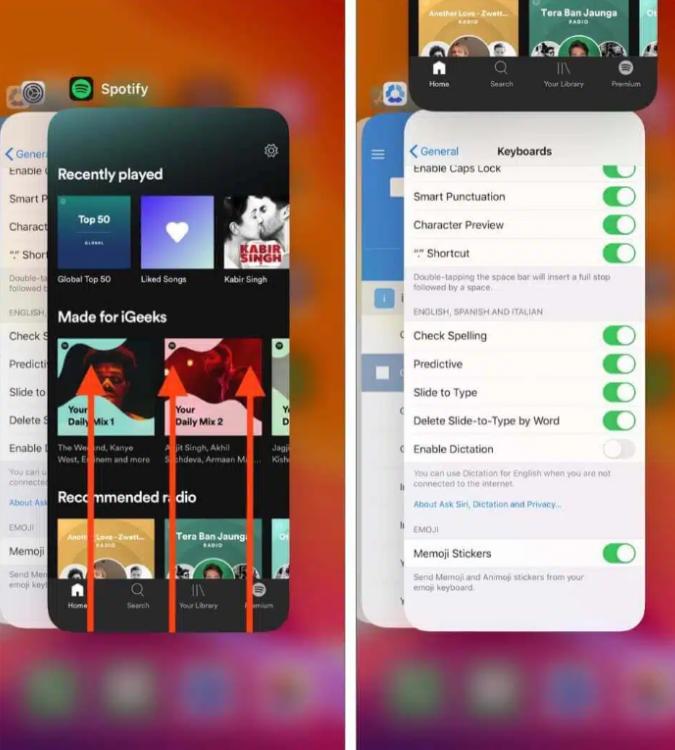
På iOS (iPhone/iPad): Svep uppåt från skärmens nederkant och pausa i mitten (eller dubbelklicka på hemknappen på äldre enheter). Hitta Spotify förhandsgranskningskortet och svep det helt uppåt och bort från skärmen.
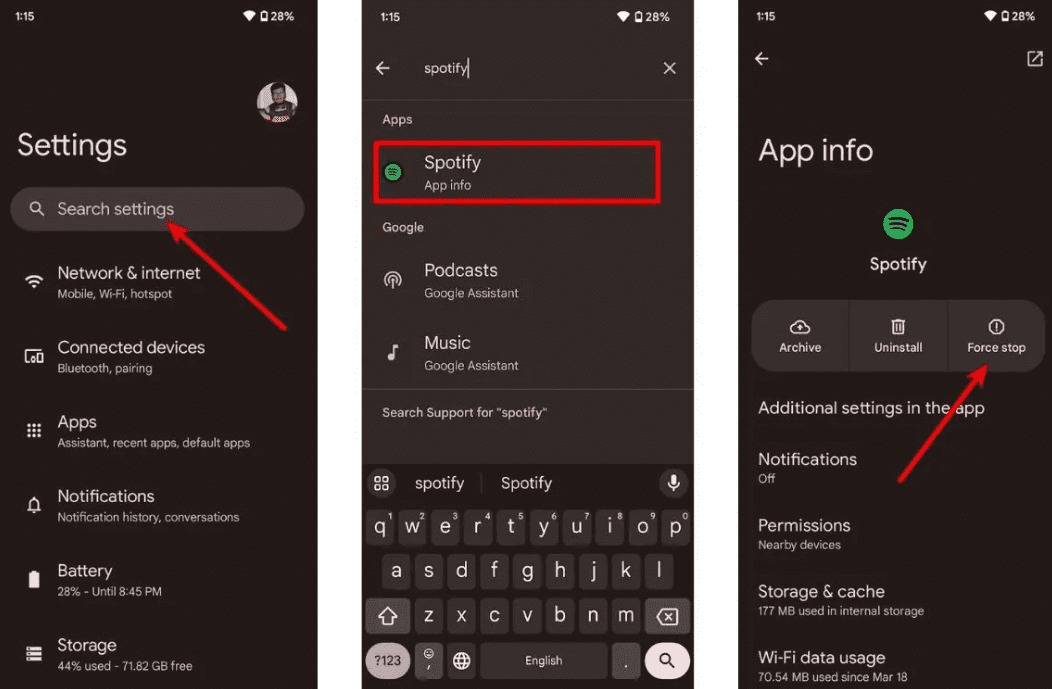
På Android: Gå till Inställningar > Appar > Spotify och tryck på Tvångsstopp. Detta avslutar alla hängande bakgrundsuppgifter. Öppna. Spotify från din applåda.
På macOS: Klicka Spotify i den övre menyraden och välj Avsluta Spotify, eller klicka helt enkelt på fönstret och tryck på Kommando (⌘) + Q.
On Windows (10/11): Klicka på Arkiv i det övre vänstra hörnet av Spotify fönstret och välj Avsluta (om du trycker på "X" i det övre högra hörnet minimeras det ofta bara till systemfältet istället för att det stängs).
Fix 2. Kontrollera din Internetanslutning
Växla mellan Wi-Fi och mobildata för att testa anslutningens stabilitet.
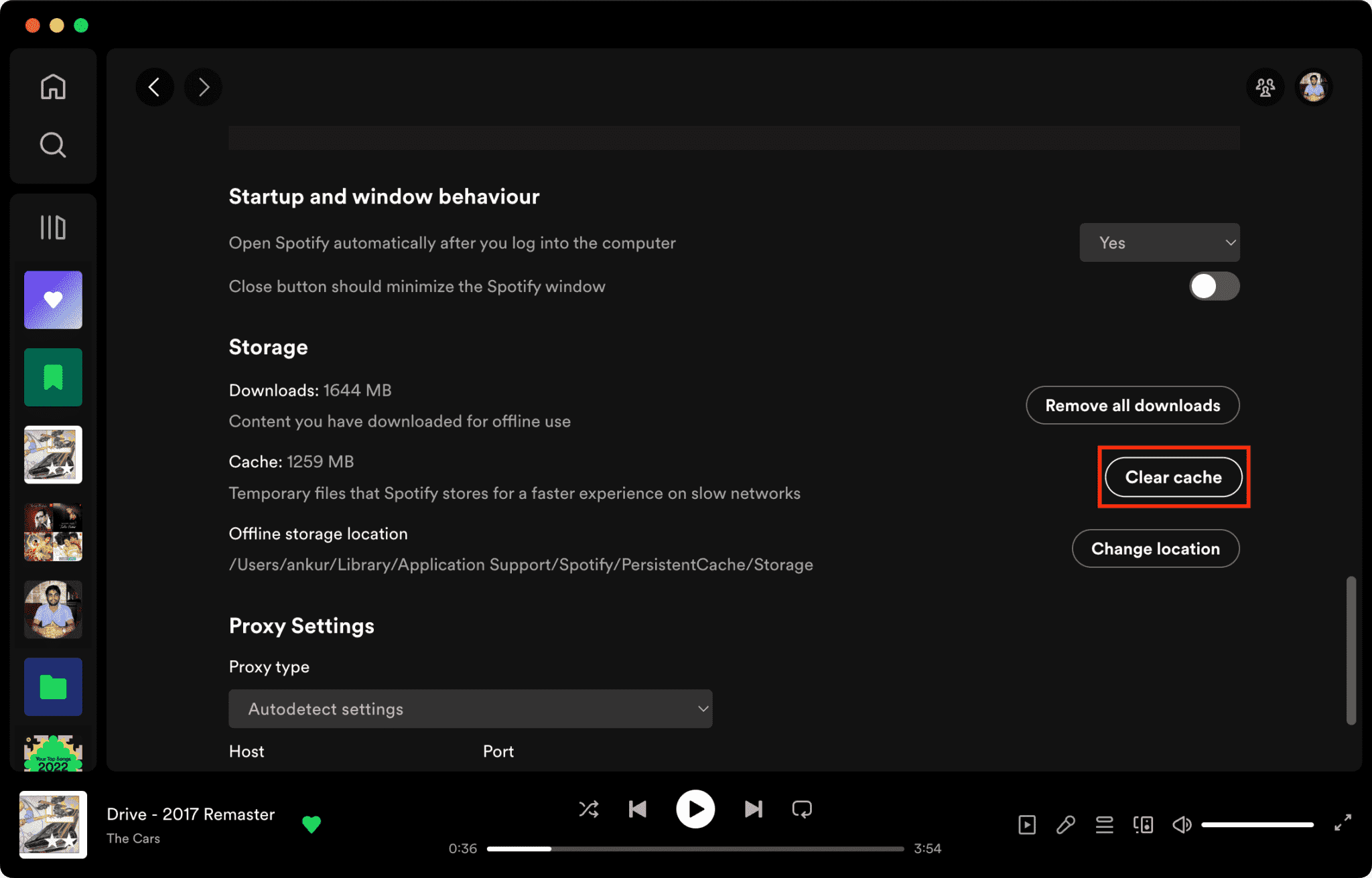
Åtgärda 3. Rensa Spotify Cache
Korrupta cachefiler är en viktig anledning till varför Spotify svarar inte.
Hur man rensar Spotify Cache på Mac/Windows/iPhone/Android >>>>
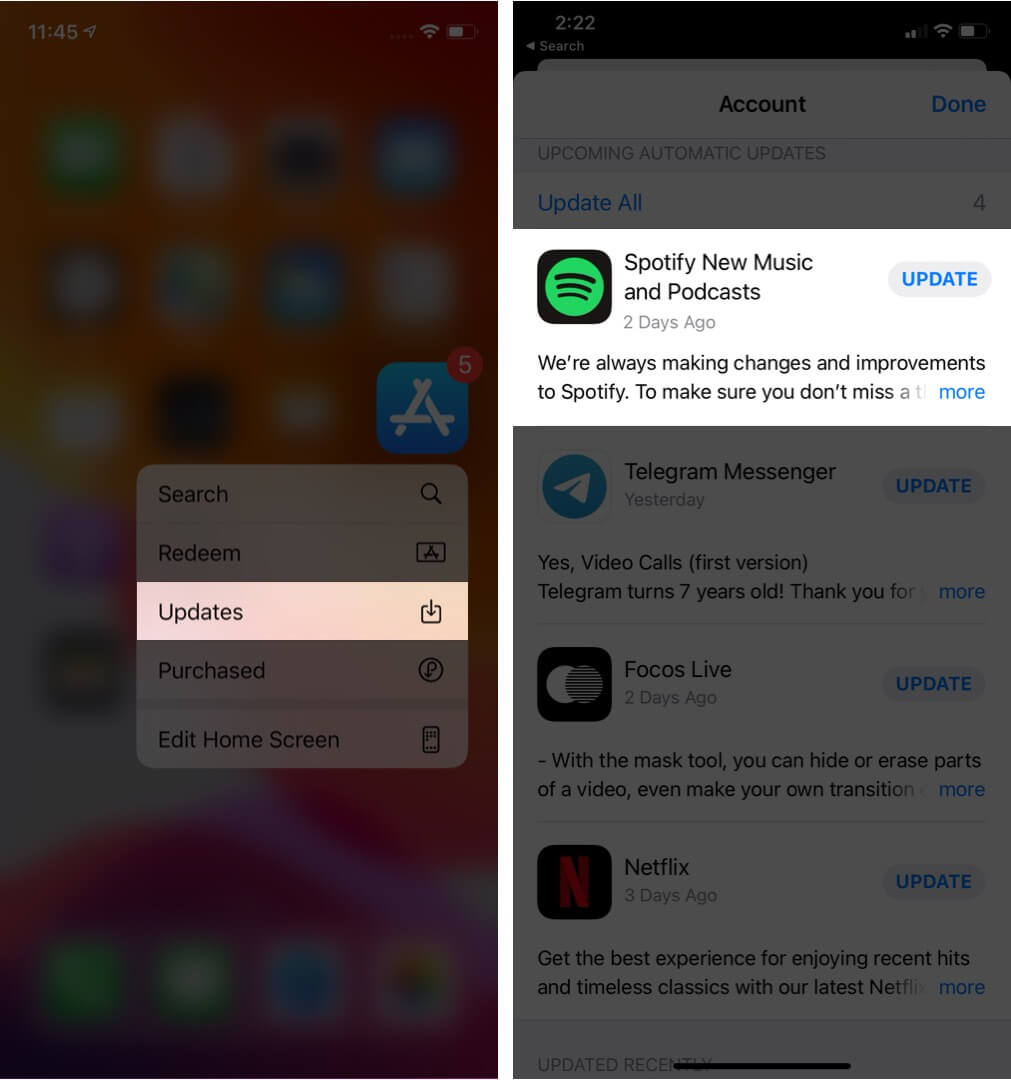
Fix 4. Uppdatera Spotify Applikation
Installerar det senaste Spotify versionen kan åtgärda kända programvarufel.
Åtgärd 5. Starta om enheten
Att starta om datorn eller telefonen kan uppdatera systemresurserna.
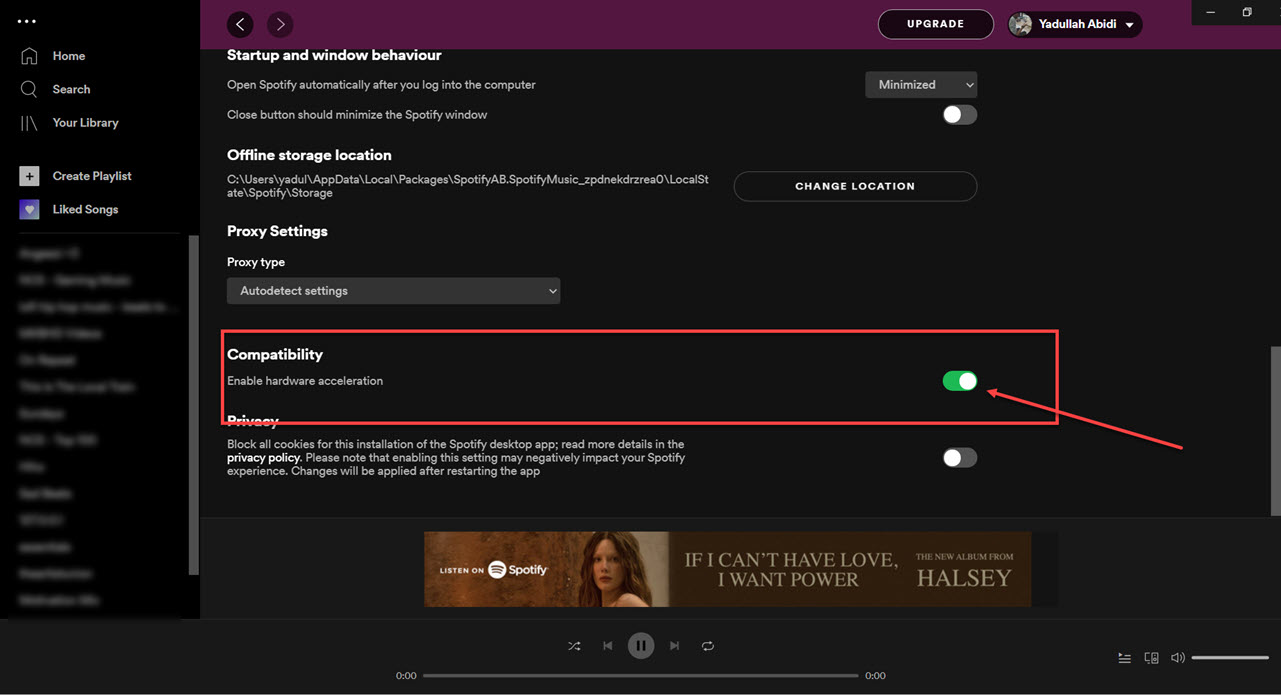
Fix 6. Inaktivera hårdvaruacceleration
Du kan inaktivera hårdvaruacceleration. Detta åtgärdar ibland problem med frysningar.
Fixa 7. Kontrollera Spotify Serverstatus
Välgörenhet Spotify Avbrott påverkar ibland uppspelnings- och inloggningstjänster.
Del 3. Bästa sättet att undvika Spotify Uppspelningsproblem
Många användare antar att de har laddats ner Spotify Låtar fungerar alltid offline, men nedladdade låtar är fortfarande skyddade av DRM, vilket innebär att musik bara fungerar i streamingappen. Nedladdningar kan inte överföras fritt. Om du ofta stöter på "Spotify "svarar inte"-problemet, ett populärt verktyg är DumpMedia Spotify Music ConverterDen här programvaran låter användare konvertera Spotify musik till lokala ljudformat för mer flexibel offline-uppspelning. Även om Spotify appen inte fungerar på din enhet kan du lek Spotify låtar offline på en annan musikspelare omedelbart.
Gratis nedladdning Gratis nedladdning
🏆Viktiga funktioner hos DumpMedia Spotify Music Converter
- Ladda ner Spotify musik till MP3, WAV, FLAC och AAC
- ta bort Spotify DRM-skydd*
- Behåll originalljudkvaliteten
- Ladda ner spellistor och album i batch
- Snabb omvandlingshastighet
- Bevara låtmetadata och ID3-taggar
- Stöd för offlineuppspelning på alla enheter
För användare som är frustrerade över Spotify appinstabilitet, lokal musikuppspelning känns ofta mycket mer pålitlig.
Konvertera Spotify till MP3 Steg för steg
Steg 1. Ladda ned och installera DumpMedia Spotify Music Converter på din Mac/PC. Starta den så ser du gränssnittet. Använd din Spotify Premium/gratis konto för att logga in.
Gratis nedladdning Gratis nedladdning
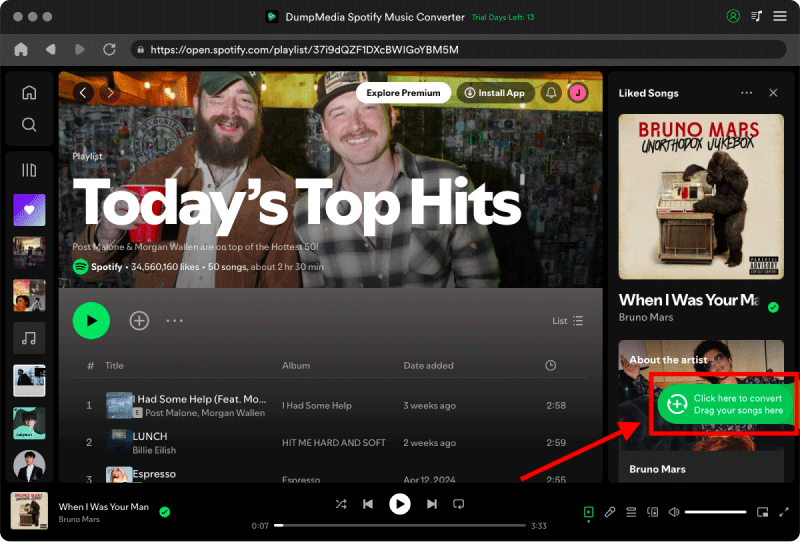
Steg 2. Hitta spellistan, albumet eller den specifika låten du vill konvertera. Du kan dra en enskild låt till "+"-ikonen på höger sida av skärmen. Alternativt kan du öppna en hel spellista/album och klicka på ikonen "Lägg till i konverter" för att ladda hela listan i konverteraren.
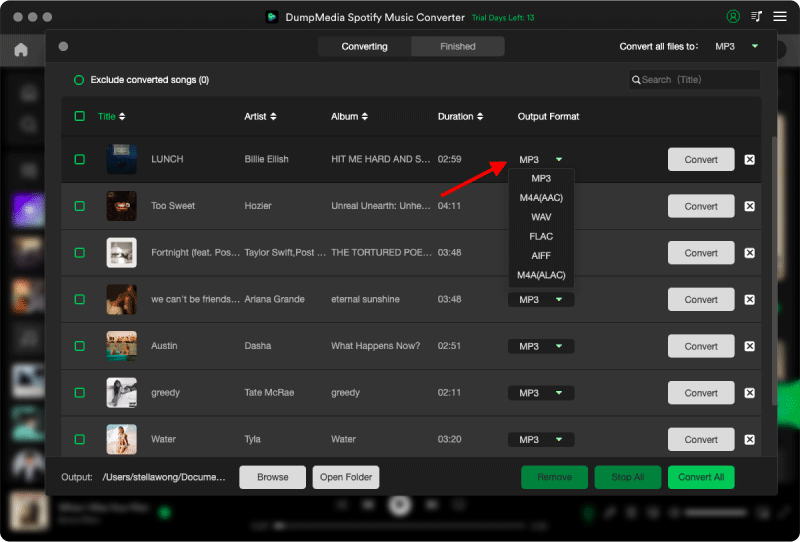
Steg 3. Välja MP3 (mest kompatibel). Du kan också ändra bithastighet eller samplingshastighet. För bästa balans, välj 320 kbps.
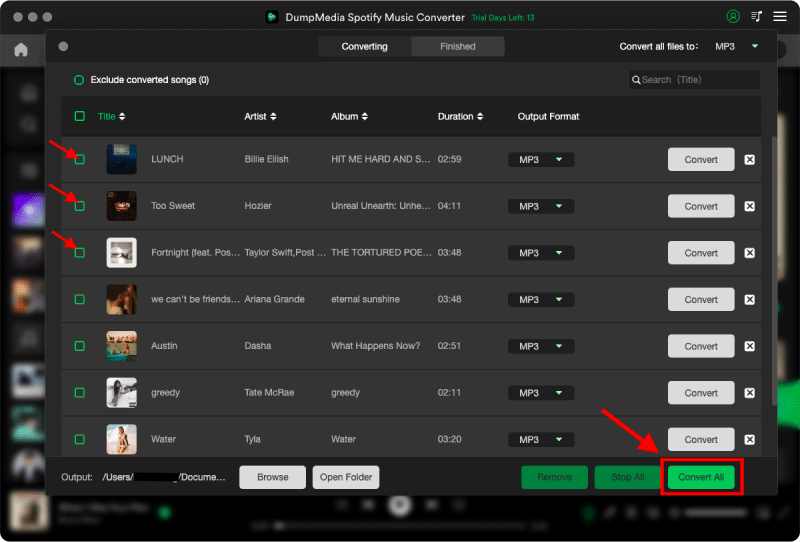
Steg 4. När inställningarna är klara kan användarna genomföra konverteringen genom att trycka på ikonen "Konvertera". DumpMedia kommer att ladda ner Spotify låtar till MP3 inom några sekunder med sin supersnabba hastighet.
Del 4. Vanliga frågor
Varför är Spotify svarar inte?
Spotify kan sluta svara på grund av internetproblem, skadade cachefiler, föråldrad programvara eller serverproblem.
Varför gör Spotify fortsätta frysa?
Spotify Frysningsproblem är ofta relaterade till cache-korruption eller konflikter med hårdvaruacceleration.
Varför är Spotify kraschar på min telefon?
Mobil Spotify Krascher kan orsakas av lågt lagringsutrymme, föråldrade appversioner eller programvarukonflikter.
Varför är Spotify fungerar inte offline-läget?
Offlineuppspelning beror fortfarande på Spotify auktorisering och appstabilitet.
Is DumpMedia Spotify Music Converter säker?
Ja. Den är utformad för Spotify musikkonvertering och lokal uppspelningshantering.
Obs: Streamingplattformar har sina egna regler och övervakningssystem. Som ett tredjepartsverktyg, DumpMedia Spotify Music Converter är också föremål för deras begränsningar, vilket kan påverka användningen i vissa fall. Spotify kan vidta åtgärder om den upptäcker aktivitet som bryter mot dess användarvillkor; detta är helt och hållet på Spotifys gottfinnande.
Del 5. Slutsats
Den "Spotify "svarar inte"-problemet kan orsakas av instabilitet i internet, skadade cachefiler, föråldrad programvara eller Spotify appproblem. Även om många tillfälliga lösningar kan hjälpa till att återställa uppspelningen, Spotify strömning är fortfarande starkt beroende av appens stabilitet och onlineverifiering. För användare som vill ha mer stabil lyssning offline, DumpMedia Spotify Music Converter erbjuder ett praktiskt sätt att konvertera Spotify låtar till lokala MP3 filer för flexibel uppspelning på olika enheter.
Gratis nedladdning Gratis nedladdning
*DumpMedia fungerar genom att dekryptera och ladda ner Spotify låtar till DRM-fria filer, vilket gör att du får en ren, obegränsad kopia av ditt bibliotek för vilken enhet som helst. Dess funktionalitet inkluderar inte DRM-borttagning av lokala ljudfiler.