


Hur man rippa en ljudbok-CD till MP3 (Gratis metoder och bättre alternativ)
Rippa en ljudbok-CD till MP3 är fortfarande möjligt, men det är inte längre det enklaste sättet att njuta av ljudböcker. Många användare idag har att göra med flera skivor, saknade metadata och föråldrad hårdvara bara för att konvertera sina ljudbokssamlingar. I den här guiden lär du dig hur du rippar ljudboks-CD till MP3 steg för steg, tillsammans med de vanliga problem du kan stöta på. Ännu viktigare är att vi visar dig ett bättre, modernare alternativ som låter dig njuta av ljudböcker utan att behöva CD-skivor alls.
Innehållsguide Del 1. Kan du rippa en ljudboks-CD till MP3?Del 2. Rippa en ljudboks-CD till MP3 Använda iTunes/Apple MusicDel 3. Rippa en ljudboks-CD till MP3 Använda Windows mediaspelareDel 4. Vanliga problem vid rippning av ljudboks-CD-skivorDel 5. Hur man laddar ner ljudböcker som MP3 (Bästa lösningen)Del 6. Slutsats
Del 1. Kan du rippa en ljudboks-CD till MP3?
Ja, du kan fortfarande rippa ljudbok-CD till MP3 filer med hjälp av standardprogramvara för media. Du behöver dock en dator med en CD/DVD-enhet, CD-rippningsprogram och tillräckligt med tid för att bearbeta flera skivor.
Även om själva processen inte har förändrats mycket, har tekniken kring den blivit föråldrad. Många moderna bärbara datorer har inte längre skivenheter, vilket gör CD-baserade arbetsflöden mindre praktiska än tidigare.
Del 2. Rippa en ljudboks-CD till MP3 Använda iTunes/Apple Music
Hur man ripper en ljudbok-CD till en MP3Här är de bästa sätten att göra det på Windows och Mac.
Steg 1. Öppet iTunes/Musik > Inställningar (eller Inställningar) > Allmänt > Importinställningar. Ställ in Importera med till MP3 Kodare. Kontrollera: "Använd felkorrigering vid läsning av ljud-CD-skivor" (hjälper med repiga biblioteks-CD-skivor).
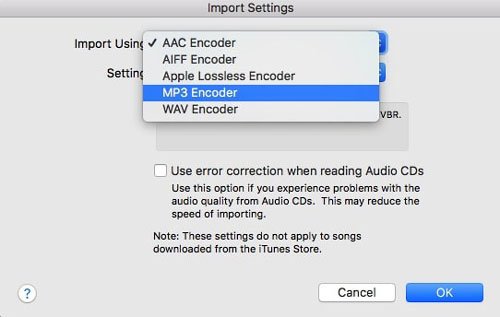
Steg 2. Sätt i CD-skivan. När listan med spår visas markerar du alla spår (Ctrl+A eller Cmd+A).
Steg 3. Klicka på Alternativ (tre punkter) eller kugghjulsikonen och välj Koppla till CD-spår.
Steg 4. Klicka på Importera CD. Upprepa för varje skiva. Programvaran konverterar varje spår till MP3 format.
Rippa en ljudbok-CD till MP3 Att använda iTunes är enkelt, men specifikt för ljudböcker vill du vara uppmärksam på kapitelorganisation och filsammankoppling så att du inte hamnar med 100 små filer för en enda bok.
Del 3. Rippa en ljudboks-CD till MP3 Använda Windows mediaspelare
Om du är på Windows 10 eller 11, kan du använda Windows Media Player Legacy för att rippa ljudbok-CD till MP3.
Steg 1. Öppet Windows Media Player. Gå till Rippningsinställningar > Format och välj MP3.
Steg 2. Gå till Rippinställningar > Ljudkvalitet och välj 192 Kbps.
Steg 3. Sätt i din CD och klicka på Rippa CD.
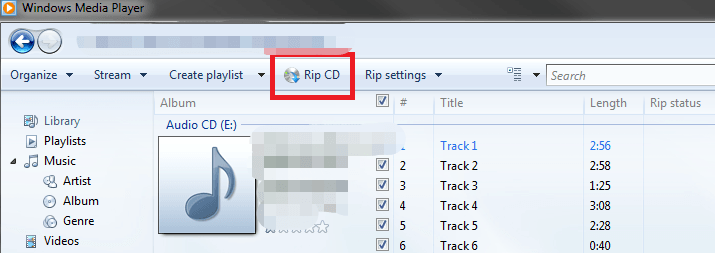
Detta är en av de enklaste gratismetoderna som finns. Men, Windows Media Player har ingen funktion för att "Lägga ihop spår", så du får flera filer per CD. Det kräver manuell filhantering.
Del 4. Vanliga problem vid rippning av ljudboks-CD-skivor
Även om rippning av CD-skivor är ett pålitligt sätt att digitalisera ditt bibliotek, presenterar processen ofta flera frustrerande hinder:
- Hög tidsåtgång: Ljudböcker sträcker sig ofta över 10 skivor eller mer, vilket förvandlar en enkel uppgift till en långsam, repetitiv syssla.
- Fragmenterad utdata: Många rippningsverktyg exporterar varje spår som en separat fil, vilket ger dig hundratals små klipp istället för en sömlös bok.
- Metadatabrister: Automatiserade databaser misslyckas ofta med att känna igen äldre eller nischade ljudböcker, vilket tvingar dig att manuellt mata in titlar, författare och kapitelmarkörer.
- Brist på hårdvara: De flesta moderna bärbara och stationära datorer har inte längre interna optiska enheter, vilket kräver den extra kostnad och det röriga som en extern CD-enhet medför.
Del 5. Hur man laddar ner ljudböcker som MP3 (Bästa lösningen)
På grund av begränsningar i uppspelning överger många användare CD-skivor och väljer istället digitala ljudboksplattformar. Digitala ljudböcker erbjuder omedelbar åtkomst (inga fysiska skivor) och kompatibilitet med flera enheter. Det finns dock en utmaning: de flesta plattformar (som Audible) använder DRM-skydd, vilket begränsar hur och var du kan spela upp dina ljudböcker.
Om du vill ha flexibiliteten hos MP3 utan att behöva hantera CD-skivor är det mest effektiva tillvägagångssättet att konvertera digitala ljudböcker till MP3 format. Det är här DumpMedia Hörbar omvandlare blir användbar.
Gratis nedladdning Gratis nedladdning
Varför välja? DumpMedia Audible-konverterare?
- ✅ Ta bort DRM-skydd* Det här verktyget tar bort DRM, vilket gör att du får full kontroll över dina filer.
- ✅ Konvertera Audible till MP3 Lätt: Du kan snabbt ladda ner Audible-böcker till MP3 och andra format som M4A eller FLAC.
- ✅ Höghastighetsomvandling: Konvertera hela ljudböcker på några minuter.
- ✅ Förlustfri kvalitet: Ingen kvalitetsförlust under konverteringen.
- ✅ Fungerar på flera enheter: Spela dina ljudböcker offline var som helst efter konverteringen.
Istället för att rippa CD-skivor kan du bygga ett helt digitalt ljudboksbibliotek som fungerar på vilken enhet som helst.
Så här använder du DumpMedia Audible Converter (En komplett guide) >>>
Del 6. Slutsats
Rippa ljudboks-cd-skivor till MP3 är fortfarande möjligt år 2026, men det är alltmer föråldrat och ineffektivt. Medan verktyg som iTunes och Windows Media Player kan få jobbet gjort, de kräver tid, ansträngning och hårdvara som många användare inte längre har.
Om du letar efter en snabbare och mer flexibel lösning, byter du till digitala ljudböcker och använder DumpMedia Audible Converter är det smartare valet. Inget behov av CD-enheter, snabbare bearbetning (inget skivbyte) och äkta offline-lyssning. DumpMedia en modern ersättning för traditionella CD-arbetsflöden.
Gratis nedladdning Gratis nedladdning
*DumpMedia fungerar genom att dekryptera och ladda ner dina ljudböcker till DRM-fria filer, vilket gör att du får en ren, obegränsad kopia av ditt bibliotek för vilken enhet som helst.

30% rabatt >>>