


PC Audible-appen: Hur man laddar ner Audible på Windows
Letar efter en Audible-app för PC för att lyssna på ljudböcker på en Windator? Du är inte ensam. Många användare föredrar att använda en dator för längre lyssningssessioner, bättre ljudkontroll och multitasking. Den goda nyheten är att Audible stöder uppspelning från datorn, men inte på det sätt du kanske förväntar dig. Även om du kan använda Audible på en dator, påverkar vissa begränsningar flexibiliteten, filåtkomst och offline-lyssning. I den här guiden lär du dig hur du laddar ner och använder Audible-appen på datorn, tillsammans med ett smartare sätt att njuta av dina ljudböcker utan begränsningar.
Innehållsguide Del 1. Finns det en Audible-app för PC? Del 2. Hur man använder Audible på PC? Del 3. Begränsningar med Audible-appen på PC Del 4. Bästa sättet att lyssna på Audible på PC utan begränsningar Del 5. Vanliga frågor Del 6. Sammanfattning
Del 1. Finns det en Audible-app för PC?
Ja, men med några viktiga detaljer. Till skillnad från mobila enheter finns det ingen fullfjädrad fristående funktion Ljud app för alla Windows-användare. Istället har du två huvudalternativ:
1. Audible Web Player
- Tillgänglig via din webbläsare
- Ingen installation krävs
- Fungerar på vilken dator som helst
2. Audible-appen (begränsad WinDows-stöd)
- Endast tillgängligt i vissa miljöer (t.ex. Windows Store-versioner)
- Mindre vanligt förekommande idag
För de flesta användare är webbspelaren det primära sättet att använda Audible på PC.
Del 2. Hur man använder Audible på PC?
Från och med nu, den dedikerade Audible-appen för Windows har utgått. Det är dock fortfarande väldigt enkelt att använda Audible på din dator, du använder bara din webbläsare eller ett litet synkroniseringsverktyg. Här är en steg-för-steg-guide för att lyssna på din dator.
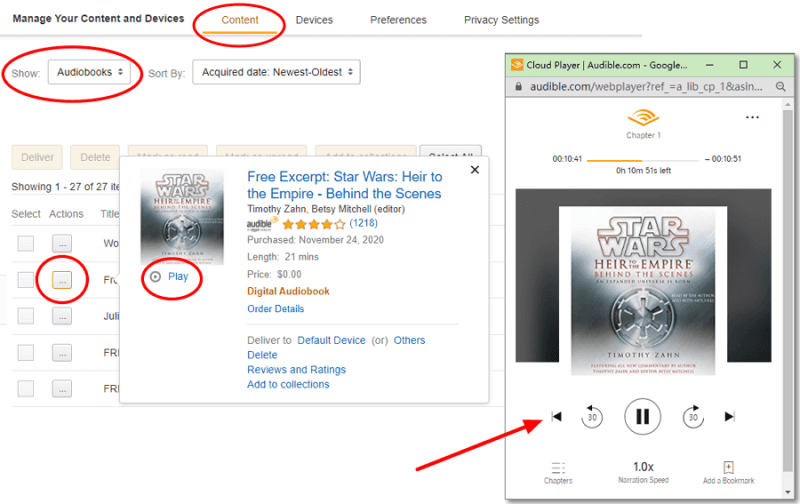
Steg 1. Öppna Audible.com (eller din regionala webbplats som .ca eller .co.uk) och logga in.
Steg 2. Klicka på Bibliotek i den övre navigeringsfältet.
Steg 3. Hitta boken du vill lyssna på och klicka på knappen Lyssna nu.
Steg 4. Ett separat fönster för "Cloud Player" dyker upp. Här kan du justera uppläsningshastigheten, hoppa över kapitel och lägga till bokmärken.
Snabba felsökningstips
- Popup-blockerare: Om Cloud Player inte öppnas när du klickar på "Lyssna nu" kontrollerar du i webbläsarens adressfält om det finns en ikon för "Popup-fönster blockerade" och väljer "Tillåt alltid".
- Ljudkvalitet: I Cloud Player-inställningarna (kugghjulsikonen) kan du växla mellan "Standard" och "Hög" kvalitet om din internetanslutning är stabil.
Del 3. Begränsningar med Audible-appen på PC
Även om PC Audible-appen (eller webbspelaren) fungerar, har den flera begränsningar:
1. Ingen verklig filåtkomst: Du äger inte ljudboksfilerna, du streamar eller får åtkomst till dem i Audibles system.
2. DRM-skydd: Audible-filer är låsta i AAX-format, vilket innebär:
- Kan inte spelas upp på de flesta mediaspelare
- Kan inte överföras fritt
- Begränsat till auktoriserade appar
3. Begränsad offline-flexibilitet: Offline-uppspelning är inte alltid enkelt på PC jämfört med mobila enheter.
4. Enhetsbegränsningar: Du kan inte enkelt flytta ljudböcker till MP3 spelare, smartklockor eller bilsystem.
Del 4. Bästa sättet att lyssna på Audible på PC utan gränser
Om du vill ha full kontroll över dina ljudböcker, till exempel spela upp dem på vilken enhet som helst, behålla dem permanent eller använda din föredragna mediaspelare, behöver du en annan metod. Istället för att enbart förlita sig på Audible-appen väljer många användare att konvertera Audible-böcker till standardformat som MP3Detta tar bort begränsningar och ger dig fullständig flexibilitet. För att göra detta effektivt kan du använda DumpMedia Hörbar omvandlare.
Gratis nedladdning Gratis nedladdning
Varför välja? DumpMedia Audible-konverterare?
- ✅ Ta bort DRM-skydd* Det här verktyget tar bort DRM, vilket gör att du får full kontroll över dina filer.
- ✅ Konvertera Audible till MP3 Lätt: Du kan snabbt ladda ner hörbara böcker till MP3 och andra format som M4A eller FLAC.
- ✅ Höghastighetsomvandling: Konvertera hela ljudböcker på några minuter.
- ✅ Förlustfri kvalitet: Ingen kvalitetsförlust under konverteringen.
- ✅ Fungerar på flera enheter: Spela dina ljudböcker offline var som helst efter konverteringen.
Så här använder du DumpMedia Hörbar omvandlare
Steg 1. Öppna programvaran på din dator. Den fungerar med båda Windows och Mac. Gränssnittet är användarvänligt, vilket gör det enkelt för nybörjare.
Gratis nedladdning Gratis nedladdning
Steg 2. Öppna den inbyggda Audible-webbspelaren inuti DumpMedia och logga in med ditt Audible-konto. Bläddra bland Audible och dra boken du vill ladda ner till konverteraren.
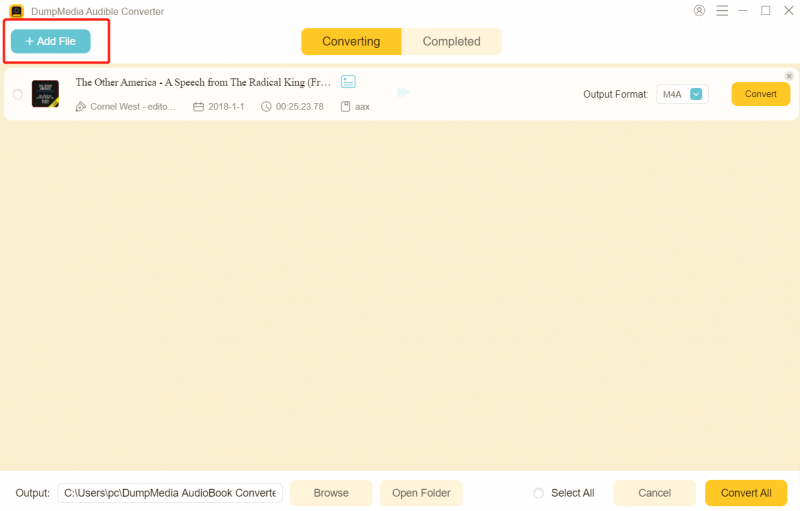
Steg 3. Välj det format du vill ladda ner i inställningspanelen.

Steg 4. Det sista steget är att trycka på knappen "Konvertera" för att starta konverteringsprocessen.

Del 5. Vanliga frågor
1. Kan jag ladda ner Audible-appen på PC?
Ja, men inte på samma sätt som på mobila enheter. De flesta användare använder Audible på datorn via webbspelaren istället för en dedikerad app. Vissa WinDows-versioner kan ha stöd för en app, men tillgänglighet och funktioner är begränsade.
2. Varför kan jag inte spela upp Audible-filer på andra mediaspelare?
Audible-filer är i AAX-format och skyddas av DRM. Det betyder att de bara kan spelas upp på auktoriserade plattformar som Audible-appen eller webbspelaren. Vanliga mediaspelare stöder inte detta format.
3. Kan jag lyssna på Audible offline på datorn?
Offline-lyssning på PC är begränsad jämfört med mobila enheter. I de flesta fall måste du hålla dig inom Audible-plattformen, och offline-åtkomst kanske inte alltid är tillgänglig beroende på din konfiguration.
4. Hur överför jag Audible-böcker till andra enheter?
Som standard kan du inte överföra Audible-böcker fritt på grund av DRM-begränsningar. De är endast knutna till ditt konto och appar som stöds. Om du vill flytta ljudböcker till enheter som MP3 spelare, smartklockor eller bilsystem, måste du konvertera dem till ett kompatibelt format som t.ex. MP3.
5. Är det lagligt att konvertera Audible-böcker till MP3?
Detta beror på dina lokala upphovsrättslagar. I många regioner är det tillåtet att konvertera innehåll för personligt bruk, men det är inte tillåtet att dela eller distribuera konverterade filer. Kontrollera alltid dina lokala bestämmelser innan du fortsätter.
6. Behöver jag fortfarande Audible-appen efter att jag har konverterat filer?
Nej. När dina Audible-böcker har konverterats till MP3 eller andra standardformat kan du spela upp dem på vilken mediaspelare som helst utan att använda Audible-appen.
Del 6. Sammanfattning
Att använda en Audible-app för PC är ett bekvämt sätt att komma åt dina ljudböcker, särskilt via webbspelaren. Den har dock begränsningar som begränsar hur du använder och hanterar dina filer. Om du letar efter en mer flexibel lösning, en som låter dig spela upp Audible-böcker var som helst, när som helst, utan begränsningar, och konvertera dem till MP3 är det bästa alternativet. Ta full kontroll över ditt ljudboksbibliotek med DumpMedia Audible Converter och njut av obegränsad lyssning på din dator och andra enheter.
Gratis nedladdning Gratis nedladdning
*DumpMedia fungerar genom att dekryptera och ladda ner dina ljudböcker till DRM-fria filer, vilket gör att du får en ren, obegränsad kopia av ditt bibliotek för vilken enhet som helst.