


Hur laddar man ner böcker i Audible-appen?
Om du undrar hur du laddar ner böcker med Audible-appen har du kommit till rätt ställe. Audible låter dig ladda ner köpta ljudböcker för offline-lyssning, men det finns begränsningar som de flesta användare förbiser. I den här guiden visar vi dig exakt hur du laddar ner dina ljudböcker på Audible och hur du säkerställer permanent åtkomst till dem, även på olika enheter.
Innehållsguide Del 1. Hur man laddar ner ljudböcker från Audible-appen? Del 2. Hur man sparar Audible-böcker permanent och lyssnar var som helst Del 3. Vanliga frågor om nedladdning av Audible-böcker Del 4. Sammanfattning
Del 1. Hur laddar man ner ljudböcker från Audible-appen?
Hur laddar man ner böcker med Audible-appen? Det är en enkel process, men stegen varierar något beroende på om du använder en iPhone eller en Android-enhet. Här är det mest direkta sättet att göra dina ljudböcker redo för offline-lyssning.
Steg 1. Se till att du är inloggad på ditt Amazon /Audible-konto.
Steg 2. Tryck på biblioteksikonen längst ner på skärmen. Hitta sedan titeln du vill ladda ner.
Steg 3. Tryck på nedåtpilen längst ner till höger på bokens omslag. När förloppscirkeln är klar försvinner nedåtpilen och boken är redo för uppspelning offline.
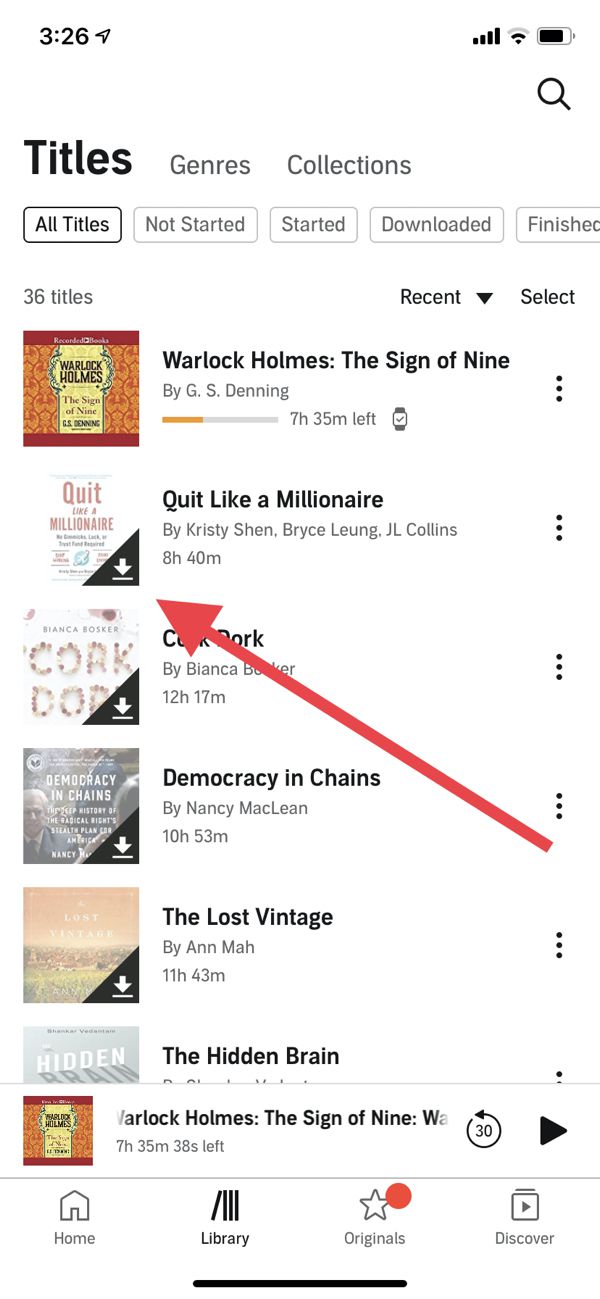
Även om detta svarar på hur man laddar ner böcker i Audible-appen, kom ihåg att nedladdade filer fortfarande är DRM-skyddade. Det betyder att du bara kan lyssna på dem i Audible-appen eller på auktoriserade enheter.
Del 2. Hur man permanent behåller hörbara böcker och lyssnar var som helst
Du kanske undrar: kan jag lyssna på Audible-böcker var som helst? Problemet är DRM. Att ladda ner böcker i Audible-appen tillåter bara offlineåtkomst inom appen, det låter dig inte överföra filer fritt till MP3 spelare, bilstereosystem eller andra enheter. Det är här DumpMedia Hörbar omvandlare kommer in
Varför välja? DumpMedia Audible-konverterare?
- ✅ Ta bort DRM-skydd* Det här verktyget tar bort DRM, vilket gör att du får full kontroll över dina filer.
- ✅ Konvertera Audible till MP3 Lätt: Du kan snabbt ladda ner hörbara böcker till MP3 och andra format som M4A eller FLAC.
- ✅ Höghastighetsomvandling: Konvertera hela ljudböcker på några minuter.
- ✅ Förlustfri kvalitet: Ingen kvalitetsförlust under konverteringen.
- ✅ Fungerar på flera enheter: Spela upp dina ljudböcker var som helst efter konvertering.
Gratis nedladdning Gratis nedladdning
Spara hörbara böcker permanent
Genom att använda DumpMedia, kan du helt kontrollera dina ljudböcker och lösa begränsningarna i Audible-appen. Detta är den mest pålitliga lösningen för alla som verkligen vill äga sitt innehåll. Om du är orolig för att förlora åtkomsten efter att du avslutat prenumerationen eller bytt enhet räcker det inte att bara ladda ner böcker i Audible-appen. Låt oss kolla in guiden för att ladda ner Audible-ljudböcker med DumpMedia.
Steg 1. Ladda ned och installera DumpMedia Audible Converter. PC- och Mac-versioner finns tillgängliga. Öppna DumpMediaoch gå sedan till fliken Audible.
Gratis nedladdning Gratis nedladdning
Steg 2. Välj de böcker du vill konvertera från ditt Audible-bibliotek.
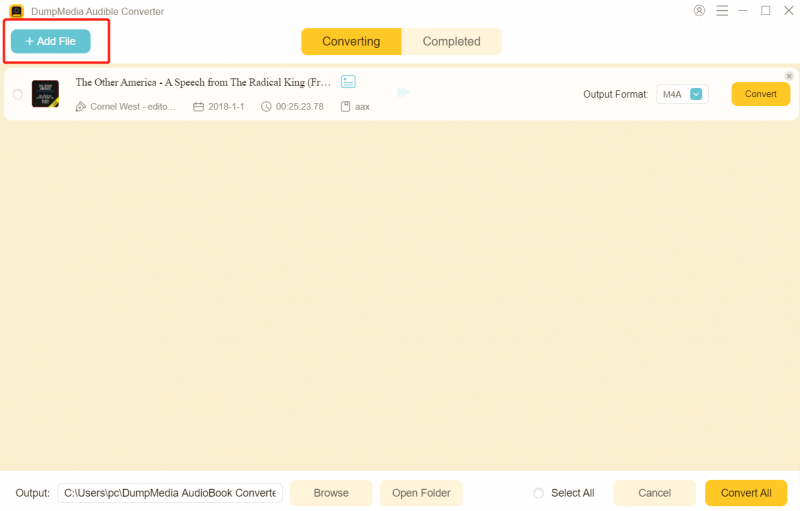
Steg 3. Välj utdatainställningar och börja konvertera.

Steg 4. Slutför konverteringen och visa utdatafilerna.

När de väl är konverterade kan du spela upp dina böcker när som helst, var som helst, utan några begränsningar. Den här metoden är det definitiva svaret på hur man laddar ner böcker i Audible-appen på ett sätt som garanterar permanent åtkomst.
Del 3. Vanliga frågor om nedladdning av ljudböcker
Kan jag ladda ner Audible-böcker som MP3?
Ja. Använder sig av DumpMedia Audible Converter, du kan konvertera nedladdade Audible-böcker till MP3.
Förlorar jag kvalitet när jag konverterar?
Nej. DumpMedia garanterar förlustfri kvalitet under konvertering.
Kan jag spela upp konverterade filer på alla enheter?
Ja. MP3 filer fungerar på telefoner, surfplattor, MP3 spelare, datorer och bilsystem.
Vad händer om jag säger upp min Audible-prenumeration?
Köpta böcker finns kvar i ditt bibliotek, men utan konvertering är åtkomsten begränsad till Audible-appen. DumpMedia säkerställer att du behåller böckerna permanent.
Del 4. Sammanfattning
Om ditt mål är att ladda ner böcker i Audible-appen och verkligen äga dem, räcker det inte att bara använda appen. DRM-begränsningar förhindrar full kontroll och begränsar uppspelning till auktoriserade enheter. För permanent åtkomst, offline-lyssning var som helst och flexibilitet, DumpMedia Audible Converter är den bästa lösningen. Låt inte DRM begränsa dina ljudböcker. Ta full kontroll idag och se till att du aldrig förlorar åtkomsten till dina köpta böcker.
Gratis nedladdning Gratis nedladdning
*DumpMedia fungerar genom att dekryptera och ladda ner dina ljudböcker till DRM-fria filer, vilket gör att du får en ren, obegränsad kopia av ditt bibliotek för vilken enhet som helst.