


Hur man lägger till sin egen musik i Apple Music (guide 2026)
Många användare vill importera sin personliga musiksamling, till exempel MP3 filer, nedladdade spår eller gamla CD-skivor, till äpple Music för enklare åtkomst mellan olika enheter. Även om Apple Music tillåter dig att lägga till lokala filer är processen inte alltid enkel. Du kan stöta på synkroniseringsproblem, format som inte stöds eller begränsningar när du försöker hantera din musik senare. I den här guiden lär du dig hur du lägger till din egen musik i Apple Music steg för steg och hur du behåller full kontroll över ditt musikbibliotek.
Innehållsguide Del 1: Varför du inte alltid kan lägga till musik i Apple MusicDel 2: Lägg till din egen musik till Apple Music på WinDows (iTunes)Del 3: Lägg till din egen musik i Apple Music på MacDel 4: Vad händer efter att du har lagt till musik i Apple Music?Del 5: Bästa lösningen för att hantera din musik frittDel 6: Vanliga frågorDel 7: Slutsats
Del 1: Varför du inte alltid kan lägga till musik i Apple Music
Innan vi går in på hur man lägger till sin egen musik i Apple Music är det viktigt att förstå varför processen ibland misslyckas.
Vanliga problem inkluderar:
- Filformat som inte stöds (Apple Music föredrar MP3, AAC, ALAC)
- Synkroniseringsfel för iCloud-musikbibliotek
- Duplicerade eller saknade spår efter synkronisering
- Problem med filstorlek eller metadata
Även om du lyckas lägga till din egen musik i Apple Music kan det fortfarande vara begränsande att hantera dessa filer senare.
Del 2: Lägg till din egen musik till Apple Music på WinDows (iTunes)
Hur lägger man till sin egen musik i Apple Music? Om man använder en Windows PC behöver du iTunes för att lägga till din musik.
Följ stegen:
- Öppna iTunes och gå till Arkiv > Lägg till fil i biblioteket
- Välj de musikfiler du vill importera
- Klicka Öppet för att lägga till dem i ditt bibliotek
- Möjliggöra Synkronisera biblioteket i inställningar
- Vänta tills din musik har laddats upp till iCloud
När det är klart bör dina låtar visas på alla enheter som använder samma Apple-ID.
Del 3: Lägg till din egen musik i Apple Music på Mac
På macOS (Catalina eller senare) ersätts iTunes av Apple Music-appen. Så här lägger du till din egen musik i Apple Music på Mac.
- Öppna Apple Music-appen
- Dra och släpp dina musikfiler till biblioteket
- Gå till Musik > Inställningar > Allmänt
- Möjliggöra Synkronisera biblioteket
- Vänta tills synkroniseringen är klar
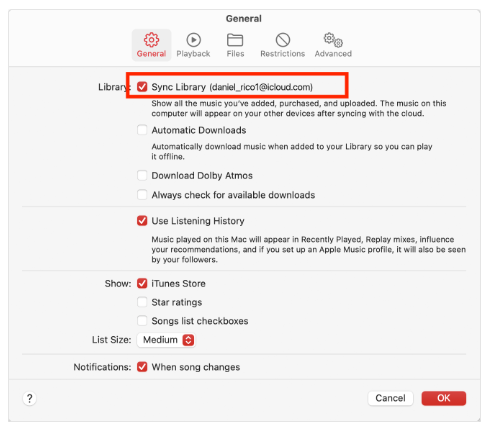
Detta är det enklaste sättet att lägga till din egen musik i Apple Music på Mac.
Del 4: Vad händer efter att du har lagt till musik i Apple Music?
När du har lärt dig hur du lägger till din egen musik i Apple Music lagras dina filer i ditt iCloud-musikbibliotek och är tillgängliga på alla Apple-enheter.
Det finns dock fortfarande begränsningar. Även efter att du har lagt till din egen musik i Apple Music kan du märka:
- ❌ Du kan inte enkelt exportera låtar
- ❌ Filer är kopplade till Apples ekosystem
- ❌ Metadata kan ändras automatiskt
- ❌ Vissa spår kan bli otillgängliga
Att lägga till musik är enkelt, men att kontrollera det är det inte. Det är här många användare står inför ett andra problem.
Del 5: Bästa lösningen för att hantera din musik fritt
Om ditt mål inte bara är att lägga till musik utan också att hantera och behålla den utan begränsningar, behöver du en annan metod. Verktyg som DumpMedia Apple Music Converter låt dig konvertera Apple Music-låtar till MP3, WAV eller FLAC. Efter det kan du behålla din musik permanent och överföra filer till vilken enhet som helst. Detta kompletterar det du lärde dig om hur du lägger till din egen musik i Apple Music, vilket ger dig full flexibilitet över ditt bibliotek.
Så här använder du DumpMedia Apple Music Converter (En komplett guide) >>>
Gratis nedladdning Gratis nedladdning

Del 6: Vanliga frågor
1. Varför kan jag inte lägga till min egen musik i Apple Music?
Detta händer vanligtvis på grund av format som inte stöds, synkroniseringsproblem eller problem med iCloud-musikbiblioteket. Se till att dina filer är i MP3, AAC- eller ALAC-format och att Synkronisera bibliotek är aktiverat.
2. Stöder Apple Music MP3 filer?
Ja, Apple Music stöder MP3 filer. Du kan enkelt importera dem när du lär dig hur du lägger till din egen musik i Apple Music.
3. Kan jag exportera låtar från Apple Music?
Nej, Apple Music tillåter inte export av skyddade låtar. Detta är en av de största begränsningarna som användare möter.
4. Vilket är det bästa sättet att hantera Apple Music-filer?
Om du vill ha mer flexibilitet är det bästa lösningen att använda verktyg som konverterar och lagrar musik som lokala filer.
Del 7: Slutsats
Att lära sig lägga till din egen musik i Apple Music är ett utmärkt sätt att organisera ditt personliga musikbibliotek och komma åt det på alla enheter. Att lägga till musik är dock bara en del av processen. Om du vill ha full kontroll, som att konvertera, exportera eller permanent behålla din musik, behöver du ytterligare verktyg och strategier utöver själva Apple Music. Att kombinera Apple Music med rätt verktyg ger dig både bekvämlighet och frihet.