


Bäst MP3 Spelare kompatibel med Apple Music år 2026
Många äpple Music prenumeranter vill ha en MP3 spelare kompatibel med Apple Music så att de kan njuta av sina favoritlåtar utan att behöva använda en smartphone. Men att hitta en MP3 Musikspelaren som är kompatibel med Apple Music är inte alltid enkel eftersom Apple Music använder streamingteknik och innehållsskyddssystem som inte stöds av många traditionella MP3 spelare. I den här guiden rekommenderar vi några av de bästa enheterna som finns tillgängliga idag och visar dig hur du kan njuta av Apple Music på en bredare mängd av MP3 spelare.
Innehållsguide Del 1. Är Apple Music kompatibel med MP3 Spelare?Del 2. Bäst MP3 Musikspelare kompatibla med Apple MusicDel 3. Hur kan du spela Apple Music på vilken som helst MP3 Spelare?Del 4. Vanliga frågorDel 5. Slutsats
Del 1. Är Apple Music kompatibel med MP3 Spelare?
Svaret är både ja och nej. Apple Music fungerar med vissa moderna enheter som stöder:
- Wi-Fi-anslutning (Enheter med Wi-Fi-stöd kan ansluta till Apple Music-servrar och verifiera prenumerationer.)
- Android-operativsystem (Detta gör det möjligt för användare att ladda ner Apple Music från appbutiken.)
- Installation av Apple Music-appen (Utan appstöd är direktströmning i allmänhet omöjlig.)
- Verifiering av onlinekonto (Eftersom Apple Music kräver kontoautentisering måste kompatibla spelare stödja onlinetjänster och streamingfunktioner.)
Men de flesta traditionella MP3 spelarna uppfyller inte dessa krav. Som ett resultat av detta är inte alla MP3 en spelare som är kompatibel med Apple Music kan komma åt Apple Music direkt.
Del 2. Bäst MP3 Musikspelare kompatibla med Apple Music
om du letar efter en MP3 spelare kompatibel med Apple Music, är följande enheter bland de mest populära valen.
Sony Walkman NW-A306
Sony Walkman NW-A306 kör Android och stöder musikstreamingappar, inklusive Apple Music. Eftersom den är konstruerad enbart för ljudprestanda snarare än allmänna uppgifter som en smartphone, ger den en specialiserad lyssningsupplevelse. Enheten har 32 GB intern lagring och en microSD-kortplats, vilket är viktigt om du planerar att ladda ner stora musikbibliotek med hög upplösning för offline-lyssning.
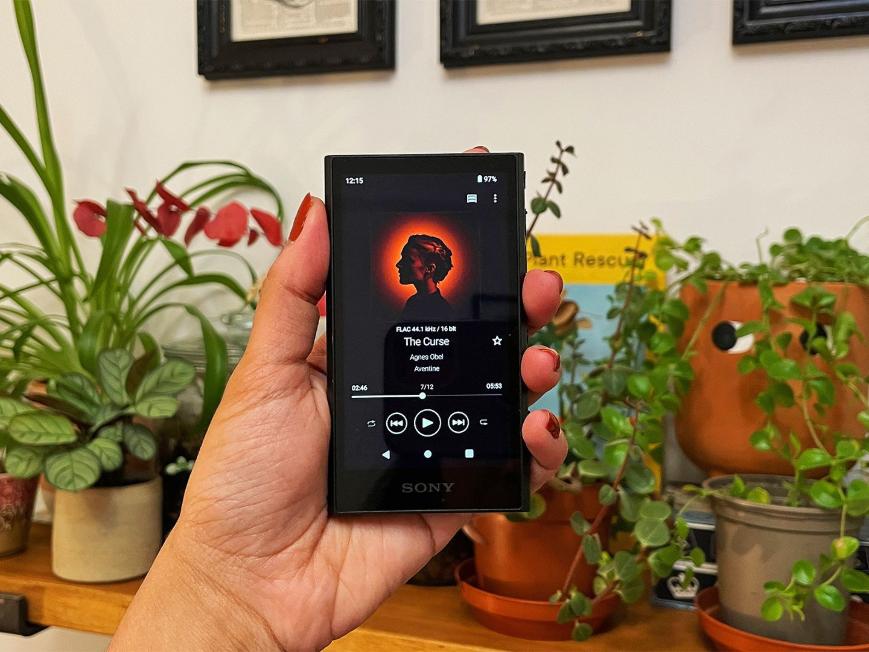
Om du funderar på detta för Apple Music, tänk på att eftersom enheten kör Android kommer appupplevelsen att vara väldigt lik den att använda den på en Android-telefon, men med fördelen av Sonys dedikerade ljudhårdvara.
Sony Walkman NW-ZX707
Denna premiummusikspelare är ytterligare en utmärkt MP3 spelaren kompatibel med Apple Music. Byggd med en ram i fräst aluminium och premiumkomponenter, inklusive högkapacitetskondensatorer i solida polymerer, för att ge förbättrad transparens, ljudbild och baskontroll.
NW-ZX707 är det bättre valet om du prioriterar ljudkvalitet och har avancerade, krävande hörlurar, medan NW-A306 är det överlägsna valet om du prioriterar portabilitet och en lätt design för lyssnande på språng.
HiBy R6 III
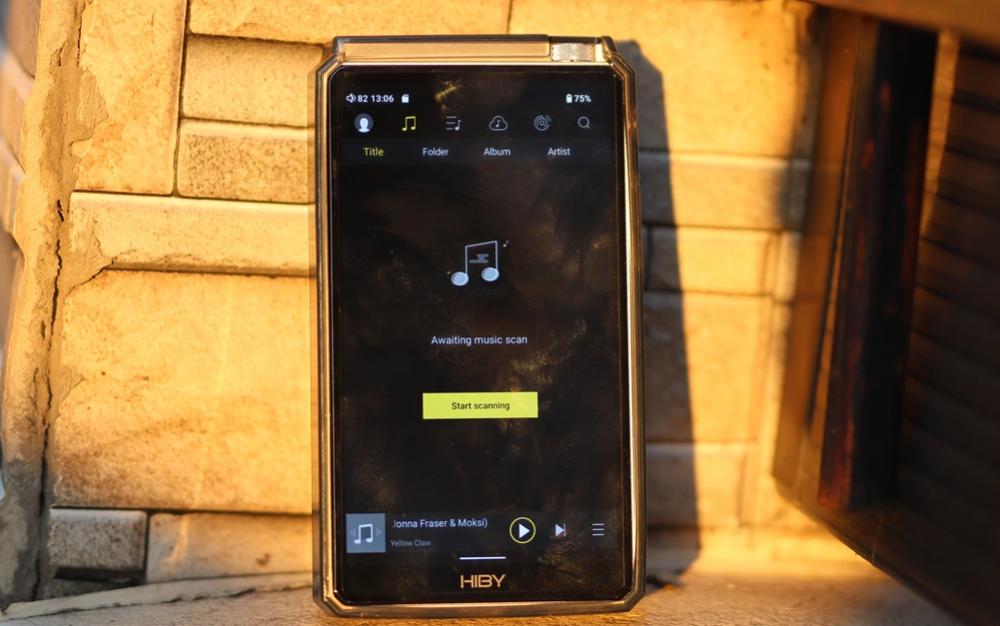
HiBy R6 III stöder Android-applikationer och erbjuder stark ljudprestanda för seriösa musiklyssnare. Den använder en fyr-DAC-matris (fyra CS43198-chip) och dedikerade kristalloscillatorer för att säkerställa högkvalitativ ljudåtergivning och lågt jitter.
FiiO M11S
FiiO M11S rekommenderas ofta för användare som söker en MP3 spelaren är kompatibel med Apple Music eftersom den kombinerar streamingstöd med utmärkt ljudkvalitet. FiiO kör ett öppet Android-baserat operativsystem med Google Play Store förinstallerat, vilket gör att du enkelt kan installera Apple Music, Tidal, Spotifyoch andra streamingappar. Den erbjuder också ett "Pure Music"-läge som kan inaktivera Android-systemet, vilket eliminerar bakgrundsprocesser för att fokusera enbart på ljuduppspelning för en mer autentisk och störningsfri upplevelse.
Del 3. Hur kan du spela Apple Music på vilken som helst MP3 Spelare?
Många användare antar att någon MP3 spelaren kan spela Apple Music. Tyvärr är detta inte fallet. Apple Music-spår skyddas av teknik för digital rättighetshantering (DRM). Detta förhindrar direkt uppspelning på enheter som inte stöds. Vad du ska göra om din föredragna enhet inte är en MP3 spelaren kompatibel med Apple Music? Lyckligtvis finns det ett alternativt tillvägagångssätt.
Istället för att förlita sig på direkt stöd från Apple Music-appen väljer vissa användare att konvertera Apple Music-spår till vanliga ljudformat för uppspelning på kompatibla enheter. DumpMedia Apple Music Converter är utformad för användare som vill ha mer flexibilitet när de hanterar Apple Music-innehåll. Denna programvara låter användare konvertera Apple Music till MP3 för mer flexibel uppspelning. Även om Apple Music-appen fungerar inte på din enhet kan du spela Apple Music-låtar offline på en annan musikspelare direkt.
Gratis nedladdning Gratis nedladdning
🏆Viktiga funktioner hos DumpMedia Apple Music Converter
- 🎵Ladda ner Apple Music till MP3, WAV, FLAC och AAC
- 🎵Integration med Apple Music webbspelare
- 🎵Behåll originalljudkvaliteten
- 🎵Ladda ner spellistor och album i batch
- 🎵Snabb konverteringshastighet
- 🎵Bevara låtmetadata och ID3-taggar
- 🎵Stöd för offlineuppspelning på alla enheter
Genom att konvertera låtar till format som stöds av många kan användare njuta av sin musik på enheter som normalt inte skulle kvalificera sig som en MP3 spelare kompatibel med Apple Music.
Hur man konverterar Apple Music till MP3
Steg 1. Ladda ner och installera programvaran på din dator. Den fungerar med båda Windows och Mac. Gränssnittet är användarvänligt, vilket gör det enkelt för nybörjare.
Gratis nedladdning Gratis nedladdning
Steg 2. Öppna den inbyggda Apple Music-webbspelaren inuti DumpMedia och logga in med ditt Apple Music-konto. Bläddra bland Apple Music och dra de låtar, album eller spellistor du vill ladda ner till konverteraren.
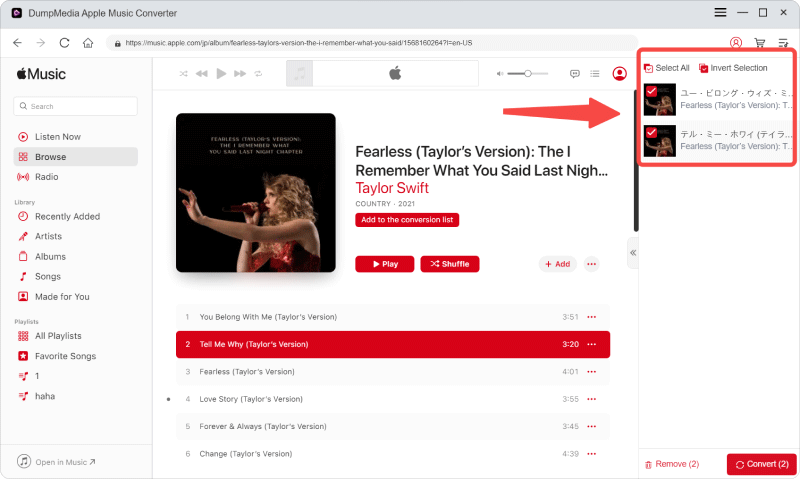
Steg 3. I inställningspanelen väljer du MP3 som utdataformat för att möjliggöra en MP3 nedladdning av dina valda låtar.

Steg 4. Klicka på Konvertera och ladda ner låtar direkt som MP3 filer.

Överför konverterad Apple Music till MP3 Spelare (Windows)
- Använd USB-kabeln för att ansluta spelaren till datorn.
- Om din spelare uppmanar dig att göra det (vanligt på Android-spelare), välj läget "Filöverföring" eller "MTP" från enhetens aviseringspanel eller inställningar.
- Din spelare bör visas som en enhet i "Den här datorn".
- Öppna enheten, navigera till mappen Intern lagring eller microSD-kort och hitta mappen med namnet Musik.
- Dra bara dina musikfiler från datorns mapp till musikmappen på din spelare.
- När du är klar, mata ut hårddisken på ett säkert sätt från datorn innan du kopplar bort USB-kabeln.
Överför konverterad Apple Music till MP3 Spelare (Mac)
- Ladda ner och installera OpenMTP på din Mac.
- Anslut din spelare till din Mac och ställ in spelarens USB-läge till "Filöverföring" (MTP) i aviseringsinställningarna.
- Öppna OpenMTP; det kommer automatiskt att identifiera din spelare.
- Dra och släpp dina musikfiler från din Mac till spelarens "Musik"-mapp i appen.
- Öppna musikappen på din spelare och välj "Sök efter låtar" för att uppdatera biblioteket.
Del 4. Vanliga frågor
Stöder Sony Walkman Apple Music?
Många nyare Sony Walkman-modeller använder Android och stöder installation av Apple Music.
Kan jag överföra Apple Music till en traditionell MP3 spelare?
Traditionell MP3 Spelare har i allmänhet inte direkt stöd för Apple Music på grund av DRM-skydd och appkrav.
Varför spelar inte Apple Music upp på min MP3 spelare?
Din enhet kanske inte stöder Apple Music-autentisering, streamingtjänster eller själva Apple Music-appen.
Kan Apple Music konverteras till MP3?
Vissa användare väljer specialiserad konverteringsprogramvara för att skapa ljudfiler som är kompatibla med ett bredare utbud av enheter.
Del 5. Slutsats
Hitta en MP3 Det kan vara svårt att få en spelare kompatibel med Apple Music eftersom Apple Music förlitar sig på streamingteknik, prenumerationsverifiering och appstöd. Om du vill ha större flexibilitet, bredare enhetskompatibilitet och enklare offline-uppspelning är det viktigt att förstå tillgängliga alternativ som DumpMedia Apple Music Converter kan hjälpa dig att välja den bästa lösningen för dina lyssningsbehov.