


Hur man laddar ner låtar från iTunes (köpt och Apple Music förklarat)
Många användare söker efter hur man laddar ner låtar från iTunes, men svaret beror på vilken typ av "iTunes-låtar" du syftar på. iTunes- musik kan betyda köpta låtar, Apple Music-prenumerationslåtar eller lokalt lagrade filer, och varje fall fungerar olika. I den här guiden kommer vi tydligt att förklara hur man laddar ner köpt musik igen och vad man ska göra om man vill behålla Apple Music-låtar för offline-användning permanent.
Innehållsguide Del 1. Kan man fortfarande ladda ner låtar från iTunes? Del 2. Hur man laddar ner köpta låtar från iTunes? Del 3. Varför kan vissa iTunes-låtar inte laddas ner normalt? Del 4. Bästa sättet att spara Apple Music-låtar som lokala filer Del 5. Vanliga frågor Del 6. Sammanfattning
Del 1. Kan man fortfarande ladda ner låtar från iTunes?
Ja, men all iTunes-musik fungerar inte på samma sätt. Varje typ har olika regler för nedladdning och offlineåtkomst. Att förstå denna skillnad är det första steget i att lära sig hur man laddar ner låtar från iTunes korrekt.
Vad "låtar från iTunes" egentligen betyder
iTunes-köpta låtar: Det här är låtar du har köpt individuellt. De kan vanligtvis laddas ner igen när som helst med ditt Apple-ID.
Apple Music-låtar: Dessa är prenumerationsbaserade låtar. De ägs inte permanent och kräver en aktiv prenumeration.
Lokala musikfiler: Det här är filer som redan är lagrade på din enhet, till exempel MP3 eller AAC-filer.
Del 2. Hur man laddar ner köpta låtar från iTunes?
Om du köpte musik från iTunes Store kan du enkelt ladda ner den igen.
På iPhone eller iPad:
- Öppna Apple Music- eller iTunes-appen
- Gå till biblioteket
- Tryck på "Köpt"
- Hitta dina låtar
- Tryck på nedladdningsikonen
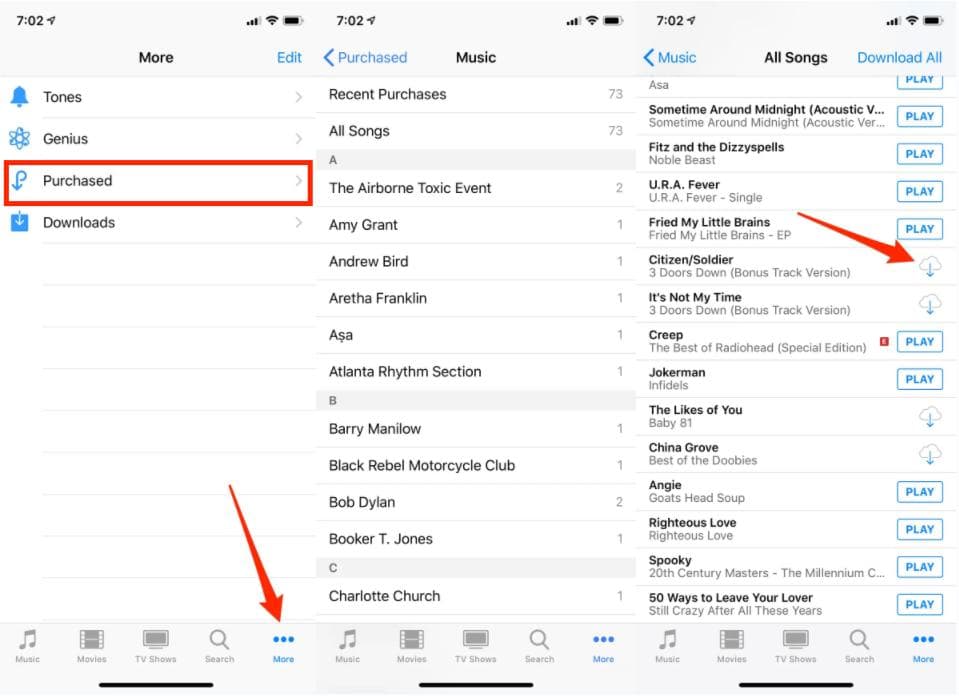
På Mac eller Windows:
- Öppna iTunes eller Apple Music-appen
- Gå till konto
- Välj "Köpt"
- Ladda ner din musik igen
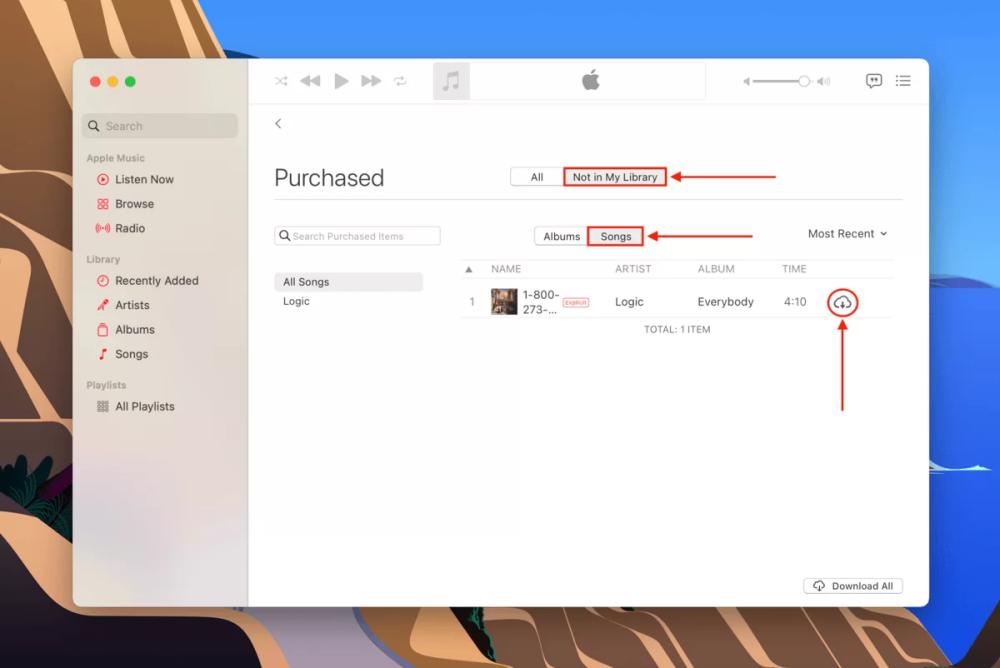
Detta är den enklaste metoden för att ladda ner låtar från iTunes när man hanterar köpt innehåll.
Del 3. Varför vissa iTunes-låtar inte kan laddas ner normalt?
Inte alla låtar kan laddas ner fritt. Vanliga orsaker inkluderar:
- Apple ID-matchningsfel
- Regionala begränsningar
- Borttaget innehåll från butiken
- Begränsningar för Apple Music-prenumerationen
Det är därför användare som söker efter hur man laddar ner låtar från iTunes ibland inte kan hitta sina låtar.
Del 4. Bästa sättet att spara Apple Music-låtar som lokala filer
Om ditt mål är att behålla musiken permanent istället för tillfällig offlineåtkomst, behöver du konvertera Apple Music till lokala ljudfiler. DumpMedia Apple Music Converter låter användare konvertera sitt Apple Music-bibliotek till olika ljudformat, till exempel MP3, AAC, WAV och FLAC, för offline-uppspelning på vilken enhet som helst. Även om Apple Music-appen fungerar inte på din enhet kan du spela upp dem på en annan musikspelare direkt.
Gratis nedladdning Gratis nedladdning
VIKTIGA FUNKTIONER
- Konvertera Apple Music till MP3, WAV, AAC och mer
- Bibehåll förlustfri ljudkvalitet
- Batchkonvertering för spellistor och album
- Spara låtar permanent på enheter
- Överför filer till valfri enhet
För att förtydliga, det här verktyget laddar inte ner låtar som köpts från iTunes. Istället fungerar det med Apple Music-innehåll och konverterar det till spelbara ljudfiler. Detta gör det till en användbar lösning för användare som vill ha mer flexibilitet utöver standardbegränsningar för hur man laddar ner låtar från iTunes.
Hur man konverterar Apple Music till MP3
Steg 1. Ladda ner och installera programvaran på din dator. Den fungerar med båda Windows och Mac. Gränssnittet är användarvänligt, vilket gör det enkelt för nybörjare.
Gratis nedladdning Gratis nedladdning
Steg 2. Öppna den inbyggda Apple Music-webbspelaren inuti DumpMedia och logga in med ditt Apple Music-konto. Bläddra bland Apple Music och dra de låtar, album eller spellistor du vill ladda ner till konverteraren.
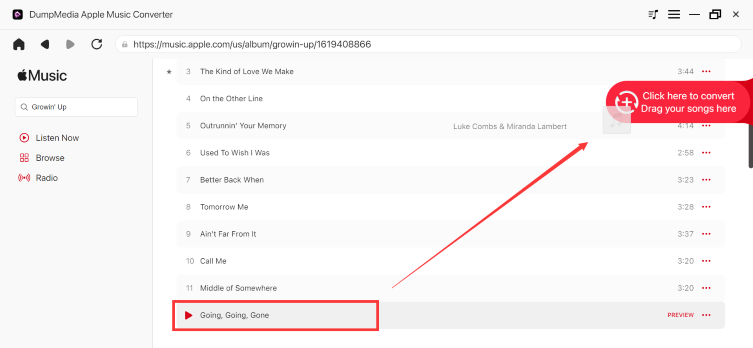
Steg 3. I inställningspanelen väljer du MP3 som utdataformat för att möjliggöra en MP3 nedladdning av dina valda låtar.

Steg 4. Klicka på Konvertera och ladda ner låtar direkt som MP3 filer.

När du väl har konverterat är du inte längre beroende av streaming eller prenumerationsåtkomst.
Del 5. Vanliga frågor
Kan jag fortfarande ladda ner låtar från iTunes?
Ja, köpta låtar kan laddas ner igen när som helst med ditt Apple-ID.
Varför kan jag inte ladda ner vissa iTunes-låtar?
Detta kan bero på regionbegränsningar, borttaget innehåll eller kontoproblem.
Kan Apple Music-låtar laddas ner permanent?
Nej, nedladdningar av Apple Music är tillfälliga och kräver en aktiv prenumeration.
Del 6. Sammanfattning
Att lära sig ladda ner låtar från iTunes beror på att förstå vilken typ av musik du har att göra med. Köpta iTunes-låtar kan laddas ner igen när som helst, medan Apple Music-låtar bara är tillfälligt tillgängliga offline. Om du vill ha permanent åtkomst är det den mest flexibla lösningen för långvarig lyssnande att konvertera Apple Music till lokala ljudfiler.
Gratis nedladdning Gratis nedladdning
*DumpMedia fungerar genom att dekryptera och ladda ner Apple Music-låtar till DRM-fria filer, vilket gör att du kan få en ren, obegränsad kopia av ditt bibliotek för vilken enhet som helst. Dess funktionalitet inkluderar inte DRM-borttagning av lokala ljudfiler.