


Hur man laddar ner musik från Apple Music till dator 2026
Många användare vill spara äpple Music låtar lokalt så att de kan lyssna offline, överföra filer eller behålla sina favoritlåtar permanent. Även om Apple tillåter nedladdningar i sin app finns det viktiga begränsningar som du behöver förstå. I den här guiden förklarar vi hur man laddar ner musik från Apple Music till datorn, vad som fungerar, vad som inte fungerar, och det bästa sättet att behålla din musik utan begränsningar.
Innehållsguide Del 1. Kan du ladda ner musik från Apple Music till datorn?Del 2. Officiellt sätt att ladda ner musik från Apple Music till datornDel 3. Bästa sättet att ladda ner Apple Music till datorn utan begränsningarDel 4. Vanliga frågorDel 5. Sammanfattning
Del 1. Kan du ladda ner musik från Apple Music till datorn?
Kan man ladda ner musik från Apple Music? Svaret är ja, men bara delvis. Om du letar efter hur man laddar ner musik från Apple Music till datorn erbjuder Apple ett officiellt sätt. Du kan ladda ner låtar med hjälp av Apple Music-appen.
Dessa nedladdningar har dock begränsningar:
- Filer är skyddade av DRM (Digital Rights Management)
- Du kan inte konvertera dem till MP3
- Du kan inte överföra dem fritt
- Musik blir otillgänglig om din prenumeration upphör
Det betyder att även om du lär dig att ladda ner musik från Apple Music till en dator, så äger du faktiskt inte filerna.
Del 2. Officiellt sätt att ladda ner musik från Apple Music till datorn
Här är den officiella metoden om du vill veta hur du laddar ner musik från Apple Music till datorn med hjälp av Apples system.
På Mac
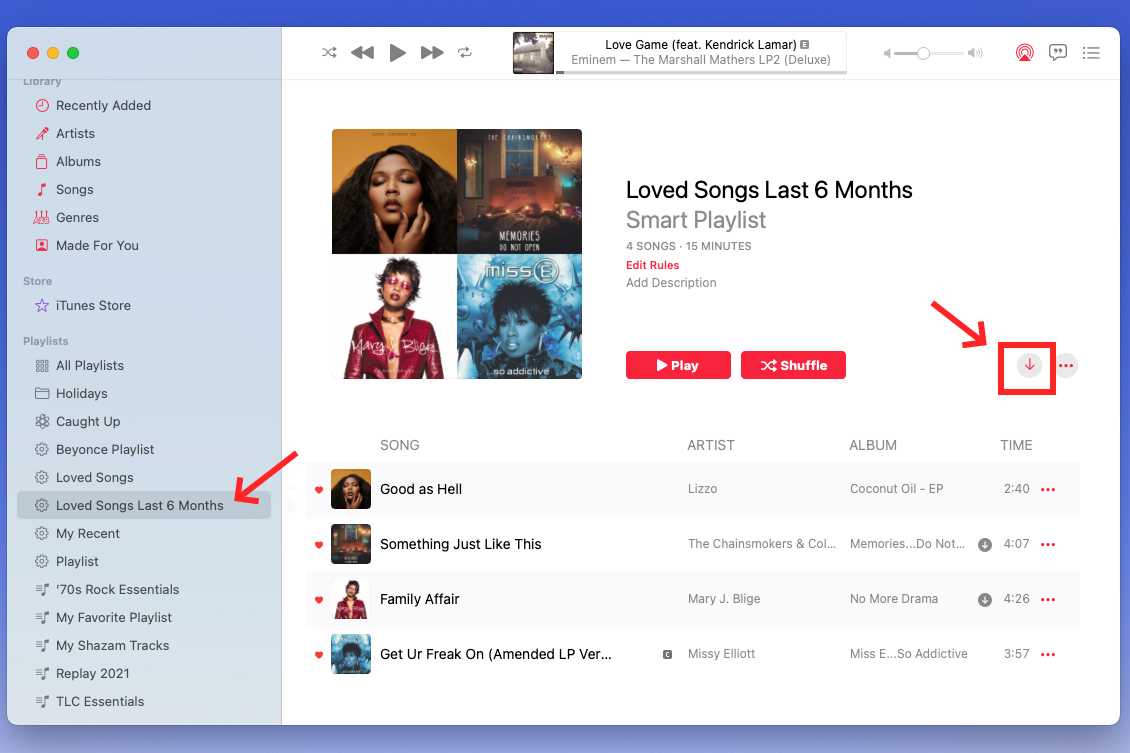
- Öppna Apple Music på din Mac.
- Logga in med ditt Apple-ID.
- Hitta låten, albumet eller spellistan.
- Klicka på knappen Ladda ner.
- Få åtkomst till nedladdad musik i ditt bibliotek.
On Windows
Ladda ner Apple Music till din Windows PC har blivit mer effektiviserad eftersom Apple officiellt har ersatt det åldrande iTunes med en dedikerad Apple Music-app.
- Installera Apple Music-appen från Microsoft Store.
- Gå till Inställningar > Allmänt och se till att Synkronisera bibliotek är aktiverat.
- Hitta låten eller albumet du vill ha och klicka på knappen "+" (Lägg till).
- När den har lagts till visas en moln-/pilikon. Klicka på den för att ladda ner låten till din hårddisk.
Detta är det mest direkta sättet för användare som söker efter hur man laddar ner musik från Apple Music till datorn.
Begränsningar av den officiella metoden
Även om den här metoden fungerar har den stora nackdelar:
- Låtar kan bara spelas inuti Apple Music
- Filerna finns inte i MP3 format
- Du kan inte flytta dem till andra enheter (på grund av DRM-skydd)
- Nedladdningar upphör att gälla om din prenumeration upphör
Så även om detta svarar på hur man laddar ner musik från Apple Music till datorn, löser det inte problemet med att äga eller kontrollera sin musik. Många användare börjar leta efter bättre lösningar efter att ha försökt ladda ner musik från Apple Music till en dator med officiella metoder.
Del 3. Bästa sättet att ladda ner Apple Music till datorn utan begränsningar
Om du vill ha mer kontroll över din musik behöver du en annan metod. DumpMedia Apple Music Converter är utformad för att hjälpa användare att gå bortom begränsningarna för Apple Music-nedladdningar.
Gratis nedladdning Gratis nedladdning
Varför välja? DumpMedia Apple Music Converter?
- Konvertera Apple Music till MP3, WAV, FLAC, AAC
- Behåll musiken permanent
- Ladda ner hela spellistor i omgångar
- Bevara ID3-taggar (artist, album, titel)
- Njut av högkvalitativt ljud
För användare som söker efter hur man laddar ner musik från Apple Music till datorn och håller filerna användbara är detta en mer komplett lösning.
Ladda ner Apple Music till datorn med DumpMedia
Steg 1. Öppna programvaran på din dator. Den fungerar med båda Windows och Mac. Gränssnittet är användarvänligt, vilket gör det enkelt för nybörjare.
Gratis nedladdning Gratis nedladdning
Steg 2. Öppna den inbyggda Apple Music-webbspelaren inuti DumpMedia och logga in med ditt Apple Music-konto. Bläddra bland Apple Music och dra de låtar, album eller spellistor du vill ladda ner till konverteraren.
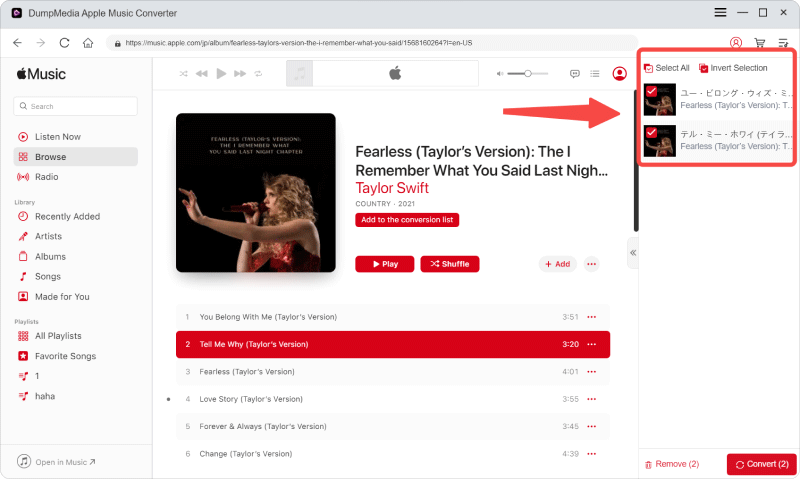
Steg 3. I inställningspanelen väljer du MP3 som utdataformat för att möjliggöra en MP3 nedladdning av dina valda låtar.

Steg 4. Det sista steget är att trycka på knappen "Konvertera" för att starta konverteringsprocessen.

Den här metoden svarar inte bara på hur man laddar ner musik från Apple Music till datorn, utan säkerställer också att du faktiskt kan använda filerna fritt.
Del 4. Vanliga frågor
Hur laddar man ner musik från Apple Music till datorn gratis?
Du kan använda Apple Music för att ladda ner låtar, men de är DRM-skyddade. För fullständig åtkomst behövs en konverterare.
Kan jag ladda ner Apple Music-låtar som MP3?
Inte med den officiella metoden. Du behöver ett verktyg som DumpMedia att konvertera filer till MP3.
Varför kan jag inte använda nedladdade Apple Music-filer?
Eftersom de är skyddade av DRM och bara kan spelas upp i Apple Music.
Är det säkert att använda Apple Music-konverterare?
Pålitliga verktyg som DumpMedia är generellt säkra när de laddas ner från officiella källor.
Kan jag behålla Apple Music-låtar för alltid?
Bara om du tar bort DRM och konverterar dem med en pålitlig konverterare.
Del 5. Sammanfattning
Att förstå hur man laddar ner musik från Apple Music till datorn är bara det första steget. Även om Apple erbjuder ett officiellt sätt att ladda ner låtar, gör begränsningarna i DRM-skydd, formatbegränsningar och prenumerationsberoende det svårt för användare att äga och hantera sin musik på riktigt. DumpMedia Apple Music Converter nu! Det erbjuder ett praktiskt sätt att övervinna dessa utmaningar genom att ge bättre kontroll, högre kompatibilitet och konsekvent prestanda. För användare som vill ha en komplett och pålitlig lösning utöver grundläggande nedladdningar kan valet av rätt verktyg göra en betydande skillnad i hur musik nås och avnjuts.

30% rabatt >>>