


Hur man konverterar DRM-skyddade filer till MP3 i 2026
DRM-skydd används ofta av streamingtjänster för att styra offline-uppspelning och prenumerationsåtkomst. På grund av detta har DRM-skyddade filer ofta uppspelningsbegränsningar, appberoende och enhetsbegränsningar. I den här guiden förklarar vi hur man konverterar DRM-skyddade filer till MP3, varför många DRM-konverteringsmetoder inte längre fungerar tillförlitligt, och hur Apple Music-användare får mer flexibel offline-uppspelning med lokala MP3 filer.
Innehållsguide Del 1. Vad är DRM-skyddade filer?Del 2. Är det fortfarande möjligt att konvertera DRM-filer till MP3?Del 3. Bonus: Ladda ner Apple Music-låtar som MP3Del 4. Vanliga frågorDel 5. Slutsats
Del 1. Vad är DRM-skyddade filer?
Innan du lär dig hur du konverterar DRM-skyddade filer till MP3, är det viktigt att förstå vad DRM egentligen betyder.
Vad betyder DRM?
DRM står för Digital Rights Management . Det är en teknik som används av streamingplattformar och digitala medieleverantörer för att kontrollera uppspelningsbehörigheter, filöverföringar, offlineåtkomst och enhetsautentisering.
Hur DRM-skydd fungerar
DRM-system krypterar mediefiler och begränsar hur de används. När en fil är DRM-skyddad kan uppspelning kräva auktorisering. Filerna kan inte heller kopieras fritt. Det är därför många användare söker efter hur man konverterar DRM-skyddade filer till MP3.
Vanliga DRM-skyddade filtyper
Flera digitala medieformat kan innehålla DRM-skydd.
- AAC-filer: Används av Apple Music.
- M4P-filer: Äldre skyddade Apple-ljudfiler.
- M4V-filer: Används ofta för skyddade iTunes-filmer.
- WMV-filer: Äldre Windows Media-filer kan också innehålla DRM-system.
Del 2. Är det fortfarande möjligt att konvertera DRM-filer till MP3?
Många användare söker efter hur man konverterar DRM-skyddade filer till MP3 främst för att uppnå bättre enhetskompatibilitet och permanent offline-uppspelning oberoende av prenumerationsverifiering. Genom att byta till det universellt stödda MP3 format kan de fritt överföra sin musik mellan enheter, undvika begränsningar från streamingappar och pålitligt bygga sina egna lokala musikbibliotek.
Konverterar DRM-filer till MP3 möjligt? Många äldre konverteringsverktyg, som historiskt sett använts för Apple Music, iTunes och Windows Media-filer fungerar inte längre tillförlitligt på grund av sofistikerade, kontinuerliga DRM-uppdateringar som orsakar misslyckade konverteringar, fel och förlust av ljudkvalitet. Dessutom medför gratisalternativ ofta risker för skadlig kod och programvaruinstabilitet, vilket leder till att många användare övergår från instabila metoder för direkt borttagning till förmån för säkrare lokala uppspelningslösningar.
Del 3. Bonus: Ladda ner Apple Music-låtar som MP3
Apple Music-spår levereras vanligtvis som skyddade AAC-filer, vilket innebär att nedladdade låtar är knutna till aktiva prenumerationer, Apple-auktorisering och onlineverifiering snarare än vanliga lokala filer. Istället för att förlita sig på opålitliga DRM-borttagningsverktyg väljer många användare nu att ladda ner Apple Music-låtar till MP3 format för offline-uppspelning. En populär lösning är DumpMedia Apple Music Converter.
Gratis nedladdning Gratis nedladdning
DumpMedia Apple Music Converter hjälper användare att spara Apple Music-låtar lokalt i vanliga ljudformat. Även om Apple Music-appen fungerar inte på din enhet kan du spela upp dem på en annan musikspelare direkt.
Fler funktioner av DumpMedia Apple Music Converter
- ⭐Konvertera Apple Music till MP3, WAV, AAC och mer
- ⭐Integration med Apple Music webbspelare
- ⭐Ge batchkonvertering med upp till 35x hastighet
- ⭐Behåll ID3-taggar som artist, omslag, konst, etc.
- ⭐Bevara den ursprungliga ljudkvaliteten
- ⭐100% rena. Ingen risk med att använda
Hur man konverterar Apple Music till MP3
Steg 1. Ladda ner och installera programvaran på din dator. Den fungerar med båda Windows och Mac. Gränssnittet är användarvänligt, vilket gör det enkelt för nybörjare.
Gratis nedladdning Gratis nedladdning
Steg 2. Öppna den inbyggda Apple Music-webbspelaren inuti DumpMedia och logga in med ditt Apple Music-konto. Bläddra bland Apple Music och dra de låtar, album eller spellistor du vill ladda ner till konverteraren.

Steg 3. I inställningspanelen väljer du MP3 som utdataformat för att möjliggöra en MP3 nedladdning av dina valda låtar.
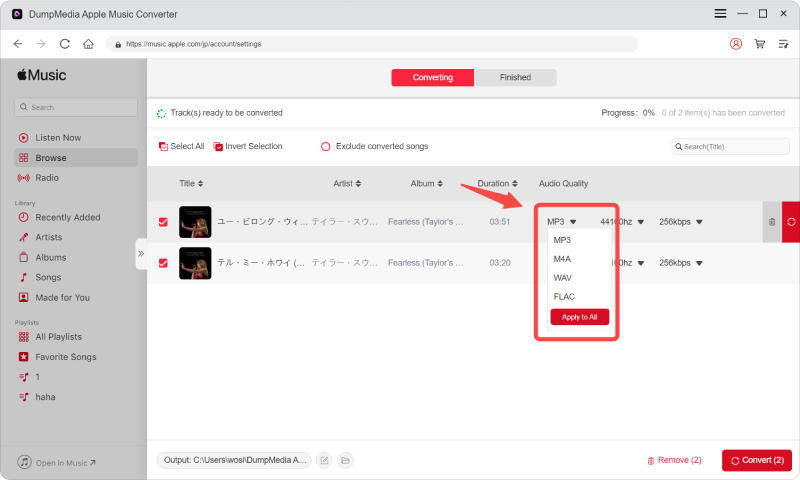
Steg 4. Klicka på Konvertera och ladda ner låtar direkt som MP3 filer.

Del 4. Vanliga frågor
Hur man konverterar DRM-skyddade filer till MP3?
Många användare använder programvara för ljudkonvertering eller lokala uppspelningslösningar beroende på mediekälla och DRM-system.
Vad är DRM-skyddade filer?
DRM-skyddade filer är krypterade mediefiler med uppspelnings- och överföringsbegränsningar.
Varför slutar DRM-konverteringsverktyg att fungera?
Streamingplattformar uppdaterar ofta DRM-system, vilket gör äldre verktyg inkompatibla.
Kan Apple Music-låtar konverteras till MP3?
Många användare använder DumpMedia Apple Music-konverterare för Apple Music MP3 konvertering och offline-uppspelning.
Kan MP3 spelas filer upp offline permanent?
Ja. Lokalt MP3 Filer kan vanligtvis spelas upp utan prenumerationsverifiering.
Del 5. Slutsats
Många användare söker efter hur man konverterar DRM-skyddade filer till MP3 försöker övervinna uppspelningsbegränsningar, prenumerationsberoende och begränsad offlineåtkomst orsakad av DRM-skyddade medier. Även om traditionella DRM-konverteringsverktyg har blivit alltmer opålitliga på grund av uppdaterade skyddssystem, har användare fortfarande alternativ för att njuta av mer flexibel offline-lyssning. För Apple Music-användare som vill ha bekväm lokal uppspelning, DumpMedia Apple Music Converter erbjuder en praktisk lösning för att spara låtar i standardformat. MP3 filer för offlineuppspelning på flera enheter.
Gratis nedladdning Gratis nedladdning
*DumpMedia fungerar genom att dekryptera och ladda ner Apple Music-låtar till DRM-fria filer, vilket gör att du kan få en ren, obegränsad kopia av ditt bibliotek för vilken enhet som helst. Dess funktionalitet inkluderar inte DRM-borttagning av lokala ljudfiler.