


Gratis AAX till MP3 Konverterare: 3 arbetsmetoder (hörbara filer ingår)
AAX är ett proprietärt ljudformat utvecklat av Ljud, och den har inbyggt DRM-skydd. Det betyder att du inte bara kan spela upp eller konvertera AAX-filer utan att använda rätt verktyg. Det finns dock några sätt att använda en gratis AAX för att MP3 konverterare, de flesta gratisverktyg har begränsningar som låg framgångsfrekvens, långsam hastighet eller dålig ljudkvalitet. I den här guiden visar vi dig arbetsmetoder och den bästa lösningen för att konvertera AAX-filer effektivt.
Innehållsguide Del 1: Vad är AAX och varför du behöver en konverterareDel 2: Gratis AAX-filer till MP3 Konverterare (online- och gratisverktyg)Del 3: Bästa sättet att konvertera AAX till MP3 (Rekommenderas)Del 4: Gratis AAX-konverterare vs. DumpMediaDel 5: vanliga frågorDel 6: Att slå in allt
Del 1: Vad är AAX och varför du behöver en konverterare
AAX är ett ljudboksformat som används av Audible för att skydda upphovsrättsskyddat innehåll. På grund av DRM-begränsningar:
- Du kan inte direkt konvertera AAX till MP3
- Många mediaspelare stöder inte AAX-filer
- Standardkonverterare kommer inte att kunna bearbeta AAX-filer
Det är därför användare söker efter en gratis AAX för att MP3 konverterare för att ta bort dessa begränsningar och göra deras ljudböcker spelbara på vilken enhet som helst.
Del 2: Gratis AAX-filer till MP3 Konverterare (online- och gratisverktyg)
Om du vill ha en gratis AAX till MP3 omvandlare, här är två vanliga alternativ.
Metod 1: AAX Audio Converter (verktyg med öppen källkod)
AAX Audio Converter är ett skrivbordsverktyg som kan konvertera Audible-filer till oskyddade format som MP3, M4A eller M4B. Den är högt ansedd i ljudbokscommunityn för sin förmåga att kringgå DRM med hjälp av användarens individuella aktiveringsbyte.
Steg:
- Se först till att du har Audible Manager eller Audible-appen installerad och auktoriserad på din dator. Konverteraren behöver dina "aktiveringsbyte" (den digitala nyckeln) från ditt system för att lagligt dekryptera de filer du äger.
- Starta programmet och klicka på knappen Lägg till... (eller dra och släpp helt enkelt dina .aax-filer till huvudfönstret).
- I rullgardinsmenyn Format väljer du önskad typ.
- Välj sedan Enskild fil eller Dela upp efter kapitel.
- Välj var du vill att de konverterade filerna ska sparas i fältet Utdatakatalog.
- Klicka på knappen Konvertera längst ner. Ett konsolfönster visas som visar förloppet.
Metod 2: Online-ljudkonverterare
Vissa webbplatser påstår sig vara en gratis AAX till MP3 online-konverterare, såsom WaveSpeed Online, AhaConvert, CloudConvert med flera.
Du måste dock ladda upp originalet och ladda ner resultatet; långsamt internet gör detta tråkigt för högupplösta WAV/FLAC-filer. Dessutom är det mycket långsammare att konvertera ett helt musikbibliotek (t.ex. 500 låtar) online än att använda ett skrivbordsverktyg.
Del 3: Bästa sättet att konvertera AAX till MP3 (Rekommenderas)
Om du vill ha en stabil och effektiv lösning utöver en grundläggande gratis AAX till MP3 omvandlare, det bästa alternativet är DumpMedia Hörbar omvandlare.
Gratis nedladdning Gratis nedladdning
Varför välja? DumpMedia Audible-konverterare?
- ✅ Fullständig DRM-borttagning* från AAX-filer
- ✅ Hög kvalitet MP3 produktion
- ✅ Batchkonvertering för ljudböcker
- ✅ Snabb konverteringshastighet
- ✅ Bevarar kapitel och metadata
Hur man konverterar AAX till MP3?
Steg 1. Ladda ned och installera DumpMedia Audible Converter. PC- och Mac-versioner finns tillgängliga. Öppna DumpMediaoch gå sedan till fliken Audible.
Gratis nedladdning Gratis nedladdning
Steg 2. Välj de böcker du vill konvertera från ditt Audible-bibliotek.
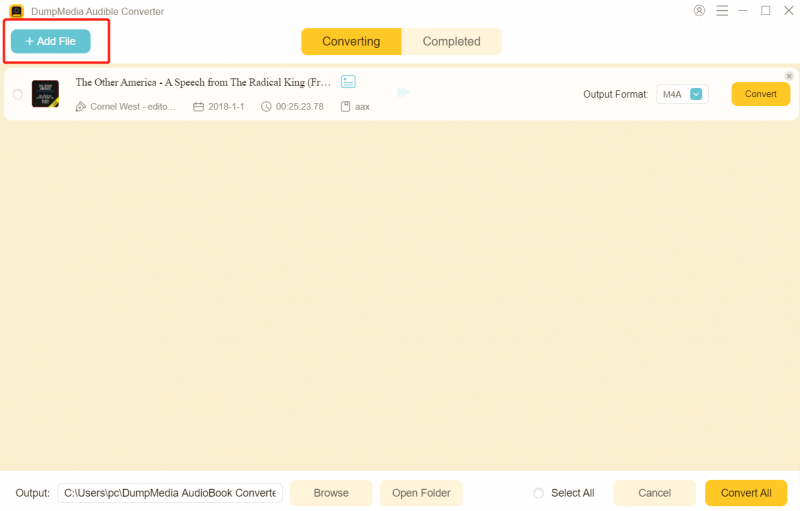
Steg 3. Välj utdatainställningar och börja konvertera.

Steg 4. Slutför konverteringen och visa utdatafilerna.

Istället för att förlita sig på en begränsad gratis AAX för att MP3 omvandlare, garanterar den här metoden tillförlitliga resultat varje gång.
Del 4: Gratis AAX-konverterare vs. DumpMedia
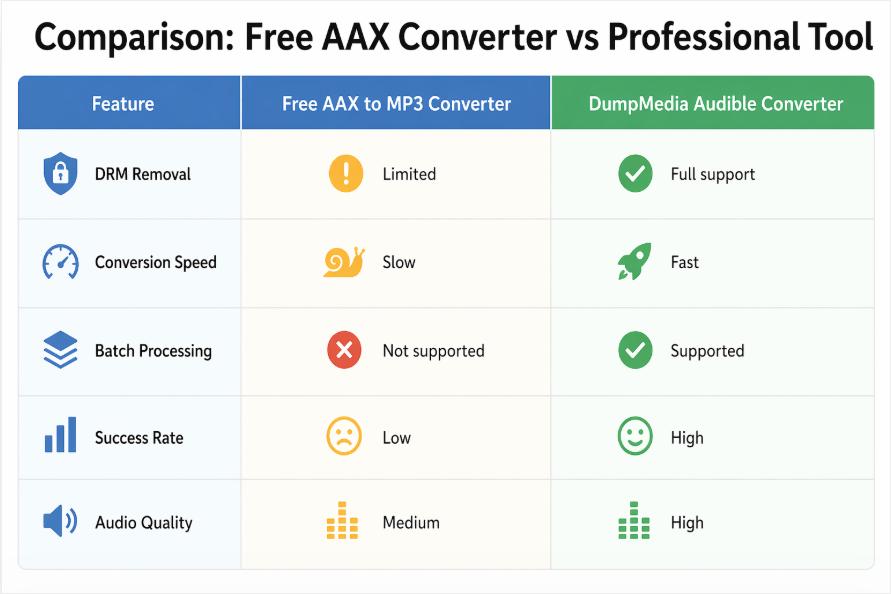
Medan en gratis AAX till MP3 Omvandlaren kan fungera för grundläggande behov, men professionella verktyg ger mycket bättre prestanda.
Del 5: vanliga frågor
Finns det en helt gratis AAX att MP3 omvandlare?
Ja, vissa verktyg påstår sig vara en gratis AAX till MP3 konverterare, men de flesta har begränsningar i funktionalitet och framgångsgrad.
Kan jag konvertera Audible AAX-filer till MP3 lagligt?
Konvertering för personligt bruk är generellt acceptabelt, men vidaredistribution är inte tillåten.
Varför misslyckas online AAX-omvandlare?
De flesta onlineverktyg kan inte hantera DRM, vilket gör dem ineffektiva som en gratis AAX för att MP3 omvandlare.
Vilket är det bästa alternativet till en gratis AAX? MP3 omvandlare?
En dedikerad lösning som DumpMedia Audible Converter ger de mest pålitliga resultaten.
Del 6: Att slå in allt
Använda en gratis AAX för att MP3 konverteraren kan fungera i begränsade fall, men de flesta gratisverktyg kämpar med DRM-skydd, hastighet och tillförlitlighet. Om du vill ha en smidig och högkvalitativ upplevelse kan du byta till en professionell lösning som DumpMedia Audible Converter är det bästa valet. Istället för att slösa tid på instabila verktyg kan du konvertera Audible-filer snabbt och effektivt med en dedikerad konverterare.
Gratis nedladdning Gratis nedladdning
*DumpMedia fungerar genom att dekryptera och ladda ner dina ljudböcker till DRM-fria filer, vilket gör att du får en ren, obegränsad kopia av ditt bibliotek för vilken enhet som helst.

30% rabatt >>>