


Hur man konverterar M4P till MP3 (Uppdaterad guide 2026)
Om du försöker konvertera M4P till MP3, du är inte ensam. M4P är ett skyddat ljudformat som används av äldre iTunes Store-köp och av äpple Music strömmande nedladdningar. På grund av Apples DRM (Digital Rights Management) kan M4P-filer inte spelas upp på många enheter eller konverteras direkt med vanliga ljudkonverterare.
Den här guiden förklarar vad M4P-filer är och varför de inte kan konverteras. Vi delar också med oss av hur man konverterar lokala M4P-filer och Apple Music-spår till MP3I slutändan vet du exakt vilket verktyg som löser ditt problem och hur du konverterar dina ljudfiler snabbt och säkert.
Innehållsguide Del 1: Vad är en M4P-fil?Del 2: Hur man konverterar lokala M4P-filer till MP3?Del 3: Hur man konverterar Apple Music-spår till MP3?Del 4: Vanliga frågor: Konvertera M4P till MP3Del 5: Sammanfattningsvis
Del 1: Vad är en M4P-fil?
M4P (”MPEG-4 Protected”) är ett DRM-skyddat ljudformat som används av Apple. Det förekommer i två huvudscenarier:
1. Gamla låtar köpta från iTunes Store
Före 2009 levererades låtar som köptes från iTunes Store som M4P-filer med FairPlay DRM.
2. Apple Music-spår
Apple Music använder också DRM-skydd. Dessa spår lagras inte som .m4p-filer, men de är lika låsta och kan inte konverteras utan ett specialiserat DRM-borttagningsverktyg.
Eftersom filen är skyddad kan du inte konvertera M4P till MP3 via vanliga konverterare, VLC, iTunes eller onlinetjänster. Ett dedikerat verktyg för borttagning av DRM krävs.
Så, innan du konverterar, identifiera var din M4P (eller skyddade ljud) kommer ifrån.
Del 2: Hur man konverterar lokala M4P-filer till MP3?
Om du har en faktisk .m4p-fil på disk (från gamla iTunes) måste du använda DumpMedia Vilken musikkonverterare som helstAlla musikkonverterare inkluderar en formatkonverteringsmodul som stöder M4P till MP3 omvandling.
Gratis nedladdning Gratis nedladdning
Nyckelfunktioner
- Konverterar lokala ljudfiler till MP3, M4A, AAC, WAV, etc.
- Stöder M4P och andra skyddade format (beroende på DRM-villkor)
- Erbjuder batchkonvertering för flera filer
- Ger anpassningsbara utgångsinställningar: bitrate, samplingsfrekvens, kanaler
- Användarvänligt dra-och-släpp-gränssnitt
- Betald funktion för avancerade eller DRM-relaterade konverteringar
Hur man konverterar lokala M4P-filer till MP3
Steg 1. Öppna valfri musikkonverterare och gå till modulen Formatkonverterare.
Steg 2. Dra och släpp M4P-filerna i gränssnittet.
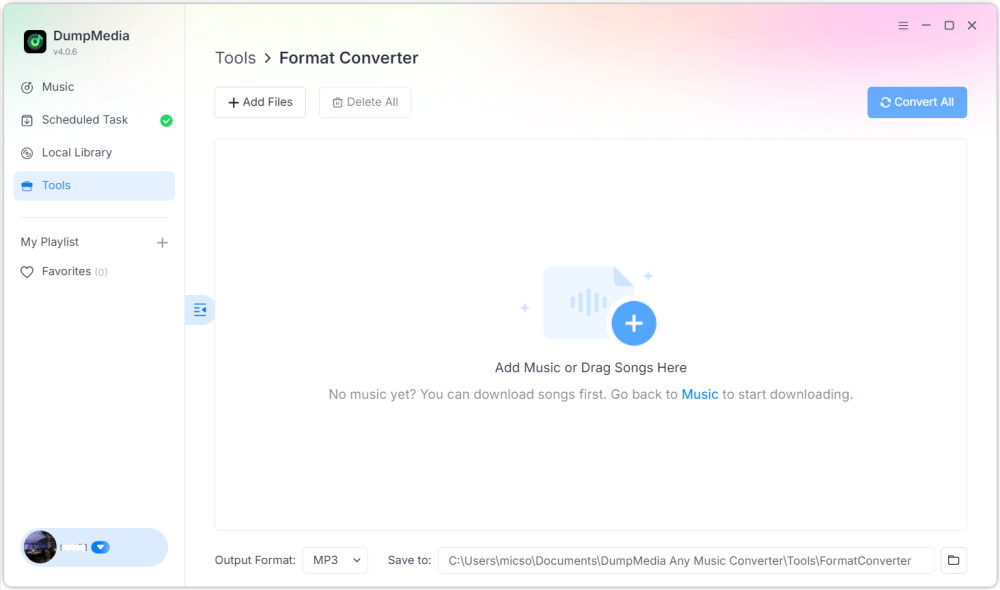
Steg 3. Välja MP3 som utdataformat
Steg 4. Klicka på Konvertera för att bearbeta filerna. Dina M4P-filer kommer att exporteras som MP3.
Del 3: Hur man konverterar Apple Music-spår till MP3?
Om ditt målljud kommer från Apple Music är det enklaste sättet att konvertera det till MP3 är med DumpMedia Apple Music Converter. DumpMedia Apple Music Converter kan ta bort DRM från Apple Music-spår och konvertera låtar till MP3, M4A, AAC, FLAC och mer. Den kan också bevara originalkvaliteten under konvertering. DumpMedia stöder batchkonvertering för att spara tid!
Gratis nedladdning Gratis nedladdning
Goda nyheter: Apple Music Converter har nu integrerats i vår nya programvara, Any Music Converter. Den nya programvaran integrerar alla tidigare konverteringsfunktioner från Apple Music samtidigt som den utökar stödet till flera streamingplattformar, erbjuder fler utdataformat och förbättrad prestanda.
Hur man konverterar Apple Music-låtar till MP3
Följ dessa steg för att konvertera M4P till MP3:
Steg 1. Öppna programmet och låt det ladda ditt Apple Music-bibliotek. Du kan välja enskilda spår eller flera spellistor.

Steg 2. Välja MP3 och justera bitrate, samplingsfrekvens och utdatamapp om det behövs.

Steg 3. Klicka på Konvertera. DRM-koden tas bort och filerna sparas i MP3 format.

Del 4: Vanliga frågor: Konvertera M4P till MP3
1. Varför kan jag inte konvertera M4P till MP3 direkt?
Eftersom M4P är skyddat av Apples DRM kan vanliga konverterare inte dekryptera det.
2. Kan iTunes konvertera M4P till MP3?
Nej. iTunes erbjuder inte längre MP3 konvertering för DRM-skyddade filer.
3. Konverterar M4P till MP3 lagligt?
Det är generellt tillåtet för personligt bruk, men lagarna varierar beroende på region.
4. Kan online-omvandlare hantera M4P?
Nej. Onlineverktyg kan inte bearbeta DRM-skyddade filer.
Del 5: Sammanfattningsvis
För att framgångsrikt konvertera M4P till MP3måste du först identifiera om din skyddade ljudfil kommer från gamla iTunes-köp eller från Apple Music. Lokala M4P-filer kräver ett dedikerat formatkonverteringsverktyg som Any Music Converter, som kan bearbeta befintliga M4P-filer och exportera dem som MP3.
Däremot behöver Apple Music-spår en specialiserad DRM-borttagningslösning. Det är här DumpMedia Apple Music Converter ger de bästa resultaten och låter användare konvertera Apple Music-låtar till högkvalitativa MP3 filer med lätthet. Genom att välja rätt verktyg för din specifika filtyp kan du säkerställa en smidig och pålitlig konverteringsprocess och njuta av din musik fritt på alla enheter.

30% rabatt >>>