


Apple Music är inte tillgängligt i din region? Åtgärda det år 2026.
Många Apple Music-användare stöter på det frustrerande meddelandet: ”Apple Music är inte tillgängligt i din regionRegionala begränsningar, licensavtal, DRM-skydd och problem med kontoverifiering förhindrar ofta att Apple Music-låtar spelas upp normalt. I den här guiden förklarar vi varför Apple Music anger "inte tillgängligt i ditt land", hur du åtgärdar problemet på iPhone, Mac och PC, och det bästa sättet att hålla Apple Music-låtar spelbara offline utan regionala begränsningar.
Innehållsguide Del 1. Varför står det "Inte tillgängligt i din region" på Apple Music?Del 2. Hur man åtgärdar problemet med att Apple Music inte är tillgängligt i ditt land?Del 3. Bästa sättet att hålla Apple Music spelbar överalltDel 4. Vanliga frågorDel 5. Sammanfattning
Del 1. Varför står det "Inte tillgängligt i din region" på Apple Music?
Användare söker ofta efter ”Apple Music är inte tillgängligt i din region” i följande situationer.
- Apple Music-låtar nedtonade
- Låtar visas i spellistor men kan inte spelas upp.
- Nedladdade låtar plötsligt otillgängliga
- Offlinespår slutar fungera efter prenumeration eller regionverifiering.
- Apple Music-problem under resor
- Problem med att ändra land för Apple-ID
- Apple Music fungerar inte på iPhone eller Mac
Det finns flera anledningar till varför användare ser felmeddelandet "Apple Music är inte tillgängligt i din region".
Licensrestriktioner
Apple Music licensierar låtar på olika sätt mellan länder och regioner. Vissa låtar kan vara tillgängliga i ett land men begränsade i ett annat på grund av upphovsrättsavtal. Detta är en av de vanligaste orsakerna till problemet "Apple Music är inte tillgängligt i ditt land".
Apple ID-regioninställningar
Om din Apple-ID-region ändras kan vissa låtar försvinna. Många användare stöter på meddelandet ”Apple Music är inte tillgängligt i ditt land” efter att ha flyttat utomlands eller ändrat betalningsinställningar.
DRM-skydd
Apple Music-låtar skyddas av DRM (Digital Rights Management), vilket kräver kontoverifiering och regional auktorisering. På grund av DRM-restriktioner kan offline-uppspelning misslyckas.
Problem med prenumerationsverifiering
Apple Music kontrollerar regelbundet prenumerationsstatus online. Om verifieringen misslyckas kan användare plötsligt förlora åtkomsten till nedladdade låtar.
Låtar borttagna från lokal katalog
Ibland tar skivbolag bort låtar från specifika regionala kataloger, vilket gör spår otillgängliga även om de tidigare varit spelbara.
Del 2. Hur man åtgärdar problemet med att Apple Music inte är tillgängligt i ditt land?
Om du fortsätter att se meddelandet ”Apple Music är inte tillgängligt i din region” kan följande metoder hjälpa till att åtgärda problemet.
Kontrollera din Apple-ID-region
Felaktiga regioninställningar är en viktig anledning till att Apple Music inte är tillgängligt i din region. Öppna Apple ID-inställningarna och bekräfta att ditt land eller din region matchar din nuvarande plats och betalningsmetod.
Uppdatera betalningsinformation
Utgångna eller ounderstödda betalningsmetoder kan påverka kontoverifiering och regional åtkomst.
Synkronisera Apple Music Library igen
Inaktivera och återaktivera Synkronisera bibliotek för att uppdatera informationen om låttillgänglighet.
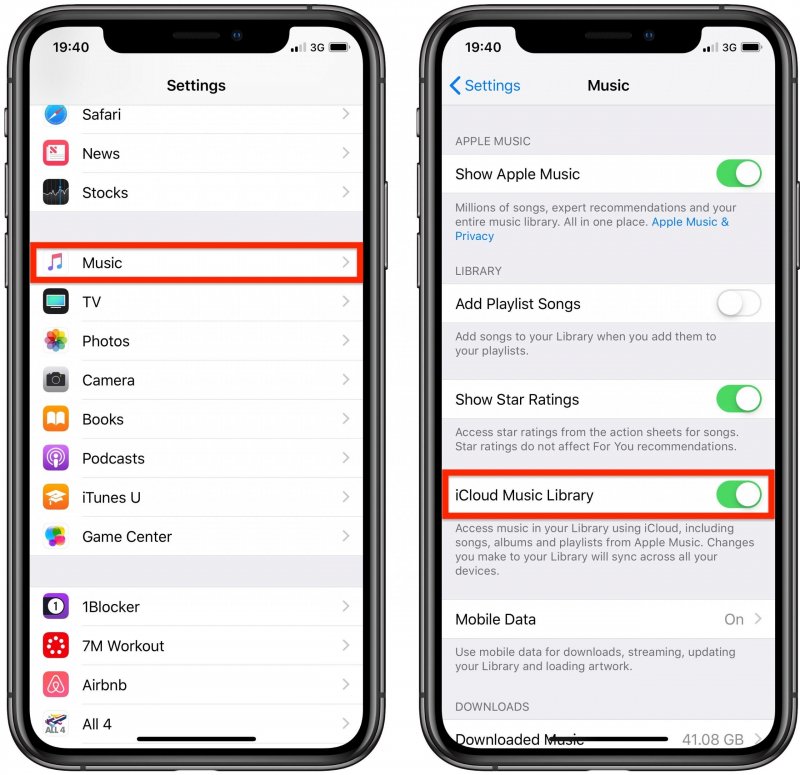
För iOS (iPhone): Öppna Inställningar > Appar > Musik. Slå AV Synkronisera bibliotek. Vänta i 30 sekunder och slå sedan tillbaka Synkronisera bibliotek till PÅ. Öppna Musik-appen. Du bör se en förloppsindikator högst upp som säger "Laddar musikbibliotek".
För Android: Öppna Apple Music-appen. Tryck på trepunktsmenyn (⋮) längst upp till höger och välj Inställningar. Hitta Synkronisera bibliotek och slå AV det, sedan PÅ det igen.
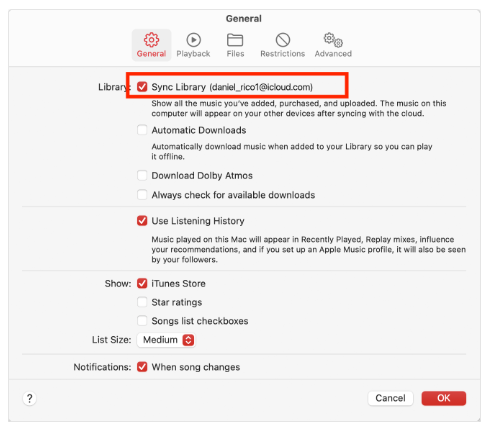
För macOS (Tahoe / 2026): Gå till Musik > Inställningar > Allmänt och avmarkera Synkronisera bibliotek, klicka på OK och gå sedan tillbaka och markera det igen.
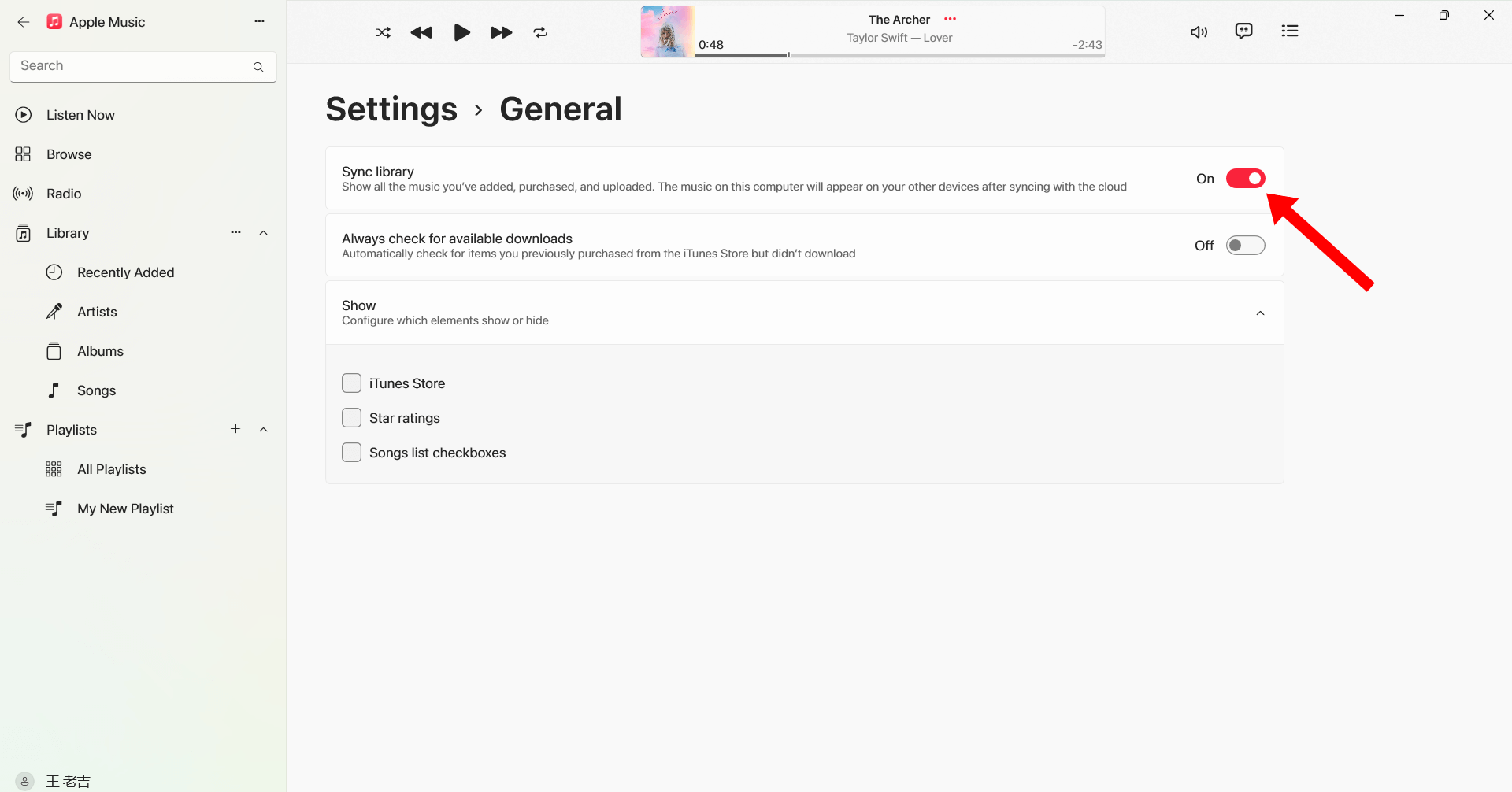
För Windows (10/11): Öppna Apple Music-appen. Klicka på ditt profilnamn/ikon längst ner i sidofältet. Gå till Inställningar > Allmänt. Slå av och på Synkronisera bibliotek igen.
Logga ut och logga in igen
Att logga in på ditt Apple-ID igen kan uppdatera Apple Music-auktoriseringen och åtgärda regionsrelaterade uppspelningsproblem.
Ladda ner låtar igen
Vissa nedladdade spår kan bli skadade eller förlora behörighet. Om du laddar ner låtar igen kan uppspelningen återställas.
Uppdatera iOS eller macOS
Äldre systemversioner kan orsaka kompatibilitetsproblem med Apple Music.

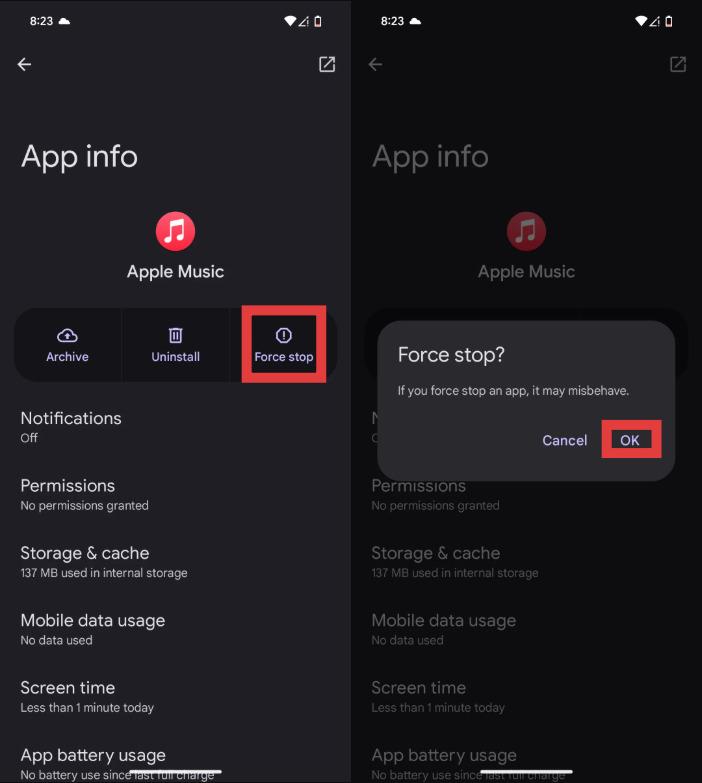
Starta om Apple Music App
Tillfälliga buggar kan också utlösa meddelandet "Apple Music är inte tillgängligt i din region".
Om dessa lösningar inte fungerar kan problemet vara relaterat till DRM-restriktioner och regionala licensbegränsningar utanför din kontroll.
Del 3. Bästa sättet att hålla Apple Music spelbar överallt
För att undvika återkommande problem med att Apple Music inte är tillgängligt i din region, har många användare konvertera Apple Music-låtar till lokala MP3 filerEtt av de bästa verktygen för detta är DumpMedia Apple Music ConverterDenna professionella Apple Music-konverterare hjälper användare att spara låtar lokalt för stabil offline-uppspelning utan att behöva regional auktorisering.
Gratis nedladdning Gratis nedladdning
🏆Varför välja DumpMedia Apple Music Converter
- Ta bort DRM-skyddet för Apple Music*
- Behåll originalljudkvaliteten
- Ladda ner spellistor och album i batch
- Snabb omvandlingshastighet
- Bevara låtmetadata och ID3-taggar
- Stöd för offlineuppspelning på alla enheter
För användare som upprepade gånger stöter på meddelandet ”Apple Music är inte tillgängligt i din region”, lokal MP3 uppspelning ger en mer pålitlig långsiktig lösning.
Hur man konverterar Apple Music till MP3 för offlineuppspelning
Steg 1. Ladda ned och installera DumpMedia Apple Music Converter på din Mac/PC. Starta programmet så ser du gränssnittet. Använd ditt Apple Music-konto för att logga in.
Gratis nedladdning Gratis nedladdning
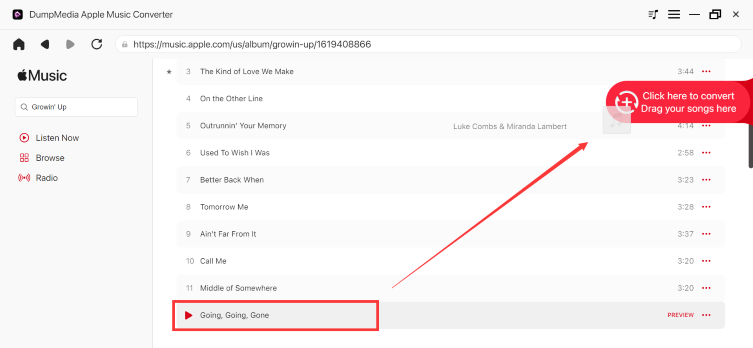
Steg 2. Hitta spellistan, albumet eller den specifika låten du vill konvertera. Du kan dra en enskild låt till "+"-ikonen på höger sida av skärmen. Alternativt kan du öppna en hel spellista/album och klicka på ikonen "Lägg till i konverter" för att ladda hela listan i konverteraren.
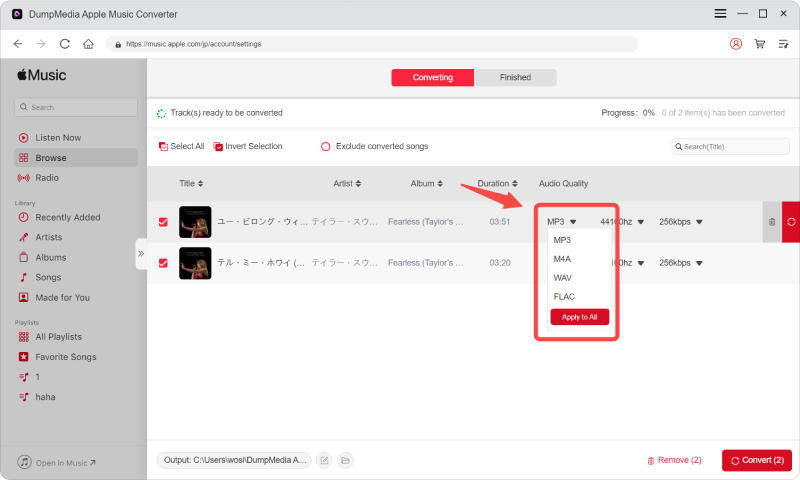
Steg 3. Välja MP3 (mest kompatibel). Du kan också ändra bithastighet eller samplingshastighet. För bästa balans, välj 320 kbps.
Steg 4. När inställningarna är klara kan användarna genomföra konverteringen genom att trycka på ikonen "Konvertera". DumpMedia kommer att konvertera Apple Music-låtar till MP3 inom några sekunder med sin supersnabba hastighet.

Efter konverteringen kan dina låtar spelas offline utan regionverifiering för Apple Music.
Del 4. Vanliga frågor
Varför säger Apple Music att den inte är tillgänglig i din region?
Detta händer vanligtvis på grund av licensbegränsningar, regioninställningar för Apple-ID eller DRM-auktoriseringsproblem.
Hur åtgärdar jag problemet om Apple Music inte är tillgängligt i din region?
Du kan prova att uppdatera Apple-ID:ts regioninställningar, synkronisera om ditt bibliotek, ladda ner låtar igen eller starta om appen.
Varför är mina Apple Music-låtar gråmarkerade?
Gråmarkerade låtar tyder ofta på problem med regional licens eller synkronisering.
Kan jag spela Apple Music när jag reser utomlands?
Ja, men vissa låtar kan bli otillgängliga på grund av regionala upphovsrättsrestriktioner.
Hur sparar jag Apple Music-låtar permanent?
Många användare använder DumpMedia Apple Music Converter för att konvertera låtar till lokala medier MP3 filer för permanent offline-uppspelning.
Is DumpMedia Är Apple Music Converter säker?
Ja. Den är utformad för Apple Music-konvertering och hantering av offline-uppspelning.
Del 5. Sammanfattning
Felet ”Apple Music är inte tillgängligt i din region” orsakas vanligtvis av licensrestriktioner, DRM-skydd, regioninställningar för Apple ID eller problem med prenumerationsverifiering. För användare som vill ha stabil offline-lyssning utan regionala begränsningar, DumpMedia Apple Music Converter erbjuder ett praktiskt sätt att konvertera Apple Music till permanenta lokala filer. MP3 filer. Genom att ta bort appberoende och streamingbegränsningar kan användare njuta av Apple Music mer fritt på olika enheter och platser.
Gratis nedladdning Gratis nedladdning
*DumpMedia fungerar genom att dekryptera och ladda ner Apple Music-låtar till DRM-fria filer, vilket gör att du kan få en ren, obegränsad kopia av ditt bibliotek för vilken enhet som helst. Dess funktionalitet inkluderar inte DRM-borttagning av lokala ljudfiler.

30% rabatt >>>