


Hur man laddar ner Amazon Prime Music offline på vilken enhet som helst
Många Amazon Prime- prenumeranter vill ladda ner Amazon Prime-musik offline så att de kan njuta av sina favoritlåtar utan att vara beroende av en internetanslutning. Oavsett om du reser, pendlar eller bara försöker spara mobildata kan offline-lyssning förbättra din musikupplevelse avsevärt. I den här guiden förklarar vi hur du laddar ner Amazon Music-låtar på olika enheter, diskuterar vanliga begränsningar och utforskar alternativ för att hantera ditt offline-musikbibliotek mer flexibelt.
Innehållsguide Del 1. Kan man ladda ner Amazon Prime Music? Del 2. Hur laddar man ner Amazon Prime Music på mobilen? Del 3. Hur laddar man ner Amazon Prime Music på PC? Del 4. Varför är vissa nedladdningar av Amazon Prime Music inte tillgängliga? Del 5. Hur håller man Amazon Prime Music offline permanent? Del 6. Vanliga frågor Del 7. Slutsats
Del 1. Kan du ladda ner Amazon Prime Music?
Ja. Amazon Prime-medlemmar kan ladda ner Amazon Prime-musik offline via den officiella Amazon Music-appen. Nedladdade låtar kan spelas utan en aktiv internetanslutning, vilket gör offline-lyssning bekvämt för resor, flyg eller områden med dålig nätverkstäckning.
Nedladdat innehåll förblir dock kopplat till ditt Amazon Music-konto och din prenumerationsstatus.
Del 2. Hur laddar jag ner Amazon Prime Music på mobilen?
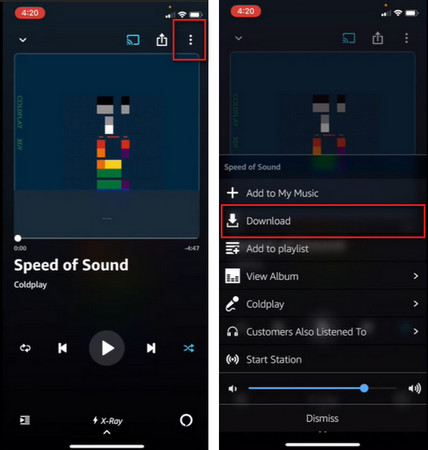
Det enklaste sättet att ladda ner Amazon Prime-musik offline är via mobilappen Amazon Music.
Ladda ner Amazon Prime Music på telefonen
- Öppna Amazon Music -appen.
- Logga in med ditt Amazon-konto.
- Hitta spellistan, albumet eller låten du vill ha.
- Tryck på knappen Ladda ner.
- Vänta tills nedladdningen är klar.
När det är klart kan du komma åt musiken utan internetanslutning.
Del 3. Hur laddar jag ner Amazon Prime Music på PC?
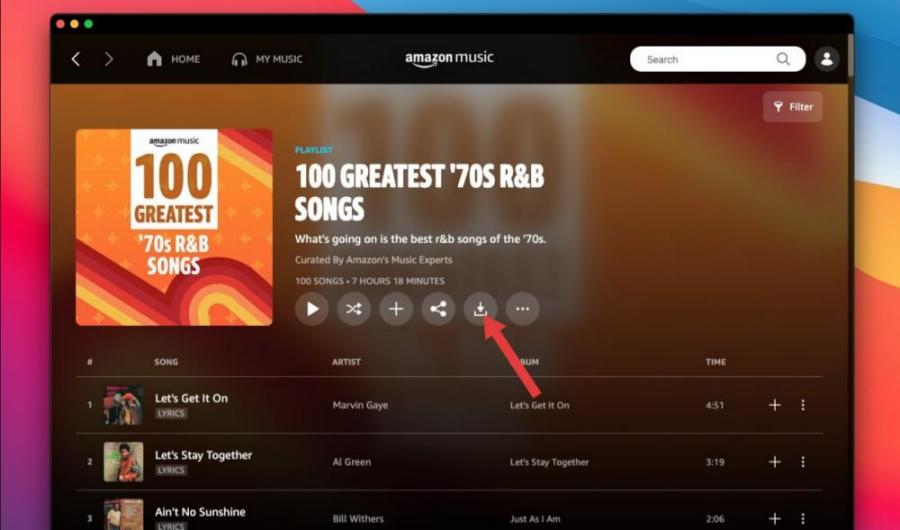
Många användare vill också ladda ner Amazon Prime-musik offline på sina datorer. Så här gör du:
- Installera Amazon Music-skrivbordsappen.
- Logga in på ditt Amazon-konto.
- Öppna ditt musikbibliotek.
- Välj den musik du vill spara.
- Klicka på alternativet Ladda ner.
Nedladdat innehåll kan sedan nås via Amazon Music-skrivbordsappen.
Del 4. Varför är vissa nedladdningar av Amazon Prime Music inte tillgängliga?
Ibland lyckas användare ladda ner Amazon Prime-musik offline bara för att upptäcka att vissa låtar senare blir otillgängliga. Detta kan hända av flera anledningar.
- Prenumerationsverifiering: Nedladdningar offline kräver ofta kontoverifiering. Om verifieringen misslyckas kanske nedladdade låtar inte spelas upp.
- Licensändringar: Musikkataloger ändras ofta. Om Amazon förlorar licensrättigheterna till specifika spår kanske dessa låtar inte längre är tillgängliga.
- Regionala begränsningar: Vissa låtar är begränsade baserat på geografisk plats. Resor mellan länder kan ibland påverka tillgängligheten.
- App- eller synkroniseringsproblem: Programvarufel och synkroniseringsproblem kan tillfälligt förhindra åtkomst till nedladdad musik.
Del 5. Hur man håller Amazon Prime Music offline permanent?
Även om Amazon tillåter användare att ladda ner Amazon Prime-musik offline, kommer officiella nedladdningar med flera begränsningar. Nedladdade låtar kan vanligtvis bara spelas upp via Amazon Music-appen. Användare kan i allmänhet inte överföra nedladdade låtar fritt mellan enheter. Många användare som söker efter nedladdningsbar Amazon Prime-musik letar faktiskt efter ett sätt att behålla långsiktig åtkomst till sina musiksamlingar.
För användare som söker mer flexibilitet, DumpMedia Amazon Music Converter erbjuder en praktisk lösning för att hantera Amazon Music-innehåll. Programvaran hjälper användare att konvertera Amazon Music-låtar till vanliga format för offline-uppspelning. Även om Låtar är gråtonade på Amazon Music, kan du spela Amazon Music-låtar offline på en annan musikspelare direkt.
Gratis nedladdning Gratis nedladdning
🏆Varför använda DumpMedia Amazon Music Converter
- Ladda ner Amazon Music till MP3, WAV, FLAC och AAC
- Integration med Amazon Music webbspelare
- Behåll originalljudkvaliteten
- Ladda ner spellistor och album i batch
- Snabb omvandlingshastighet
- Bevara låtmetadata och ID3-taggar
- Stöd för offlineuppspelning på alla enheter
Genom att konvertera musik till ljudformat som stöds av många kan användare njuta av sina favoritlåtar på en bredare mängd enheter.
Konvertera Amazon Music till MP3 Steg för steg
Steg 1. Ladda ned och installera DumpMedia Amazon Music Converter på din Mac/PC. Starta programmet så ser du gränssnittet. Använd ditt Amazon Music-konto för att logga in.
Gratis nedladdning Gratis nedladdning
Steg 2. Hitta spellistan, albumet eller den specifika låten du vill konvertera. Du kan dra en enskild låt till "+"-ikonen på höger sida av skärmen. Alternativt kan du öppna en hel spellista/album och klicka på ikonen "Lägg till i konverter" för att ladda hela listan i konverteraren.
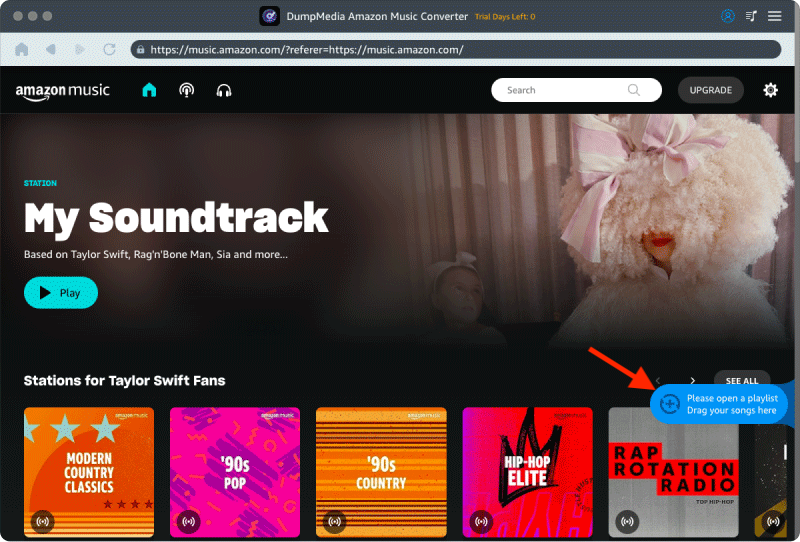
Steg 3. Välja MP3 (mest kompatibel). Du kan också ändra bithastighet eller samplingshastighet. För bästa balans, välj 320 kbps.
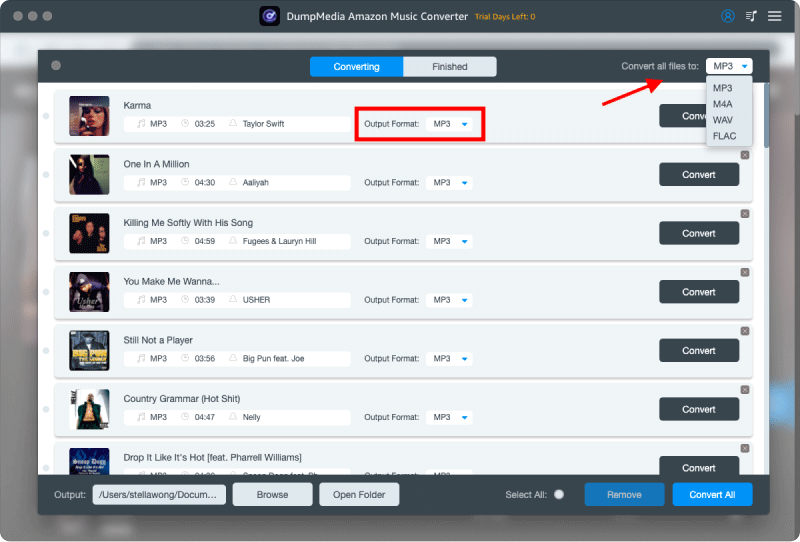
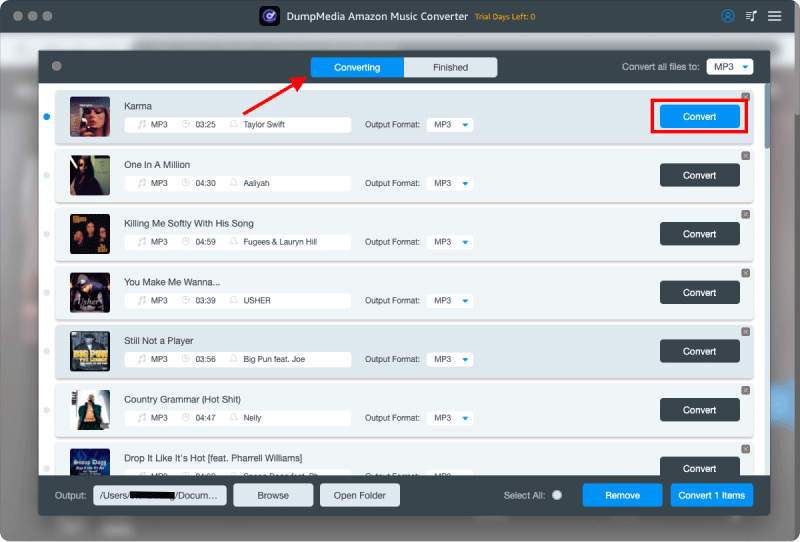
Steg 4. När inställningarna är klara kan användarna genomföra konverteringen genom att trycka på ikonen "Konvertera". DumpMedia kommer att ladda ner Amazon Music-låtar till MP3 inom några sekunder med sin supersnabba hastighet.
Del 6. Vanliga frågor
Kan jag ladda ner Amazon Prime Music offline?
Ja. Godkända låtar, album och spellistor kan laddas ner via Amazon Music-appen för att lyssna offline.
Var lagras Amazon Music-nedladdningar?
Nedladdningar lagras i Amazon Music-appen och är vanligtvis inte tillgängliga som vanliga ljudfiler.
Går nedladdningar från Amazon Music ut?
Nedladdat innehåll kan bli otillgängligt om prenumerationer löper ut eller licensändringar sker.
Kan jag överföra Amazon Music-nedladdningar till en annan enhet?
Officiella nedladdningar kan vanligtvis inte överföras fritt som traditionella MP3 filer.
Kan jag ladda ner Amazon Prime Music offline som MP3?
Amazon Music tillhandahåller normalt inte nedladdade låtar eftersom MP3 filer via sin officiella app.
Del 7. Slutsats
Många användare vill ladda ner Amazon Prime-musik offline för att njuta av oavbruten lyssning var de än går. Officiella nedladdningar har dock vissa begränsningar, inklusive prenumerationsberoende, uppspelningsbegränsningar och begränsad filflexibilitet. Att förstå dessa begränsningar kan hjälpa dig att välja det bästa sättet att hantera din musiksamling och njuta av en bekvämare lyssningsupplevelse offline.