


Amazon Music gråtonad? Orsaker och lösningar som faktiskt fungerar
Att se låtar markerade som otillgängliga kan vara frustrerande, särskilt när du försöker lyssna på din favoritmusik offline. Om du har märkt att Amazon Music är gråmarkerat i ditt bibliotek, dina spellistor eller nedladdningssektioner är du inte ensam. Problemet med att låtar är gråmarkerade kan uppstå av flera anledningar. I den här guiden förklarar vi varför låtar visas gråmarkerade på Amazon Music, hur du åtgärdar det och hur du undviker att förlora åtkomsten till din musik i framtiden.
Innehållsguide Del 1. Varför är låtar gråtonade på Amazon Music? Del 2. Hur man åtgärdar gråtonade Amazon Music-låtar? Del 3. Bonus: Håll Amazon Music tillgänglig offline Del 4. Vanliga frågor Del 5. Slutsats
Del 1. Varför är låten nedtonad på Amazon Music?
Innan du försöker åtgärda problemet är det viktigt att förstå varför problemet med den gråmarkerade Amazon Music uppstår. Det finns flera vanliga orsaker som kan göra att låtar verkar otillgängliga.
Prenumerationsfrågor
Om din Amazon Music-prenumeration har löpt ut eller om det finns ett faktureringsproblem kan vissa låtar bli oåtkomliga. Detta är en av de vanligaste orsakerna till att Amazon Music är nedtonat.
Licensändringar
Musikströmningstjänster uppdaterar regelbundet licensavtal. När låtar tas bort från Amazon Musics katalog kan de visas nedtonade även om du tidigare har lagt till dem i ditt bibliotek.
Problem med nedladdningsverifiering
Nedladdade låtar kräver ofta regelbunden verifiering. Om verifieringen misslyckas kan du stöta på det gråmarkerade felmeddelandet Amazon Music för nedladdat innehåll.
Synkroniseringsproblem
Problem med synkronisering av bibliotek mellan enheter kan göra att låtar tillfälligt blir otillgängliga.
Regionrestriktioner
Vissa låtar är bara tillgängliga i specifika länder eller regioner. Resor eller ändringar av kontoinställningar kan utlösa problemet med att Amazon Music är nedtonat.
Appbuggar eller skadad data
Föråldrad programvara, skadade cachefiler eller tillfälliga systemfel kan också påverka låtens tillgänglighet.
Del 2. Hur fixar man nedtonade Amazon Music-låtar?
Om du har problem med att Amazon Music är nedtonad kan du prova följande lösningar.
Kontrollera din prenumerationsstatus
För att säkerställa oavbruten åtkomst till ditt Amazon Music-bibliotek, kontrollera att din prenumeration är aktiv, att din betalningsinformation är giltig och att dina Amazon Music Unlimited-förmåner fortfarande gäller, eftersom prenumerationsupphör är en vanlig orsak till att låtar blir otillgängliga.
Uppdatera ditt musikbibliotek
Att uppdatera ditt bibliotek kan hjälpa Amazon Music att synkronisera om innehåll och uppdatera låttillgängligheten.
Ladda ner otillgängliga låtar igen
Om dina nedladdade låtar visas gråtonade kan du ofta lösa problemet genom att ta bort den befintliga nedladdningen, uppdatera ditt bibliotek och ladda ner låten igen.
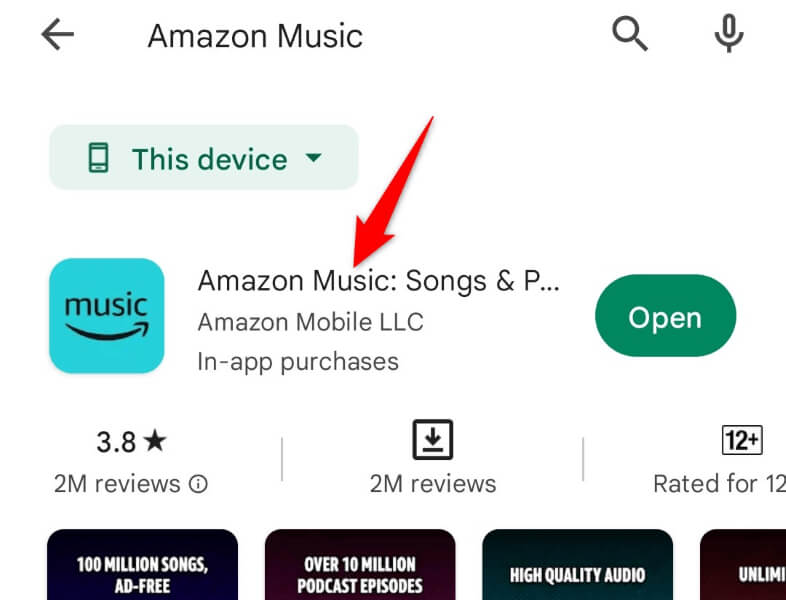
Uppdatera Amazon Music-appen
Äldre appversioner kan innehålla buggar som bidrar till problemet med att Amazon Music är nedtonad. Installera alltid den senaste tillgängliga versionen.
Logga ut och logga in igen
Problem med kontosynkronisering kan ibland lösas genom att helt enkelt logga ut och logga in på Amazon Music igen.
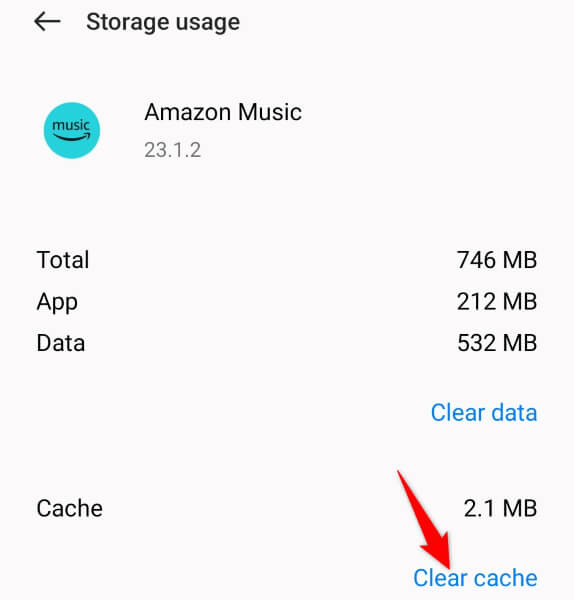
Rensa App Cache
Cachad data kan bli skadad med tiden. Att rensa cachen hjälper ofta till att återställa normal funktionalitet.
Kontrollera din Internet-anslutning
Även nedladdade låtar kan ibland kräva kontoverifiering. En stabil internetanslutning kan hjälpa Amazon Music att uppdatera licenser och återställa åtkomst.
Del 3. Bonus: Håll Amazon Music tillgänglig offline
Många användare rapporterar att nedladdade Amazon Music-låtar som är nedladdade påverkar låtar som de tidigare laddat ner för offline-lyssning. Detta kan vara förvirrande eftersom filerna verkar vara lagrade på enheten. Nedladdningar av Amazon Music är dock inte traditionella ljudfiler. Istället är de fortfarande kopplade till prenumerationsstatus, licensavtal och auktorisering av Amazon Music-appen. Som ett resultat kan nedladdade låtar ibland bli otillgängliga även efter lyckade nedladdningar.
Om du ofta stöter på problemet med att Amazon Music är nedtonat kanske du letar efter ett mer pålitligt sätt att komma åt din musik offline. För användare som söker mer flexibilitet, DumpMedia Amazon Music Converter ger en praktisk lösning för att hantera Amazon Music-innehåll. Även om Amazon Music-appen inte fungerar på din enhet kan du spela Amazon Music-låtar offline på en annan musikspelare omedelbart.
Gratis nedladdning Gratis nedladdning
🏆Varför använda DumpMedia Amazon Music Converter
- Ladda ner Amazon Music till MP3, WAV, FLAC och AAC
- Integration med Amazon Music webbspelare
- Behåll originalljudkvaliteten
- Ladda ner spellistor och album i batch
- Snabb omvandlingshastighet
- Bevara låtmetadata och ID3-taggar
- Stöd för offlineuppspelning på alla enheter
Genom att konvertera stödda Amazon Music-spår till vanliga ljudformat kan användare få större kontroll över sina musiksamlingar.
Ladda ner Amazon Music till MP3 Använda DumpMedia
Steg 1. Ladda ned och installera DumpMedia Amazon Music Converter på din Mac/PC. Starta programmet så ser du gränssnittet. Använd ditt Amazon Music-konto för att logga in.
Gratis nedladdning Gratis nedladdning
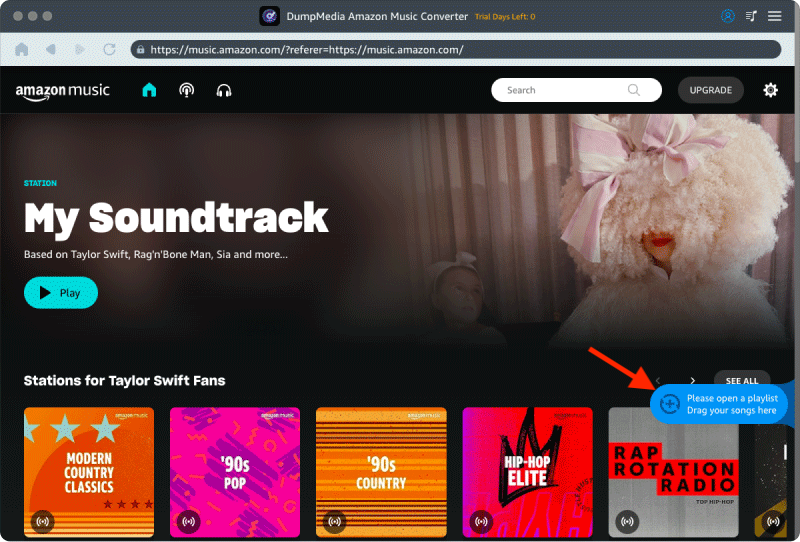
Steg 2. Hitta spellistan, albumet eller den specifika låten du vill konvertera. Du kan dra en enskild låt till "+"-ikonen på höger sida av skärmen. Alternativt kan du öppna en hel spellista/album och klicka på ikonen "Lägg till i konverter" för att ladda hela listan i konverteraren.
Steg 3. Välja MP3 (mest kompatibel). Du kan också ändra bithastighet eller samplingshastighet. För bästa balans, välj 320 kbps.
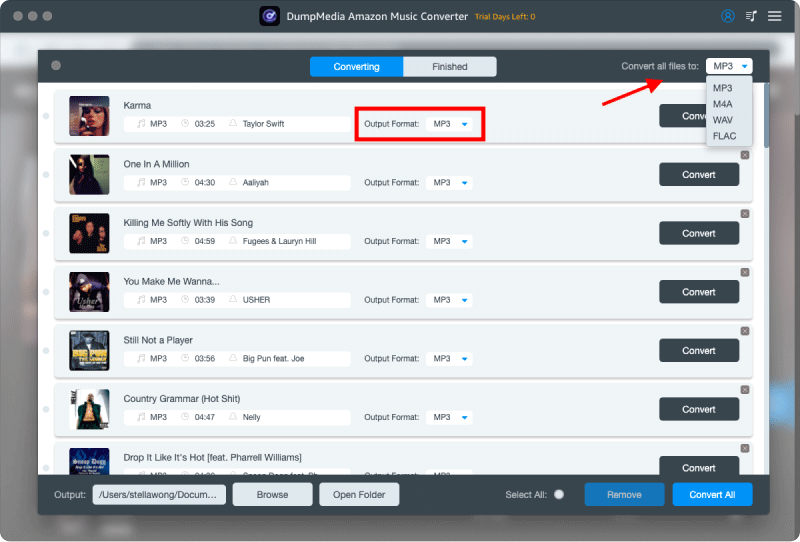
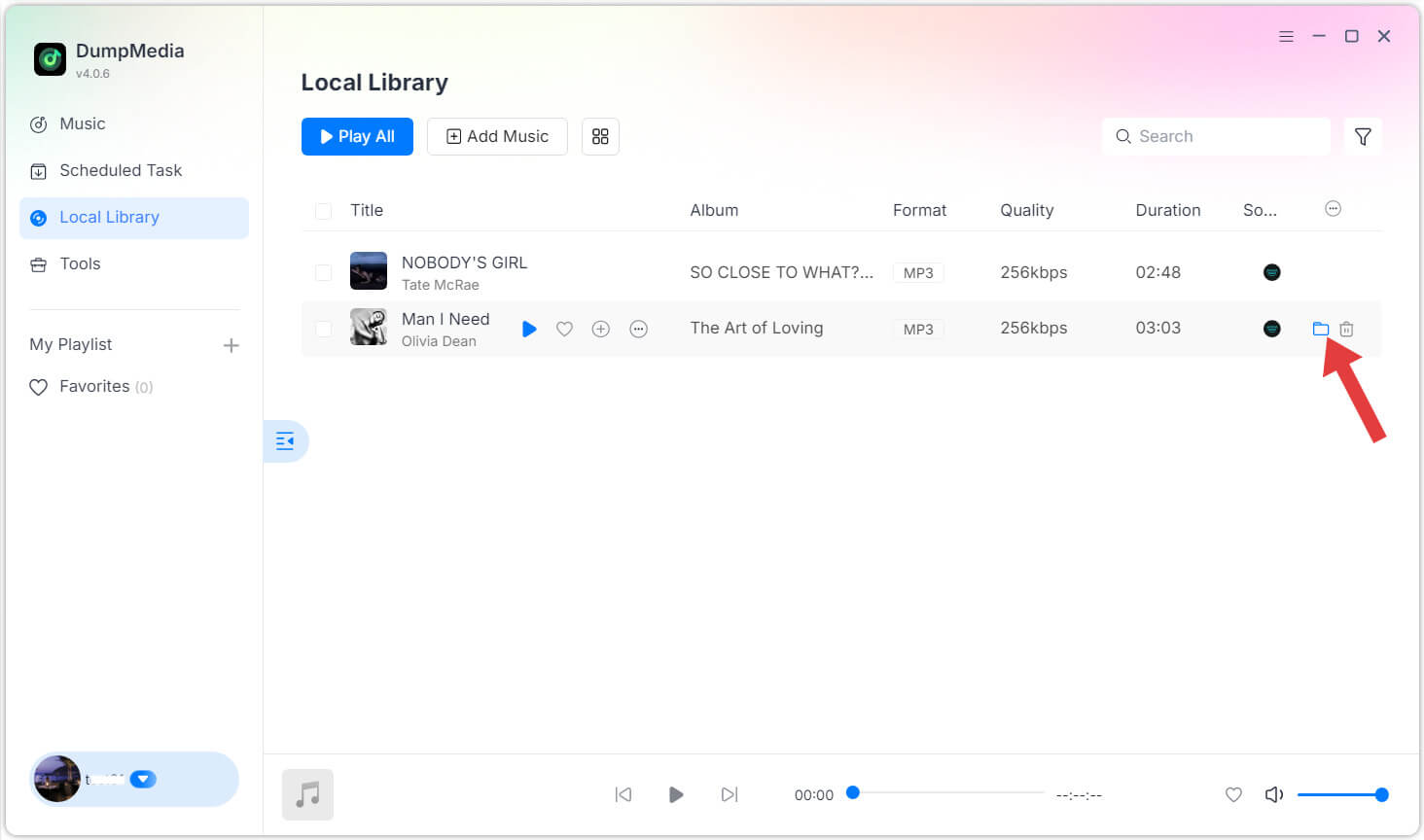
Steg 4. När inställningarna är klara kan användarna genomföra konverteringen genom att trycka på ikonen "Konvertera". DumpMedia kommer att konvertera Amazon Music-låtar till MP3 inom några sekunder med sin supersnabba hastighet.
Del 4. Vanliga frågor
Varför är Amazon Music gråmarkerat?
De vanligaste orsakerna inkluderar prenumerationsproblem, licensändringar, synkroniseringsproblem, verifieringsfel vid nedladdning och programfel.
Varför är mina nedladdade låtar inte tillgängliga?
Nedladdade låtar kan kräva aktiva prenumerationer och regelbunden kontoverifiering för att förbli tillgängliga.
Tar Amazon Music bort nedladdade låtar?
I vissa situationer kan nedladdade låtar bli otillgängliga på grund av licensändringar, kontoproblem eller att prenumerationen har löpt ut.
Kan jag lyssna på Amazon Music offline?
Ja. Amazon Music stöder offlinelyssning för kvalificerat nedladdat innehåll.
Hur förhindrar jag att Amazon Music-låtar blir gråtonade?
Att hålla din prenumeration aktiv, uppdatera appen regelbundet, upprätthålla en stabil internetanslutning och hantera nedladdningar korrekt kan bidra till att minska tillgänglighetsproblem.
Del 5. Slutsats
Problemet med att Amazon Music är nedtonat orsakas vanligtvis av prenumerationsverifiering, licensbegränsningar, nedladdningsproblem eller synkroniseringsfel. Lyckligtvis kan de flesta fall lösas genom grundläggande felsökningssteg som att uppdatera biblioteket, uppdatera appen eller ladda ner låtar igen.
Men eftersom strömmande nedladdningar fortfarande är beroende av konto- och licenskrav, fortsätter vissa användare att stöta på åtkomstbegränsningar över tid. Att förstå hur Amazon Music hanterar nedladdat innehåll kan hjälpa dig att välja den bästa metoden för att upprätthålla pålitlig offlineåtkomst till dina favoritlåtar.