


Hur laddar man ner Amazon Music för att lyssna offline?
Många användare vill ladda ner Amazon Music för offline-lyssning för att njuta av sina favoritlåtar utan att behöva en internetanslutning. Även om Amazon Music tillåter officiella offline-nedladdningar är filerna krypterade, kan inte överföras till andra enheter och försvinner när din prenumeration upphör. Om du vill ha permanent offline-åtkomst och större flexibilitet visar den här guiden hur du spelar Amazon Music offline med både officiella metoder och en professionell lösning.
Innehållsguide Del 1: Kan man ladda ner Amazon Music för offlineuppspelning? Del 2: Hur man laddar ner Amazon Music offline officiellt? Del 3: Bästa sättet att ladda ner Amazon Music permanent Del 4: Vanliga frågor Del 5: Sammanfattning
Del 1: Kan du ladda ner Amazon Music för offline-uppspelning?
Ja, Amazon Music stöder officiellt offline-lyssning för prenumeranter, men det finns vissa begränsningar:
- Endast tillgängligt för Amazon Music Prime- eller Unlimited-användare
- Låtar är DRM-skyddad och får inte kopieras fritt
- Nedladdningar kan bara spelas upp i Amazon Music-appen
- Om du avslutar din prenumeration tas du bort åtkomsten till nedladdade låtar
Kort sagt, officiella nedladdningar tillåter tillfällig offline-uppspelning men inte permanent ägande. Användare som söker efter sätt att ladda ner Amazon Music för offline-lyssning behöver ofta en lösning som sparar deras musik för alltid.
Del 2: Hur laddar man ner Amazon Music offline officiellt?
Hur laddar man ner Amazon Music för att lyssna offline? Det är en enkel process. Här är steg-för-steg-guiden med ditt Prime Music- och Unlimited-konto.
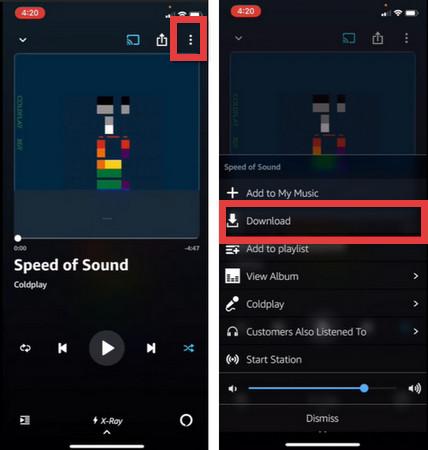
På mobil (iOS / Android)
- Starta Amazon Music-appen och se till att du är inloggad.
- Navigera till låten, albumet eller spellistan du vill ladda ner.
- Tryck på ikonen med tre punkter (⋮) bredvid låten eller högst upp i albumet/spellistan.
- Välj Ladda ner från listan.
- En blå ikon för "nedladdad" (vanligtvis en bockmarkering eller en nedåtpil) visas bredvid musiken när den är klar.
- Gå till Bibliotek > Nedladdade för att bara se musiken som lagrats på din enhet.
På skrivbordet (Windows / Mac)
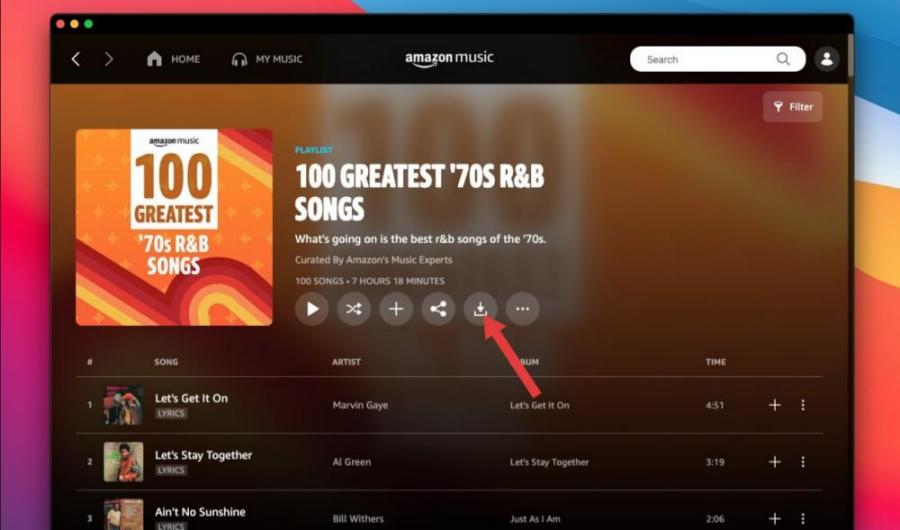
- Ladda ner och installera Amazon Music-appen från Amazons webbplats eller din appbutik.
- Gå till biblioteket eller använd sökfältet för att hitta din musik.
- Klicka på nedåtpilen bredvid låt- eller albumtiteln.
- Du kan se dina aktiva nedladdningar på fliken "Nedladdningar" i sidofältet.
Begränsningar för nedladdningar av Amazon Music offline
Även om du kan ladda ner Amazon Music för offline-lyssning finns det betydande begränsningar. DRM-skyddet för nedladdningarna förhindrar kopiering eller överföring av musik. Offline-uppspelning är begränsad till Amazon Music-appen. Dessutom försvinner låtar när prenumerationen upphör. Dessa begränsningar gör det omöjligt att verkligen äga din musik offline. För användare som vill ha permanent offline-åtkomst är en professionell Amazon Music-nedladdare den bästa lösningen.
Del 3: Bästa sättet att ladda ner Amazon Music permanent
För att övervinna dessa begränsningar rekommenderar vi DumpMedia Amazon Music Converter, ett professionellt verktyg utformat för att ladda ner Amazon Music för permanent offline-lyssning.
Gratis nedladdning Gratis nedladdning
DumpMedia Amazon Music Converter hjälper användare att ladda ner Amazon Music till MP3, WAV, FLAC och AAC. På så sätt kan du spara låtar permanent, hålla spellistor offline för alltid och överföra musik till vilken enhet som helst. Även om Amazon Music-appen fungerar inte på din enhet kan du spela Amazon Music-låtar offline på en annan musikspelare direkt.
🏆Viktiga funktioner hos DumpMedia Amazon Music Converter
- 🎵Ta bort Amazon Music DRM-skydd*
- 🎵Behåll originalljudkvaliteten
- 🎵Ladda ner spellistor och album i batch
- 🎵Snabb konverteringshastighet
- 🎵Bevara låtmetadata och ID3-taggar
- 🎵Stöd för offlineuppspelning på alla enheter
Ladda ner Amazon Music till MP3 Steg för steg
Följ dessa enkla steg för att ladda ner Amazon Music för offlinelyssning med DumpMedia Amazon Music Converter:
Steg 1. Ladda ned och installera DumpMedia Amazon Music Converter på din Mac/PC. DumpMedia använder en inbyggd Amazon Music-webbspelare. Använd ditt Amazon Music Premium/Free-konto för att logga in.
Gratis nedladdning Gratis nedladdning
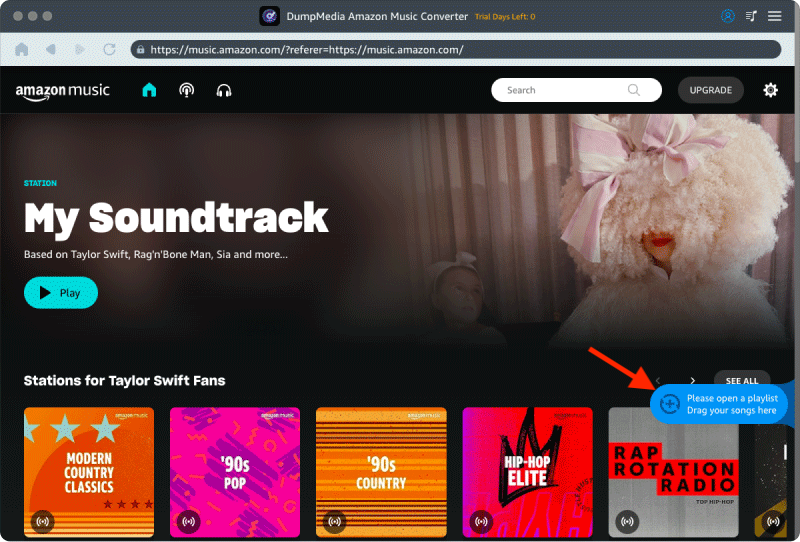
Steg 2. Hitta spellistan, albumet eller den specifika låten du vill konvertera. Du kan dra en enskild låt till "+"-ikonen på höger sida av skärmen. Alternativt kan du öppna en hel spellista/album och klicka på ikonen "Lägg till i konverter" för att ladda hela listan i konverteraren.
Steg 3. Välja MP3 (mest kompatibel). Du kan också ändra bithastighet eller samplingshastighet. För bästa balans, välj 320 kbps.
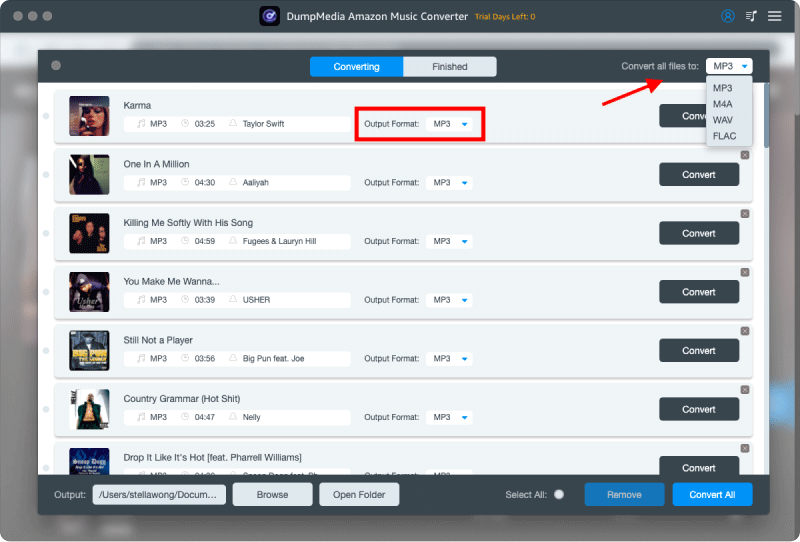
Steg 4. När inställningarna är klara kan användarna genomföra konverteringen genom att trycka på ikonen "Konvertera". DumpMedia kommer att konvertera Amazon Music till MP3 inom några sekunder med sin supersnabba hastighet.
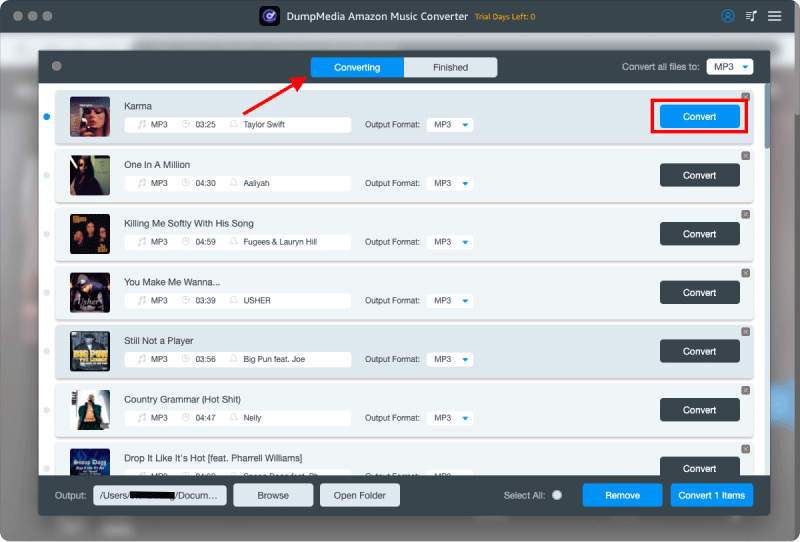
Efter konverteringen kan du njuta av offlineuppspelning på vilken enhet som helst utan begränsningar. Detta är den perfekta lösningen för användare som verkligen vill ladda ner Amazon Music för att lyssna offline permanent.
Del 4: vanliga frågor
F1. Kan jag ladda ner Amazon Music för att lyssna offline?
Ja, men officiella nedladdningar är begränsade till Amazon Music-appen och försvinner efter att prenumerationen upphör. DumpMedia tillåter permanent MP3 Nedladdningar.
F2. Upphör offline-uppspelning på Amazon Music?
Ja, officiella offline-nedladdningar upphör att gälla om du avslutar din prenumeration.
F3. Hur konverterar jag Amazon Music till MP3?
Använda DumpMedia Amazon Music Converter för att konvertera låtar, spellistor och album till MP3.
F4. Kan jag överföra Amazon Music till USB?
Officiella nedladdningar kan inte, utan konverteras MP3 filer kan överföras fritt.
Q5. Är DumpMedia Är Amazon Music Converter säker?
Ja, det är en pålitlig programvara som tusentals användare litar på.
Del 5: Sammanfattning
Medan Amazon Music tillåter offline-uppspelning, är officiella nedladdningar begränsade av DRM-, prenumerations- och enhetsbegränsningar. Det mest effektiva sättet att ladda ner Amazon Music för offline-lyssning permanent är att använda DumpMedia Amazon Music Converter. Med DumpMedia, kan du konvertera Amazon Music-spår till MP3, behåll dem för alltid och njut av din musik offline på vilken enhet som helst. Börja ladda ner dina favoritlåtar från Amazon Music idag och oroa dig aldrig för att förlora åtkomsten igen.
Gratis nedladdning Gratis nedladdning
*DumpMedia fungerar genom att dekryptera och ladda ner Amazon Music-låtar till DRM-fria filer, vilket gör att du kan få en ren, obegränsad kopia av ditt bibliotek för vilken enhet som helst. Dess funktionalitet inkluderar inte DRM-borttagning av lokala ljudfiler.