


Melhores Spotify MP3 Jogador em 2026: Os melhores dispositivos para jogos offline Spotify Escuta
Spotify Tornou-se uma das plataformas de streaming de música mais populares do mundo. No entanto, muitos usuários ainda preferem serviços dedicados. MP3 Reprodutores para ouvir música offline, maior duração da bateria e prazer musical sem distrações.
Se você está procurando o melhor Spotify MP3 jogadorVocê já deve ter descoberto que nem tudo MP3 o jogador pode jogar Spotify músicas diretamente. Neste guia, exploraremos as melhores Spotify-compatível MP3 jogadores, expliquem as limitações de Spotify música, e mostrar como você pode curtir Spotify faixas em praticamente qualquer MP3 jogador.
Guia de conteúdo Parte 1: Você consegue jogar Spotify Música em qualquer MP3 Jogador?Parte 2: O que torna um bom Spotify MP3 Reprodutor de música?Parte 3: Melhor Spotify MP3 Comparativo de reprodutores de músicaParte 4: Por que alguns MP3 Os jogadores não podem jogar. Spotify Música?Parte 5: Como Jogar Spotify Música em qualquer MP3 Jogador?Parte 6: Perguntas frequentesParte 7: Veredicto Final
Parte 1: Você consegue jogar Spotify Música em qualquer MP3 Jogador?
A resposta curta é não.
Spotify a música é protegida por Gerenciamento de direitos digitais (DRM), o que significa que as músicas baixadas só podem ser reproduzidas dentro do Spotify aplicativo. Até mesmo Spotify Premium Os usuários não podem transferir faixas baixadas diretamente para um formato padrão. MP3 jogador.
É por isso que muitos usuários que procuram por um Spotify MP3 Os jogadores frequentemente se deparam com problemas de compatibilidade. Embora alguns dispositivos modernos sejam compatíveis com o Spotify aplicativo, tradicional MP3 Os jogadores normalmente não.
Parte 2: O que torna um bom Spotify MP3 Reprodutor de música?
Antes de escolher um SpotifyPara dispositivos compatíveis, considere os seguintes fatores:
Spotify Suporte App: A maneira mais fácil de jogar Spotify está em um dispositivo que pode instalar o Spotify aplicativo diretamente.
Reprodução off-line: Spotify A versão Premium permite ouvir offline em dispositivos compatíveis.
Capacidade de armazenamento: Um armazenamento amplo é útil para listas de reprodução baixadas e arquivos de música locais.
Qualidade de áudio: Os audiófilos podem preferir reprodutores de áudio de alta resolução com conversores digital-analógico (DACs) superiores.
Duração da bateria: Reprodutores de música dedicados geralmente superam os smartphones em termos de duração da bateria.
Parte 3: Melhor Spotify MP3 Comparativo de reprodutores de música
Aqui estão alguns dos melhores Spotify MP3 jogadores atualmente disponíveis para Spotify usuários.
Mighty 3 (Edição de 2026)
Mighty é um dos poucos dispositivos projetados especificamente para Spotify Reprodução offline. Frequentemente descrito como o sucessor espiritual moderno do iPod Shuffle, ele foi desenvolvido especificamente para usuários que desejam curtir suas músicas, podcasts e audiolivros em qualquer lugar, sem o volume, as notificações ou o consumo excessivo de bateria de um smartphone. Ele é compatível com fones de ouvido/caixas de som Bluetooth e fones de ouvido com fio tradicionais de 3.5 mm.
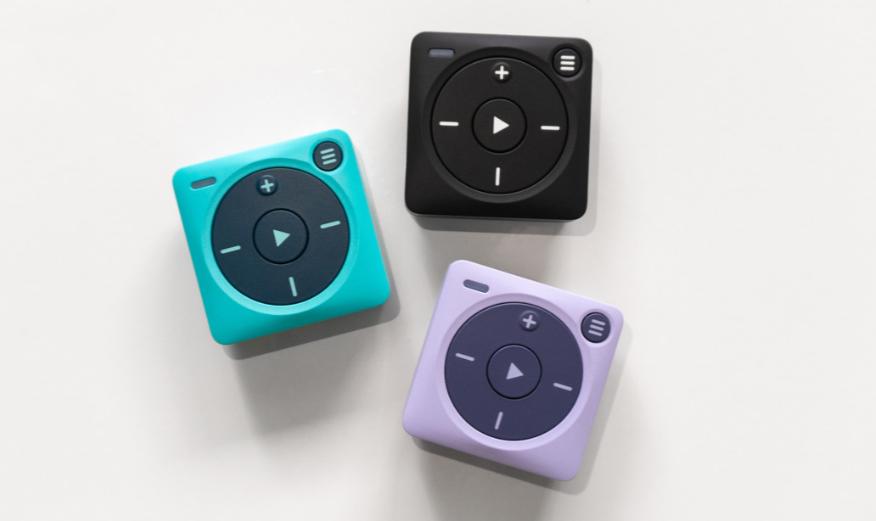
No entanto, você precisa ter uma conta ativa. Spotify Assinatura Premium; não suporta versões locais. MP3 arquivos ou outros serviços de streaming como o Apple Music. Como não há tela, você depende de comandos de voz e botões físicos para alternar entre as listas de reprodução, o que alguns usuários consideram menos intuitivo do que uma interface touchscreen.
Walkman Sony NW-A306
O mais recente Walkman da Sony combina qualidade de som premium com a funcionalidade do Android. Para muitos usuários, este é o melhor Walkman premium. Spotify MP3 O reprodutor está disponível. Equipado com o amplificador digital S-Master HX proprietário da Sony e a tecnologia de aprimoramento de imagem por IA DSEE Ultimate, ele oferece um som mais rico, nítido e detalhado do que quase qualquer smartphone. Inclui um slot para cartão microSD, permitindo que você adicione facilmente mais espaço para sua biblioteca de músicas locais em alta resolução, sem ficar limitado pela memória interna.
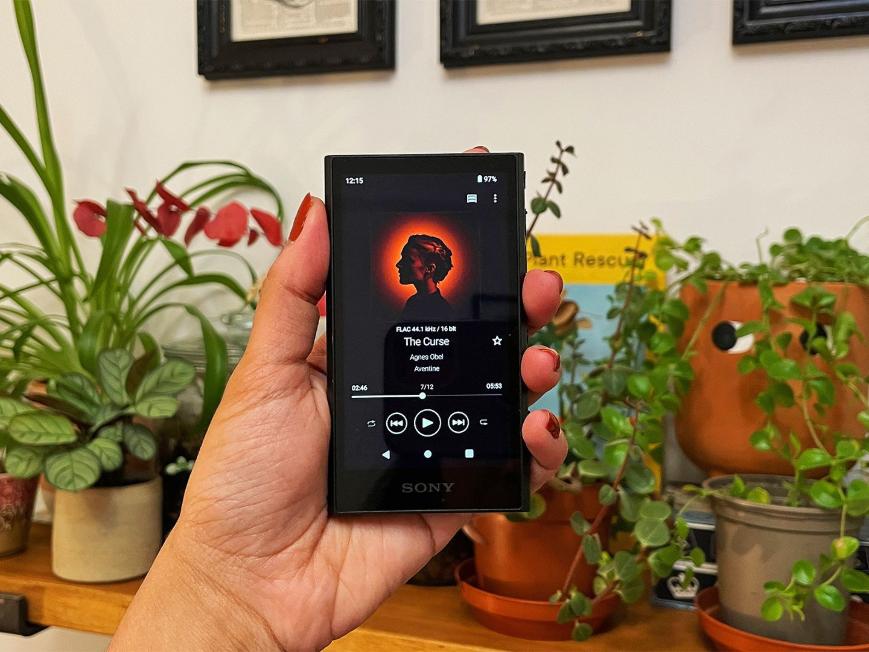
Alguns usuários consideram a interface do Android um pouco lenta ou com desempenho inferior ao navegar por menus complexos, já que o hardware interno é otimizado para reprodução de áudio em vez de multitarefa de aplicativos. Embora ofereça excelente duração de bateria para arquivos locais, o uso de serviços de streaming via Wi-Fi consome a bateria muito mais rapidamente, resultando em tempos de reprodução menores do que o máximo anunciado.
Olá, por R4
O HiBy R4 e outros reprodutores de áudio digital (DAPs) da HiBy baseados em Android são dispositivos de alto desempenho e qualidade audiófila que executam versões abertas do Android. Isso permite que funcionem como smartphones dedicados, otimizados exclusivamente para música, oferecendo suporte nativo a todos os recursos do sistema operacional. Spotify aplicativo e outros serviços de streaming.
Embora utilizem processadores competentes (como o Snapdragon 665), eles não são tão rápidos quanto os smartphones topo de linha modernos. Aplicativos como Spotify Pode parecer um pouco menos ágil do que você está acostumado.
Óleosky MP3 Jogadores
A Oilsky produz uma gama de dispositivos Android acessíveis. MP3 reprodutores comercializados como dispositivos de mídia "inteligentes". Ao contrário dos tradicionais, com firmware fechado. MP3 Muitos dos modelos mais recentes da Apple (como o M502, M308 ou os vários modelos da série "Android 13.0") funcionam essencialmente como mini-tablets simplificados que permitem instalar aplicativos da Google Play Store ou de repositórios de aplicativos pré-instalados. Assim, você pode instalar o aplicativo oficial. Spotify aplicativo (juntamente com Pandora, Tidal e Amazon Music). Isso oferece uma interface nativa com a qual você provavelmente já está familiarizado.
Por serem projetados com um custo muito baixo, os processadores costumam ser pouco potentes. Você pode notar lentidão, carregamento lento de aplicativos ou travamentos ao navegar na interface ou alternar entre aplicativos. Além disso, eles não são construídos com os mesmos padrões de robustez ou alta qualidade dos players da Sony ou da HiBy e podem não ser tão duráveis a longo prazo.
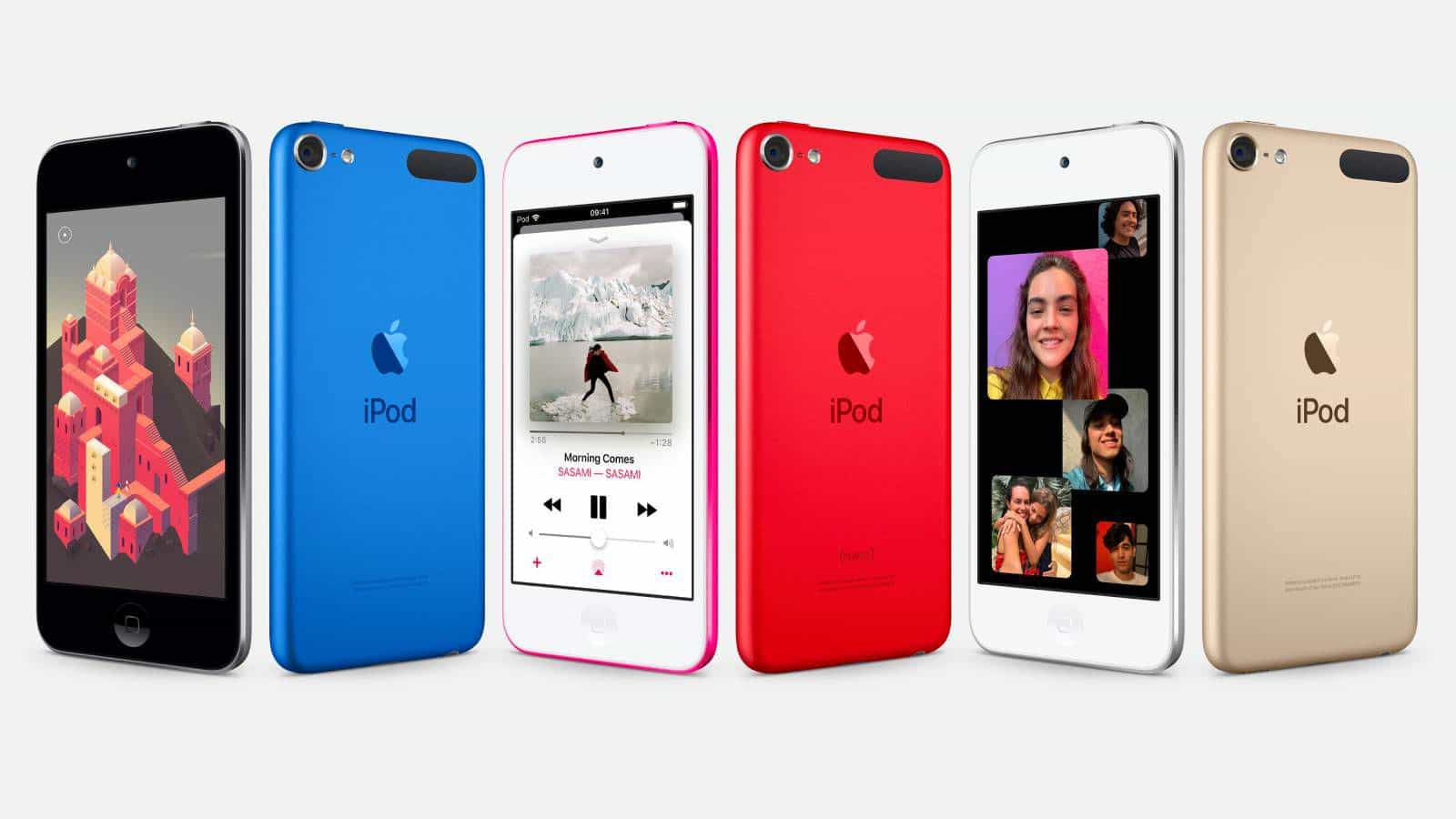
iPod touch
Embora descontinuado, muitos usuários ainda utilizam o iPod Touch como um dispositivo de armazenamento. Spotify MP3 O player oferece a interface refinada, intuitiva e de alto desempenho com a qual os usuários do iOS estão familiarizados. Se você está profundamente integrado ao ecossistema da Apple, a experiência de uso será ainda melhor. Spotify Usar um iPod Touch é idêntico a usá-lo em um iPhone. Além disso, SpotifyEle é compatível com praticamente todos os aplicativos que rodam no iOS, incluindo outros serviços de streaming (Tidal, Qobuz), audiolivros (Audible, LibriVox) e até mesmo aplicativos básicos de jogos ou vídeo. No entanto, apesar de ser um dispositivo muito querido, é importante notar que a Apple descontinuou oficialmente o iPod Touch em maio de 2022.
Parte 4: Por que alguns MP3 Os jogadores não podem jogar. Spotify Música?
Mais tradicional MP3 Os reprodutores suportam apenas formatos de áudio padrão, como MP3, M4A, WAV e FLAC. Mas Spotify As músicas não são baixadas como padrão. MP3 arquivos. Em vez disso, eles permanecem criptografados dentro Spotifyecossistema.
Como resultado, mesmo após baixar músicas com Spotify Premium, você não pode simplesmente arrastar e soltar músicas em uma versão normal. MP3 reprodutor. Esta é uma das maiores frustrações para usuários que buscam um reprodutor universal. Spotify MP3 jogador.
Parte 5: Como Jogar Spotify Música em qualquer MP3 Jogador?
Felizmente, existe uma solução alternativa. Você pode converter Spotify faixas em MP3 ou outros formatos de áudio amplamente suportados e transfira-os para o seu MP3 Reprodutor. Essa abordagem remove as restrições de compatibilidade e permite a verdadeira propriedade offline dos seus arquivos de música. Se você quiser reproduzir Spotify músicas em dispositivos que não suportam Spotify nativamente, DumpMedia Spotify Music Converter podem ajudar.
Download grátis Download grátis
O software foi projetado especificamente para Spotify Usuários Premium e gratuitos que desejam maior flexibilidade em suas bibliotecas de música. Com DumpMedia, Você pode facilmente convertem Spotify músicas em MP3, WAV, FLAC e outros formatos que podem ser reproduzidos em Spotify MP3 tocadores, telefones, aparelhos de som automotivos ou outros dispositivos. Mesmo que o Spotify aplicativo não está funcionando No seu dispositivo, você pode jogar Spotify músicas offline em outro reprodutor de música imediatamente.
🏆Principais benefícios de DumpMedia Spotify Music Converter
- Integrou o oficial Spotify reprodutor web para acessar músicas e baixá-las localmente
- Baixar tudo Spotify músicas e podcasts sem um Spotify Assinatura premium
- Download em lote Spotify Reproduza listas de reprodução em 35x ou até mais rápido para economizar seu tempo.
- Preservação completa das tags ID3 para facilitar a categorização das músicas após o download offline.
- Configurações de saída personalizadas, como taxa de amostragem e taxa de bits, para atender ao seu gosto musical único.
- Qualidade de saída personalizada de até 320 kbps para streaming de música offline de alta qualidade.
Baixar Spotify Música para MP3 Passo a Passo
Passo 1. Baixe e instale DumpMedia Spotify Music Converter No seu Mac/PC. Inicie o programa e você verá a interface. Use o seu Spotify Conta Premium/Gratuita para efetuar login.
Download grátis Download grátis
Passo 2. Navegue pela biblioteca de músicas e encontre músicas, playlists e podcasts que você deseja converter. Spotify para MP3Em seguida, clique no botão "Adicionar à conversão" na capa ou simplesmente arraste a música para o botão "+" para convertê-la.

Passo 3. Agora, você pode selecionar "MP3Selecione "como formato de saída" no menu suspenso. Além disso, você também pode personalizar a taxa de bits e a taxa de amostragem de saída de acordo com sua preferência.

Passo 4. Após a conclusão das configurações, os usuários podem processar a conversão clicando no ícone "Converter". DumpMedia vai baixar Spotify canções para MP3 Em segundos, graças à sua velocidade ultrarrápida.

Após a conversão, Spotify As faixas podem ser armazenadas localmente e reproduzidas em praticamente qualquer dispositivo, facilitando o acesso à música sem depender de... Spotify Compatibilidade com aplicativos. Isso facilita a criação de aplicativos. DumpMedia Uma solução útil para usuários que desejam maior flexibilidade. Spotify MP3 experiência do jogador.
Parte 6: Perguntas frequentes
Posso colocar Spotify músicas em um MP3 jogador?
Não diretamente. Spotify Os downloads são protegidos por DRM e não podem ser transferidos como arquivos normais. MP3 arquivos.
O quê MP3 O jogador funciona melhor com Spotify?
baseado em Android MP3 Os reprodutores e os modelos Sony Walkman estão entre as opções mais compatíveis.
Posso ouvir Spotify offline em um MP3 jogador?
Somente se o dispositivo for compatível com Spotify aplicativo e você tem um Spotify Assinatura premium.
Por que não consigo baixar? Spotify músicas tocam no meu MP3 jogador?
Spotify Os downloads são criptografados e só podem ser reproduzidos através de Spotify-aplicações autorizadas.
Posso transferir Spotify Música para um Sony Walkman?
Sim. Alguns modelos de Walkman são compatíveis. Spotify diretamente, enquanto outros podem jogar convertidos MP3 arquivos.
Parte 7: Veredicto Final
Melhor Spotify MP3 Depende de como você ouve música. Se você prefere algo mais direto, o player pode te ajudar. Spotify Para acesso, dispositivos baseados em Android, como o Sony Walkman NW-A306 ou o Mighty 3, são excelentes opções.
No entanto, se você deseja total liberdade para jogar, Spotify músicas em qualquer MP3 O reprodutor que converte as faixas em formatos de áudio padrão oferece a maior flexibilidade. Nesse cenário, DumpMedia Spotify Music Converter pode ajudar a preencher a lacuna entre Spotifyecossistema de streaming e reprodutores de música offline tradicionais.