


Hoe over te dragen Spotify Muziek streamen naar YouTube: complete handleiding voor alle apparaten
Het overzetten van je afspeellijsten tussen streamingplatforms is een veelvoorkomende behoefte, vooral bij het wisselen van apps of het samenvoegen van je muziekbibliotheek. Als je dat wilt... overdracht Spotify muziek naar YouTubeHet goede nieuws is dat moderne overdrachtstools het proces naadloos laten verlopen op web, desktop en mobiel. Deze handleiding leidt u stap voor stap door elke methode. Met ondersteuning voor Spotify En met YouTube op alle belangrijke apparaten kun je je afspeellijsten moeiteloos overzetten en overal waar je luistert toegang houden tot je muziek.
Inhoudsopgave Deel 1. Overdracht Spotify Playlist voor YouTube OnlineDeel 2. Overdracht Spotify Playlist op YouTube Windows/MacDeel 3. Overdracht Spotify Playlist voor YouTube op iOSDeel 4. Overdracht Spotify Playlist voor YouTube op AndroidDeel 5. Veelgestelde vragenDeel 6. Om het allemaal samen te vatten
Deel 1. Overdracht Spotify Playlist voor YouTube Online
Als je de snelste manier wilt om geld over te maken Spotify Om muziek naar YouTube te streamen zonder software te installeren, is een online tool voor het synchroniseren van afspeellijsten de handigste optie. Een veelgebruikte oplossing is TuneMyMusic, een browsergebaseerde service die directe migratie van afspeellijsten tussen de belangrijkste streamingplatforms ondersteunt.
Hoe TuneMyMusic online werkt:
- Open TuneMyMusic in je browser.
- Kies Spotify als bronplatform en log in.
- Selecteer de afspeellijst die u wilt verplaatsen.
- Kies YouTube als de bestemming.
- Bevestig de tracklijst en start de overdracht.

Deze methode is snel, platformonafhankelijk en vereist geen lokale installatie. Het is ideaal voor gebruikers die Spotify-muziek zo eenvoudig mogelijk naar YouTube willen overzetten.
Deel 2. Overdracht Spotify Playlist op YouTube Windows/Mac
Voor desktopgebruikers die meer controle, een hogere conversiestabiliteit en geautomatiseerde afspeellijstverwerking wensen, DumpMedia Elke muziekconverter Biedt een speciale module voor het overzetten van afspeellijsten. Dit is vooral handig voor gebruikers die regelmatig afspeellijsten overzetten. Spotify Muziek in bulk uploaden naar YouTube of voor wie behoefte heeft aan voorspelbare en herhaalbare afspeellijstmapping.
Gratis downloaden Gratis downloaden
Belangrijkste voordelen van de functie voor het overzetten van afspeellijsten:
- Ondersteunt het批量 migreren van afspeellijsten
- Beheert metadata, albumhoezen en de volgorde van nummers.
- Biedt robuuste matchinglogica om het aantal niet-overeenkomende sporen te minimaliseren.
- Werkt op beide Windows en macOS
: Hoe het te gebruiken
Stap 1. Open Any Music Converter. Kies Tools > Playlist Transfer.
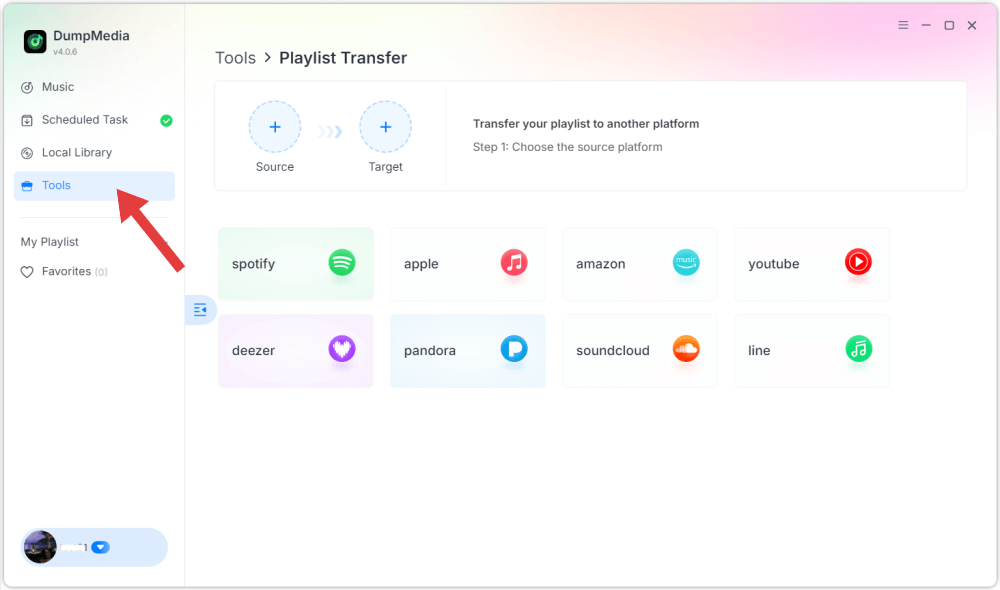
Stap 2. Selecteren Spotify als bron.

Stap 3. Selecteer YouTube Music als bestemming.
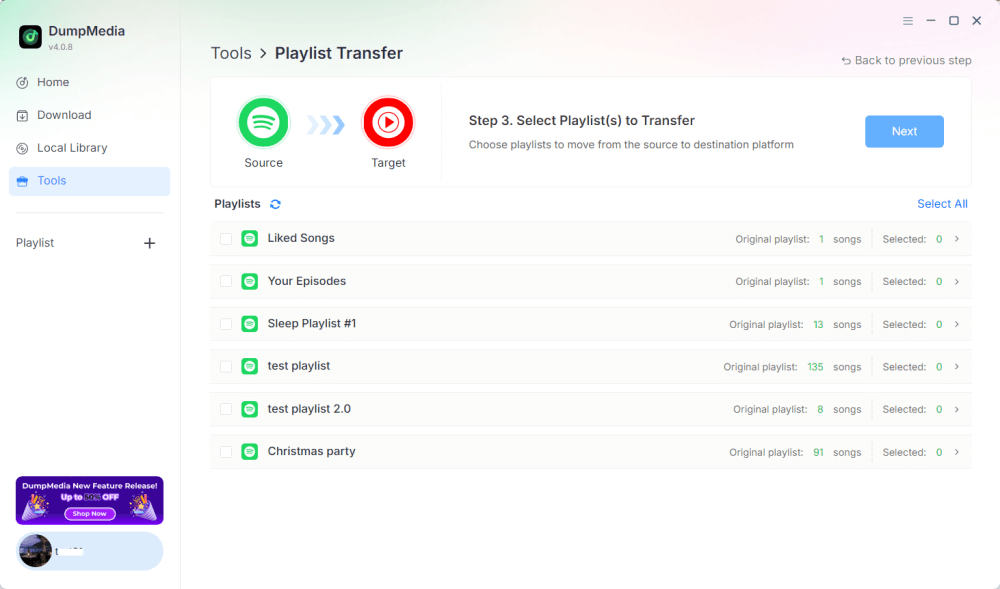
Stap 4. Selecteer wat je wilt overzetten. We ondersteunen je favoriete nummers, artiesten, albums en je samengestelde afspeellijsten.
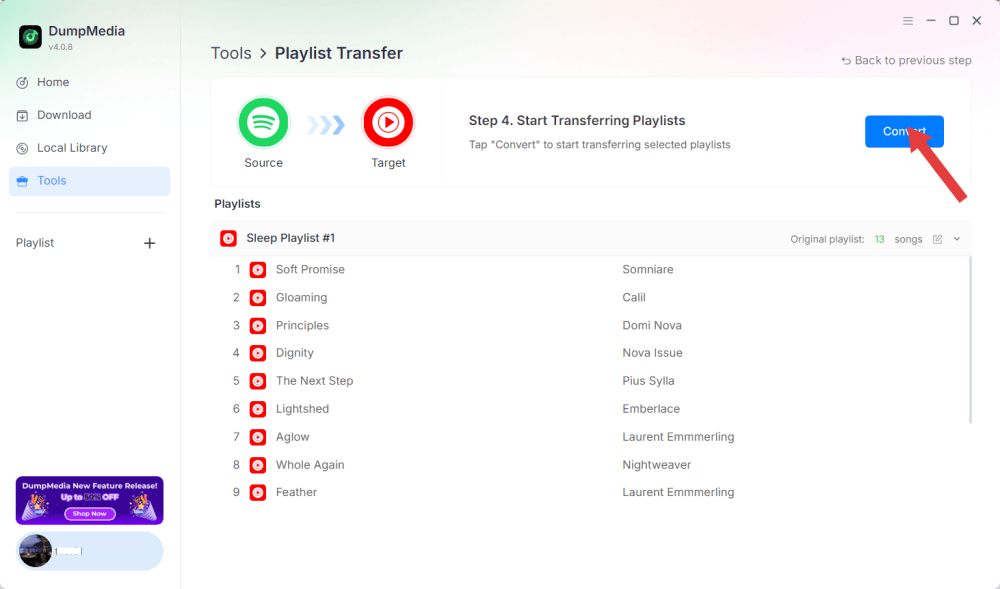
Stap 5. Klik op Converteren om de overdracht te starten.
Stap 6. De overdracht is voltooid. Klik op 'Ga naar YouTube Music'. Je afspeellijsten zijn overgezet naar een nieuwe service en je kunt nu genieten van een nieuwe afspeellijst op YouTube Music.
Omdat alle bewerkingen lokaal worden uitgevoerd, is deze oplossing stabieler dan browsergebaseerde tools, perfect voor gebruikers die regelmatig Spotify-muziek naar YouTube moeten overzetten voor meerdere afspeellijsten of grote muziekbibliotheken.
Deel 3. Overdracht Spotify Playlist voor YouTube op iOS
Als je een iPhone of iPad gebruikt en Spotify-muziek naar YouTube wilt overzetten, is een voor mobiel geoptimaliseerde migratietool zoals SongShift een beproefde optie. Het is speciaal ontworpen voor het Apple-ecosysteem en biedt intuïtieve workflows voor het koppelen van afspeellijsten.
Hoe SongShift werkt:
- Installeer SongShift vanuit de App Store.
- Koppel jouw Spotify account.
- Koppel je YouTube-account.
- Maak een nieuwe Shift-taak aan en kies de Spotify afspeellijst als bron.
- Stel YouTube in als bestemming en controleer of de nummers overeenkomen.
- Voer de overdracht uit.
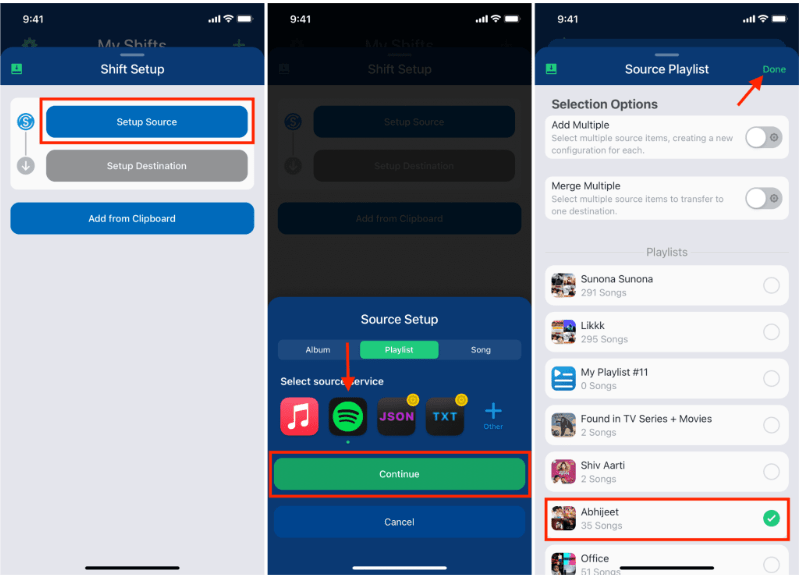
De kracht van SongShift ligt in de native iOS-interface, waardoor de overdracht een stuk eenvoudiger wordt. Spotify Muziek streamen naar YouTube werkt soepel voor gebruikers die voornamelijk op mobiele apparaten werken.
Deel 4. Overdracht Spotify Playlist voor YouTube op Android
Op Android-apparaten is de eenvoudigste manier om gegevens over te dragen. Spotify Met Soundiiz Mobile Web kun je muziek naar YouTube streamen. De app werkt goed in mobiele browsers en ondersteunt Android-vriendelijke interfaces.
Stappenplan voor Soundiiz Mobile Web:
- Open de Soundiiz-website in je Android-browser.
- Log in op uw Spotify account.
- Kies de afspeellijst die je wilt verplaatsen.
- Selecteer YouTube als de doelservice.
- Bevestig en start de synchronisatie.
Deze workflow is handig voor gebruikers die geen extra apps willen installeren, maar toch een eenvoudige manier nodig hebben om gegevens over te zetten. Spotify Luister onderweg naar muziek op YouTube.
Deel 5. Veelgestelde vragen
1. Blijft de volgorde van de afspeellijsten hetzelfde na de overdracht? Spotify Muziek uploaden naar YouTube?
De meeste hulpmiddelen proberen de orde te bewaren, maar een exacte conservering hangt af van de beschikbaarheid van sporen en de nauwkeurigheid van de herkenning.
2. Zijn alle Spotify Zijn deze nummers beschikbaar op YouTube?
Niet altijd. Verschillen in auteursrecht, regionale beperkingen en niet-beschikbare nummers kunnen hiaten veroorzaken.
3. Hebben deze tools toegang tot mijn accounts nodig?
Ja. Ze hebben toestemming nodig om uw gegevens te lezen. Spotify Voeg afspeellijsten toe aan je YouTube-bibliotheek. Betrouwbare tools gebruiken veilige OAuth-authenticatie.
4. Hoe lang duurt de overdracht? Spotify afspeellijsten naar YouTube?
Het hangt af van de grootte van de afspeellijst; kleine afspeellijsten zijn binnen enkele seconden klaar, grote bibliotheken kunnen enkele minuten in beslag nemen.
Deel 6. Om het allemaal samen te vatten
De beste overdrachtsmethode vinden Spotify Het overzetten van muziek naar YouTube hangt af van je workflow en apparaat. Met de juiste tool kun je moeiteloos muziek overzetten. Spotify afspeellijsten uploaden naar YouTube en de muzikale continuïteit op verschillende platforms behouden.