Handleiding van DumpMedia Elke muziekconverter
Deel 1. Hoe te activeren DumpMedia Elke muziekconverter
DumpMedia Any Music Converter is een alles-in-één tool waarmee je muziek van verschillende streamingplatforms kunt downloaden en converteren naar gangbare audioformaten, zodat je er offline naar kunt luisteren. Dankzij de intuïtieve interface en krachtige conversie-engine kunnen gebruikers altijd en overal van hun favoriete muziek genieten.
Ondersteunde diensten: Apple Music/Amazon Music/Audible/Deezer/Line Music/Pandora/Spotify
Muziek/SoundCloud/YouTube Muziek
Stap 1. Installeren DumpMedia Elke muziekconverter
Download het installatiepakket voor uw besturingssysteem (Win(Windows of macOS). Open het gedownloade bestand en volg de instructies op het scherm om de installatie te voltooien. Na de installatie kunt u het programma starten. DumpMedia
Elke muziekconverter op je computer.
Veelvoorkomende installatieproblemen
Schakel uw antivirussoftware tijdelijk uit als de installatie wordt geblokkeerd.
Zorg ervoor dat u het installatieprogramma downloadt van de officiële website. DumpMedia website.
Voer het installatieprogramma uit als beheerder op WinGebruik de downstream-functie indien nodig.
Stap 2. Koop een licentiesleutel.
Om alle functies te ontgrendelen en de beperkingen van de proefperiode op te heffen, moet u een licentiesleutel aanschaffen. Ga naar de DumpMedia online winkelKies een abonnement dat bij uw behoeften past. Voltooi de aankoop met een van de ondersteunde betaalmethoden. Na betaling wordt de licentiesleutel naar uw geregistreerde e-mailadres gestuurd.
Stap 3. Activeer de licentiesleutel.
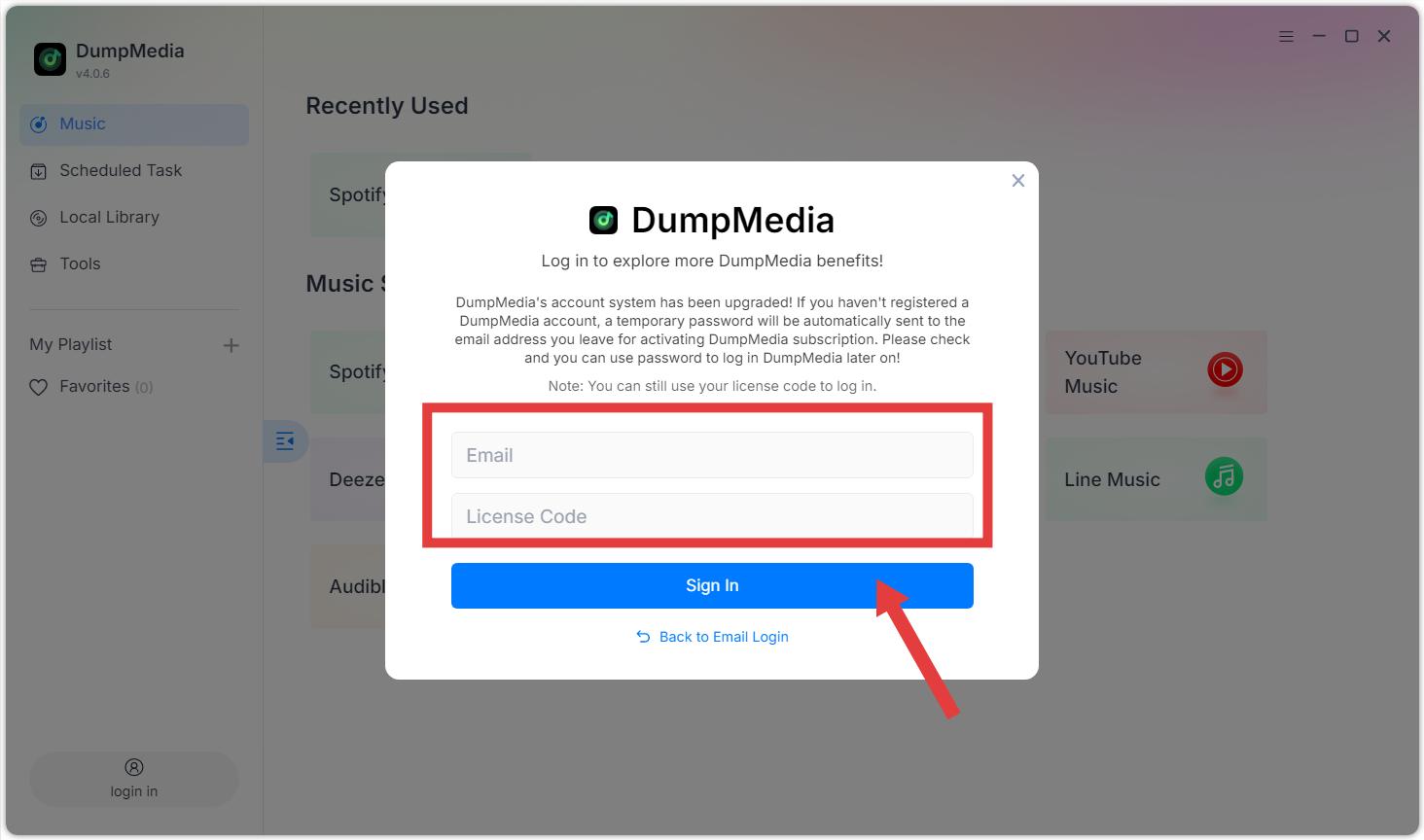
Optie 1: Starten DumpMedia Any Music Converter. Klik op de knop 'Inloggen' of het profielpictogram linksonder. Voer het e-mailadres en de licentiesleutel in die u bij uw aankoop hebt gebruikt. Klik op 'Inloggen' om de registratie te voltooien. Na activering kunt u onbeperkt nummers downloaden.
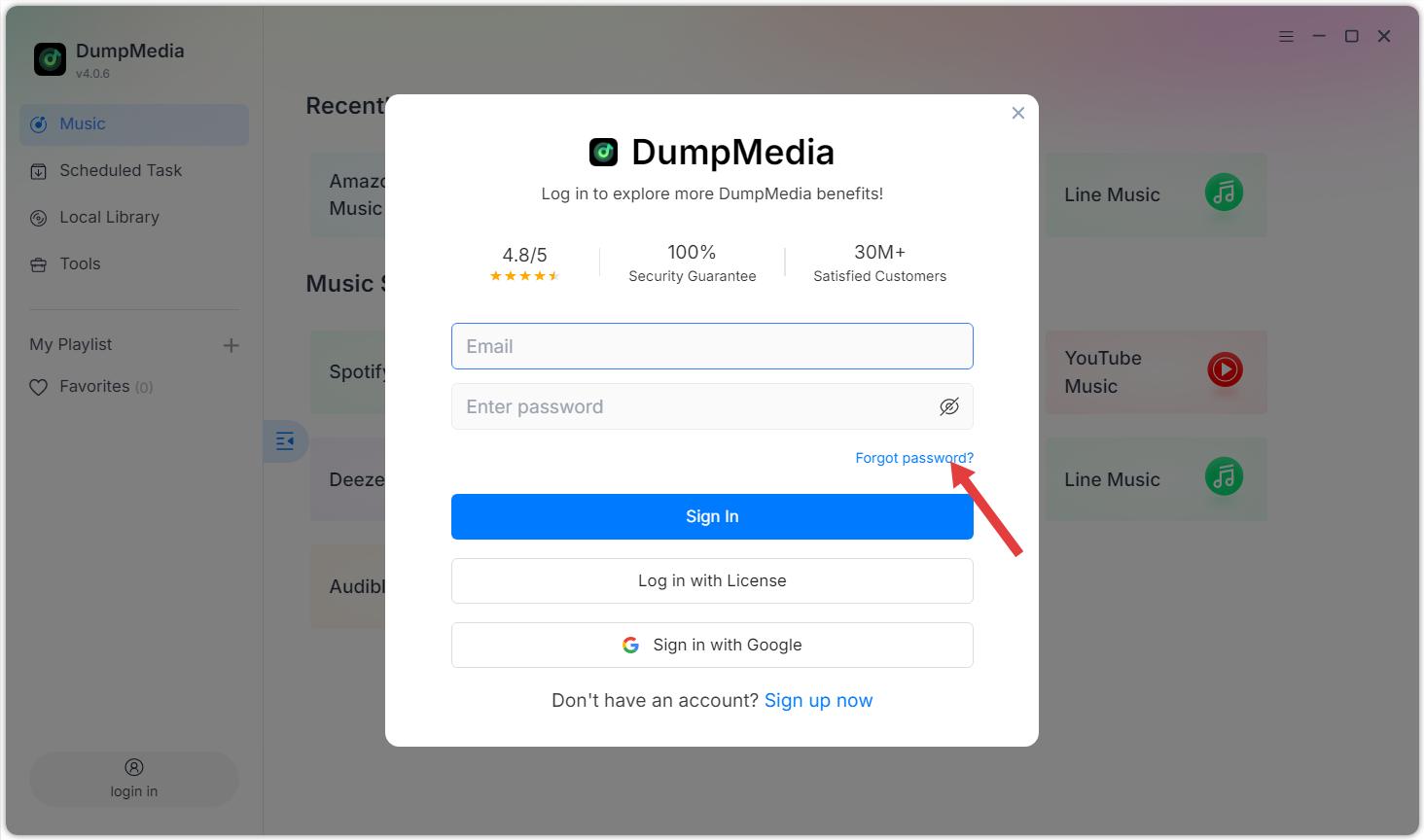
Optie 2: Voer uw e-mailadres en het standaardwachtwoord in dat u na aankoop hebt ontvangen. Als u uw wachtwoord bent vergeten, klik dan op 'Wachtwoord vergeten'. U wordt dan doorgestuurd naar het ledenportaal om uw wachtwoord opnieuw in te stellen.
Extra Tips:
De licentiesleutel wordt alleen gebruikt om in te loggen op de software en kan niet worden gebruikt om in te loggen op het webgebaseerde ledenportaal.
Beperkingen van de gratis proefversie: Met de gratis proefversie kunt u slechts 3 volledige nummers per muziekdienst gratis converteren. Om meer nummers te converteren, moet u de volledige versie activeren.
DumpMedia Any Music Converter is uitsluitend een tool voor het converteren van muziek. Het biedt geen lidmaatschappen voor streamingplatforms (zoals Apple Music of Apple Music) en is hier ook niet bij inbegrepen. Spotify Premium). Gebruikers moeten over een eigen geldig streamingabonnement beschikken.
Om volledige nummers te beluisteren en te converteren, vereist Apple Music een betaald abonnement. Sommige platforms bieden toegang met gratis accounts, hoewel de inhoud dan mogelijk beperkt is, zoals YouTube Music (gratis en premium).
Spotify
(Gratis & Premium), of andere.
DumpMedia Any Music Converter is uitsluitend bedoeld voor persoonlijk, niet-commercieel gebruik. Zorg ervoor dat u voldoet aan de lokale auteursrechtwetgeving en de gebruiksvoorwaarden van elk streamingplatform.
Deel 2. Instellingenmenu in DumpMedia Elke muziekconverter
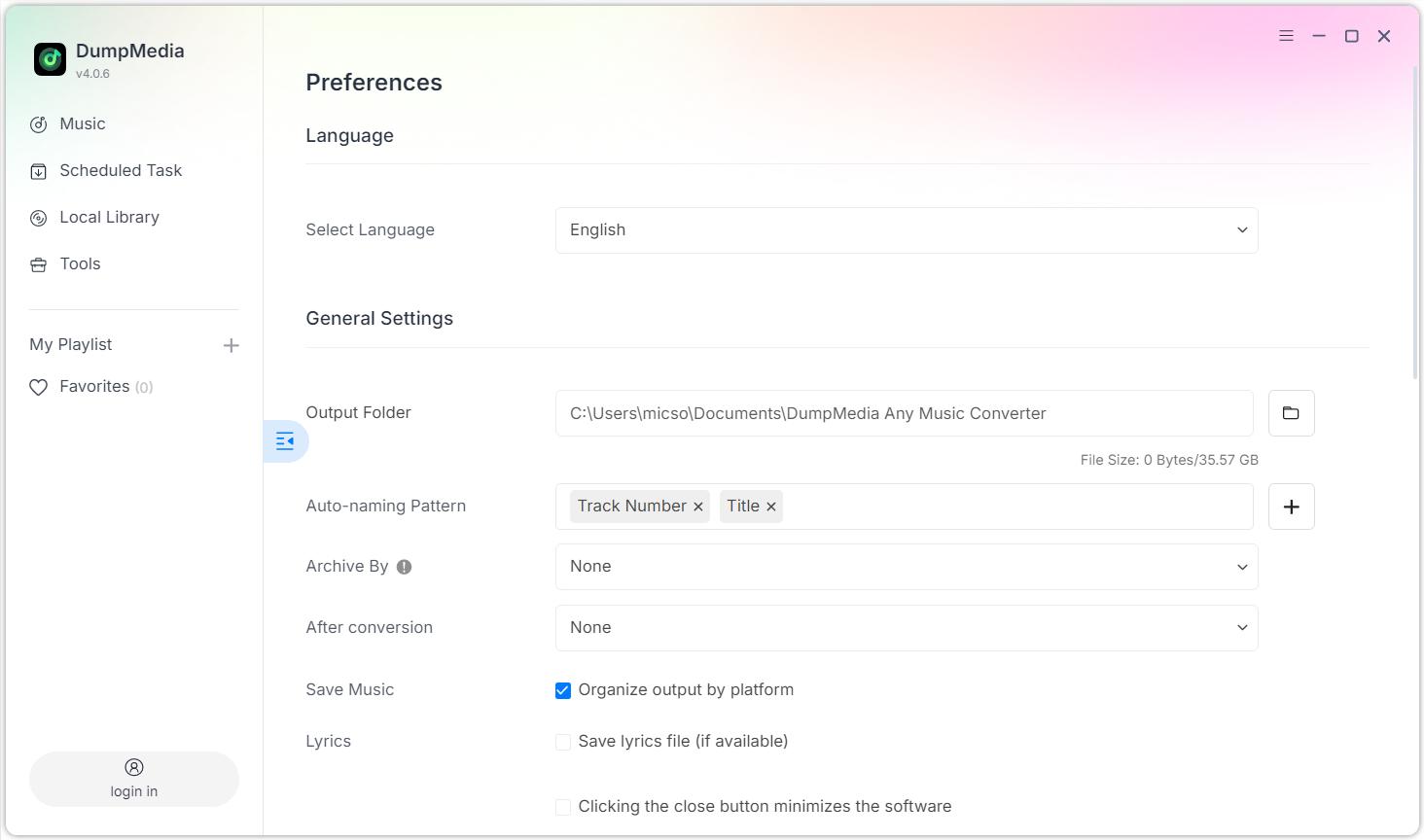
Open het instellingenmenu door op het menu-icoon in de rechterbovenhoek van het programma te klikken. In het instellingenmenu kunt u de software aanpassen aan uw voorkeuren.
Instellingen > Voorkeuren
Taal
Algemene instellingen
Output Folder
Patroon voor automatische naamgeving
Archief door
Na conversie
Muziek opslaan
Lyrics
Parameterinstellingen
Output Format
Bemonsteringsfrequentie (Hz)
Bitrate (Kbps)
Audible Splitter
Netwerkinstellingen
Gelijktijdige download
volmacht
Andere
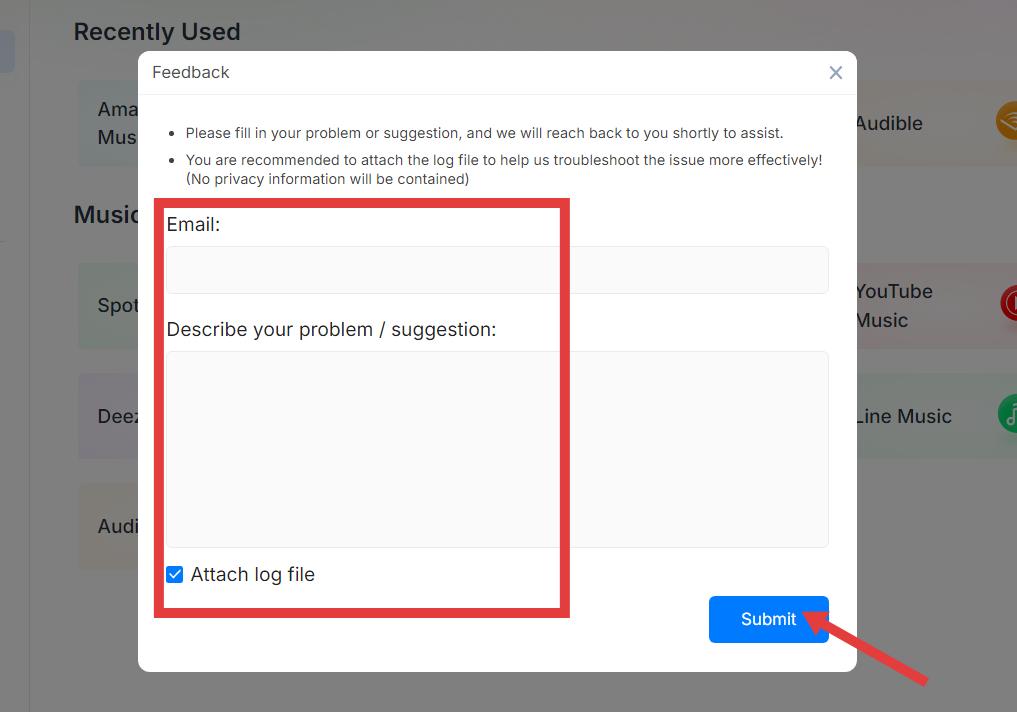
Instellingen > Feedback verzenden
U kunt hier uw probleem of suggestie invullen. Wij nemen dan zo snel mogelijk contact met u op om u te helpen. Voeg het logbestand bij, zodat we het probleem effectiever kunnen oplossen! (Er worden geen privacygevoelige gegevens in het logbestand opgenomen).
Instellingen > Controleren op updates
Update zo snel mogelijk naar de nieuwe versie die we hebben uitgebracht.
Deel 3. Hoe je muziek in je favoriete formaat kunt downloaden.
DumpMedia Any Music Converter biedt de mogelijkheid om muziek te downloaden en snel en in hoge kwaliteit naar verschillende formaten te converteren. Volg de onderstaande stappen om aan de slag te gaan.
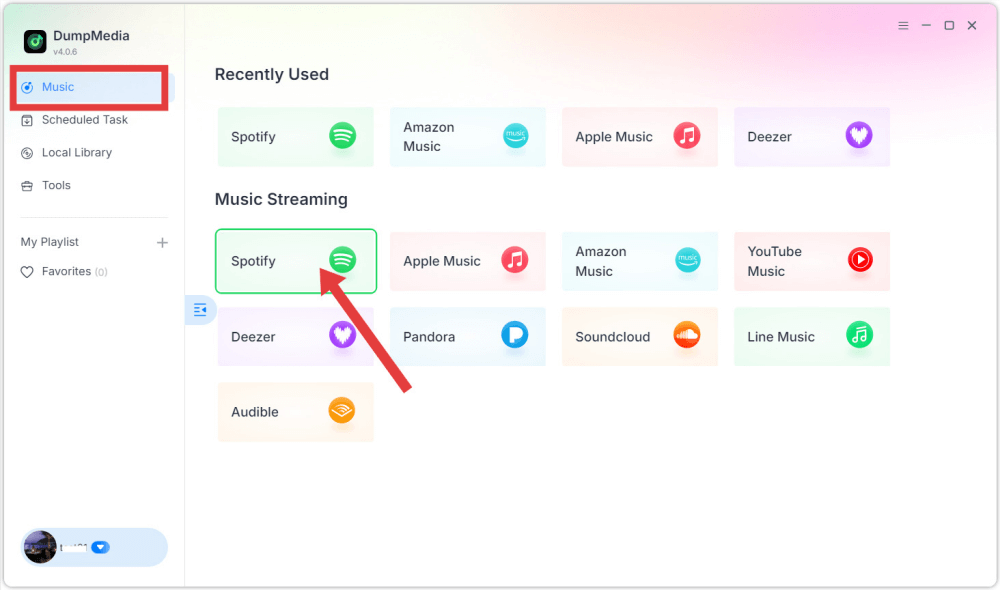
Stap 1. Kies een muziekstreamingdienst.
Start de software en kies in de hoofdinterface het streamingplatform dat u wilt gebruiken.
Stap 2. Log in op het platform
Log in met je eigen streamingaccount via de ingebouwde speler.
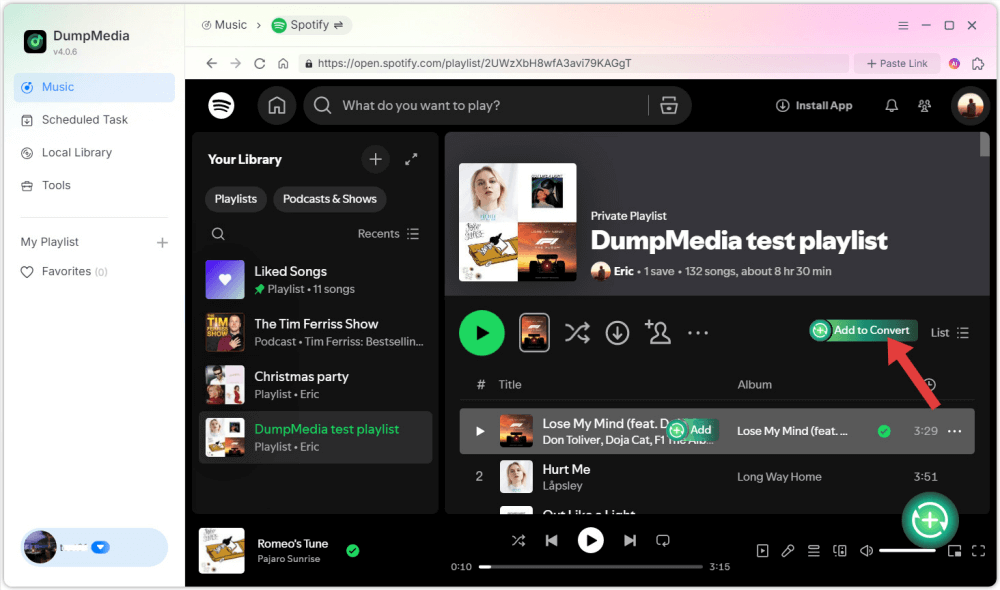
Stap 3. Voeg nummers, albums of afspeellijsten toe voor conversie.
Blader of zoek naar de inhoud die u wilt converteren. U kunt nummers, albums of afspeellijsten toevoegen door op de knop 'Toevoegen aan conversie' te klikken of ze naar het conversiepaneel te slepen.
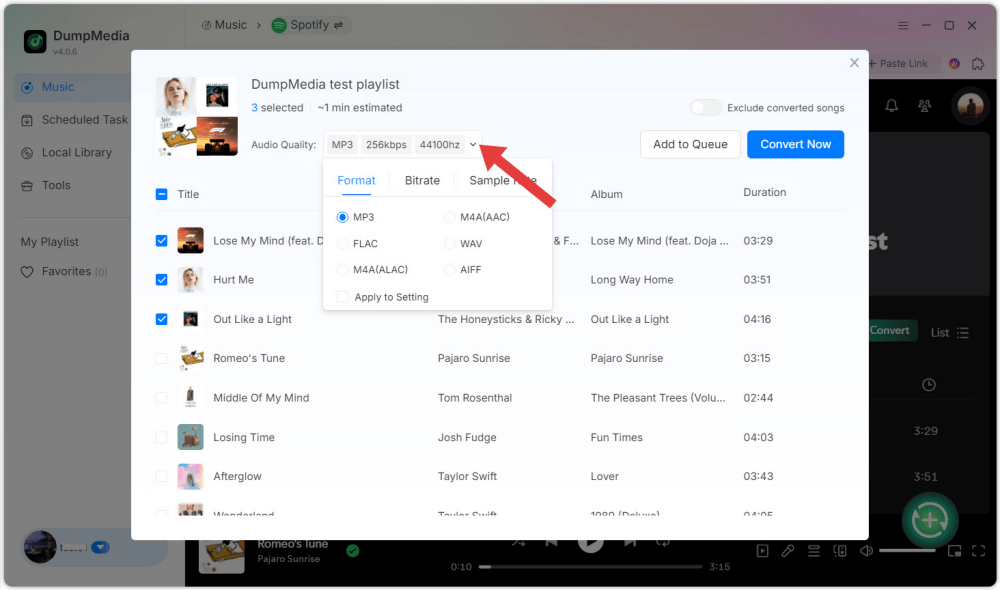
Stap 4. Selecteer uitvoerformaat
Kies het gewenste uitvoerformaat en de kwaliteitsinstellingen.
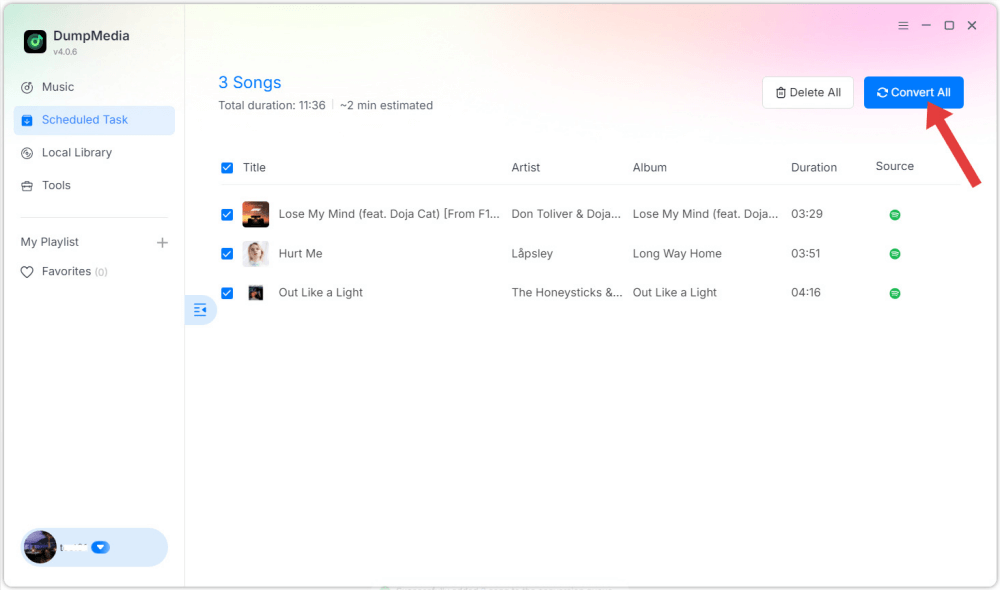
Stap 5. Muziek downloaden
Klik op de knop 'Converteren' om het downloaden te starten. Wacht tot de conversie is voltooid.
Stap 6. Controleer de geconverteerde muziek.
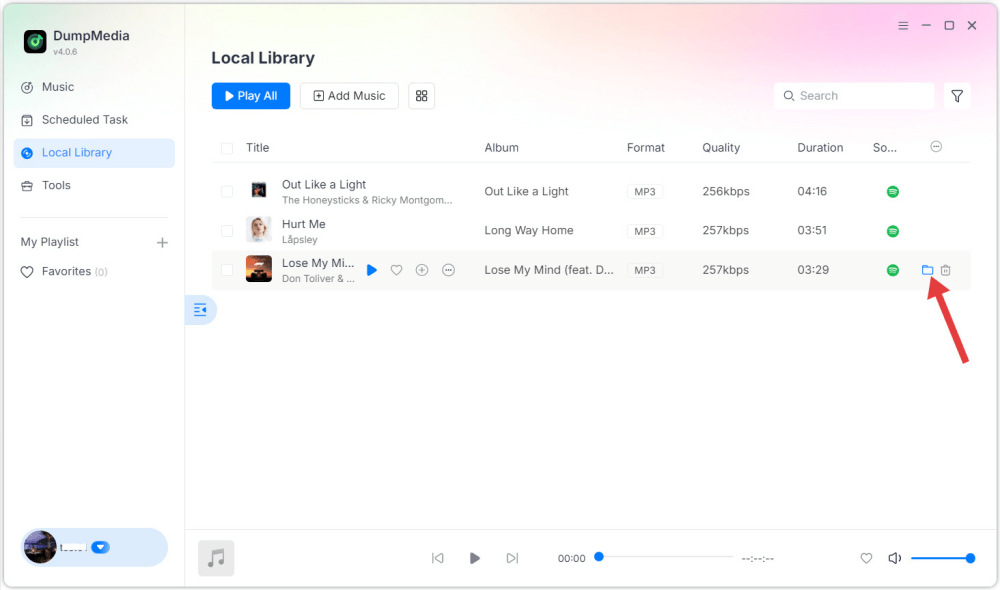
Zodra het muziekbestand klaar is, wordt het opgeslagen in de door u gekozen uitvoermap.
Deel 4. Hoe u uw DumpMedia Account
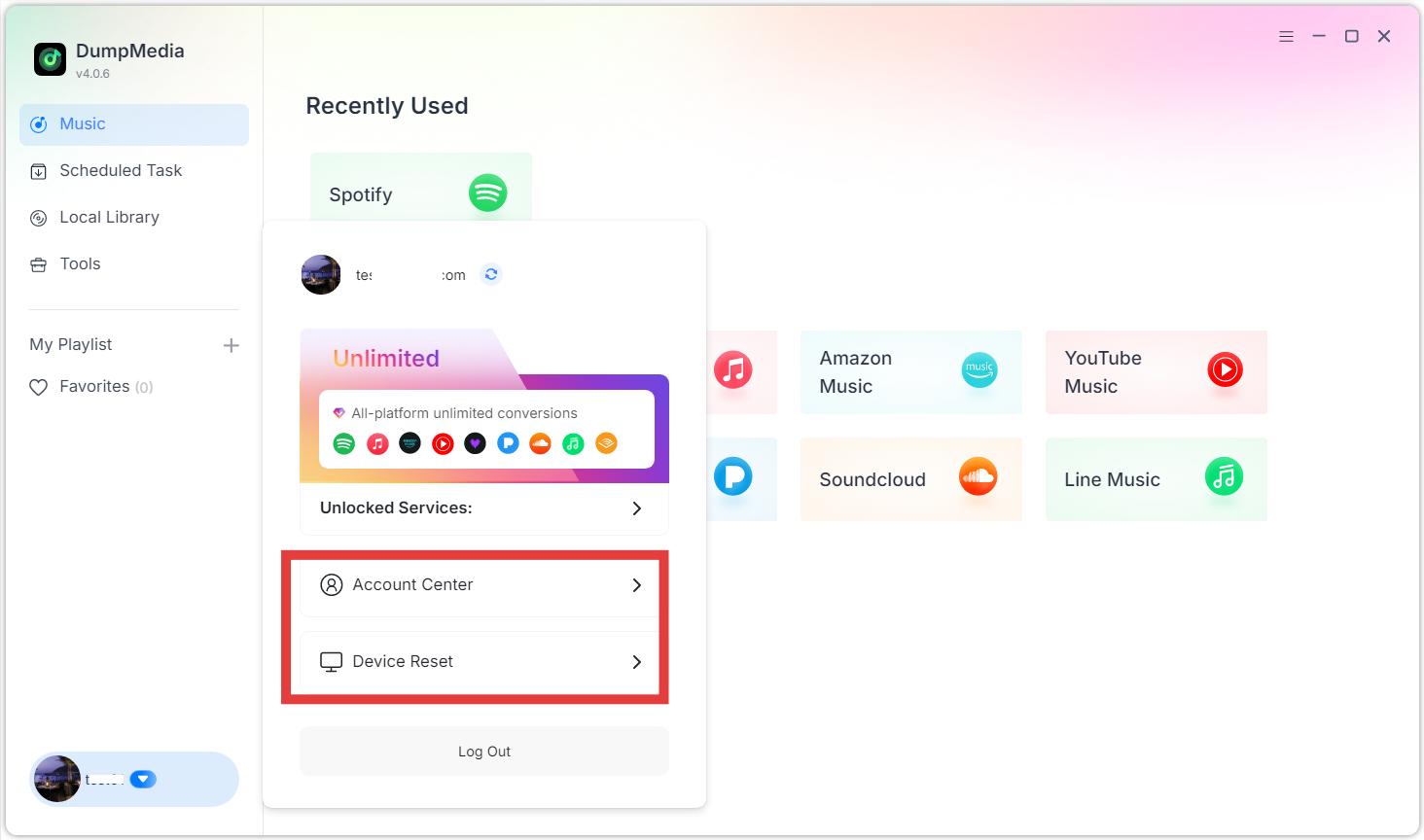
Accountgerelateerde opties zijn toegankelijk via het profielgedeelte in de software. Klik op het profielpictogram in de linkerbenedenhoek. Hier kunt u uw licentiestatus bekijken.
Accountcentrum: Ga naar het DumpMedia Rekeningcentrum.
Apparaat resetten: Als u een bericht ziet dat de apparaatlimiet is overschreden, betekent dit dat de licentiesleutel al is geactiveerd op het maximaal toegestane aantal apparaten. U kunt de apparaatkoppeling resetten. Houd er rekening mee dat het aantal keren dat u een apparaat zelf kunt resetten beperkt is. Neem contact op met onze supportafdeling zodra de limiet is bereikt.ondersteuning@dumpmedia.com) en geef uw geregistreerde e-mailadres en licentiesleutel op, zodat we de apparaatkoppeling voor uw licentie kunnen resetten.
FAQs (veelgestelde vragen)
1. Wat zijn de beperkingen van de gratis proefperiode?
DumpMedia Met Any Music Converter kun je gratis 3 volledige nummers van elke muziekdienst converteren. Om meer nummers zonder beperkingen te converteren, moet je je registreren en de volledige versie van de software activeren.
2. Waarom is mijn conversie mislukt?
Veelvoorkomende oorzaken zijn netwerkproblemen, verlopen streamingabonnementen of tijdelijke platformwijzigingen. Start de software opnieuw op en probeer het nogmaals. Heeft u meer hulp nodig? Geef dan feedback, dan kunnen we u verder helpen.
3. Waar kan ik mijn geconverteerde bestanden vinden?
De geconverteerde bestanden worden opgeslagen in de uitvoermap die is opgegeven in Instellingen > Uitvoer.
4.
Doet DumpMedia Ondersteuning voor gratis accounts?
Ja, voor platforms die gratis toegang bieden (zoals SpotifySommige platforms vereisen echter een betaald abonnement.
5. Kan ik één licentie op meerdere apparaten gebruiken?
Nee. Eén licentie kan slechts op één computer tegelijk worden geactiveerd. Bovendien kan elke licentiesleutel alleen worden gebruikt op het besturingssysteem van het apparaat dat bij de aankoop is gespecificeerd.


